Home › Social Networking

 US
US
1 of 1 storefronts
Content in en-US
Content in en-US
Information
Preview 1 platform
iPhone 5 images



What’s New Version 1.6
Either person can start the connection. Before, it was fixed: the teen shared a code, the parent entered it. Now there's a "how do you want to connect" step where either role can choose Share my code or I have a code — so pairing works no matter who sets up first. (OnboardingFlow.swift)
The invite buttons actually work now. This is the headline fix — the Text invite / Copy / QR tiles were previously decorative and did nothing when tapped. Now: Text invite opens the system share sheet with a pre-filled message + App Store link, Copy code copies to clipboard with a "Copied!" confirmation, and QR code shows a scannable code. (InviteShareRow.swift, FamilyOverviewView.swift)
Onboarding safety polish. No role is pre-selected anymore (you must deliberately tap one, so nobody gets silently onboarded as a teen by default), Continue stays dimmed until name/role are filled in, names get whitespace-trimmed, and an invite code is only minted once you actually choose "Share."
Description
TeenBridge is a small, quiet daily place between you and your kid.
It's built for the years where the conversation gets harder — late tweens through teens — and the moments that used to be easy (asking about their day, saying goodnight) need a new shape. TeenBridge doesn't try to replace those moments. It just gives them somewhere to land, one tap at a time.
WHAT'S IN THE APP
• Mood emoji, just for today. Pick how you're feeling. Choose to share it with your partner, or keep it to yourself. Both sides see a soft pattern over time — never a clinical chart.
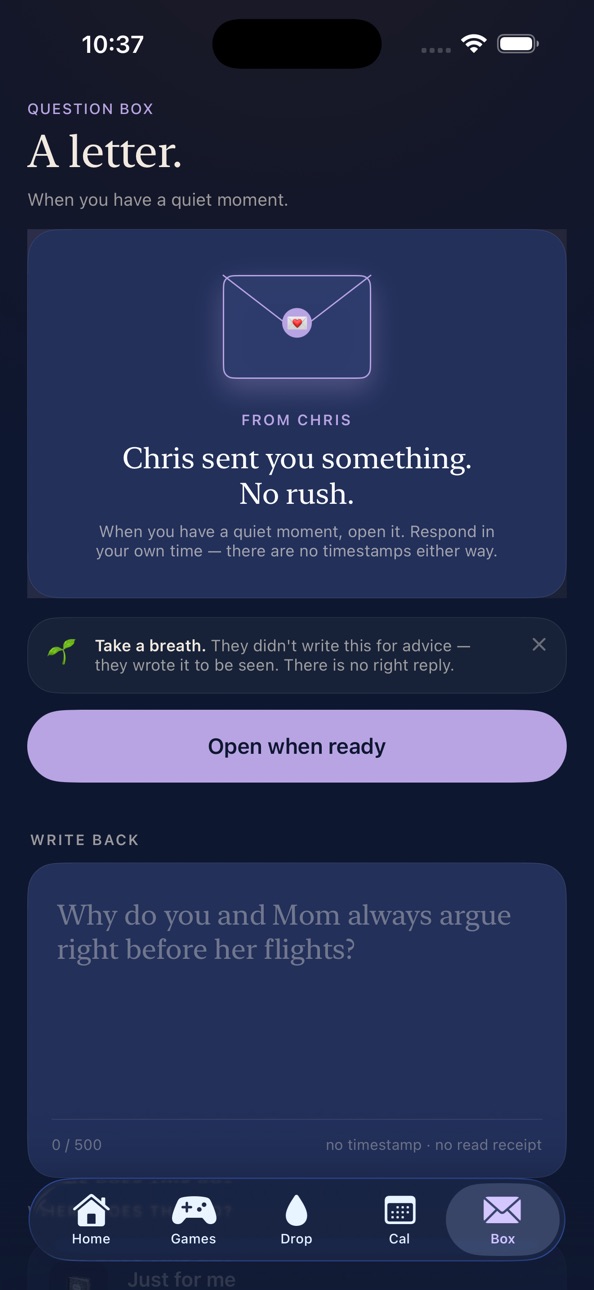
• Question Box. Write something hard, save it to your journal, or send it as a sealed envelope to your person. You can unsend before they open it. The persistent crisis-resource footer (988, Crisis Text Line, Childhelp) is always one tap away.
• Daily Drop. A new prompt every day — a hairstyle to try, a science fact to wonder about, a tiny astrology read. Something small to talk about that isn't "how was school."
• Shared album. Snap a photo when the daily drop sparks something. It posts only to the two of you. Every photo passes through content-safety review before your partner sees it.
• Shared calendar. Each side can add events; mark anything as a "surprise" and the other side just sees a placeholder until the day arrives.
• Games. Two Truths and a Lie. Dad jokes with reactions. Lightweight, deliberately unimportant.
THE SAFETY DESIGN
TeenBridge is built around a few rules that don't bend:
• Sign in with Apple. We never see your email.
• No clock times on shared content — only soft bands like "this afternoon" or "last week." The app is not a surveillance tool.
• Mood patterns are computed on your device, only against your own log. Your partner sees the mood emoji you chose to share — not the analysis.
• Mutual-reveal reactions on shared content — your partner's reaction stays hidden until you've reacted too.
• An active-consent checkbox on both sides when you pair, written in plain language.
• Crisis resources are always visible, never blocking, on the screens where you'd need them most.
WHO IT'S FOR
TeenBridge is for users 13 and older. The teen role is designed for 13-17; the parent role is designed for the adults in their life. One bridge connects one teen and one parent — parents can pair with multiple kids over time.
WHAT'S NEXT
End-to-end encryption, push notifications, and several new games are on the roadmap and will arrive in updates. The version you're holding is the version we wanted to ship first: small, honest, safe by default.
If something feels off, tell us. lita.kelly.ltk77@gmail.com
Accessibility
ipadiphonemacrealityDevicetvoswatch
Version history 2 versions
Build 886702654v1.62026-06-17 02:17:05
Either person can start the connection. Before, it was fixed: the teen shared a code, the parent entered it. Now there's a "how do you want to connect" step where either role can choose Share my code or I have a code — so pairing works no matter who sets up first. (OnboardingFlow.swift)
The invite buttons actually work now. This is the headline fix — the Text invite / Copy / QR tiles were previously decorative and did nothing when tapped. Now: Text invite opens the system share sheet with a pre-filled message + App Store link, Copy code copies to clipboard with a "Copied!" confirmation, and QR code shows a scannable code. (InviteShareRow.swift, FamilyOverviewView.swift)
Onboarding safety polish. No role is pre-selected anymore (you must deliberately tap one, so nobody gets silently onboarded as a teen by default), Continue stays dimmed until name/role are filled in, names get whitespace-trimmed, and an invite code is only minted once you actually choose "Share."
Build 886123663v1.02026-06-03 13:09:50
No pricing data captured yet — comparisons appear once the app has paid storefronts or in-app purchases.
Availability 1 of 1 storefronts
| Region | Language | Price | Ratings | Avg | Version |
|---|---|---|---|---|---|
| US | en-US | Free | 0 | — | 1.6 |
Change log 5 changes · US
✎
releaseNotes updated
Either person can start the connection. Before, it was fixed: the teen shared a code, the parent entered it. Now there's a "how do you want to connect" step whe
✎
description updated
TeenBridge is a small, quiet daily place between you and your kid.
It's built for the years where the conversation gets harder — late tweens through teens — an
✎
name updated
TeenBridge
◆
Version 1.6 released
Either person can start the connection. Before, it was fixed: the teen shared a code, the parent entered it. Now there's a "how do you want to connect" step where either role can choose Share my code or I have a code — so pairing works no m
◆
Version 1.0 released