Home › Productivity

 US
US
1 of 1 storefronts
Content in en-US
Content in en-US
Information
Apple ID6771842605
Bundle IDcom.zeyadamer.hotstash
SellerSeller
Min iOS17.0
Device familiesmac, iphone, ipad
Released2026-05-23
Copyright© 2026 Zeyad Amer
Privacy policyLink ↗
Preview 3 platforms
iPhone 5 images


iPad 5 images


Mac 10 images




What’s New Version 2.0
What's New in Hotstash 2.0
A friendlier Marketplace, a smarter keyboard, and cleaner links.
Marketplace is now its own tab. Browsing and installing community transforms got a proper home at the bottom of the screen — no more digging through
Settings to find it.
A better custom keyboard. Paste more than one thing without leaving the keyboard, run your transforms right there, and it grabs your latest clip the
moment you open it. The transform result scrolls now too, so long output isn't cut off.
Clean up links. Copied a link with a pile of tracking junk on the end? Run the new Clean Link transform to strip out the utm and fbclid bits and get
back a tidy URL.
First-run setup made easy. New here? We'll walk you through switching the keyboard on so you're ready to paste in seconds.
Fixes & polish.
- Snippets keep their leading and trailing spaces exactly as you copied them.
- Your Marketplace sign-in sticks around instead of logging you out when the token expires.
- Squashed a Settings crash that could happen with duplicate transform IDs.
Description
Your clipboard, everywhere.
Copy on your Mac, paste from your iPhone keyboard. Pin favorites, transform text instantly, and never lose something you copied again.
Hotstash keeps your clipboard history synced across your Mac and iPhone, making everything you’ve copied easy to search, organize, and reuse.
THE KEYBOARD THAT PASTES ANYTHING
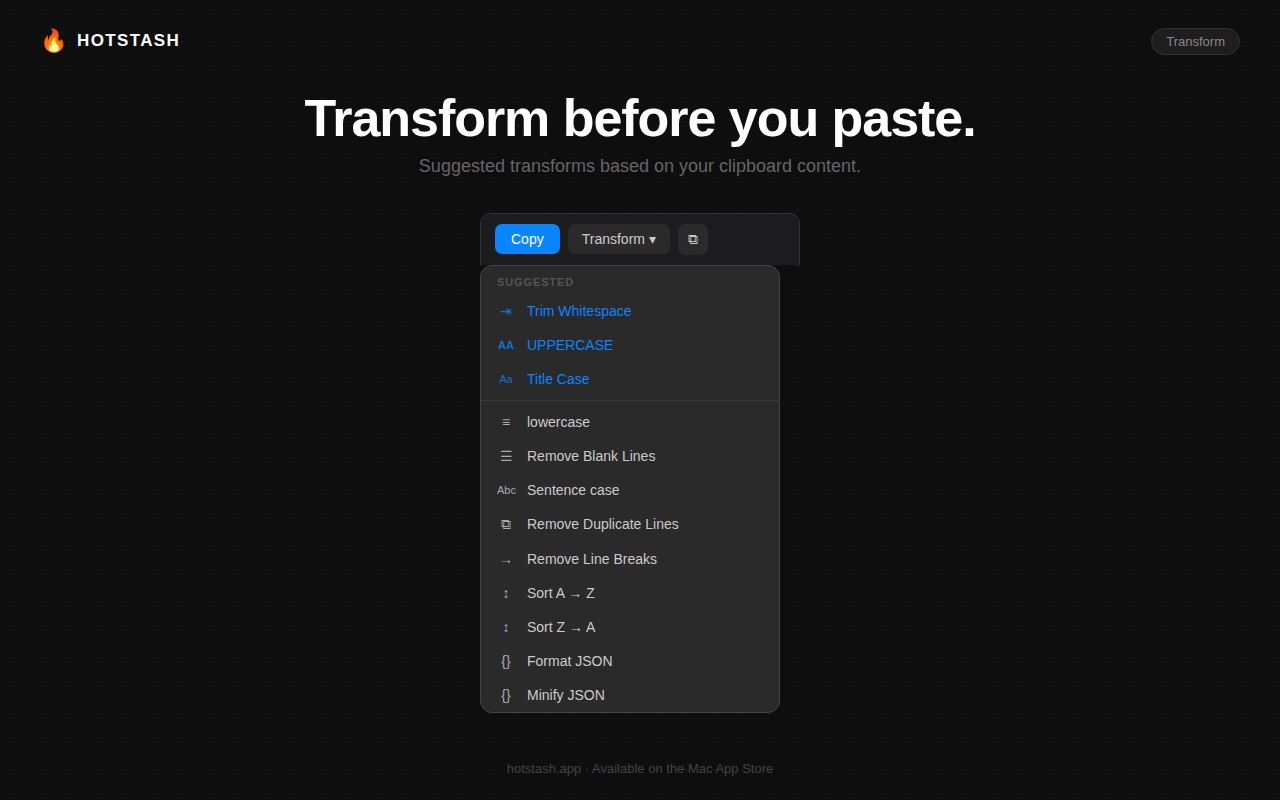
Switch to the Hotstash keyboard in any app to access your clipboard instantly. Tap to paste without switching apps or copying again. Swipe between Recent and Pinned clips, paste your last 2–5 clips in sequence, or transform text before inserting it with UPPERCASE, Trim, Base64, JSON formatting, and more.
SYNCED WITH YOUR MAC
Copy something on your Mac and it’s ready on your iPhone. Clipboard history, pinned items, and installed transforms sync privately through iCloud. Your data never passes through our servers.
CAPTURE ON THE GO
• Copy text anywhere and it’s automatically saved
• Save text from any app using the Share Sheet
• Save with one tap from Control Center
• Search text inside screenshots using OCR on your Mac
TRANSFORM MARKETPLACE
Browse community-made text transforms and install them with a single tap. They appear throughout the app and sync automatically to your Mac. Create your own transforms on your Mac and use them on your iPhone.
PRIVACY FIRST
Your clipboard often contains sensitive information. Hotstash keeps everything on your devices and in your private iCloud account. No analytics. No tracking. No account required.
Password manager clipboard entries are never captured on your Mac.
HOTSTASH PRO — ONE PURCHASE, EVERY DEVICE
A single purchase unlocks Hotstash Pro on iPhone, iPad, and Mac. No subscription.
On Mac, Pro includes unlimited clipboard history, Paste Stack (each ⌘V pastes the next item), instant text transforms with global shortcuts, file and rich text support, and a menu bar panel that’s always one keystroke away.
In-App Purchases US pricing
One-Time Purchases
Hotstash$9.99
Capabilities
In-App Purchases
Accessibility
ipadiphonemacrealityDevicetvoswatch
Version history 2 versions
Build 887684213v2.02026-07-02 20:25:54
What's New in Hotstash 2.0
A friendlier Marketplace, a smarter keyboard, and cleaner links.
Marketplace is now its own tab. Browsing and installing community transforms got a proper home at the bottom of the screen — no more digging through
Settings to find it.
A better custom keyboard. Paste more than one thing without leaving the keyboard, run your transforms right there, and it grabs your latest clip the
moment you open it. The transform result scrolls now too, so long output isn't cut off.
Clean up links. Copied a link with a pile of tracking junk on the end? Run the new Clean Link transform to strip out the utm and fbclid bits and get
back a tidy URL.
First-run setup made easy. New here? We'll walk you through switching the keyboard on so you're ready to paste in seconds.
Fixes & polish.
- Snippets keep their leading and trailing spaces exactly as you copied them.
- Your Marketplace sign-in sticks around instead of logging you out when the token expires.
- Squashed a Settings crash that could happen with duplicate transform IDs.
Build 886078624v1.02026-06-12 05:56:14
Price history by region
Currency
Show
Columns
Search
Availability 1 of 1 storefronts
| Region | Language | Price | Ratings | Avg | Version |
|---|---|---|---|---|---|
| US | en-US | Free | 0 | — | 2.0 |
Change log 6 changes · US
✎
releaseNotes updated
What's New in Hotstash 2.0
A friendlier Marketplace, a smarter keyboard, and cleaner links.
Marketplace is now its own tab. Browsing and installing community
✎
description updated
Your clipboard, everywhere.
Copy on your Mac, paste from your iPhone keyboard. Pin favorites, transform text instantly, and never lose something you copied aga
✎
subtitle updated
Clipboard History
✎
name updated
Hotstash
◆
Version 2.0 released
What's New in Hotstash 2.0
A friendlier Marketplace, a smarter keyboard, and cleaner links.
Marketplace is now its own tab. Browsing and installing community transforms got a proper home at the bottom of the screen — no more digging throu
◆
Version 1.0 released