Home › Productivity

 US
US
1 of 1 storefronts
Content in en-US
Content in en-US
Information
Preview 2 platforms
iPhone 10 images




Apple Watch 3 images


What’s New Version 2.0.0
New: Pause or End a habit —
• Pause: take a break without breaking your streak; missed days during a pause don't count. Set an auto-resume date and it comes back on its own.
• End (Archive): stop for good while keeping full history and a frozen streak; restore anytime from Archived.
• While paused or ended, a habit stays out of Today and sends no reminders.
Strong reminders upgraded (iOS 26):
• Strong reminders now ring like a system alarm — through silent mode and Focus.
• Tap “Check in” on the alarm to jump straight to the habit.
• On earlier iOS, they still arrive as prominent notifications.
More icons: 13 categories and ~130 icons (food, health, fitness and more), pick by category.
Also: fixed keyboard not dismissing when editing a name, and reminders that could fire after deleting a habit.
Description
Turn every good habit into a piece of art on your home screen.
HabitDesign is a habit-tracking app crafted with one obsession: making consistency feel beautiful. Every detail serves the experience. Soft cards, gentle animations, seamless light/dark modes.
[Why HabitDesign]
Beautiful by Design
No clutter. No complexity. Just elegant cards and gentle motion that delight every glance.
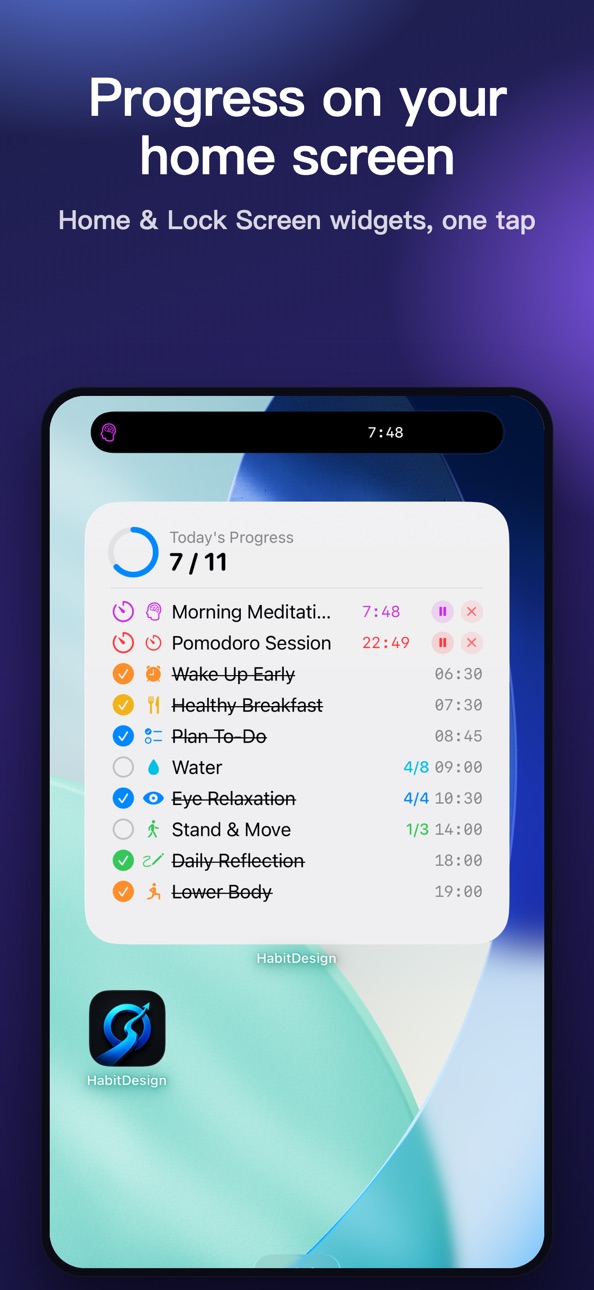
Interactive Home Screen Widgets
Stunning widgets right on your home screen. Tap to check in. Small, Medium, and Large sizes to fit your aesthetic.
Dynamic Island Live Activity
Reading, meditating, or working out? Your countdown lives in the Dynamic Island and on the lock screen. No need to open the app.
Apple Watch Sync
Check in from your wrist. All data syncs seamlessly across all your devices.
[Core Features]
Habit Creation and Management
- Custom name, icon, color, schedule, reminder time
- 64 hand-picked SF Symbol icons in 8 categories
- 8 elegant color palettes plus Pro custom color picker
- Drag to reorder, batch manage, duplicate habits
Multiple Check-In Methods
- Swipe or tap on the list row
- Big +/- progress button in detail view
- Tap directly from Home Screen widgets
- Check in on Apple Watch
- Multi-target support (8 glasses of water, 4 pomodoros, N sets)
Focus Timer with Dynamic Island
- Set duration, start the timer
- Live countdown in Dynamic Island
- Pause/resume, runs in background
- Auto check-in when timer completes
- "Continue Next" button for multi-target chains
Powerful Statistics
- 6 overview metrics: total habits, total check-ins, longest streak, completion rate, grand-slam days, daily average
- Week / Month / Year matrix reports
- Monthly plus Yearly heatmap (GitHub style)
- Top 10 rankings with gold/silver/bronze medals
- Per-habit detail cards: icon, schedule, reminder, 4 stats
Streak Color Tiers
The longer your streak, the brighter the flame:
1-2 days light orange, 3-6 days orange, 7-29 days red-orange, 30-99 days deep red, 100-364 days purple, 365+ days gold
20 Curated Habit Packs
Science-backed combinations, one-tap import:
Healthy Daily, Productivity Flow, Morning Routine, Fitness Week, Deep Learning, Mindful Body, Reading Flow, Writing Routine, Fat Loss, Muscle Gain, Coding Craft, Founder Rhythm, Student Exam, Household Routine, Parenting Daily, Money Habits, Social Connection, Digital Detox, Creative Practice, Habit Replace
Smart Reminders
- Notifications on scheduled days at your chosen time
- Already checked in today? No more nagging
- Rolling 14-day notification refresh
- Tap notification to jump to habit detail
Beautiful PDF Reports
Export statistics as a rich PDF report with gradient covers, medal rankings, yearly heatmap.
Habit Notes
Add notes to any habit. Reminders show clickable links and copyable content. Build your personal habit knowledge base.
[Made For]
- Professionals and students who want self-improvement without the bloat
- Aesthetic lovers who care about how their apps look
- iOS power users who appreciate efficient, minimal design
[Privacy First]
No servers. All data lives on your device and your private iCloud space. No tracking, no analytics.
[Optional Pro Upgrade]
Free tier supports up to 5 active habits with full core functionality.
Pro unlocks:
- Unlimited habits
- Multi-target counts plus focus timer
- Full statistics, rankings, heatmap
- PDF report export
- 8 theme colors plus custom palette
- Large Widget plus Live Activity
- 20 habit pack imports
Subscription options:
- Monthly $1.99 / month
- Annual $11.99 / year (7-day free trial)
- Lifetime $24.99 (one-time, forever)
Payments processed by Apple. Cancel anytime in Settings - Apple ID - Subscriptions.
[Start Today]
Every check-in makes life a little more beautiful.
Plant a good habit on your home screen, today.
Feedback: Settings - Feedback in the app.
Privacy Policy: https://legal.taicikong.top/habitdesign/privacy-en.html
Terms of Service: https://legal.taicikong.top/habitdesign/terms-en.html
In-App Purchases US pricing
Pro Subscription Subscription
Pro Monthly · Monthly$1.99
Pro Yearly · Yearly 7-day free trial$9.99
One-Time Purchases
Pro Lifetime$24.99
Capabilities
In-App Purchases
Accessibility
ipadiphonemacrealityDevicetvoswatch
Version history 4 versions
Build 887928137v2.0.02026-07-08 05:25:11
New: Pause or End a habit —
• Pause: take a break without breaking your streak; missed days during a pause don't count. Set an auto-resume date and it comes back on its own.
• End (Archive): stop for good while keeping full history and a frozen streak; restore anytime from Archived.
• While paused or ended, a habit stays out of Today and sends no reminders.
Strong reminders upgraded (iOS 26):
• Strong reminders now ring like a system alarm — through silent mode and Focus.
• Tap “Check in” on the alarm to jump straight to the habit.
• On earlier iOS, they still arrive as prominent notifications.
More icons: 13 categories and ~130 icons (food, health, fitness and more), pick by category.
Also: fixed keyboard not dismissing when editing a name, and reminders that could fire after deleting a habit.
Build 887224546v1.1.12026-06-24 14:07:13
• Redeem offer codes right inside the app — one tap to unlock Pro
• UX polish and stability improvements
Build 886576771v1.12026-06-06 01:09:08
English:
V1.1 major update
• Apple Watch complications (4 families)
• iOS Lock Screen widgets (Circular / Rectangular / Inline)
• New Calendar tab — Monthly view with daily details
• Detailed charts — This month vs last / completion rate / time-of-day
• 6 theme packs (Pro) with dark mode
• UX polish and refinements
Build 885912477v1.02026-05-29 13:30:05
Price history by region
Currency
Show
Columns
Search
Availability 1 of 1 storefronts
| Region | Language | Price | Ratings | Avg | Version |
|---|---|---|---|---|---|
| US | en-US | Free | 0 | — | 2.0.0 |
Change log 8 changes · US
✎
releaseNotes updated
New: Pause or End a habit —
• Pause: take a break without breaking your streak; missed days during a pause don't count. Set an auto-resume date and it comes bac
✎
description updated
Turn every good habit into a piece of art on your home screen.
HabitDesign is a habit-tracking app crafted with one obsession: making consistency feel beautifu
✎
subtitle updated
Habit tracker, streak, widget
✎
name updated
HabitDesign: Habit Tracker
◆
Version 2.0.0 released
New: Pause or End a habit —
• Pause: take a break without breaking your streak; missed days during a pause don't count. Set an auto-resume date and it comes back on its own.
• End (Archive): stop for good while keeping full history and a fr
◆
Version 1.1.1 released
• Redeem offer codes right inside the app — one tap to unlock Pro
• UX polish and stability improvements
◆
Version 1.1 released
English:
V1.1 major update
• Apple Watch complications (4 families)
• iOS Lock Screen widgets (Circular / Rectangular / Inline)
• New Calendar tab — Monthly view with daily details
• Detailed charts — This month vs last / completion rate
◆
Version 1.0 released