Home › Education

 US
US
1 of 1 storefronts
Content in en-US
Content in en-US
Information
Preview 4 platforms
iPhone 9 images



iPad 6 images


Mac 5 images



Apple Watch 7 images


What’s New Version 1.0.9
Your exports just leveled up.
• Everything in one sheet. Your comments and the key takeaways you drafted with SnapJury's help now follow into every CSV and Excel export.
• A summary that finally makes sense. One row per student per assignment, with the overall grade — ready for your gradebook or a quick glance.
• Nothing slips through. Standalone orals get their own row too, and your student recaps are saved from one session to the next.
• Smoother on iPad.
Stay with your student. SnapJury handles the rest.
Description
Stay with your student. SnapJury handles the rest.
During an oral exam you have to listen, time, score, comment — and stay present. On paper, doing it all at once is impossible.
SnapJury replaces the grading sheet with an interface built for the moment:
• Plus / minus notes in one tap, your criteria within reach
• Built-in timer with alert and a Live Activity on your lock screen
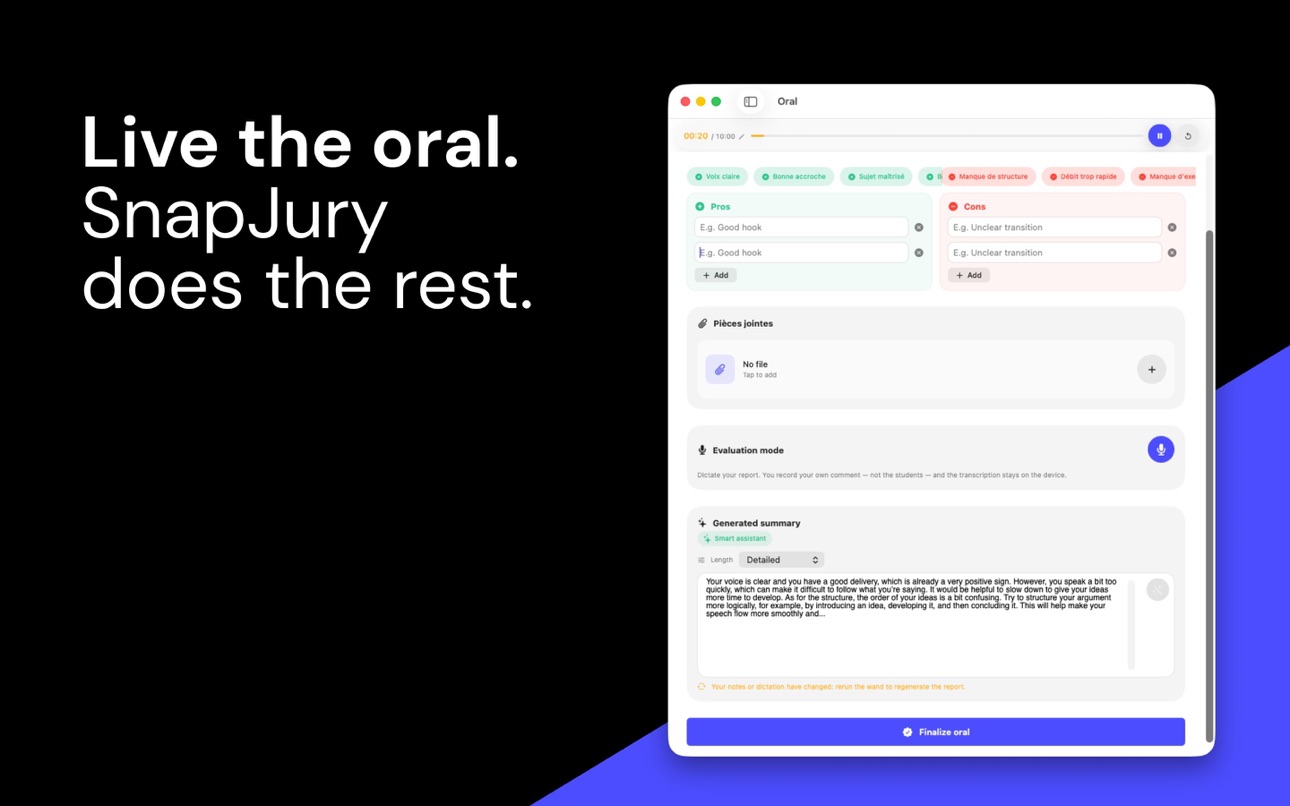
• Dictate your feedback in thirty seconds — it's written in your own words
• Everything archived per student, synced across your Apple devices
Your data stays on your iPhone and your iCloud. No server. No account.
Try it free for 7 days. No credit card.
— — —
WHO IT'S FOR
For teachers who assess oral work regularly: capstone orals, presentations, defenses, vivas — from middle school to higher ed.
THE LIVE ORAL
Start the oral, identify the student afterward. Tap the strengths, note the areas to improve right beside them. The timer frames each turn; on iPhone, a Live Activity keeps the duration in view even on the lock screen. With Apple Watch, the timer sits on your wrist and both hands stay free for the student.
A WHOLE CLASS, NO DEAD TIME
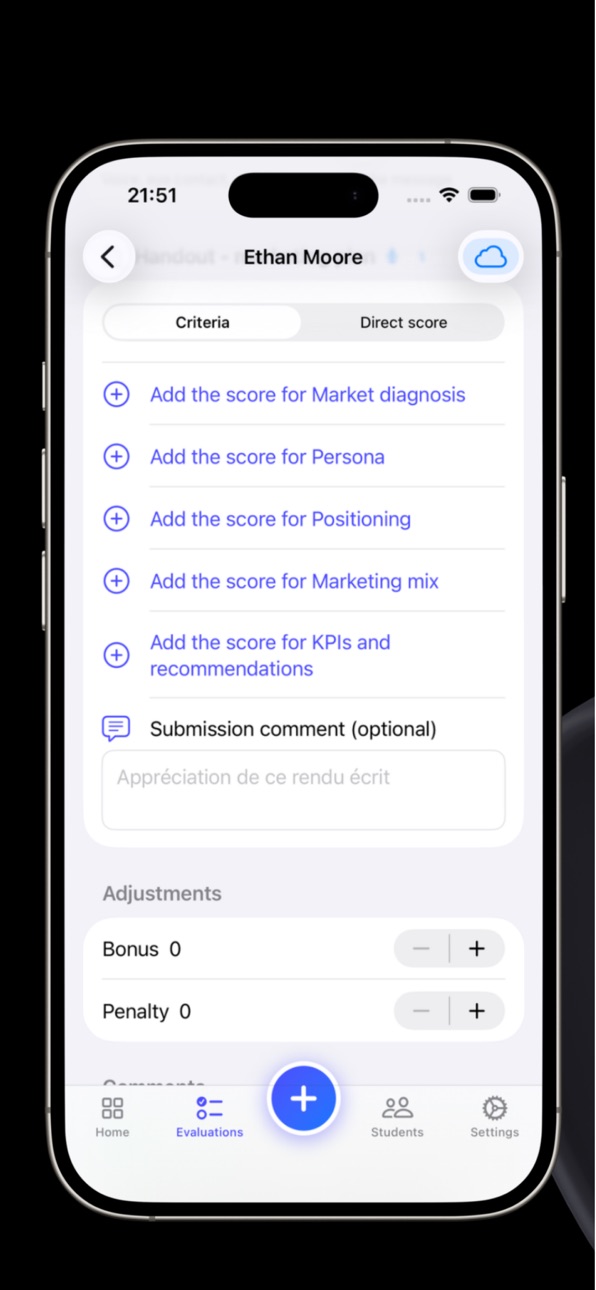
Set the running order before class: SnapJury chains the orals and brings up the next student — the queue empties itself. Same comfort for written work: grade a whole stack in a row, without going back to the menu. Group work and peer evaluation included — designate a student evaluator straight from the rubric, peer pedagogy with no extra sheet.
FEEDBACK IN THIRTY SECONDS
After the turn, dictate your impressions: SnapJury shapes your words into a draft. Writing assistance turns your notes into a first draft — short, medium or detailed, your call. You stay in control: you review, you adjust. Richer writing on Apple Intelligence-compatible devices (iPhone 15 Pro and later, iPad and Apple silicon Mac).
RUBRICS & TEMPLATES
Build a rubric once, reuse it for every turn. Criteria, scale, weighting: you decide everything.
CLASS TRACKING
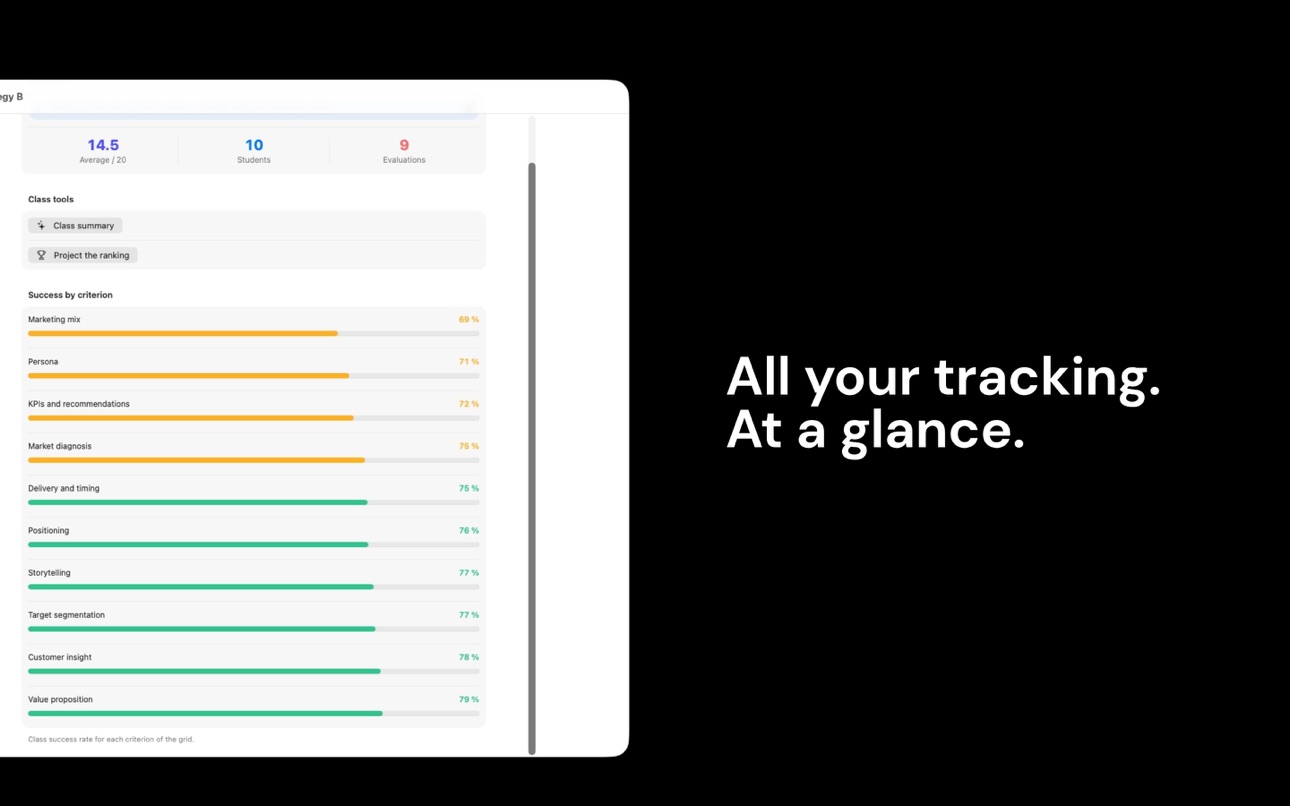
Every oral archived per student, averages computed, absences and lateness in one place. At a glance, your dashboard shows where you stand and who's left to assess. At year's end, archive the class in one gesture and start fresh — nothing is lost, everything stays searchable. On Apple Intelligence-compatible devices, a deeper read on each student and an anonymous group summary, ready to project.
ON THE MAC
Plug in the projector: the class podium is ready, no slide to prepare. A large window for tracking, CSV export to your gradebook in two gestures.
THE APPLE ECOSYSTEM
One purchase covers iPhone, iPad, Mac and Apple Watch. Score in class on iPhone, finish in the evening on Mac: everything follows, no cable, no export.
PRIVACY
SnapJury never listens to the student: only your voice is captured, after the oral, on device. Data stored locally and in your private iCloud. No server, no account, no ads.
TRIAL & PRICING
7-day free trial, no credit card. Then your choice:
• Yearly subscription $24.99/year — recommended
• Monthly subscription $4.99/month, no commitment
• Lifetime access $59.99, one single payment
Every plan covers all your Apple devices.
— — —
Privacy Policy: https://snapjury.fr/privacy
Terms of Use (EULA): https://www.apple.com/legal/internet-services/itunes/dev/stdeula/
Subscriptions renew automatically unless canceled at least 24 hours before the end of the current period. Manage or cancel anytime in your App Store account settings. Lifetime access is a one-time purchase, no renewal.
Capabilities
In-App Purchases
Accessibility
ipadiphonemacrealityDevicetvoswatch
Version history 7 versions
Build 887489484v1.0.92026-06-26 15:56:30
Your exports just leveled up.
• Everything in one sheet. Your comments and the key takeaways you drafted with SnapJury's help now follow into every CSV and Excel export.
• A summary that finally makes sense. One row per student per assignment, with the overall grade — ready for your gradebook or a quick glance.
• Nothing slips through. Standalone orals get their own row too, and your student recaps are saved from one session to the next.
• Smoother on iPad.
Stay with your student. SnapJury handles the rest.
Build 887305302v1.0.72026-06-23 07:02:01
This update makes iCloud sync noticeably faster and more reliable across all your devices — your students, rubrics, evaluations and grades follow you everywhere, seamlessly.
• Reworked sync: faster and more faithful from one device to another
• Pull any list down to refresh it
• A subtle indicator shows when your data is saving to iCloud
• Stability and various fixes
Stay with your student. SnapJury handles the rest.
Build 886950569v1.0.52026-06-15 05:40:46
• Simplified pricing
• Bug fixes and stability improvements
Build 886823445v1.0.42026-06-11 10:33:01
New ways to subscribe — your choice:
• Monthly subscription, no commitment
• Lifetime access, one single payment
The yearly subscription remains the recommended plan. Every plan covers iPhone, iPad, Mac and Apple Watch.
Also: translation fixes on the subscription screen and small visual refinements.
Build 886787374v1.032026-06-11 05:43:03
Added a new video tutorial.
Build 886696687v1.022026-06-09 06:17:49
Fix: video tutorials sometimes got stuck on an endless loading spinner. Playback is now smooth and reliable. The first episode is available right inside the app.
Build 885884077v1.02026-06-08 18:54:33
No pricing data captured yet — comparisons appear once the app has paid storefronts or in-app purchases.
Availability 1 of 1 storefronts
| Region | Language | Price | Ratings | Avg | Version |
|---|---|---|---|---|---|
| US | en-US | Free | 0 | — | 1.0.9 |
Change log 11 changes · US
✎
releaseNotes updated
Your exports just leveled up.
• Everything in one sheet. Your comments and the key takeaways you drafted with SnapJury's help now follow into every CSV and Exc
✎
description updated
Stay with your student. SnapJury handles the rest.
During an oral exam you have to listen, time, score, comment — and stay present. On paper, doing it all at o
✎
subtitle updated
Rubric grading for teachers
✎
name updated
SnapJury – Oral Assessment
◆
Version 1.0.9 released
Your exports just leveled up.
• Everything in one sheet. Your comments and the key takeaways you drafted with SnapJury's help now follow into every CSV and Excel export.
• A summary that finally makes sense. One row per student per assignm
◆
Version 1.0.7 released
This update makes iCloud sync noticeably faster and more reliable across all your devices — your students, rubrics, evaluations and grades follow you everywhere, seamlessly.
• Reworked sync: faster and more faithful from one device to anot
◆
Version 1.0.5 released
• Simplified pricing
• Bug fixes and stability improvements
◆
Version 1.0.4 released
New ways to subscribe — your choice:
• Monthly subscription, no commitment
• Lifetime access, one single payment
The yearly subscription remains the recommended plan. Every plan covers iPhone, iPad, Mac and Apple Watch.
Also: translation f
◆
Version 1.03 released
Added a new video tutorial.
◆
Version 1.02 released
Fix: video tutorials sometimes got stuck on an endless loading spinner. Playback is now smooth and reliable. The first episode is available right inside the app.
◆
Version 1.0 released