Home › Education

Information
Preview 2 platforms
iPhone 7 images


iPad 7 images



What’s New Version 1.15.0
- [NEW]: Build Random & Mock exams by picking specific topics — now with per-topic mastery shown in the picker.
- [NEW]: Pass results now celebrate with a green verdict + confetti.
- [NEW]: Manually check for exam-library updates from Profile.
- [FIX]: Time-aware Study hub greeting.
- [FIX]: Android tablets no longer get stuck in the wrong orientation, and some devices without Google Play Services can now be approved.
- [FIX]: Analytics readiness profile shows full subject names.
- [FIX]: Fixed math units breaking on middle-dot inside \text{}.
Description
Buy it once. Own it forever. No subscriptions. No ads. No paywalled review materials.
Conquer The Board Exam turns months of overwhelming reviewers into a focused daily routine — guided by an AI tutor that actually teaches, not just quizzes. Whether you're prepping for nursing, engineering, education, criminology, or any of the exams in our catalog, this is the study partner you wish you had from day one.
WHY IT'S DIFFERENT
One honest price.
You pay once and get one exam of your choice. Every practice question, every mock exam, every analytics report, every flashcard review — yours for good. No "premium tier" locked behind a monthly fee. No banner ads breaking your focus.
Supported Examinations
• Certified Public Accountant Licensure Examination (CPALE)
• Licensure Examination for Professional Teachers (LEPT)
• Nursing Licensure Examination (NLE)
• Psychometricians Licensure Examination (PmLE)
• Medical Technologists Licensure Examination (MTLE)
• Electronics Engineers Licensure Examination (EELE)
• Chemical Engineers Licensure Examination (ChELE)
• Civil Service Examination (CSE)
• University of the Philippines College Admission Test (UPCAT)
A real AI tutor in your pocket
• Guided Path walks you through the curriculum one topic at a time, adapting to what you already know.
• Topic Mastery drills into a single topic with you until you've truly nailed it — explanation, examples, and checks for understanding in one place.
• Teach Back puts the Feynman technique to work. You explain what you've learned in your own words; the tutor listens, spots the gaps, and patches them.
• Test Builder generates custom practice tests on any subject in seconds.
• Flashcard Builder creates personalized decks from any topic — or from your own notes. Drop in a PDF or a photo and it does the rest.
Three ways to practice, your way
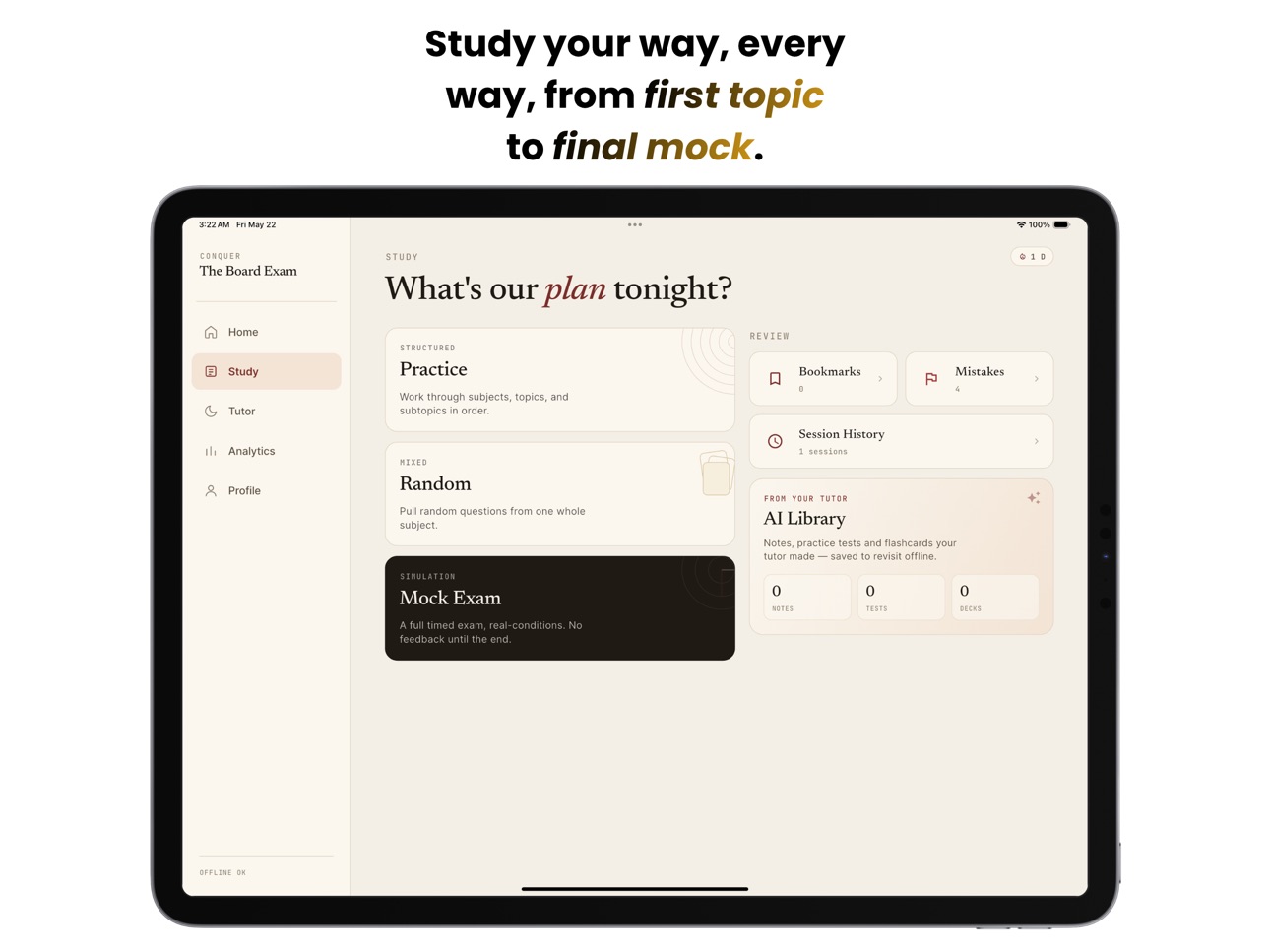
• Structured Practice — drill down subject by subject, topic by topic.
• Random Quizzes — keep yourself sharp with mixed questions.
• Mock Exam — a full timed simulation that mirrors the real thing.
Spaced repetition that respects your exam date
• Daily flashcard reviews powered by the FSRS algorithm, trusted by serious learners worldwide.
• The schedule clamps itself to your exam date, so nothing ever gets pushed past the day that matters.
Analytics that actually help
• See your weakest topics at a glance in The Ledger — your daily readiness report.
• Weekly accuracy trends, Guided Path mastery, and a clear exam-readiness score.
Stay on track without trying
• Activity heatmap on Home.
• Streak tracker with personal-best memory.
• Smart daily reminders that skip the nudge when you've already hit your goal.
• Streak-saver warnings before midnight; exam countdowns at 30, 14, 7, and 1 day to go.
Works offline, syncs when you're back
• Download every question and asset once, then study on the train, in a clinic break room, anywhere. Your progress, bookmarks, and review schedule stay safe.
Sign in with Apple or Google
One tap to get started. No passwords to remember.
ABOUT THE AI TUTOR
All five tutor modes (Guided Path, Topic Mastery, Teach Back, Test Builder, Flashcard Builder) and file uploads run on AI credits — sold inside the app as optional one-time bundles. Use as much or as little as you want. No subscription, no auto-renew, no surprise charges.
Don't want to use AI? Skip it entirely. The full study experience works without spending another peso.
BUILT BY REVIEWEES, FOR REVIEWEES
We're a small team that's been through the board-exam grind ourselves. Every feature is here because we wished it existed when we were studying.
Buy the app. Build the streak. Take the exam. Win it.
Capabilities
In-App Purchases
Accessibility
ipadiphonemacrealityDevicetvoswatch
Version history 15 versions
Build 887903270v1.15.02026-07-06 16:41:30
- [NEW]: Build Random & Mock exams by picking specific topics — now with per-topic mastery shown in the picker.
- [NEW]: Pass results now celebrate with a green verdict + confetti.
- [NEW]: Manually check for exam-library updates from Profile.
- [FIX]: Time-aware Study hub greeting.
- [FIX]: Android tablets no longer get stuck in the wrong orientation, and some devices without Google Play Services can now be approved.
- [FIX]: Analytics readiness profile shows full subject names.
- [FIX]: Fixed math units breaking on middle-dot inside \text{}.
Build 887181316v1.14.02026-06-19 22:02:07
- [NEW] Ask Mayari for help right inside a quiz
- [NEW] Cram mode for flashcard decks
- [NEW] Image and image-occlusion flashcards
- [NEW] Share and download decks & quizzes with the community
- [IMPROVEMENT] Clearer exam version labels and update prompts
- [FIX] Smoother loading and several bug fixes
Build 887003918v1.13.02026-06-16 01:12:14
- [NEW] Per-question Scratch Pad in the quiz runner — jot handwritten ink or typed notes on any question while you work.
- [NEW] Practice all your bookmarked questions in one go, just like the mistakes drill.
- [NEW] Hand-authored MCQ quizzes in the Library.
- [NEW] Share tests & decks as .ctbeshare files, and open them straight from your device via "Open with" to import.
Build 886742386v1.12.32026-06-09 22:27:08
- [FIX] Diagram rendering stability in tutor feature
- [IMPROVED] Onboarding screen
Build 886646426v1.12.02026-06-07 21:06:01
- [NEW] Resume in-progress study sessions right where you left off with saved checkpoints
- [NEW] Smarter, more relevant study reminders, plus a dedicated notification settings page
- [NEW] Share the app with friends directly from your Profile
- [IMPROVED] AI Library shelves simplified into Quizzes · Mock Exams · Decks
- [IMPROVED] Topic list now keeps your scroll position when you go back
- [FIX] Math now renders correctly in answer-explanation verdict lines
- [FIX] Resolved a 1px overflow on answer choice tiles
- [FIX] Confirm before exiting the app when pressing system back
- [FIX] Stopped the repeated Google sign-in prompt when enabling Android cloud backup
Build 886540763v1.11.12026-06-04 23:03:30
- [FIX] Some devices hangs up in google sign-in
- [IMPROVEMENT] - Speed query of topics in practice mode
Build 886446301v1.11.02026-06-02 23:17:04
- [IMPROVED] Added extra privacy and security
Build 886391124v1.10.02026-06-01 23:44:20
- [NEW] You can now highlight and cross out individual words right in question stems and answer choices — mark up tricky wording while you work through a question.
- [FIX] Error messages now show clear, friendly wording instead of confusing technical text.
- [FIX] Corrected the headline text styling on the content-download screen during onboarding.
Build 886330417v1.9.12026-05-31 01:39:03
- [NEW] Dark mode — the app now follows your system light/dark setting.
- [FIX] Tutor "Retry" now works after a failed turn, and Guided Path practice questions no longer show "no practice questions" when they were actually generated.
- [IMPROVED] Guided Path now shows topic coverage plus a Mastered / Needs review badge from your real quiz scores.
Build 886354835v1.9.22026-05-31 23:18:59
- [NEW] Guided Path quizzes now use the offline question bank
- [NEW] Readiness radar + Guided Path quizzes in Analytics
- [NEW] Tutor renders mermaid diagrams
- [IMPROVED] Mode icons on conversation list; "Others" hidden from Guided Path picker
- [FIX] Guided Path sessions counted correctly in Study history
- [FIX] Tutor greeting tracks local time; sharper Home/Analytics headlines
Build 886278428v1.9.02026-05-29 18:56:48
- [NEW] Back up your data to the cloud — optional encrypted backup to Google Drive (Android) and iCloud (iOS), set up from your Profile.
- [NEW] Guided app tours — one-time walkthroughs of the Study Hub and Tutor screens to help you find your way around. Replay them anytime from Profile → Support & About → Replay app tours.
- [IMPROVED] Cleaner, more consistent empty screens across Mistakes, Bookmarks, Analytics, Exam Library, Practice Topics, and Random setup. The flashcard "Done" button is now full-width.
- [FIX] Fixed a crash that could occur on launch when opening the app while signed out.
Build 886182800v1.7.22026-05-27 16:41:42
- [IMPROVE] Catalog and exam entitlements load instantly from cache, then refresh in the background — faster first paint on Home and Store.
Build 886210876v1.8.02026-05-27 21:21:32
- [FIX] Quiz verdict and footer hints now match the letter shown on the shuffled answer tiles instead of the original pre-shuffle letter.
- [NEW] Added error monitoring to help us catch and fix crashes faster.
Build 885745681v1.7.02026-05-26 07:54:26
Build 886141295v1.7.12026-05-26 18:04:23
- [IMPROVED] Quiz answer choices now shuffle each session, so you can't rely on memorizing option positions.
- [FIXED] The "Rate app" button in Profile now opens the App Store correctly.
Price history by region
Currency
Show
Columns
Search
Availability 16 of 16 storefronts
| Region | Language | Price | Ratings | Avg | Version |
|---|---|---|---|---|---|
 PH PH | en-GB | PHP 199 | 33 | 5.0 | 1.15.0 |
 AT AT | de-DE | EUR 2.99 | 0 | — | 1.15.0 |
 BB BB | en-GB | USD 3.99 | 0 | — | 1.15.0 |
 BZ BZ | en-GB | USD 2.99 | 0 | — | 1.15.0 |
 GM GM | en-GB | USD 2.99 | 0 | — | 1.15.0 |
 GW GW | en-GB | USD 2.99 | 0 | — | 1.15.0 |
 GY GY | en-GB | USD 2.99 | 0 | — | 1.15.0 |
 ID ID | en-GB | IDR 49000 | 0 | — | 1.15.0 |
 ME ME | en-GB | EUR 2.99 | 0 | — | 1.15.0 |
 RW RW | en-GB | USD 2.99 | 0 | — | 1.15.0 |
 SC SC | en-GB | USD 2.99 | 0 | — | 1.15.0 |
 ST ST | en-GB | USD 2.99 | 0 | — | 1.15.0 |
 SZ SZ | en-GB | USD 2.99 | 0 | — | 1.15.0 |
 TH TH | en-GB | THB 99 | 0 | — | 1.15.0 |
 US US | en-US | USD 2.99 | 0 | — | 1.15.0 |
 ZW ZW | en-GB | USD 3.99 | 0 | — | 1.15.0 |
Change log 19 changes · US
✎
releaseNotes updated
- [NEW]: Build Random & Mock exams by picking specific topics — now with per-topic mastery shown in the picker.
- [NEW]: Pass results now celebrate with a green
✎
description updated
Buy it once. Own it forever. No subscriptions. No ads. No paywalled review materials.
Conquer The Board Exam turns months of overwhelming reviewers into a focu
✎
subtitle updated
Reviewer, AI Tutor, Flashcards
✎
name updated
Conquer The Board Exam
◆
Version 1.15.0 released
- [NEW]: Build Random & Mock exams by picking specific topics — now with per-topic mastery shown in the picker.
- [NEW]: Pass results now celebrate with a green verdict + confetti.
- [NEW]: Manually check for exam-library updates from Profi
◆
Version 1.14.0 released
- [NEW] Ask Mayari for help right inside a quiz
- [NEW] Cram mode for flashcard decks
- [NEW] Image and image-occlusion flashcards
- [NEW] Share and download decks & quizzes with the community
- [IMPROVEMENT] Clearer exam version labels and
◆
Version 1.13.0 released
- [NEW] Per-question Scratch Pad in the quiz runner — jot handwritten ink or typed notes on any question while you work.
- [NEW] Practice all your bookmarked questions in one go, just like the mistakes drill.
- [NEW] Hand-authored MCQ quizz
◆
Version 1.12.3 released
- [FIX] Diagram rendering stability in tutor feature
- [IMPROVED] Onboarding screen
◆
Version 1.12.0 released
- [NEW] Resume in-progress study sessions right where you left off with saved checkpoints
- [NEW] Smarter, more relevant study reminders, plus a dedicated notification settings page
- [NEW] Share the app with friends directly from your Prof
◆
Version 1.11.1 released
- [FIX] Some devices hangs up in google sign-in
- [IMPROVEMENT] - Speed query of topics in practice mode
◆
Version 1.11.0 released
- [IMPROVED] Added extra privacy and security
◆
Version 1.10.0 released
- [NEW] You can now highlight and cross out individual words right in question stems and answer choices — mark up tricky wording while you work through a question.
- [FIX] Error messages now show clear, friendly wording instead of confusing
◆
Version 1.9.2 released
- [NEW] Guided Path quizzes now use the offline question bank
- [NEW] Readiness radar + Guided Path quizzes in Analytics
- [NEW] Tutor renders mermaid diagrams
- [IMPROVED] Mode icons on conversation list; "Others" hidden from Guided Path p
◆
Version 1.9.1 released
- [NEW] Dark mode — the app now follows your system light/dark setting.
- [FIX] Tutor "Retry" now works after a failed turn, and Guided Path practice questions no longer show "no practice questions" when they were actually generated.
- [IMP
◆
Version 1.9.0 released
- [NEW] Back up your data to the cloud — optional encrypted backup to Google Drive (Android) and iCloud (iOS), set up from your Profile.
- [NEW] Guided app tours — one-time walkthroughs of the Study Hub and Tutor screens to help you find yo
◆
Version 1.8.0 released
- [FIX] Quiz verdict and footer hints now match the letter shown on the shuffled answer tiles instead of the original pre-shuffle letter.
- [NEW] Added error monitoring to help us catch and fix crashes faster.
◆
Version 1.7.2 released
- [IMPROVE] Catalog and exam entitlements load instantly from cache, then refresh in the background — faster first paint on Home and Store.
◆
Version 1.7.1 released
- [IMPROVED] Quiz answer choices now shuffle each session, so you can't rely on memorizing option positions.
- [FIXED] The "Rate app" button in Profile now opens the App Store correctly.
◆
Version 1.7.0 released