Home › Photo & Video

 US
US
1 of 1 storefronts
Content in en-US
Content in en-US
Information
Preview 2 platforms
iPhone 3 images


iPad 1 image

What’s New Version 1.0.5
Minor bugfixes and stability improvements.
Description
CardBackup copies photos and videos from your camera's memory card to your iPhone - reliably, quickly, and without duplicates.
CardBackup copies files to a folder of your choosing. It does not import into your Photos library - it's designed for photographers who want their original files intact and organised, ready for Lightroom, Capture One, PhotoCuller, or whichever app you process in.
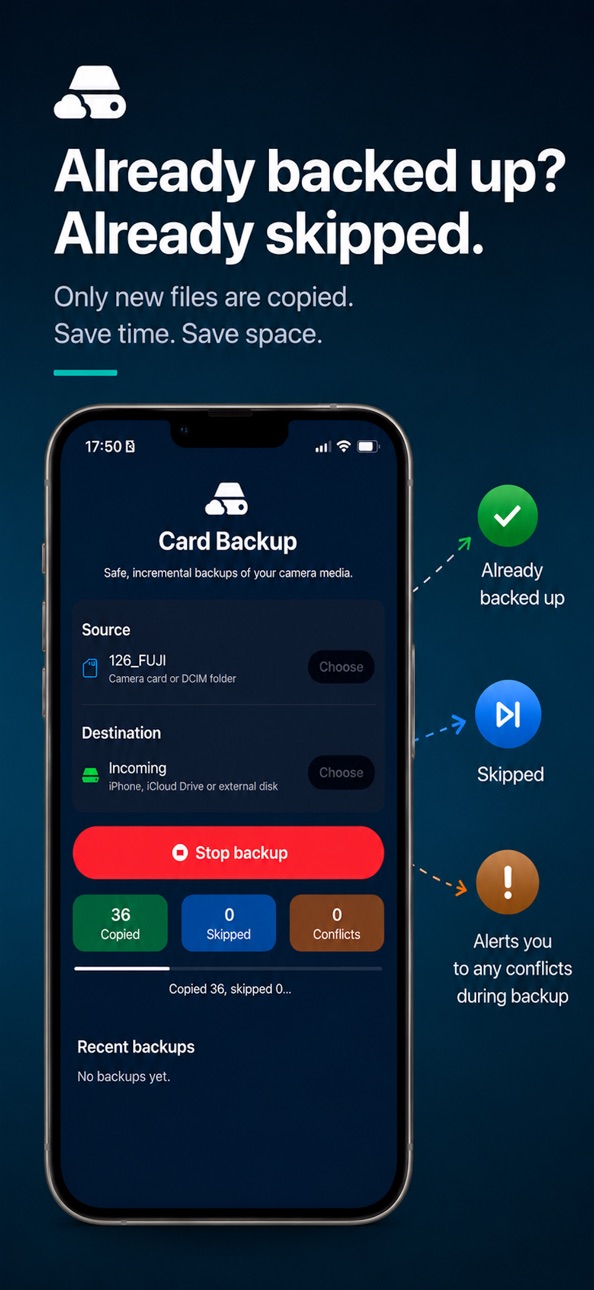
Connect a card reader or camera, choose a source and destination folder, and tap Back Up. CardBackup handles the rest: skipping files you've already copied, verifying each file as it goes, and keeping a log of your last 30 backup runs.
Perfect for photographers who want a safety net while travelling. Back up to a local folder, an external drive, or iCloud Drive — and if you choose iCloud, your shots sync automatically overnight so they're waiting on your Mac when you get home.
Works on iPhone, iPad, and natively on Mac. One purchase covers all three.
No subscriptions. No ads. No cloud service required. Everything stays on your device.
Features:
- Incremental backups: skips files already copied, no duplicates
- Hash verification: detects corruption on every copied file
- Conflict handling: safely renames files when names clash
- Backup history with run times and file statistics
- iCloud Drive support
- Local notifications on completion
Visit cardbackup.app for more information.
Accessibility
ipadiphonemacrealityDevicetvoswatch
Version history 6 versions
Build 887300534v1.0.52026-06-23 00:30:23
Minor bugfixes and stability improvements.
Build 886194621v1.0.42026-05-28 16:51:48
• iPad now rotates between portrait and landscape
• On Mac, you can now create a new destination folder without leaving the app
• Subtle haptic feedback when a backup completes
• Smoother counter animations during backup
Build 886143247v1.0.22026-05-26 17:49:46
Fixed a bug where external volumes connected via a hub can wrongly report no free space. Thanks to u/NecessaryDetective31 on Reddit for the bug report!
Build 886163881v1.0.32026-05-26 21:49:26
Backup history now shows how long each run took. Conflict warnings now only appear when conflicts actually occurred, so no more orange warnings on clean runs. After a few successful backups, CardBackup may also ask you to leave a rating; your reviews help other photographers find the app.
Build 885721039v1.02026-05-21 14:51:18
Build 885983716v1.0.12026-05-21 23:31:18
Bug fixes and improvements: fixed an issue where starting a backup with a disconnected card reader would silently record an empty run; fixed controls scrolling off screen after multiple backups; improved folder picker defaults; buttons and stat counters are now more visually distinct; backup history increased to 30 runs.
Price history by region
Currency
Show
Columns
Search
Availability 1 of 1 storefronts
| Region | Language | Price | Ratings | Avg | Version |
|---|---|---|---|---|---|
| US | en-US | USD 6.99 | 0 | — | 1.0.5 |
Change log 10 changes · US
✎
releaseNotes updated
Minor bugfixes and stability improvements.
✎
description updated
CardBackup copies photos and videos from your camera's memory card to your iPhone - reliably, quickly, and without duplicates.
CardBackup copies files to a fol
✎
subtitle updated
Camera import without a laptop
✎
name updated
CardBackup: SD Card Import
◆
Version 1.0.5 released
Minor bugfixes and stability improvements.
◆
Version 1.0.4 released
• iPad now rotates between portrait and landscape
• On Mac, you can now create a new destination folder without leaving the app
• Subtle haptic feedback when a backup completes
• Smoother counter animations during backup
◆
Version 1.0.3 released
Backup history now shows how long each run took. Conflict warnings now only appear when conflicts actually occurred, so no more orange warnings on clean runs. After a few successful backups, CardBackup may also ask you to leave a rating; yo
◆
Version 1.0.2 released
Fixed a bug where external volumes connected via a hub can wrongly report no free space. Thanks to u/NecessaryDetective31 on Reddit for the bug report!
◆
Version 1.0.1 released
Bug fixes and improvements: fixed an issue where starting a backup with a disconnected card reader would silently record an empty run; fixed controls scrolling off screen after multiple backups; improved folder picker defaults; buttons and
◆
Version 1.0 released