Home › Productivity

 US
US
1 of 1 storefronts
Content in en-US
Content in en-US
Information
Preview 3 platforms
iPhone 4 images


iPad 4 images


Mac 4 images


What’s New Version 1.2.0
Markdown, live on the card.
Type **bold** and *italic* (⌘B / ⌘I on a hardware keyboard) and the asterisks vanish as you go. Start a line with "- " for a bullet, "1." for a number, or "- [ ]" for a checkbox you can tap to tick. Return continues the list. Your text stays plain Markdown, so notes round-trip with the Mac app.
No tracking, no account, no telemetry.
Description
NoteLess is a scratch pad for fleeting thoughts.
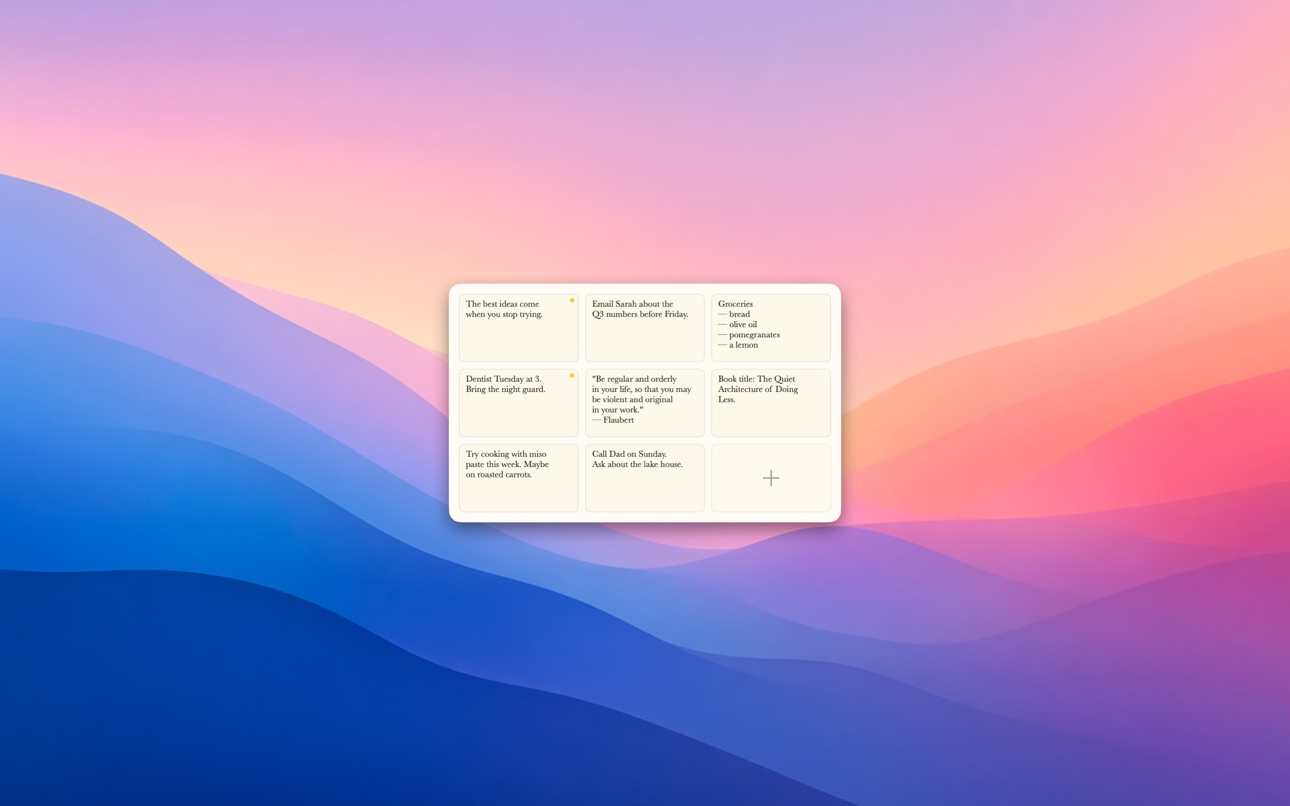
Tap +, a small cream card opens. Type. It can't grow past the card — that's the point. If you need more, that's a different card.
Pinned cards stay forever. Everything else ages out after 7 days, automatically. There is nothing to manage.
• Hard-bounded card — no scrolling, no growing past one screenful
• 7-day TTL on unpinned notes; pinned cards stick around
• Light Markdown — bold, italic, lists, and tappable checkboxes, rendered live
• Long-press a card to pin or delete
• Cream paper, Baskerville, dark mode
• iCloud sync across iPhones, iPads, and Macs
NoteLess is the absence of a notes app. No folders, no tags, no search, no themes, no plugins, no AI. Just a card, bound, that disappears.
Accessibility
ipadiphonemacrealityDevicetvoswatch
Version history 4 versions
Build 887468186v1.2.02026-06-26 17:05:47
Markdown, live on the card.
Type **bold** and *italic* (⌘B / ⌘I on a hardware keyboard) and the asterisks vanish as you go. Start a line with "- " for a bullet, "1." for a number, or "- [ ]" for a checkbox you can tap to tick. Return continues the list. Your text stays plain Markdown, so notes round-trip with the Mac app.
No tracking, no account, no telemetry.
Build 886088669v1.1.12026-05-27 18:34:18
Localized into 10 languages.
The welcome card, pin and delete actions, accessibility labels, and the "(empty)" placeholder all follow your system language now: English, German, Spanish, French, Italian, Japanese, Korean, Brazilian Portuguese, Russian, and Simplified Chinese.
Build 885991254v1.1.02026-05-22 14:19:22
Accessibility pass.
• Dynamic Type — Baskerville now scales with your system text size in Settings → Display & Brightness. Card body and grid previews both follow.
• VoiceOver — the pin glyph announces "Pinned", and each thumbnail reads as its body excerpt followed by "Pinned" when pinned, so VO users hear the state without drilling in.
• Reduce Motion — the overflow-shake skips the visible jitter when Reduce Motion is on. The haptic still fires so you don't lose the rejection signal.
• Pin signal is now a real pin shape, not just a yellow dot — readable on grayscale displays.
Build 885651347v1.0.02026-05-15 00:17:46
Price history by region
Currency
Show
Columns
Search
Availability 1 of 1 storefronts
| Region | Language | Price | Ratings | Avg | Version |
|---|---|---|---|---|---|
| US | en-US | USD 4.99 | 0 | — | 1.2.0 |
Change log 8 changes · US
✎
releaseNotes updated
Markdown, live on the card.
Type **bold** and *italic* (⌘B / ⌘I on a hardware keyboard) and the asterisks vanish as you go. Start a line with "- " for a bullet
✎
description updated
NoteLess is a scratch pad for fleeting thoughts.
Tap +, a small cream card opens. Type. It can't grow past the card — that's the point. If you need more, that'
✎
subtitle updated
Bound-by-design notes
✎
name updated
NoteLess — To Catch a Thought
◆
Version 1.2.0 released
Markdown, live on the card.
Type **bold** and *italic* (⌘B / ⌘I on a hardware keyboard) and the asterisks vanish as you go. Start a line with "- " for a bullet, "1." for a number, or "- [ ]" for a checkbox you can tap to tick. Return conti
◆
Version 1.1.1 released
Localized into 10 languages.
The welcome card, pin and delete actions, accessibility labels, and the "(empty)" placeholder all follow your system language now: English, German, Spanish, French, Italian, Japanese, Korean, Brazilian Portugue
◆
Version 1.1.0 released
Accessibility pass.
• Dynamic Type — Baskerville now scales with your system text size in Settings → Display & Brightness. Card body and grid previews both follow.
• VoiceOver — the pin glyph announces "Pinned", and each thumbnail reads as
◆
Version 1.0.0 released