Home › Photo & Video

 US
US
1 of 1 storefronts
Content in en-US
Content in en-US
Information
Apple ID6768220272
Bundle IDcom.pinpix.ios
SellerSeller
Min iOS15.1
Min macOS12.0
Device familiesiphone, ipad, ipod
Released2026-05-12
Copyright© 2026 Joey Salatino
Privacy policyLink ↗
Preview 2 platforms
iPhone 5 images


iPad 5 images



What’s New Version 1.0.6
New location title autofill
Various bug fixes
Description
PinPix is a photos map.
A community-driven map of the world's best photo spots, contributed by the people who actually shoot there. Whether you're scouting locations for tomorrow's shoot or hunting golden hour wherever you happen to be, PinPix puts every spot worth shooting at your fingertips.
WHAT YOU CAN DO
— Discover spots on a live map
See pinned photo locations near you and around the world. Tap any pin to view the shot, the address, and how to get there.
— Add your own spots in seconds
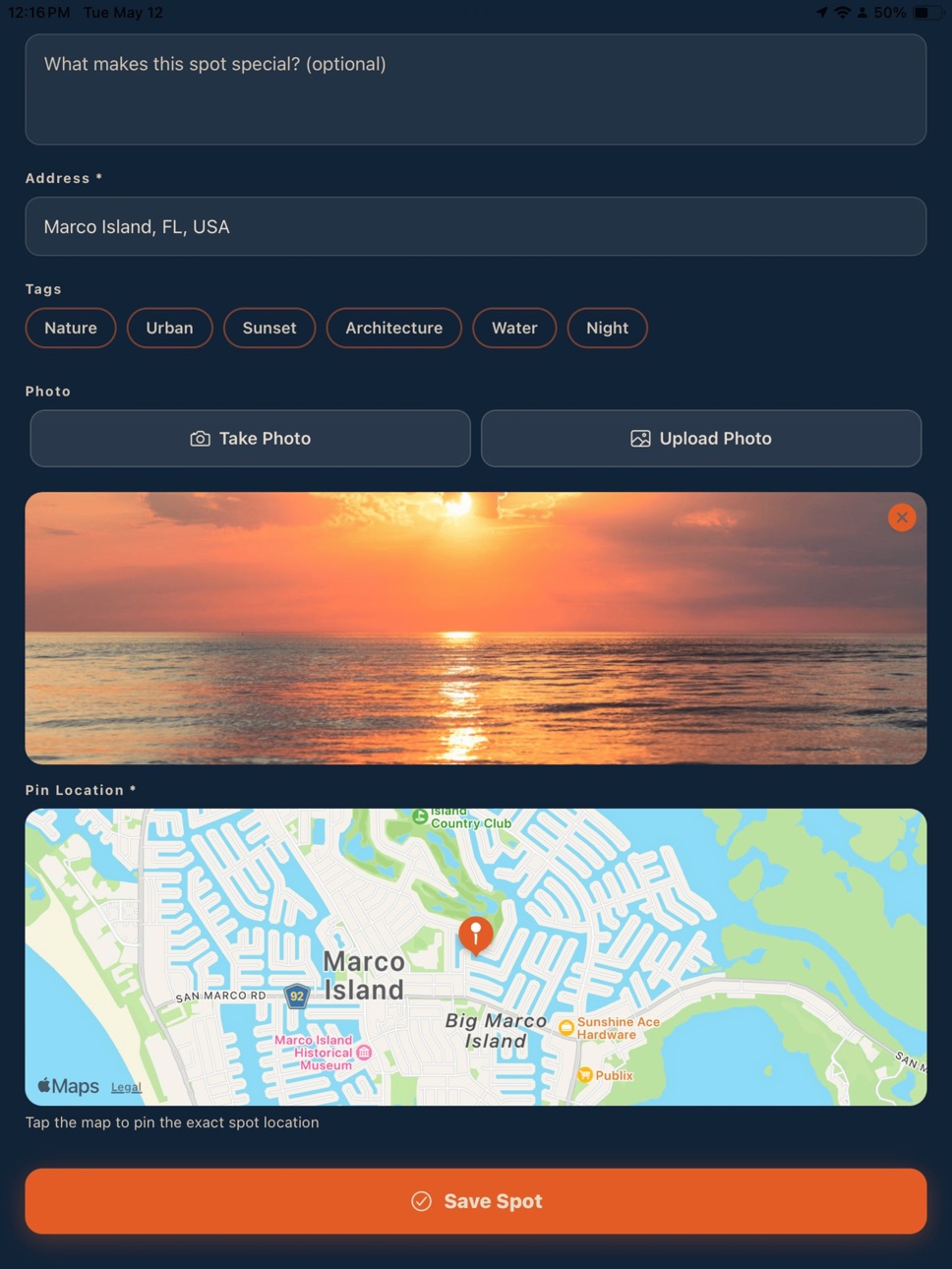
Snap a photo or pick one from your library, drop a pin on the exact location, tag the vibe (Sunrise, Cityscape, Architecture, Nature, and more), and your spot is on the map. When your photo already has a saved location, PinPix can suggest that pin so you spend less time hunting on the map (you can always adjust it).
— Smart address search
Search any address in the world with autocomplete, or just tap the map to drop a pin where you actually shot.
— Save your favorites
Heart the spots you want to come back to. Build a private list of must-shoot locations for your next trip.
— Get directions instantly
One tap to open Apple Maps or Google Maps with the spot's coordinates already loaded.
— Follow other photographers
Tap any username to see the spots they've shared. Find creators with the same taste and discover what they're shooting. Use the Feed tab to stay on top of follows, requests, and activity in one place.
— Find people you know (optional)
On your profile, you can sync contacts to see photographers from your address book who are already on PinPix, plus suggested profiles to explore—all in one simple row. Hide suggestions anytime to tuck that row away; Show suggestions when you want it back. You can also add an optional phone number when you sign up (or later in Settings) so friends can find you through contact matching—only if you want that.
— Filter by what you're looking for
Sunrise. Cityscape. Architecture. Long Exposure. Filter the map by tag to plan exactly the kind of session you want.
— Share spots beyond PinPix
Share a spot to Messages, Instagram, or anywhere else with a single tap.
— Profile and privacy controls
Choose whether your profile is public or private. Hide your email. Control what others see—including how you show up in discovery and contact-based suggestions.
— Delete anything, anytime
Delete spots you've posted, or delete your entire account, right from inside Settings. We never make you email support to remove your data.
BUILT FOR PHOTOGRAPHERS, BY PHOTOGRAPHERS
PinPix wasn't built to be another social feed. It was built to solve one problem: photographers waste hours every trip trying to find the spots worth shooting. PinPix is the answer — a single, beautiful map of locations that real photographers have stood in and shot.
We're starting with the basics and listening to the community for what comes next. Future updates will keep improving discovery, notifications, and the map experience based on what photographers ask for.
PRIVACY FIRST
— We never sell your data.
— Your account, your photos, your spots — you can delete any of it at any time.
— Public profiles only show what you've shared publicly.
— Contact-based friend suggestions are optional: you choose whether to sync contacts and whether to save a phone number for matching. You can clear or change that number in Settings.
— Read the full policy in Settings, or at the link below.
REQUIREMENTS
— iOS 15 or later
— Location services (for posting spots at your current location and for spot discovery on the map)
— Contacts (optional — only if you use “sync contacts” on your profile to find people you know)
— Photo library access (optional — for choosing photos when you add a spot)
— A free PinPix account, or sign in with Apple or Google
SUPPORT
Questions, ideas, or bug reports? Email us at pinpixhelp@gmail.com — a real human reads every one.
Welcome to PinPix. Let's go find some good light.
Accessibility
ipadiphonemacrealityDevicetvoswatch
Version history 7 versions
Build 886752416v1.0.62026-06-10 17:02:25
New location title autofill
Various bug fixes
Build 885830296v1.0.52026-05-19 20:05:55
Comments on spots — Leave comments, reply in threads, and like comments from the map and your feed.
Stay in the loop — Notifications for new comments, replies, follows, and activity on your spots (manage types in Settings).
Open from a notification — Tap a push to jump straight to the spot or conversation.
Followers & following — See who follows you and who you follow from any profile.
Smoother experience — Faster updates when you return to the app and more reliable nearby-spot alerts.
Build 885690348v1.0.42026-05-15 18:24:16
Profile: Sync contacts to see people you may know, plus suggested profiles, in one horizontal row on your profile.
Privacy: Hide suggestions collapses that whole row (contacts + suggestions); tap Show suggestions to bring it back.
Signup & profile setup: Optional phone number so friends can find you via contacts (validated; you can skip it).
Settings: Manage the phone number used for contact discovery (update or remove).
Spots: When you pick a photo, we can read location from the photo (EXIF) to help fill the map pin (you can still adjust it).
Profiles: Your profile and others’ profiles stay in sync when counts or info change.
Tabs & social: Feed tab updates and a clearer follow / activity hub.
Build 885636447v1.0.22026-05-14 04:31:47
PinPix — highlights
Map — Explore photo spots on the map, filter with tags, and open a rich preview for each pin.
Add spots — Post a location with several photos at once, a title, caption, address search, and tags.
Edit spots — Update your own spots (photos, text, location, tags) anytime.
Saves — Bookmark favorites; saved spots show a gold pin on the map and live in Saved.
Share — Share a spot with a normal link in Messages; it opens PinPix to the right place when the app is installed.
Friends — Add friends by username, handle requests in Friends, and browse friends’ latest spots on the Friends tab.
Directions — Jump to maps directions from a spot.
In 1.0.2
More reliable opening shared links and deep links after sign-in.
iOS — Correct URL registration so the app opens from shared PinPix links (alongside Google sign-in).
Map Friends shortcut opens the Friends hub (not only the activity feed).
Spot sheet save / like / share / directions sit below the photo so taps register reliably.
Build 885681937v1.0.32026-05-14 22:40:07
Profile: Sync contacts to see people you may know, plus suggested profiles, in one horizontal row on your profile.
Privacy: Hide suggestions collapses that whole row (contacts + suggestions); tap Show suggestions to bring it back.
Signup & profile setup: Optional phone number so friends can find you via contacts (validated; you can skip it).
Settings: Manage the phone number used for contact discovery (update or remove).
Spots: When you pick a photo, we can read location from the photo (EXIF) to help fill the map pin (you can still adjust it).
Profiles: Your profile and others’ profiles stay in sync when counts or info change.
Tabs & social: Feed tab updates and a clearer follow / activity hub.
Build 885513401v1.02026-05-12 15:29:39
Build 885585338v1.0.12026-05-12 23:06:34
We fixed an issue where you had to sign in again after leaving the app. Your session now stays active as you’d expect.
Also includes small improvements and bug fixes.
No pricing data captured yet — comparisons appear once the app has paid storefronts or in-app purchases.
Availability 1 of 1 storefronts
| Region | Language | Price | Ratings | Avg | Version |
|---|---|---|---|---|---|
| US | en-US | Free | 8 | 5.0 | 1.0.6 |
Change log 10 changes · US
✎
releaseNotes updated
New location title autofill
Various bug fixes
✎
description updated
PinPix is a photos map.
A community-driven map of the world's best photo spots, contributed by the people who actually shoot there. Whether you're scouting loc
✎
name updated
PinPix
◆
Version 1.0.6 released
New location title autofill
Various bug fixes
◆
Version 1.0.5 released
Comments on spots — Leave comments, reply in threads, and like comments from the map and your feed.
Stay in the loop — Notifications for new comments, replies, follows, and activity on your spots (manage types in Settings).
Open from a no
◆
Version 1.0.4 released
Profile: Sync contacts to see people you may know, plus suggested profiles, in one horizontal row on your profile.
Privacy: Hide suggestions collapses that whole row (contacts + suggestions); tap Show suggestions to bring it back.
Signup
◆
Version 1.0.3 released
Profile: Sync contacts to see people you may know, plus suggested profiles, in one horizontal row on your profile.
Privacy: Hide suggestions collapses that whole row (contacts + suggestions); tap Show suggestions to bring it back.
Signup
◆
Version 1.0.2 released
PinPix — highlights
Map — Explore photo spots on the map, filter with tags, and open a rich preview for each pin.
Add spots — Post a location with several photos at once, a title, caption, address search, and tags.
Edit spots — Update your
◆
Version 1.0.1 released
We fixed an issue where you had to sign in again after leaving the app. Your session now stays active as you’d expect.
Also includes small improvements and bug fixes.
◆
Version 1.0 released