Home › Business

 US
US
 AGen-GB
 AIen-GB
 AOen-GB
 ARes-MX
 BBen-GB
 BFen-GB
 BJen-GB
 BOes-MX
 BRpt-BR
 BSen-GB
 BWen-GB
 BZen-GB
 CDen-GB
 CGen-GB
 CIfr-FR
 CLes-MX
 CMfr-FR
 COes-MX
 CRes-MX
 CVen-GB
 DMen-GB
 DOes-MX
 DZen-GB
 ECes-MX
 GAfr-FR
 GDen-GB
 GHen-GB
 GMen-GB
 GTes-MX
 GWen-GB
 GYen-GB
 HNes-MX
 JMen-GB
 KEen-GB
 KNen-GB
 KYen-GB
 LCen-GB
 LRen-GB
 LYen-GB
 MAen-GB
 MGen-GB
 MLen-GB
 MSen-GB
 MUen-GB
 MWen-GB
 MXes-MX
 MZen-GB
 NAen-GB
 NEen-GB
 NGen-GB
 NIes-MX
 PAes-MX
 PEes-MX
 PYes-MX
 RWen-GB
 SCen-GB
 SLen-GB
 SNen-GB
 SRen-GB
 STen-GB
 SVes-MX
 SZen-GB
 TCen-GB
 TDen-GB
 TNen-GB
 TTen-GB
 TZen-GB
 UGen-GBUSen-US
 UYen-GB
 VCen-GB
 VEes-MX
 VGen-GB
 ZMen-GB
 ZWen-GB
75 of 75 storefronts
Content in en-US
Content in en-US
Information
Apple ID6767250724
Bundle IDKenneth.Resera-kning
SellerSeller
Min iOS17.6
Min macOS14.6
Device familiesiphone, ipad
Released2026-05-08
Copyright© Kenneth Wallgren
Privacy policyLink ↗
Preview 2 platforms
iPhone 3 images

iPad 4 images


What’s New Version 1.8
Fixed a rounding issue in the travel time calculation that could cause the total duration to be off by one minute. Times are now rounded to the nearest minute for accurate results.
Description
Medical Escort Expenses is a professional travel expense management app built specifically for medical escorts, flight nurses and healthcare professionals working with organisations such as SOS International.
Designed by a flight nurse with real-world experience, the app streamlines the entire expense reporting process — from the moment you leave home to submitting your final invoice.
CASE ID-BASED TRACKING
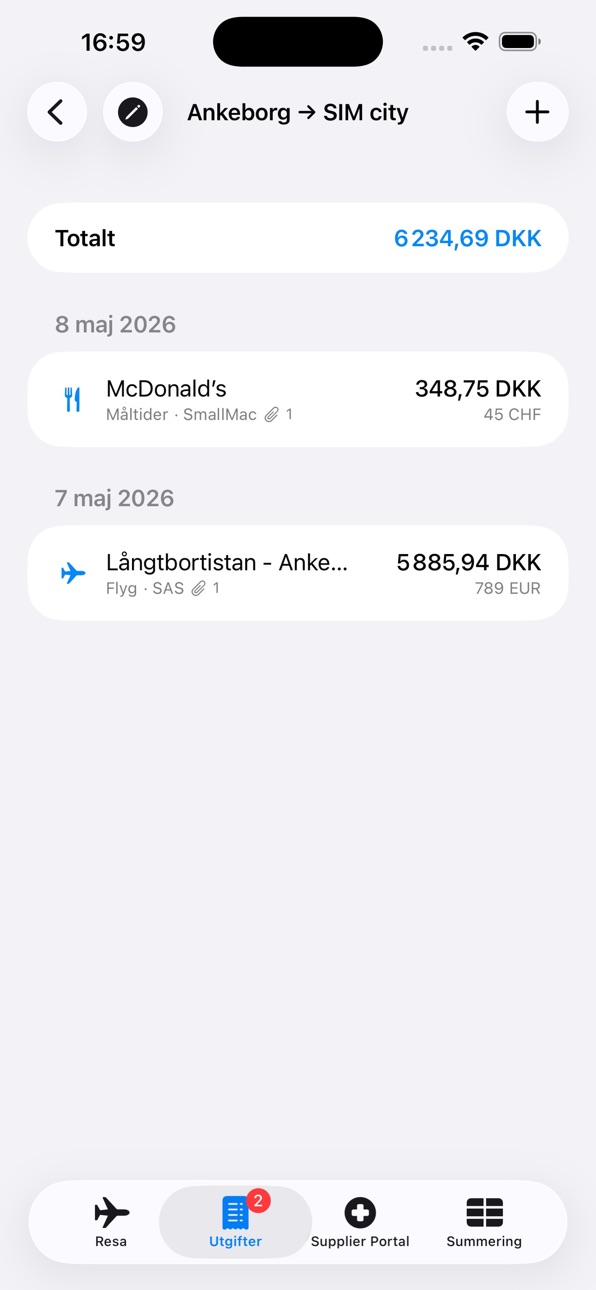
Organise every assignment by its SOS International Case ID. Each case contains a complete record of travel dates, pickup and delivery locations, traveller details and all associated expenses — ready to submit when the mission is complete.
EXPENSES IN 90+ CURRENCIES
Add expenses in any of over 90 currencies with automatic conversion to DKK. Exchange rates are fetched live from the European Central Bank and stored on your device for offline use. Recently used currencies appear at the top of the list for fast access.
RECEIPT SCANNING & IMPORT
Attach receipts directly to each expense by scanning with your camera, importing from your photo library, or attaching a PDF. Receipts are numbered by position and included automatically in your PDF report.
PROFESSIONAL PDF EXPORT
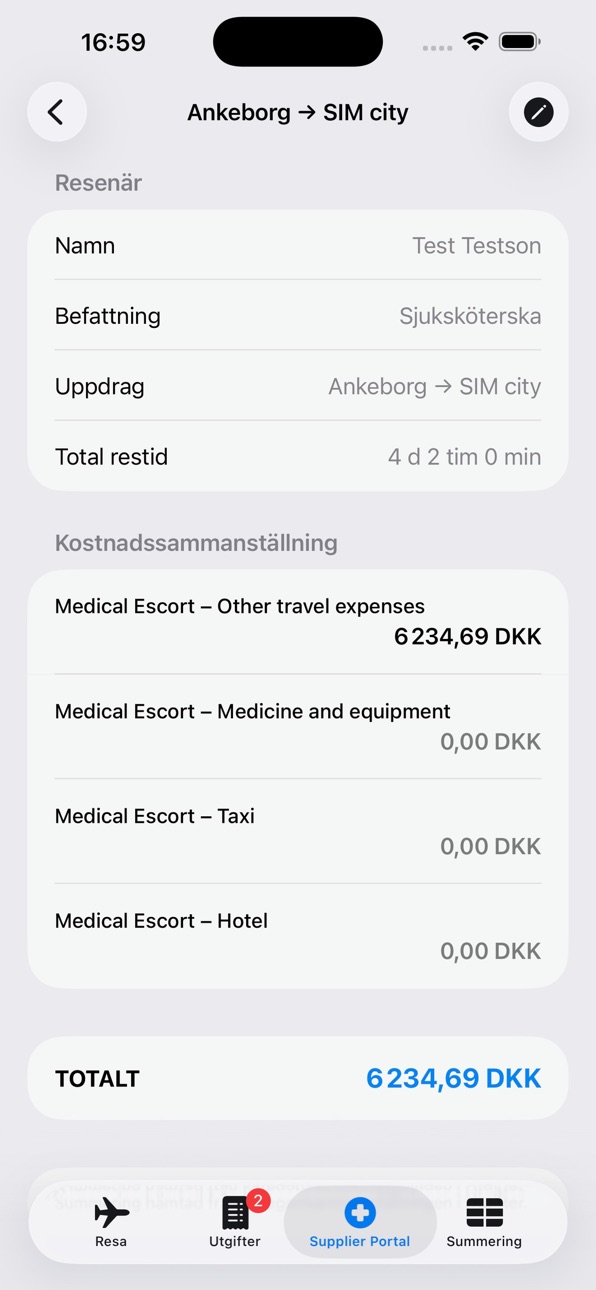
Generate a complete, professional expense report with a single tap. The report includes a full expense table with position numbers, category summary, Medical Escort cost breakdown by SOS Supplier Portal categories, and all attached receipts in a 2×2 grid layout. Exchange rates can be shown or hidden per export.
SUPPLIER PORTAL CATEGORIES
Expenses are automatically grouped according to SOS International Supplier Portal categories: Other travel expenses, Medicine and equipment, Taxi, and Hotel — giving you an instant cost summary ready for invoicing.
ICLOUD SYNC
All your data syncs automatically across your iPhone and iPad via iCloud. Start an expense report on your iPhone at the airport and continue on your iPad at the hotel — everything stays in sync.
IPAD OPTIMISED
The app features a full master-detail layout on iPad in landscape mode, making it easy to manage multiple assignments side by side with a professional interface built for larger screens.
STATUS TRACKING
Track each assignment through its full lifecycle: Draft → Complete → Locked → Archived. Lock a report when submitted and archive it when settled — keeping your active list clean and your history intact.
PRIVACY FIRST
All your data is stored exclusively on your device and in your personal iCloud account. Nothing is shared with third parties — ever.
— Available in Swedish and English —
Accessibility
ipadiphonemacrealityDevicetvoswatch
Version history 8 versions
Build 887510124v1.82026-06-27 07:12:43
Fixed a rounding issue in the travel time calculation that could cause the total duration to be off by one minute. Times are now rounded to the nearest minute for accurate results.
Build 887361945v1.72026-06-24 05:49:09
What's New in Version 1.7:
• Fixed an issue where mission start/end times could appear to change while traveling across time zones
• Receipt dates are now protected from shifting to the wrong calendar day when crossing time zones
• Various sync reliability improvements
Build 887202313v1.62026-06-21 07:53:32
What's New in Version 1.6:
• New Profile setting – save your name and title once, and they'll automatically fill in for every new trip report
• Download all receipts as a ZIP file in one tap, perfect for bookkeeping
• Multi-page receipts (e.g. Uber) are now kept together as a single file when exporting
• Cleaner layout for traveler name and title on the trip details screen
Build 887126693v1.52026-06-18 15:54:33
- Pickup and destination countries can now be selected from a searchable list, sorted alphabetically in your device's language. The travel expense report shows each country with its flag.
- Traveler name and title are now filled in automatically from your Profile and no longer need to be entered for each trip.
- Mission start/end times now scroll in 5-minute steps for faster entry.
Build 886472340v1.42026-06-03 15:23:06
Version 1.4 brings several improvements and fixes based on real-world usage:
Times are now displayed in 24-hour format in PDF reports
Multi-page receipts (e.g. Uber) now show all pages in the PDF export
App icon updated with a new professional design
App badge now shows the number of active drafts on the home screen
Fixed an issue where the version number was displayed incorrectly
Build 885574795v1.22026-05-12 15:28:00
ersion 1.2 brings several improvements based on feedback from SOS International medical escorts:
• Departure and return times now included in PDF reports, shown as Mission start and Mission end
• Case ID is now required when creating a new travel expense
• PDF reports now show page numbers on every page
• Expense descriptions are automatically translated to English in PDF reports
• Exchange rates are now shown by default in PDF reports
• Recently used currencies appear at the top of the currency picker for faster access
• Fixed camera not responding on iPad
Build 885444427v1.12026-05-11 14:59:48
Bug fixes
Build 885390377v1.02026-05-08 08:03:23
No pricing data captured yet — comparisons appear once the app has paid storefronts or in-app purchases.
Availability 75 of 75 storefronts
| Region | Language | Price | Ratings | Avg | Version |
|---|---|---|---|---|---|
| AG | en-GB | Free | 0 | — | 1.8 |
| AI | en-GB | Free | 0 | — | 1.8 |
| AO | en-GB | Free | 0 | — | 1.8 |
| AR | es-MX | Free | 0 | — | 1.8 |
| BB | en-GB | Free | 0 | — | 1.8 |
| BF | en-GB | Free | 0 | — | 1.8 |
| BJ | en-GB | Free | 0 | — | 1.8 |
| BO | es-MX | Free | 0 | — | 1.8 |
| BR | pt-BR | Free | 0 | — | 1.8 |
| BS | en-GB | Free | 0 | — | 1.8 |
| BW | en-GB | Free | 0 | — | 1.8 |
| BZ | en-GB | Free | 0 | — | 1.8 |
| CD | en-GB | Free | 0 | — | 1.8 |
| CG | en-GB | Free | 0 | — | 1.8 |
| CI | fr-FR | Free | 0 | — | 1.8 |
| CL | es-MX | Free | 0 | — | 1.8 |
| CM | fr-FR | Free | 0 | — | 1.8 |
| CO | es-MX | Free | 0 | — | 1.8 |
| CR | es-MX | Free | 0 | — | 1.8 |
| CV | en-GB | Free | 0 | — | 1.8 |
| DM | en-GB | Free | 0 | — | 1.8 |
| DO | es-MX | Free | 0 | — | 1.8 |
| DZ | en-GB | Free | 0 | — | 1.8 |
| EC | es-MX | Free | 0 | — | 1.8 |
| GA | fr-FR | Free | 0 | — | 1.8 |
| GD | en-GB | Free | 0 | — | 1.8 |
| GH | en-GB | Free | 0 | — | 1.8 |
| GM | en-GB | Free | 0 | — | 1.8 |
| GT | es-MX | Free | 0 | — | 1.8 |
| GW | en-GB | Free | 0 | — | 1.8 |
| GY | en-GB | Free | 0 | — | 1.8 |
| HN | es-MX | Free | 0 | — | 1.8 |
| JM | en-GB | Free | 0 | — | 1.8 |
| KE | en-GB | Free | 0 | — | 1.8 |
| KN | en-GB | Free | 0 | — | 1.8 |
| KY | en-GB | Free | 0 | — | 1.8 |
| LC | en-GB | Free | 0 | — | 1.8 |
| LR | en-GB | Free | 0 | — | 1.8 |
| LY | en-GB | Free | 0 | — | 1.8 |
| MA | en-GB | Free | 0 | — | 1.8 |
| MG | en-GB | Free | 0 | — | 1.8 |
| ML | en-GB | Free | 0 | — | 1.8 |
| MS | en-GB | Free | 0 | — | 1.8 |
| MU | en-GB | Free | 0 | — | 1.8 |
| MW | en-GB | Free | 0 | — | 1.8 |
| MX | es-MX | Free | 0 | — | 1.8 |
| MZ | en-GB | Free | 0 | — | 1.8 |
| NA | en-GB | Free | 0 | — | 1.8 |
| NE | en-GB | Free | 0 | — | 1.8 |
| NG | en-GB | Free | 0 | — | 1.8 |
| NI | es-MX | Free | 0 | — | 1.8 |
| PA | es-MX | Free | 0 | — | 1.8 |
| PE | es-MX | Free | 0 | — | 1.8 |
| PY | es-MX | Free | 0 | — | 1.8 |
| RW | en-GB | Free | 0 | — | 1.8 |
| SC | en-GB | Free | 0 | — | 1.8 |
| SL | en-GB | Free | 0 | — | 1.8 |
| SN | en-GB | Free | 0 | — | 1.8 |
| SR | en-GB | Free | 0 | — | 1.8 |
| ST | en-GB | Free | 0 | — | 1.8 |
| SV | es-MX | Free | 0 | — | 1.8 |
| SZ | en-GB | Free | 0 | — | 1.8 |
| TC | en-GB | Free | 0 | — | 1.8 |
| TD | en-GB | Free | 0 | — | 1.8 |
| TN | en-GB | Free | 0 | — | 1.8 |
| TT | en-GB | Free | 0 | — | 1.8 |
| TZ | en-GB | Free | 0 | — | 1.8 |
| UG | en-GB | Free | 0 | — | 1.8 |
| US | en-US | Free | 0 | — | 1.8 |
| UY | en-GB | Free | 0 | — | 1.8 |
| VC | en-GB | Free | 0 | — | 1.8 |
| VE | es-MX | Free | 0 | — | 1.8 |
| VG | en-GB | Free | 0 | — | 1.8 |
| ZM | en-GB | Free | 0 | — | 1.8 |
| ZW | en-GB | Free | 0 | — | 1.8 |
Change log 11 changes · US
✎
releaseNotes updated
Fixed a rounding issue in the travel time calculation that could cause the total duration to be off by one minute. Times are now rounded to the nearest minute f
✎
description updated
Medical Escort Expenses is a professional travel expense management app built specifically for medical escorts, flight nurses and healthcare professionals worki
✎
name updated
Medical Escort Expenses
◆
Version 1.8 released
Fixed a rounding issue in the travel time calculation that could cause the total duration to be off by one minute. Times are now rounded to the nearest minute for accurate results.
◆
Version 1.7 released
What's New in Version 1.7:
• Fixed an issue where mission start/end times could appear to change while traveling across time zones
• Receipt dates are now protected from shifting to the wrong calendar day when crossing time zones
• Various
◆
Version 1.6 released
What's New in Version 1.6:
• New Profile setting – save your name and title once, and they'll automatically fill in for every new trip report
• Download all receipts as a ZIP file in one tap, perfect for bookkeeping
• Multi-page receipts (
◆
Version 1.5 released
- Pickup and destination countries can now be selected from a searchable list, sorted alphabetically in your device's language. The travel expense report shows each country with its flag.
- Traveler name and title are now filled in automati
◆
Version 1.4 released
Version 1.4 brings several improvements and fixes based on real-world usage:
Times are now displayed in 24-hour format in PDF reports
Multi-page receipts (e.g. Uber) now show all pages in the PDF export
App icon updated with a new professi
◆
Version 1.2 released
ersion 1.2 brings several improvements based on feedback from SOS International medical escorts:
• Departure and return times now included in PDF reports, shown as Mission start and Mission end
• Case ID is now required when creating a ne
◆
Version 1.1 released
Bug fixes
◆
Version 1.0 released