Home › Finance

 US
US
 AEen-GB
 AFen-GB
 ALen-GB
 AMen-GB
 AUen-AU
 AZen-GB
 BAen-GB
 BHen-GB
 BMen-GB
 BNen-GB
 BTen-GB
 BYen-GB
 CAen-CA
 CHde-CH
 CNzh-Hans-CN
 EGen-GB
 FJen-GB
 FMen-GB
 GBen-GB
 GEen-GB
 HKzh-Hant-HK
 IDen-GB
 ILen-GB
 INen-GB
 IQen-GB
 ISen-GB
 JOen-GB
 JPja
JPja KGen-GB
 KHen-GB
 KRko
KRko KWen-GB
 KZen-GB
 LAen-GB
 LBen-GB
 LKen-GB
 MDen-GB
 MEen-GB
 MKen-GB
 MMen-GB
 MNen-GB
 MOzh-Hant-HK
 MRen-GB
 MVen-GB
 MYen-GB
 NOen-GB
 NPen-GB
 NRen-GB
 NZen-AU
 OMen-GB
 PGen-GB
 PHen-GB
 PKen-GB
 PWen-GB
 QAen-GB
 RSen-GB
 RUru
RUru SAen-GB
 SBen-GB
 SGen-GB
 THen-GB
 TJen-GB
 TMen-GB
 TOen-GB
 TRen-GB
 TWzh-Hant-TW
 UAen-GBUSen-US
 UZen-GB
 VNen-GB
 VUen-GB
 XKen-GB
 YEen-GB
 ZAen-GB
 ATNot Available
 BENot Available
 BGNot Available
 CYNot Available
 CZNot Available
 DENot Available
 DKNot Available
 EENot Available
 ESNot Available
 FINot Available
 FRNot Available
 GRNot Available
 HRNot Available
 HUNot Available
 IENot Available
 ITNot Available
 LTNot Available
 LUNot Available
 LVNot Available
 MTNot Available
 NLNot Available
 PLNot Available
 PTNot Available
 RONot Available
 SENot Available
 SINot Available
 SKNot Available
74 of 101 storefronts
Content in en-US
Content in en-US
Information
Preview 1 platform
iPhone 6 images




What’s New Version 1.3
Version 1.3
We've polished the core of Kaptur to make billing faster and smoother:
• Redesigned Expense, Invoice, and Estimate forms — cleaner layouts and quicker entry so you can bill in fewer taps.
• New update prompt — get a friendly heads-up in-app whenever a new version of Kaptur is ready.
• Fixed an issue where unpaid invoice totals could display incorrectly.
• Squashed bugs and tightened up performance throughout the app.
Thanks for using Kaptur! Have an idea? Send us a feature request right from Settings.
Description
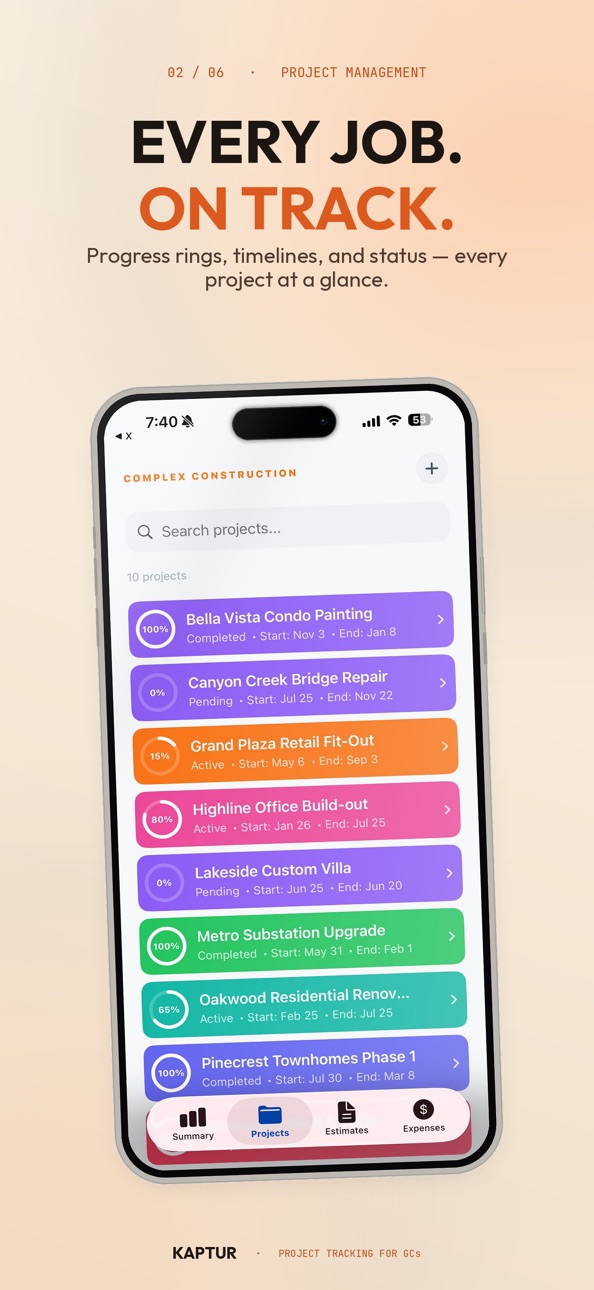
Kaptur is the ultimate all-in-one financial management tool built specifically for general contractors, remodelers, and specialty tradespeople. Stop wasting hours on administrative work after a long day on the jobsite. With Kaptur, you can handle estimating, expense tracking, change orders, client billing, and tax prep directly from your iPhone or iPad.
Built with a professional, glassmorphic design that is both beautiful and highly responsive, Kaptur is designed to work in the field. From voice-enabled entry to automated project balance sheets, Kaptur helps you run your business like a pro and get paid faster.
THE CONTRACTOR’S WORKFLOW, SIMPLIFIED:
1. SPEEDY ESTIMATING & CONTRACTS
Build accurate estimates on the spot. Add line items manually or dictate them hands-free using our intelligent Voice Entry. Say "Kitchen floor 10 by 5 feet at 50 dollars," and Kaptur automatically extracts the item name, calculates dimensions (L x W x H), and applies the price. Attach jobsite photos directly to estimates or specific line items to document pre-existing conditions or justify your pricing. Turn draft estimates into client-ready PDFs in seconds.
2. REAL-TIME JOBSITE & EXPENSE TRACKING
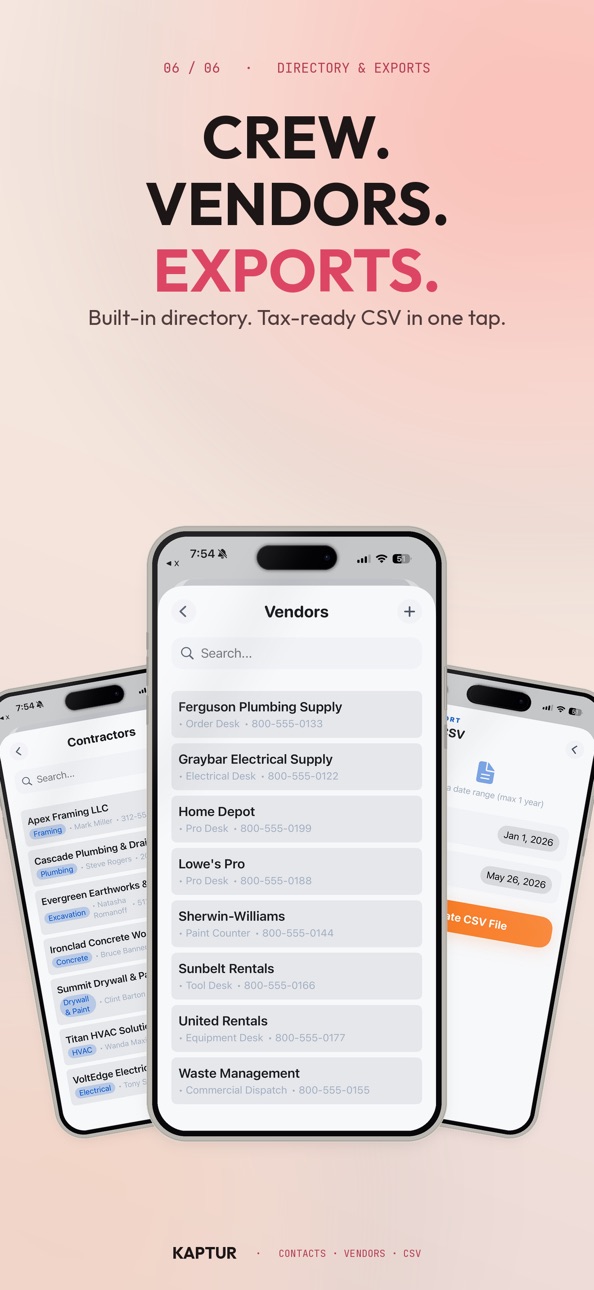
Never lose a receipt or forget an expense. Snap photos of receipts and use our Voice Expense assistant to log materials, tools, or subcontractor costs on the go. Speak naturally-like "$10 for paint from Home Depot"-and watch Kaptur instantly categorize the item, assign it to a project, and record the date. Logging mileage? Say "45 miles to jobsite" to automatically calculate costs using the standard IRS mileage rate. Keep subcontractor details and vendor profiles centralized so assigning expenses is seamless.
3. SEAMLESS CLIENT BILLING & CHANGE ORDERS
Transform approved estimates into professional invoices with a single tap. If a project scope changes after approval, Kaptur automatically handles the transition. Subsequent estimates under an active project are flagged as Change Orders, generating sequential numbers (Change Order #1, #2) to keep contracts organized. Keep a constant pulse on project profitability with the Project Balance Sheet-a dynamic calculator comparing your approved contract value against what has been billed, warning you instantly if a project is under-billed or over-billed.
4. TAX-READY HAND-OFF & EXPORTS
Keep your accountant happy and tax season stress-free. Kaptur organizes all your raw financial data, overhead, and project expenses into a QuickBooks-ready CSV format. Export and share your clean spreadsheets with your accountant or import them directly into accounting software, saving hours of manual data entry.
KEY FEATURES:
• Voice-First Data Entry: Dictate estimate items and expenses in seconds (supports Guided and Free Talk modes).
• Professional PDF Generator: Create and share beautiful, customized estimates, change orders, and invoices.
• Change Order Tracking: Auto-detect post-approval adjustments and generate numbered change orders.
• Project Balance Sheet: Live contract-to-billing ratio tracking (Contract Value - Billed Value = Outstanding Balance).
• Jobsite Photo Attachments: Attach images with captions directly to estimate lines to capture evidence and details.
• Rate Customization: Set global defaults for tax rates, overhead markup, and IRS mileage rates.
• Local-First Security: Your data and photos are stored securely on your device, with cloud sync readiness.
Take control of your construction business's cash flow. Download Kaptur today and simplify your jobsite finances.
Kaptur is subject to Apple's Standard Terms of Use (EULA) located at https://www.apple.com/legal/internet-services/itunes/dev/stdeula/
In-App Purchases US pricing
US-CANADA Subscription
US · Monthly$9.99
Kaptur Pro Year · Yearly$99.99
Capabilities
In-App Purchases
Accessibility
ipadiphonemacrealityDevicetvoswatch
Version history 4 versions
Build 887567936v1.32026-06-29 16:29:08
Version 1.3
We've polished the core of Kaptur to make billing faster and smoother:
• Redesigned Expense, Invoice, and Estimate forms — cleaner layouts and quicker entry so you can bill in fewer taps.
• New update prompt — get a friendly heads-up in-app whenever a new version of Kaptur is ready.
• Fixed an issue where unpaid invoice totals could display incorrectly.
• Squashed bugs and tightened up performance throughout the app.
Thanks for using Kaptur! Have an idea? Send us a feature request right from Settings.
Build 887269678v1.22026-06-22 16:29:32
You asked, we listened. Version 1.2 makes it easy to tell us what to build next, and tightens things up across the app.
Request a Feature — Got an idea for Kaptur? Send it to us right from Settings.
Settings refresh — Cleaner layout and a few rough edges smoothed out.
Reliability fixes — More dependable invoice and estimate PDFs (including client names with slashes), more consistent plan limits, and tidier expense entry.
Thanks for tracking with Kaptur. Keep the feedback coming.
Build 887204644v1.12026-06-20 18:05:41
What's New in Kaptur 1.1
New
- Quick Capture — a new center button on the tab bar gets you to a new invoice, estimate, or expense in one tap.
- Request a Feature — tell us what you want next, right from the app. Your ideas come straight to the team.
- Change Orders — add a change order to an estimate after it's sent, without redoing the whole thing.
- Project color tags on invoices, so you can spot which job is which at a glance.
- Auto-fill for vendors and line items to speed up expense entry.
Improved
- Smarter invoice numbering — choose global or per-project sequences, with no duplicate numbers.
- Better estimate filtering and a cleaner list view.
- Voice entry is steadier and no longer interrupts your music or podcasts.
- Money fields now handle every currency and number format correctly (including comma decimals).
- Cleaner Export CSV with filtering, plus a corrected income figure on reports.
- Polished settings, billing, and dashboard screens.
Fixed
- Your data is now safer than ever — invoices, estimates, and expenses are protected against load errors.
- Pro features stay unlocked reliably and no longer flicker back to Free.
- Clearer feedback during purchases, restores, and pending approvals.
- Numerous stability and reliability fixes throughout.
- Thanks for using Kaptur. Keep the feedback coming!
Build 885353702v1.02026-06-13 20:49:40
Price history by region
Currency
Show
Columns
Search
Availability 74 of 101 storefronts
| Region | Language | Price | Ratings | Avg | Version |
|---|---|---|---|---|---|
| AE | en-GB | Free | 0 | — | 1.3 |
| AF | en-GB | Free | 0 | — | 1.3 |
| AL | en-GB | Free | 0 | — | 1.3 |
| AM | en-GB | Free | 0 | — | 1.3 |
| AU | en-AU | Free | 0 | — | 1.3 |
| AZ | en-GB | Free | 0 | — | 1.3 |
| BA | en-GB | Free | 0 | — | 1.3 |
| BH | en-GB | Free | 0 | — | 1.3 |
| BM | en-GB | Free | 0 | — | 1.3 |
| BN | en-GB | Free | 0 | — | 1.3 |
| BT | en-GB | Free | 0 | — | 1.3 |
| BY | en-GB | Free | 0 | — | 1.3 |
| CA | en-CA | Free | 0 | — | 1.3 |
| CH | de-CH | Free | 0 | — | 1.3 |
| CN | zh-Hans-CN | Free | 0 | — | 1.3 |
| EG | en-GB | Free | 0 | — | 1.3 |
| FJ | en-GB | Free | 0 | — | 1.3 |
| FM | en-GB | Free | 0 | — | 1.3 |
| GB | en-GB | Free | 0 | — | 1.3 |
| GE | en-GB | Free | 0 | — | 1.3 |
| HK | zh-Hant-HK | Free | 0 | — | 1.3 |
| ID | en-GB | Free | 0 | — | 1.3 |
| IL | en-GB | Free | 0 | — | 1.3 |
| IN | en-GB | Free | 0 | — | 1.3 |
| IQ | en-GB | Free | 0 | — | 1.3 |
| IS | en-GB | Free | 0 | — | 1.3 |
| JO | en-GB | Free | 0 | — | 1.3 |
| JP | ja | Free | 0 | — | 1.3 |
| KG | en-GB | Free | 0 | — | 1.3 |
| KH | en-GB | Free | 0 | — | 1.3 |
| KR | ko | Free | 0 | — | 1.3 |
| KW | en-GB | Free | 0 | — | 1.3 |
| KZ | en-GB | Free | 0 | — | 1.3 |
| LA | en-GB | Free | 0 | — | 1.3 |
| LB | en-GB | Free | 0 | — | 1.3 |
| LK | en-GB | Free | 0 | — | 1.3 |
| MD | en-GB | Free | 0 | — | 1.3 |
| ME | en-GB | Free | 0 | — | 1.3 |
| MK | en-GB | Free | 0 | — | 1.3 |
| MM | en-GB | Free | 0 | — | 1.3 |
| MN | en-GB | Free | 0 | — | 1.3 |
| MO | zh-Hant-HK | Free | 0 | — | 1.3 |
| MR | en-GB | Free | 0 | — | 1.3 |
| MV | en-GB | Free | 0 | — | 1.3 |
| MY | en-GB | Free | 0 | — | 1.3 |
| NO | en-GB | Free | 0 | — | 1.3 |
| NP | en-GB | Free | 0 | — | 1.3 |
| NR | en-GB | Free | 0 | — | 1.3 |
| NZ | en-AU | Free | 0 | — | 1.3 |
| OM | en-GB | Free | 0 | — | 1.3 |
| PG | en-GB | Free | 0 | — | 1.3 |
| PH | en-GB | Free | 0 | — | 1.3 |
| PK | en-GB | Free | 0 | — | 1.3 |
| PW | en-GB | Free | 0 | — | 1.3 |
| QA | en-GB | Free | 0 | — | 1.3 |
| RS | en-GB | Free | 0 | — | 1.3 |
| RU | ru | Free | 0 | — | 1.3 |
| SA | en-GB | Free | 0 | — | 1.3 |
| SB | en-GB | Free | 0 | — | 1.3 |
| SG | en-GB | Free | 0 | — | 1.3 |
| TH | en-GB | Free | 0 | — | 1.3 |
| TJ | en-GB | Free | 0 | — | 1.3 |
| TM | en-GB | Free | 0 | — | 1.3 |
| TO | en-GB | Free | 0 | — | 1.3 |
| TR | en-GB | Free | 0 | — | 1.3 |
| TW | zh-Hant-TW | Free | 0 | — | 1.3 |
| UA | en-GB | Free | 0 | — | 1.3 |
| US | en-US | Free | 0 | — | 1.3 |
| UZ | en-GB | Free | 0 | — | 1.3 |
| VN | en-GB | Free | 0 | — | 1.3 |
| VU | en-GB | Free | 0 | — | 1.3 |
| XK | en-GB | Free | 0 | — | 1.3 |
| YE | en-GB | Free | 0 | — | 1.3 |
| ZA | en-GB | Free | 0 | — | 1.3 |
Not available in: AT, BE, BG, CY, CZ, DE, DK, EE, ES, FI, FR, GR, HR, HU, IE, IT, LT, LU, LV, MT, NL, PL, PT, RO, SE, SI, SK
Change log 8 changes · US
✎
releaseNotes updated
Version 1.3
We've polished the core of Kaptur to make billing faster and smoother:
• Redesigned Expense, Invoice, and Estimate forms — cleaner layouts and qui
✎
description updated
Kaptur is the ultimate all-in-one financial management tool built specifically for general contractors, remodelers, and specialty tradespeople. Stop wasting hou
✎
subtitle updated
Scan & Track Business Expenses
✎
name updated
Kaptur by Koreex
◆
Version 1.3 released
Version 1.3
We've polished the core of Kaptur to make billing faster and smoother:
• Redesigned Expense, Invoice, and Estimate forms — cleaner layouts and quicker entry so you can bill in fewer taps.
• New update prompt — get a friendly h
◆
Version 1.2 released
You asked, we listened. Version 1.2 makes it easy to tell us what to build next, and tightens things up across the app.
Request a Feature — Got an idea for Kaptur? Send it to us right from Settings.
Settings refresh — Cleaner layout and a
◆
Version 1.1 released
What's New in Kaptur 1.1
New
- Quick Capture — a new center button on the tab bar gets you to a new invoice, estimate, or expense in one tap.
- Request a Feature — tell us what you want next, right from the app. Your ideas come straight t
◆
Version 1.0 released