Home › Photo & Video

 US
US
1 of 1 storefronts
Content in en-US
Content in en-US
Information
Preview 2 platforms
iPhone 9 images





iPad 9 images


What’s New Version 1.13
Improved the Lucky filmstrip for more stable fast scrolling, better alignment with the current photo, and less flicker.
Refined the Dynamic Island deletion queue with clearer status, a more compact batch-delete action, and faster sync.
Updated Home Screen widgets with an organization overview and Lucky Photo card that jump back into the right cleanup flow.
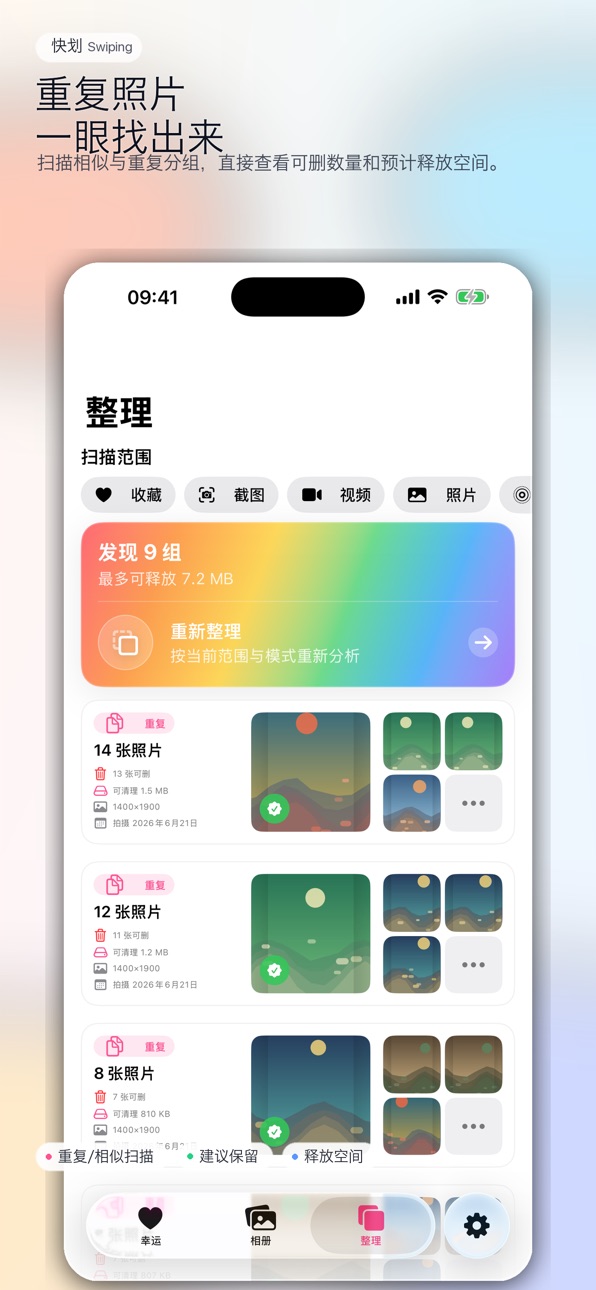
Made duplicate cleanup easier with restorable scan results, clearer group cards, and Lucky-based group-by-group review.
Description
Swiping helps you clean up your photo library with a calmer, faster, and more visual workflow.
Instead of scrolling endlessly through thousands of photos, you can review clutter in focused ways: find duplicate and similar shots, swipe through photos one by one, mark items for deletion, and confirm everything before anything is removed.
Key features:
• Duplicate & Similar Photo Cleanup
Find duplicate and visually similar photos, review each group, choose what to keep, and clean up the rest with confidence.
• Lucky Swipe Review
Swipe left to mark a photo for deletion, swipe right to keep it. A simple, focused way to make progress through a large photo library.
• Smarter Photo Grid
Browse your library with sharp thumbnails, fast scrolling, and pinch-to-zoom grid density from compact overviews to larger previews.
• Batch Delete Queue
Mark photos as you browse, then review the pending deletion queue before confirming. Single-photo deletion stays simple, while larger cleanup sessions remain organized.
• Storage-Focused Cleanup
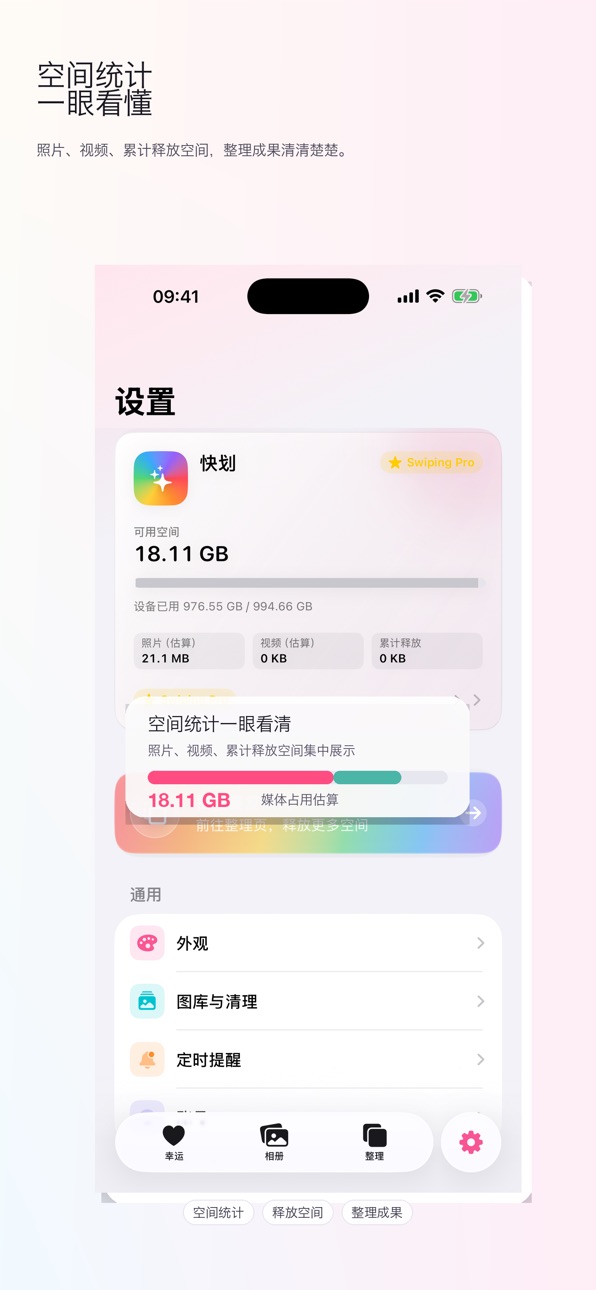
See estimated space savings and focus on the photos, screenshots, videos, and duplicates that take up room.
• Designed for Large Libraries
EntroSwipe is built for big photo libraries, with smoother browsing, cached scan results, and a review flow that helps you keep going without losing your place.
Whether you want to remove duplicates, clean screenshots, review similar photos, or simply reduce photo library clutter, EntroPhotos gives you a practical way to make your library feel lighter.
In-App Purchases US pricing
熵减年付订阅 Subscription
熵减相册 · Yearly 3-day free trial$9.99
Capabilities
In-App Purchases
Accessibility
ipadiphonemacrealityDevicetvoswatch
Version history 14 versions
Build 887882212v1.132026-07-06 21:19:40
Improved the Lucky filmstrip for more stable fast scrolling, better alignment with the current photo, and less flicker.
Refined the Dynamic Island deletion queue with clearer status, a more compact batch-delete action, and faster sync.
Updated Home Screen widgets with an organization overview and Lucky Photo card that jump back into the right cleanup flow.
Made duplicate cleanup easier with restorable scan results, clearer group cards, and Lucky-based group-by-group review.
Build 887582658v1.122026-06-29 20:34:00
Lucky swiping feels smoother, with ambient backgrounds, cards, thumbnails, and gestures moving together more naturally.
Added a launch gesture intro to teach left swipe to delete, right swipe to keep, and swipe up to go back.
Improved album zoom, grouping, and scrollbar behavior for easier browsing through large photo libraries.
Build 887236041v1.112026-06-25 15:36:00
Version 1.11 brings a refreshed brand name and a smoother photo-cleanup experience:
• Chinese app name updated to “快划”; other languages now show “Swiping”.
• Improved Lucky swipe cleanup: swipe left to delete, swipe right to keep, with clearer filmstrip navigation.
• Added and refined confirmation before batch deletion, so you can review item count and estimated space before cleaning.
• Improved storage statistics for clearer photo, video, and reclaimed-space summaries.
• Added zoomable album browsing for faster scanning and closer detail review.
• Added scheduled cleanup reminders with daily, weekly, or monthly options, plus optional sync to Calendar or Reminders.
• Updated App Store screenshots and promotional materials for version 1.11.
Build 886565450v1.102026-06-06 16:06:38
Duplicate cleanup has been upgraded: scan results are cached by scope, progress is steadier, and newly found groups appear while scanning continues.
Duplicate and similar matching is stricter to reduce false positives from nearby timestamps or matching resolutions, with a rare vision group ID crash fixed.
Cleanup cards are redesigned with clearer details; tap a group to review it in Lucky Swipe, then move between groups with previous/next controls.
Photo grid thumbnails are sharper, pinch zoom is back with 3 to 9 column density, and a crash after zooming the grid has been fixed.
Lucky Swipe feels smoother: idle hints now demonstrate delete/keep swipes, dice random no longer skips unreviewed photos, and the current card gets priority image quality.
Deleting a single item no longer shows a subscription prompt; Pro access still applies when cleaning up 2 or more items at once.
The pending deletion Dynamic Island is more reliable, with faster red keyline updates, synced count and space estimates, and a more compact expanded action.
Build 886390619v1.92026-06-01 23:39:02
简体中文
相册点选照片直达幸运划卡,按当前相册、筛选与排序定位到该图
幸运划卡连续浏览全库:左滑标记删除、删除按钮打开「熵减总结」;待删数量与相册网格同步
底栏「回到最新」跳至排序下最新照片;再次点击可返回跳转前的位置与待删状态
工具栏骰子在未浏览照片中随机跳转,不改变浏览顺序;划卡顺序始终与相册排序一致
幸运页记住当前进度,下次打开可继续同一张;图片预加载与高清显示更稳定
繁体中文
相簿點選照片直達幸運劃卡,依目前相簿、篩選與排序定位到該圖
幸運劃卡連續瀏覽全庫:左滑標記刪除、刪除按鈕開啟「熵減總結」;待刪數量與相簿網格同步
底欄「回到最新」跳至排序下最新照片;再次點擊可返回跳轉前的位置與待刪狀態
工具列骰子在未瀏覽照片中隨機跳轉,不改變瀏覽順序;劃卡順序始終與相簿排序一致
幸運頁記住目前進度,下次開啟可繼續同一張;圖片預載入與高清顯示更穩定
English
Tap a photo in the library to open Lucky Swipe at that item with matching album, filter, and sort
Lucky Swipe now browses the whole library: swipe left to queue delete; Delete opens the entropy summary; pending count stays in sync with the library grid
Bottom bar: jump to the newest photo in sort order, then tap again to return to where you were
Toolbar dice jumps to a random unreviewed photo without changing browse order; swipe order always follows your library sort
Lucky Swipe remembers your place across launches; smoother image prefetch and sharper display
Français
Touchez une photo dans la bibliothèque pour ouvrir Lucky Swipe sur cet élément, avec album, filtre et tri actuels
Lucky Swipe parcourt toute la bibliothèque : glissement gauche pour mettre en file d’attente ; Supprimer ouvre le résumé « entropie » ; compteur synchronisé avec la grille
Barre du bas : aller à la photo la plus récente selon le tri, puis revenir à la position précédente
Dé en barre d’outils : saut aléatoire vers une photo non parcourue, sans changer l’ordre ; l’ordre suit toujours le tri de la bibliothèque
Reprise de la session et affichage d’images plus fluide et net
Deutsch
Foto in der Mediathek antippen → Lucky Swipe springt dorthin (Album, Filter, Sortierung bleiben)
Lucky Swipe durchläuft die ganze Mediathek: nach links wischen zum Löschen vormerken; Löschen öffnet die Entropie-Zusammenfassung; Zähler synchron mit dem Raster
Unten: zur neuesten Foto nach Sortierung, erneut tippen kehrt zur vorherigen Position zurück
Würfel in der Symbolleiste: zufälliger Sprung zu einem noch nicht gesehenen Foto, Sortierung unverändert; Reihenfolge entspricht immer der Mediathek-Sortierung
Sitzung wird gemerkt; stabilere Bildvorschau und schärfere Darstellung
Italiano
Tocca una foto nella libreria per aprire Lucky Swipe su quell’elemento con album, filtro e ordinamento attuali
Lucky Swipe attraversa tutta la libreria: scorri a sinistra per accodare l’eliminazione; Elimina apre il riepilogo entropia; conteggio sincronizzato con la griglia
Barra inferiore: vai alla foto più recente secondo l’ordinamento, poi torna alla posizione precedente
Dado nella barra: salto casuale a una foto non ancora vista, senza cambiare l’ordine; l’ordine segue sempre l’ordinamento della libreria
Ricorda la sessione; precaricamento immagini e visualizzazione più nitida
日本語
ライブラリの写真をタップすると、現在のアルバム・フィルター・並び順のままラッキースワイプでその写真へ
ラッキースワイプでライブラリ全体を連続閲覧:左スワイプで削除予約、削除ボタンで「エントロピーまとめ」、予約数はグリッドと同期
下部「最新へ」で並び順の最新写真へ、もう一度タップで直前の位置に戻れる
ツールバーのサイコロで未閲覧の写真へランダムジャンプ(閲覧順は変更なし)、スワイプ順は常にライブラリの並び順
セッションを記憶、画像の先読みと高画質表示を改善
한국어
앨범에서 사진을 탭하면 현재 앨범·필터·정렬에 맞춰 럭키 스와이프에서 해당 사진으로 이동
럭키 스와이프로 전체 라이브러리 연속 탐색: 왼쪽 스와이프로 삭제 예약, 삭제 버튼으로 「엔트로피 요약」, 예약 수는 그리드와 동기화
하단 「최신으로」 정렬 기준 최신 사진으로 이동, 다시 탭하면 이전 위치로 복귀
도구 모음 주사위: 미열람 사진으로 무작위 점프(탐색 순서 유지), 스와이프 순서는 항상 앨범 정렬과 동일
세션 기억, 이미지 선로딩 및 선명한 표시 개선
Build 886339508v1.82026-05-31 18:16:36
简体中文
幸运划卡更跟手:修复划卡卡住、松手不回弹等问题,边缘滑动与按钮操作更可靠
iPad 上卡片按屏幕比例放大,浏览照片与视频更舒适
长时间未操作时,会显示「左滑删除、右滑保留」提示,新手也能快速上手
回合总结支持选择性删除:缩略图默认全选,点按可取消,批量删除只处理你选中的照片
标记删除不再打断划卡;仅在确认批量删除时才需要订阅
大相册改用系统级网格列表,滚动更流畅;多选支持涂抹连选
全屏预览支持下滑关闭,返回相册后保持原来的滚动位置
视频与 Live Photo 加载更快,划卡切换更顺滑
全新 Liquid Glass 风格 App 图标
繁体中文
幸運劃卡更跟手:修復劃卡卡住、鬆手不回彈等問題,邊緣滑動與按鈕操作更可靠
iPad 上卡片依螢幕比例放大,瀏覽照片與影片更舒適
長時間未操作時,會顯示「左滑刪除、右滑保留」提示,新手也能快速上手
回合總結支援選擇性刪除:縮圖預設全選,點按可取消,批次刪除只處理你選中的照片
標記刪除不再打斷劃卡;僅在確認批次刪除時才需要訂閱
大相簿改用系統級網格列表,捲動更流暢;多選支援塗抹連選
全螢幕預覽支援下滑關閉,返回相簿後保持原先的捲動位置
影片與 Live Photo 載入更快,劃卡切換更順暢
全新 Liquid Glass 風格 App 圖示
English
Smoother Lucky Swipe: fixes for stuck cards, missed snap-back, and more reliable edge swipes and button actions
On iPad, cards scale to the screen for a more comfortable photo and video experience
After a few seconds of inactivity, a gentle hint reminds you: swipe left to delete, right to keep
Round summary lets you choose what to delete: all items selected by default; tap to exclude; batch delete applies only to your selection
Marking for deletion no longer interrupts swiping; subscription is required only when you confirm batch delete
Large libraries use a native grid for smoother scrolling; multi-select supports paint-to-select
Full-screen preview dismisses with a swipe down; return to the same scroll position in your library
Faster video and Live Photo loading for smoother card transitions
New Liquid Glass app icon
Français
Lucky Swipe plus fluide : corrections des cartes bloquées, du manque de retour et des balayages sur les bords et actions par boutons plus fiables
Sur iPad, les cartes s’adaptent à l’écran pour une lecture photo et vidéo plus confortable
Après quelques secondes d’inactivité, un rappel discret : glisser à gauche pour supprimer, à droite pour conserver
Récapitulatif de manche : suppression sélective ; tout est sélectionné par défaut, touchez pour exclure ; la suppression groupée ne concerne que votre sélection
La mise en file d’attente n’interrompt plus le balayage ; l’abonnement n’est demandé qu’à la confirmation de la suppression groupée
Grandes bibliothèques : grille native pour un défilement plus fluide ; sélection multiple par glissement
Aperçu plein écran fermable par glissement vers le bas ; position de défilement conservée au retour
Chargement vidéo et Live Photo plus rapide pour des transitions plus douces
Nouvelle icône d’app au style Liquid Glass
Deutsch
Flüssigeres Lucky Swipe: Behebt hängende Karten, fehlendes Zurückschnappen; zuverlässigere Rand-Wischgesten und Tastenaktionen
Auf dem iPad passen sich die Karten dem Bildschirm an – angenehmeres Betrachten von Fotos und Videos
Nach ein paar Sekunden ohne Aktion erscheint ein Hinweis: nach links wischen zum Löschen, nach rechts zum Behalten
Runden-Zusammenfassung mit Auswahl: Standardmäßig alles ausgewählt, antippen zum Abwählen; Stapel-Löschung nur für Ihre Auswahl
Vormerken zum Löschen unterbricht das Wischen nicht mehr; Abo erst bei bestätigter Stapel-Löschung
Große Mediatheken: natives Raster für flüssigeres Scrollen; Mehrfachauswahl per Pinsel-Geste
Vollbildvorschau per Wisch nach unten schließen; Scrollposition in der Mediathek bleibt erhalten
Schnelleres Laden von Videos und Live Photos für weichere Kartenwechsel
Neues App-Symbol im Liquid-Glass-Stil
日本語
ラッキースワイプの操作性を改善:カードが止まる・戻らない問題を修正。端からのスワイプとボタン操作がより確実に
iPad では画面に合わせてカードを拡大表示し、写真・動画の閲覧が快適に
しばらく操作がないと「左スワイプで削除、右スワイプで残す」のヒントを表示
ラウンドまとめで削除対象を選択可能:初期は全選択、タップで除外、一括削除は選んだ項目のみ
削除予約中もスワイプを中断しにくく;一括削除の確定時のみサブスクリプションが必要
大容量ライブラリはネイティブグリッドでスクロールを高速化;複数選択は塗りつぶし連続選択に対応
全画面プレビューは下スワイプで閉じ、ライブラリのスクロール位置を維持
動画・Live Photo の読み込みを高速化し、カード切り替えをスムーズに
Liquid Glass スタイルの新しいアプリアイコン
한국어
럭키 스와이프가 더 부드럽게:카드 멈춤·되돌아오지 않음 문제 수정, 가장자리 스와이프와 버튼 동작 안정화
iPad에서 화면 비율에 맞게 카드가 커져 사진·동영상 보기가 더 편함
잠시 조작이 없으면 「왼쪽 스와이프 삭제, 오른쪽 스와이프 유지」 안내 표시
라운드 요약에서 선택 삭제 지원:기본 전체 선택, 탭으로 제외, 일괄 삭제는 선택한 항목만
삭제 예약 중에도 스와이프 흐름 유지;일괄 삭제 확인 시에만 구독 필요
대용량 앨범 네이티브 그리드로 스크롤 개선;다중 선택 드래그 연속 선택 지원
전체 화면 미리보기 아래로 스와이프해 닫기, 앨범 스크롤 위치 유지
동영상·Live Photo 로딩 속도 향상으로 카드 전환 더 매끄럽게
Liquid Glass 스타일의 새 앱 아이콘
Build 886325328v1.72026-05-30 21:01:56
简体中文
全新 Liquid Glass 风格 App 图标,在 iOS 26 及更高版本上呈现通透、立体的系统原生质感
图标随系统主题与桌面环境自然融合,桌面更清爽、识别度更高
繁体中文
全新 Liquid Glass 風格 App 圖示,在 iOS 26 及更高版本呈現通透、立體的系統原生質感
圖示隨系統主題與桌面環境自然融合,桌面更清爽、辨識度更高
English
New Liquid Glass app icon with a native, layered look on iOS 26 and later
The icon blends naturally with your Home Screen and system theme for a cleaner, more recognizable presence
Français
Nouvelle icône Liquid Glass avec un rendu natif et profond sur iOS 26 et versions ultérieures
L’icône s’intègre naturellement à l’écran d’accueil et au thème système pour une présence plus nette
Deutsch
Neues Liquid-Glass-App-Symbol mit nativem, mehrschichtigem Erscheinungsbild ab iOS 26
Das Symbol fügt sich nahtlos in Home-Bildschirm und Systemdesign ein – klarer und wiedererkennbarer
Italiano
Nuova icona Liquid Glass con aspetto nativo e stratificato su iOS 26 e versioni successive
L’icona si integra con la schermata Home e il tema di sistema per un aspetto più pulito e riconoscibile
日本語
iOS 26 以降向けの Liquid Glass スタイル App アイコンを追加。システムに馴染む立体感のあるデザイン
ホーム画面やテーマに自然に溶け込み、より見やすく、識別しやすいアイコンに刷新
한국어
iOS 26 이상에서 Liquid Glass 스타일의 새 App 아이콘 적용. 시스템과 어울리는 입체감 있는 디자인
홈 화면과 테마에 자연스럽게 어울려 더 깔끔하고 알아보기 쉬운 아이콘으로 업데이트
Build 886245348v1.62026-05-29 14:57:41
简体中文
全新 Liquid Glass 风格 App 图标,在 iOS 26 及更高版本上呈现通透、立体的系统原生质感
图标随系统主题与桌面环境自然融合,桌面更清爽、识别度更高
繁体中文
全新 Liquid Glass 風格 App 圖示,在 iOS 26 及更高版本呈現通透、立體的系統原生質感
圖示隨系統主題與桌面環境自然融合,桌面更清爽、辨識度更高
English
New Liquid Glass app icon with a native, layered look on iOS 26 and later
The icon blends naturally with your Home Screen and system theme for a cleaner, more recognizable presence
Français
Nouvelle icône Liquid Glass avec un rendu natif et profond sur iOS 26 et versions ultérieures
L’icône s’intègre naturellement à l’écran d’accueil et au thème système pour une présence plus nette
Deutsch
Neues Liquid-Glass-App-Symbol mit nativem, mehrschichtigem Erscheinungsbild ab iOS 26
Das Symbol fügt sich nahtlos in Home-Bildschirm und Systemdesign ein – klarer und wiedererkennbarer
Italiano
Nuova icona Liquid Glass con aspetto nativo e stratificato su iOS 26 e versioni successive
L’icona si integra con la schermata Home e il tema di sistema per un aspetto più pulito e riconoscibile
日本語
iOS 26 以降向けの Liquid Glass スタイル App アイコンを追加。システムに馴染む立体感のあるデザイン
ホーム画面やテーマに自然に溶け込み、より見やすく、識別しやすいアイコンに刷新
한국어
iOS 26 이상에서 Liquid Glass 스타일의 새 App 아이콘 적용. 시스템과 어울리는 입체감 있는 디자인
홈 화면과 테마에 자연스럽게 어울려 더 깔끔하고 알아보기 쉬운 아이콘으로 업데이트
Build 886093276v1.52026-05-26 18:17:11
简体中文 (zh-Hans)
设置页全新设计:顶部存储仪表盘、分组布局,设备空间与 Pro 升级一目了然
整理页支持手动开始扫描,按钮上实时显示扫描进度;超大相册扫描更快,结果列表更流畅
幸运划卡设为默认首页,支持按时间顺序浏览或一键随机洗牌;与相册共用筛选菜单
大相册后台建立索引,启动与浏览更顺畅;全屏预览支持下滑关闭,返回后保持原先滚动位置
相册多选:工具栏「选择」进入,支持涂抹连选;长按可快速标记删除或撤销
改进恢复购买与订阅状态识别,已有订阅用户恢复后状态更准确
繁体中文 (zh-Hant)
設定頁全新設計:頂部儲存儀表板、分組版面,裝置空間與 Pro 升級一目了然
整理頁支援手動開始掃描,按鈕上即時顯示掃描進度;超大相簿掃描更快,結果列表更流暢
幸運劃卡設為預設首頁,支援依時間順序瀏覽或一鍵隨機洗牌;與相簿共用篩選選單
大相簿於背景建立索引,啟動與瀏覽更順暢;全螢幕預覽支援下滑關閉,返回後保持原先捲動位置
相簿多選:工具列「選擇」進入,支援塗抹連選;長按可快速標記刪除或撤銷
改進恢復購買與訂閱狀態識別,已有訂閱用戶恢復後狀態更準確
English (en)
Redesigned Settings with a storage dashboard header and grouped sections for space and Pro upgrade
Cleanup: start scans on demand with live progress on the button; faster scans and smoother results on large libraries
Lucky Swipe is now the default tab with chronological or random shuffle batches and shared filters with the library
Faster large-library browsing with background grid indexing; full-screen preview dismisses with a swipe and restores scroll position
Library multi-select from the toolbar with paint-to-select; long-press to queue delete or undo
Improved Restore Purchases and subscription status for existing subscribers
Français (fr)
Réglages repensés : tableau de bord du stockage en tête, sections groupées, espace et passage Pro en un coup d’œil
Nettoyage : lancez l’analyse à la demande, progression en direct sur le bouton ; analyses plus rapides et liste de résultats plus fluide sur les grandes bibliothèques
Lucky Swipe en onglet par défaut, parcours chronologique ou mélange aléatoire ; filtres partagés avec la bibliothèque
Grandes bibliothèques : indexation en arrière-plan ; aperçu plein écran fermable par glissement vers le bas, position de défilement conservée
Sélection multiple depuis la barre d’outils avec sélection par glissement ; appui long pour mettre en file d’attente la suppression ou annuler
Amélioration de Restaurer les achats et de la reconnaissance d’abonnement pour les abonnés existants
Deutsch (de)
Einstellungen neu gestaltet: Speicher-Dashboard oben, gruppierte Bereiche, freier Speicher und Pro-Upgrade auf einen Blick
Aufräumen: Scan bei Bedarf starten, Live-Fortschritt am Button; schnellere Scans und flüssigere Ergebnisliste bei großen Mediatheken
Lucky Swipe als Standard-Tab, chronologisch oder per Zufall mischen; gemeinsame Filter mit der Mediathek
Große Mediathek: Hintergrund-Indexierung; Vollbildvorschau per Wisch nach unten schließen, Scrollposition bleibt erhalten
Mehrfachauswahl über „Auswählen“ in der Symbolleiste, Pinsel-Auswahl; langes Drücken zum Löschen vormerken oder rückgängig
Verbesserte Wiederherstellung von Käufen und Abo-Statuserkennung für bestehende Abonnenten
Italiano (it)
Impostazioni ridisegnate: dashboard dello spazio in alto, sezioni raggruppate, spazio e upgrade Pro a colpo d’occhio
Pulizia: avvia la scansione quando vuoi, progresso in tempo reale sul pulsante; scansioni più rapide ed elenco risultati più fluido su librerie grandi
Lucky Swipe come scheda predefinita, ordine cronologico o mescola casuale; filtri condivisi con la libreria
Librerie grandi: indicizzazione in background; anteprima a schermo intero chiudibile con swipe verso il basso, posizione di scorrimento mantenuta
Selezione multipla dalla barra degli strumenti con selezione a pennello; pressione prolungata per accodare l’eliminazione o annullare
Migliorato Ripristina acquisti e riconoscimento dello stato dell’abbonamento per gli abbonati esistenti
日本語 (ja)
設定画面を刷新:ストレージダッシュボード付きヘッダーとグループ化レイアウト
整理タブで手動スキャン開始、ボタンに進捗表示。大容量ライブラリのスキャンと結果表示を高速化
ラッキースワイプをデフォルトタブに。時系列/ランダム切替、ライブラリと共通のフィルター
大規模ライブラリはバックグラウンドで索引構築。全画面プレビューは下スワイプで閉じ、スクロール位置を維持
ツールバー「選択」で複数選択、塗りつぶし連続選択。長押しで削除予約/取り消し
購入の復元とサブスクリプション状態の判定を改善
한국어 (ko)
설정 화면 새 디자인: 저장 공간 대시보드 헤더와 그룹형 레이아웃
정리 탭에서 수동 스캔 시작, 버튼에 진행률 표시. 대용량 앨범 스캔·결과 목록 성능 개선
럭키 스와이프 기본 탭, 시간순·랜덤 배치 전환, 앨범과 공유 필터
대용량 앨범 백그라운드 인덱싱, 전체 화면 미리보기 아래로 스와이프 종료 및 스크롤 위치 유지
도구 모음 「선택」으로 다중 선택, 드래그 연속 선택, 길게 눌러 삭제 예약/취소
구매 복원 및 구독 상태 인식 개선
Build 886071280v1.42026-05-25 00:11:01
简体中文
新功能
心流:在照片全屏预览中,点左上角即可进入心流,从当前照片开始整理
心流采用上下滑动、每屏一张照片,底部操作与预览一致(删除、隐藏、撤销等)
改进
整理:全新扫描按钮与进度显示;照片很多时查重更快、更稳定,界面更简洁
设置:全新个人资料与存储空间概览,订阅与常用选项更易找到
语言设置已移至「外观」页面
幸运划卡:划卡更流畅,角标随卡片移动
错误修正
修复心流中先标记删除、再点「保留」仍被误标为待删的问题
繁体中文
新功能
心流:在照片全螢幕預覽中,點左上角即可進入心流,從目前照片開始整理
心流採上下滑動、每螢幕一張照片,底部操作與預覽一致(刪除、隱藏、復原等)
改進
整理:全新掃描按鈕與進度顯示;照片很多時查重更快、更穩定,介面更簡潔
設定:全新個人資料與儲存空間概覽,訂閱與常用選項更易找到
語言設定已移至「外觀」頁面
幸運劃卡:劃卡更流暢,角標隨卡片移動
錯誤修正
修復心流中先標記刪除、再點「保留」仍被誤標為待刪的問題
English
What’s New
Flow: Open Flow from full-screen photo preview and start from the current photo
Swipe vertically through one photo per screen; bottom actions match preview (delete, hide, undo, and more)
Improvements
Cleanup: New scan button and progress indicator; faster, more reliable duplicate scan on large libraries; cleaner layout
Settings: Redesigned profile and storage overview; easier access to subscription and preferences
Language option moved to Appearance
Lucky Swipe: Smoother swipes; badges move with the card
Bug Fixes
Fixed an issue where photos could be marked for deletion again after tapping Keep in Flow
日本語
新機能
フロー:写真の全画面プレビューからワンタップで開始、現在の写真から整理できます
縦スワイプで1枚ずつ表示。下部の操作はプレビューと同じです
改善
整理:新しいスキャンボタンと進捗表示。大量の写真でも重複検出が高速・安定に
設定:プロフィールとストレージ概要を刷新。サブスクや各種設定が見つけやすく
言語設定は「外観」に移動
ラッキースワイプ:スワイプがより滑らか。バッジがカードに追従
不具合修正
フローで削除予定にした後「保留」しても、再び削除予定になる問題を修正
한국어
새로운 기능
플로우: 사진 전체 화면 미리보기에서 한 번에 시작, 현재 사진부터 정리
위아래로 스와이프해 한 장씩 보기, 하단 작업은 미리보기와 동일
개선
정리: 새 스캔 버튼과 진행 표시, 사진이 많아도 중복 검사가 더 빠르고 안정적
설정: 프로필·저장 공간 개요 재디자인, 구독·환경설정 찾기 쉬움
언어 설정은 「모양」으로 이동
럭키 스와이프: 더 부드러운 스와이프, 배지가 카드와 함께 이동
버그 수정
플로우에서 삭제 표시 후 「유지」를 눌러도 다시 삭제 예정으로 표시되던 문제 수정
Build 886038666v1.32026-05-23 16:39:10
简体中文
- 整理页面新增流畅的过渡动画与触觉反馈,操作体验更加跟手
- 照片网格支持长按呼出快捷菜单,可快速收藏或标记删除
- 优化深色模式下的卡片阴影,界面层次更清晰
- 提升旁白(VoiceOver)无障碍体验,网格照片支持完整语音描述
- 扩大清理页面的按钮触控区域,减少误触
繁体中文
- 整理頁面新增流暢的過渡動畫與觸覺回饋,操作體驗更加跟手
- 照片網格支援長按叫出快捷選單,可快速收藏或標記刪除
- 優化深色模式下的卡片陰影,介面層次更清晰
- 提升旁白(VoiceOver)無障礙體驗,網格照片支援完整語音描述
- 擴大清理頁面的按鈕觸控區域,減少誤觸
English
- Smooth animations and haptic feedback added to the Cleanup tab for a more responsive feel
- Long-press context menu on photos supports quick favorite and delete actions
- Improved card shadows in Dark Mode for clearer visual depth
- Enhanced VoiceOver support with descriptive labels on all grid photos
- Larger touch targets on Cleanup page buttons to reduce mistaps
日本語
- 整理タブにスムーズなアニメーションと触覚フィードバックを追加
- 写真グリッドを長押しでクイックメニューを表示、お気に入り登録や削除が可能に
- ダークモード時のカードの影を改善し、奥行き感を向上
- グリッド写真に詳細なVoiceOverラベルを追加し、アクセシビリティを強化
- 整理ページのボタンのタップ領域を拡大し、誤操作を低減
한국어
- 정리 탭에 부드러운 애니메이션과 햅틱 피드백 추가
- 사진 그리드 길게 눌러 빠른 메뉴로 즐겨찾기·삭제 가능
- 다크 모드에서 카드 그림자 개선으로 입체감 향상
- 그리드 사진에 상세 VoiceOver 레이블 추가로 접근성 강화
- 정리 페이지 버튼의 터치 영역을 확대하여 오작동 감소
Build 885825171v1.22026-05-18 22:18:11
简体中文
- 修复视频播放无声的问题
- 优化相册页面的批量操作体验
- 新增「整理」页面,可查找重复与相似照片、释放存储空间
繁体中文
- 修復影片播放無聲的問題
- 優化相簿頁面的批量操作體驗
- 新增「整理」頁面,可查找重複與相似的照片、影片,釋放儲存空間
English
- Fixed an issue where videos played without sound
- Improved batch operations in the photo library
- New Cleanup tab to find duplicate and similar photos and free up storage
日本語
- 動画が無音で再生される問題を修正
- 写真ライブラリの一括操作を改善
- 重複・類似写真を見つけて整理できる「整理」タブを追加
한국어
- 동영상이 소리 없이 재생되던 문제 수정
- 사진 앨범의 일괄 작업 경험 개선
- 중복·유사 사진을 찾는 「정리」 탭 추가
Build 885676779v1.12026-05-14 20:42:35
此版本新增内容(1.1)
新增「搜索」:可按相册名称查找并进入相册浏览;支持按拍摄年份或年月筛选照片;输入带防抖,查询更顺滑。
优化大图连续浏览时的稳定性,避免在整理队列变化时意外跳回起始位置。
设置:首页集中语言与触觉反馈;外观、图库占用、清理统计、订阅与账户等改为独立子页面,结构更清晰、更易查找。
订阅:在设置中可查看订阅状态,并一键进入管理或升级;付费页展示订阅权益说明,并支持系统提供的恢复购买。
其他细节改进与问题修复。
What’s New in 1.1
New Search: find albums by name, browse inside albums, and filter photos by capture year or year-month; debounced search for smoother typing.
Improved stability when swiping through full-screen photo review.
Settings: language and haptics on the main screen; appearance, library storage, cleanup stats, subscription, and account moved into dedicated subpages for clearer navigation.
Subscription: check your subscription status in Settings and open manage/upgrade; the paywall highlights included benefits and includes Restore Purchases.
Minor improvements and bug fixes.
Build 885309035v1.02026-05-10 13:42:23
Price history by region
Currency
Show
Columns
Search
Availability 1 of 1 storefronts
| Region | Language | Price | Ratings | Avg | Version |
|---|---|---|---|---|---|
| US | en-US | Free | 0 | — | 1.13 |
Change log 18 changes · US
✎
releaseNotes updated
Improved the Lucky filmstrip for more stable fast scrolling, better alignment with the current photo, and less flicker.
Refined the Dynamic Island deletion queu
✎
description updated
Swiping helps you clean up your photo library with a calmer, faster, and more visual workflow.
Instead of scrolling endlessly through thousands of photos, you
✎
subtitle updated
Photo Cleaner by Swiping!
✎
name updated
Swiping
◆
Version 1.13 released
Improved the Lucky filmstrip for more stable fast scrolling, better alignment with the current photo, and less flicker.
Refined the Dynamic Island deletion queue with clearer status, a more compact batch-delete action, and faster sync.
Upda
◆
Version 1.12 released
Lucky swiping feels smoother, with ambient backgrounds, cards, thumbnails, and gestures moving together more naturally.
Added a launch gesture intro to teach left swipe to delete, right swipe to keep, and swipe up to go back.
Improved album
◆
Version 1.11 released
Version 1.11 brings a refreshed brand name and a smoother photo-cleanup experience:
• Chinese app name updated to “快划”; other languages now show “Swiping”.
• Improved Lucky swipe cleanup: swipe left to delete, swipe right to keep, with cle
◆
Version 1.10 released
Duplicate cleanup has been upgraded: scan results are cached by scope, progress is steadier, and newly found groups appear while scanning continues.
Duplicate and similar matching is stricter to reduce false positives from nearby timestamps
◆
Version 1.9 released
简体中文
相册点选照片直达幸运划卡,按当前相册、筛选与排序定位到该图
幸运划卡连续浏览全库:左滑标记删除、删除按钮打开「熵减总结」;待删数量与相册网格同步
底栏「回到最新」跳至排序下最新照片;再次点击可返回跳转前的位置与待删状态
工具栏骰子在未浏览照片中随机跳转,不改变浏览顺序;划卡顺序始终与相册排序一致
幸运页记住当前进度,下次打开可继续同一张;图片预加载与高清显示更稳定
繁体中文
相簿點選照片直達幸運劃卡,依目前相簿、篩選與排序定位到該圖
幸運劃卡連續瀏覽全庫:左滑標記
◆
Version 1.8 released
简体中文
幸运划卡更跟手:修复划卡卡住、松手不回弹等问题,边缘滑动与按钮操作更可靠
iPad 上卡片按屏幕比例放大,浏览照片与视频更舒适
长时间未操作时,会显示「左滑删除、右滑保留」提示,新手也能快速上手
回合总结支持选择性删除:缩略图默认全选,点按可取消,批量删除只处理你选中的照片
标记删除不再打断划卡;仅在确认批量删除时才需要订阅
大相册改用系统级网格列表,滚动更流畅;多选支持涂抹连选
全屏预览支持下滑关闭,返回相册后保持原来的滚动位置
视频与 Live Photo 加载
◆
Version 1.7 released
简体中文
全新 Liquid Glass 风格 App 图标,在 iOS 26 及更高版本上呈现通透、立体的系统原生质感
图标随系统主题与桌面环境自然融合,桌面更清爽、识别度更高
繁体中文
全新 Liquid Glass 風格 App 圖示,在 iOS 26 及更高版本呈現通透、立體的系統原生質感
圖示隨系統主題與桌面環境自然融合,桌面更清爽、辨識度更高
English
New Liquid Glass app icon with a native, layered look
◆
Version 1.6 released
简体中文
全新 Liquid Glass 风格 App 图标,在 iOS 26 及更高版本上呈现通透、立体的系统原生质感
图标随系统主题与桌面环境自然融合,桌面更清爽、识别度更高
繁体中文
全新 Liquid Glass 風格 App 圖示,在 iOS 26 及更高版本呈現通透、立體的系統原生質感
圖示隨系統主題與桌面環境自然融合,桌面更清爽、辨識度更高
English
New Liquid Glass app icon with a native, layered look
◆
Version 1.5 released
简体中文 (zh-Hans)
设置页全新设计:顶部存储仪表盘、分组布局,设备空间与 Pro 升级一目了然
整理页支持手动开始扫描,按钮上实时显示扫描进度;超大相册扫描更快,结果列表更流畅
幸运划卡设为默认首页,支持按时间顺序浏览或一键随机洗牌;与相册共用筛选菜单
大相册后台建立索引,启动与浏览更顺畅;全屏预览支持下滑关闭,返回后保持原先滚动位置
相册多选:工具栏「选择」进入,支持涂抹连选;长按可快速标记删除或撤销
改进恢复购买与订阅状态识别,已有订阅用户恢复后状态更准确
繁体
◆
Version 1.4 released
简体中文
新功能
心流:在照片全屏预览中,点左上角即可进入心流,从当前照片开始整理
心流采用上下滑动、每屏一张照片,底部操作与预览一致(删除、隐藏、撤销等)
改进
整理:全新扫描按钮与进度显示;照片很多时查重更快、更稳定,界面更简洁
设置:全新个人资料与存储空间概览,订阅与常用选项更易找到
语言设置已移至「外观」页面
幸运划卡:划卡更流畅,角标随卡片移动
错误修正
修复心流中先标记删除、再点「保留」仍被误标为待删的问题
繁体中文
新功能
心流:在照片全螢幕預覽中,點左上角即
◆
Version 1.3 released
简体中文
- 整理页面新增流畅的过渡动画与触觉反馈,操作体验更加跟手
- 照片网格支持长按呼出快捷菜单,可快速收藏或标记删除
- 优化深色模式下的卡片阴影,界面层次更清晰
- 提升旁白(VoiceOver)无障碍体验,网格照片支持完整语音描述
- 扩大清理页面的按钮触控区域,减少误触
繁体中文
- 整理頁面新增流暢的過渡動畫與觸覺回饋,操作體驗更加跟手
- 照片網格支援長按叫出快捷選單,可快速收藏或標記刪除
- 優化深色模式下的卡片陰影,介面層次更清晰
- 提升旁白(Voi
◆
Version 1.2 released
简体中文
- 修复视频播放无声的问题
- 优化相册页面的批量操作体验
- 新增「整理」页面,可查找重复与相似照片、释放存储空间
繁体中文
- 修復影片播放無聲的問題
- 優化相簿頁面的批量操作體驗
- 新增「整理」頁面,可查找重複與相似的照片、影片,釋放儲存空間
English
- Fixed an issue where videos played without sound
- Improved batch operations in the photo librar
◆
Version 1.1 released
此版本新增内容(1.1)
新增「搜索」:可按相册名称查找并进入相册浏览;支持按拍摄年份或年月筛选照片;输入带防抖,查询更顺滑。
优化大图连续浏览时的稳定性,避免在整理队列变化时意外跳回起始位置。
设置:首页集中语言与触觉反馈;外观、图库占用、清理统计、订阅与账户等改为独立子页面,结构更清晰、更易查找。
订阅:在设置中可查看订阅状态,并一键进入管理或升级;付费页展示订阅权益说明,并支持系统提供的恢复购买。
其他细节改进与问题修复。
What’s New in 1.1
Ne
◆
Version 1.0 released