Home › Utilities

 US
US
1 of 1 storefronts
Content in en-US
Content in en-US
Information
Apple ID6766566017
Bundle IDjp.ne.sakura.token.DualVideo
SellerSeller
Min iOS15.6
Min macOS12.5
Device familiesiphone, ipad, ipod
Released2026-05-13
Copyright© tokentoken all rights reserved.
Privacy policyLink ↗
Preview 2 platforms
iPhone 6 images


iPad 3 images


What’s New Version 1.0.4
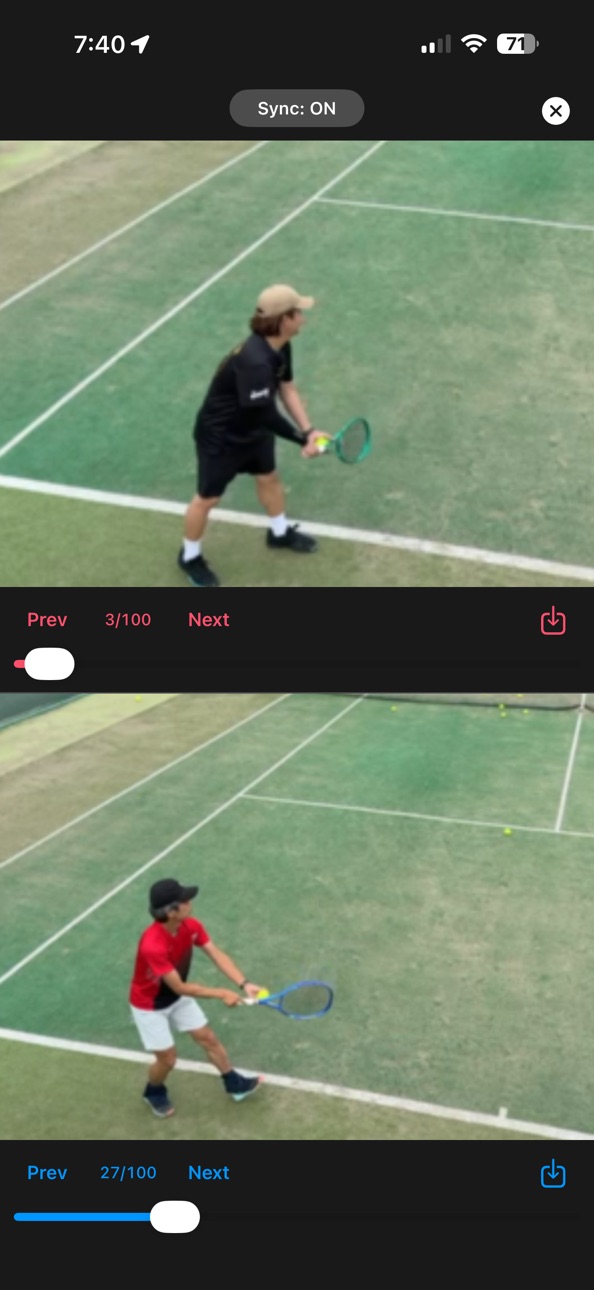
The dual-frame capture screen is now more useful.
What's new:
・Auto-play: continuous playback in the frame-by-frame view, with looping and speed control (0.25× / 0.5× / 1× / 2×).
・Video export: save your perfectly aligned dual-frame comparison as a video file (mp4) to your Photo Library — great for sharing or keeping a record.
Perfect for sports form comparison, dance, music practice, and rehab progress tracking.
Description
Play two videos simultaneously on your iPhone or iPad.
Reviewing your own movements on video is one of the most effective ways to improve at sports — but the real breakthroughs come when you can compare your form side-by-side with a reference video. PairView was built exactly for that. After searching and finding no app that fit this need as of April 2026, that’s why PairView was created.
You can import up to 3 videos for free. Unlock unlimited imports with a one-time in-app purchase.
Key Features:
Split-screen playback in vertical or horizontal layout
Independent playback speed control per player (0.1x – 2.0x)
Pinch to zoom in/out; drag to reposition each video
Supports your iPhone’s video library
Import videos from the Files app
Switch to single-screen mode at any time
Perfect For:
Comparing form in sports or musical instrument practice (your video vs. a reference)
Before/after comparisons
Viewing the same moment from different angles simultaneously
Slow-motion movement analysis
Requirements: iOS / iPadOS 15.6 or later
In-App Purchases US pricing
One-Time Purchases
Unlimited Imports$2.99
Capabilities
In-App Purchases
Accessibility
ipadiphonemacrealityDevicetvoswatch
Version history 5 versions
Build 887339191v1.0.42026-06-24 23:36:46
The dual-frame capture screen is now more useful.
What's new:
・Auto-play: continuous playback in the frame-by-frame view, with looping and speed control (0.25× / 0.5× / 1× / 2×).
・Video export: save your perfectly aligned dual-frame comparison as a video file (mp4) to your Photo Library — great for sharing or keeping a record.
Perfect for sports form comparison, dance, music practice, and rehab progress tracking.
Build 886116386v1.0.32026-05-25 22:44:48
- Improved landscape layout for the frame capture screen
- Controls are now more compact in landscape, giving more room for the image
- Dual frame capture now displays side by side in landscape
- Fixed an issue where pinch-to-zoom could cause the image to overflow its bounds
- Zoom now resets correctly when rotating the device
Build 885886816v1.0.22026-05-20 21:40:01
The capture screen now supports dual-view display. Tap the camera button to compare frames from both videos side by side. You can step through each video's frames independently, or use sync mode to navigate both at once. Pinch-to-zoom is also supported.
Build 885690318v1.0.12026-05-15 16:19:14
What's New (Version 1.0.1):
• Moved the play button to the center of the control bar
• Changed the import button to a more intuitive icon
• Controls now display in two rows when space is limited
Build 885289991v1.02026-05-13 23:34:40
Price history by region
Currency
Show
Columns
Search
Availability 1 of 1 storefronts
| Region | Language | Price | Ratings | Avg | Version |
|---|---|---|---|---|---|
| US | en-US | Free | 0 | — | 1.0.4 |
Change log 8 changes · US
✎
releaseNotes updated
The dual-frame capture screen is now more useful.
What's new:
・Auto-play: continuous playback in the frame-by-frame view, with looping and speed control (0.25×
✎
description updated
Play two videos simultaneously on your iPhone or iPad.
Reviewing your own movements on video is one of the most effective ways to improve at sports — but the r
✎
name updated
PairView
◆
Version 1.0.4 released
The dual-frame capture screen is now more useful.
What's new:
・Auto-play: continuous playback in the frame-by-frame view, with looping and speed control (0.25× / 0.5× / 1× / 2×).
・Video export: save your perfectly aligned dual-frame compar
◆
Version 1.0.3 released
- Improved landscape layout for the frame capture screen
- Controls are now more compact in landscape, giving more room for the image
- Dual frame capture now displays side by side in landscape
- Fixed an issue where pinch-to-zoom could cau
◆
Version 1.0.2 released
The capture screen now supports dual-view display. Tap the camera button to compare frames from both videos side by side. You can step through each video's frames independently, or use sync mode to navigate both at once. Pinch-to-zoom is al
◆
Version 1.0.1 released
What's New (Version 1.0.1):
• Moved the play button to the center of the control bar
• Changed the import button to a more intuitive icon
• Controls now display in two rows when space is limited
◆
Version 1.0 released