Home › Productivity

 US
US
1 of 1 storefronts
Content in en-US
Content in en-US
Information
Apple ID6766506898
Bundle IDcom.sarayaya.casenote
SellerSeller
Min iOS17.0
Min macOS14.0
Device familiesiphone
Released2026-05-20
Copyright© 2026 sarayaya
Privacy policyLink ↗
Preview 1 platform
iPhone 10 images




What’s New Version 1.4.2
New
- Added the Sage Coral theme with a softer and cleaner visual style.
- Improved diagnosis display on the note detail page, prioritizing imaging diagnosis in the header.
- Refined status indicators on Home and Library cards for easier recognition.
Improvements
- Improved Home statistics and Library search performance.
- Optimized detail editing and autosave behavior to reduce input lag.
- Improved image upload and preview handling to reduce memory pressure.
- Optimized statistics calculation for smoother refreshes and navigation.
- Reorganized Settings for clearer access to exam information options.
Fixes
- Fixed unclear display hierarchy between exam name, imaging diagnosis, and final diagnosis.
- Improved low-contrast colors in status and statistics views.
- Improved input area background clarity on the entry page.
Description
CaseNote — Your Personal Case Notebook
Still relying on paper or scattered files to track study cases? CaseNote helps you systematize every learning experience — review anytime, find anything instantly, and turn knowledge into lasting understanding.
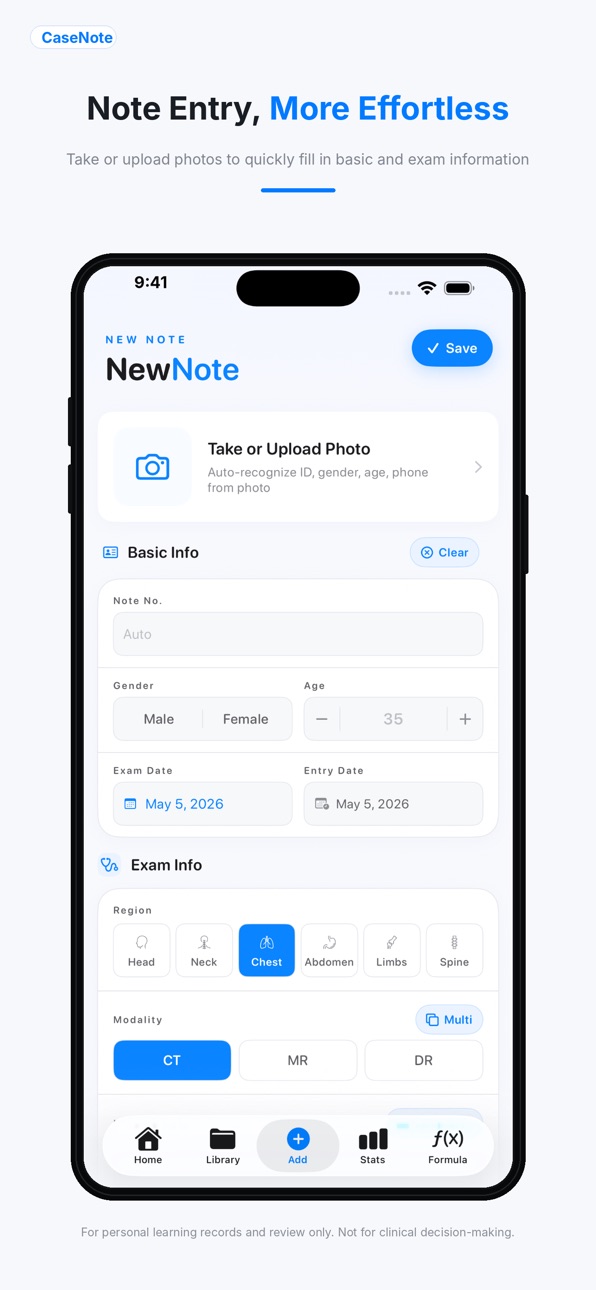
Quick Entry, Effortless Logging
A structured input interface captures patient basics, exam type, and diagnostic findings all at once. OCR support lets you snap a photo and extract key information instantly. Bulk import via Excel makes migrating your existing study materials fast and easy.
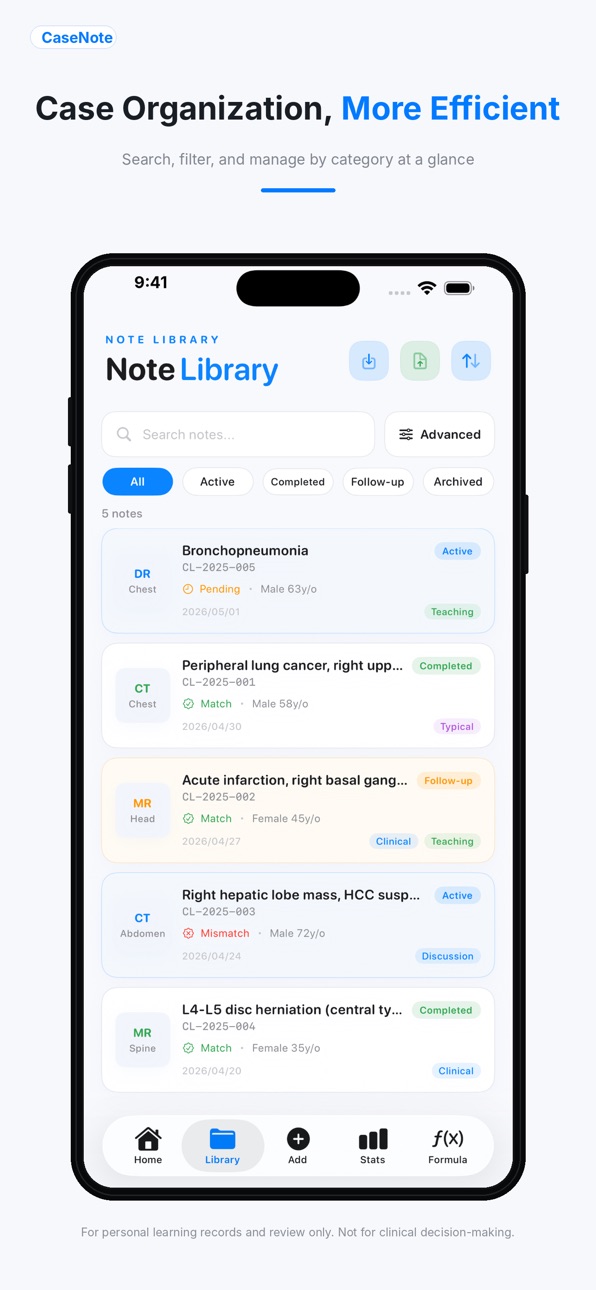
Build Your Own Learning Library
Organize cases by body region, exam type, custom tags, and more. Attach representative imaging to preserve every noteworthy case with both visuals and text. A flexible tagging system lets you categorize cases around your own learning goals.
Review Anytime, Find Anything Fast
Powerful search and filter tools let you locate cases by keyword, tag, or date range in seconds. Browse, compare, and revisit your entire case library at a glance. Link related cases to deepen understanding through pattern recognition.
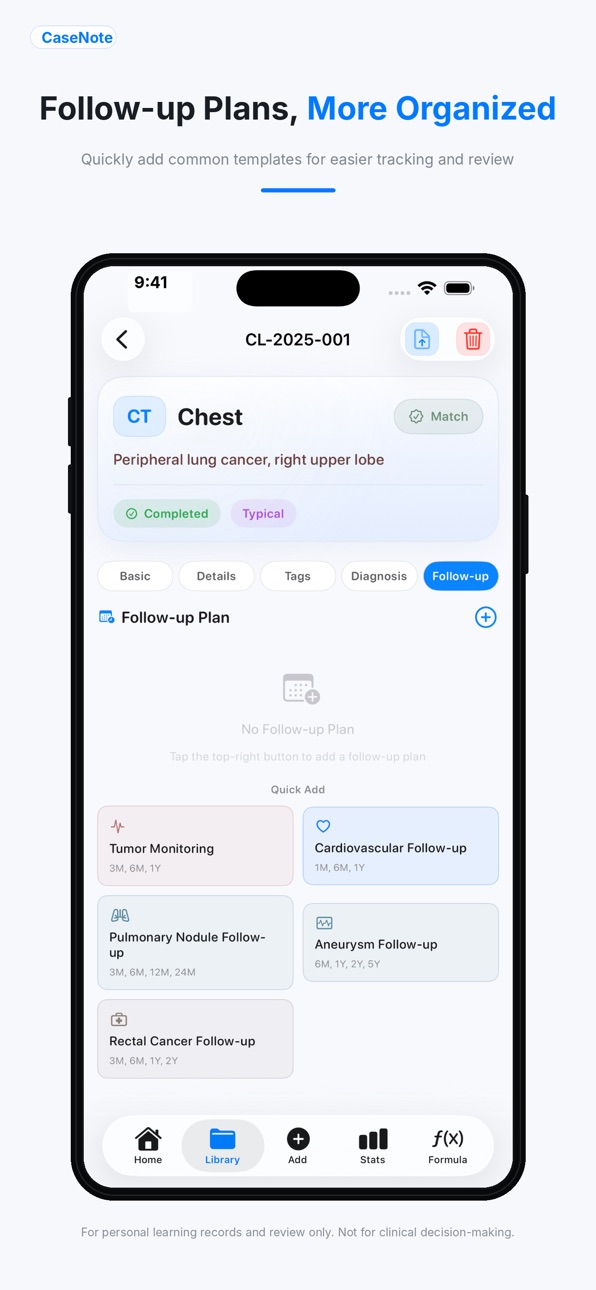
Scheduled Reviews, Nothing Missed
Set personalized study plans with recurring reminders to make sure you revisit important cases on time. Track every case's status — completed or pending — at a glance.
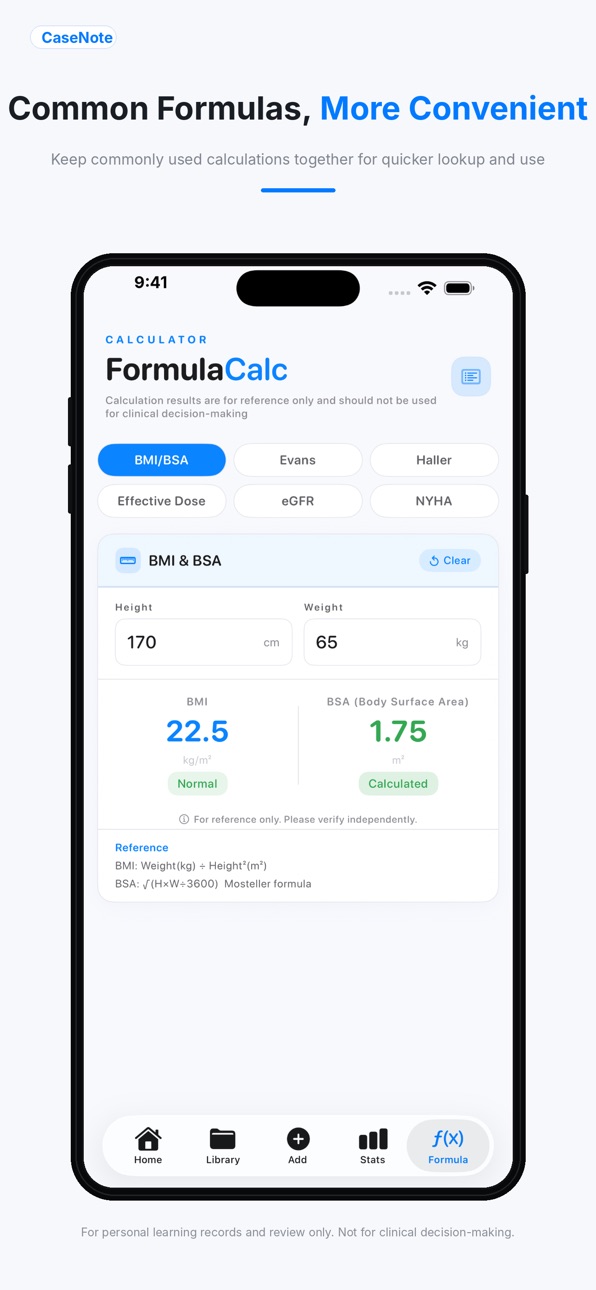
Formula Reference, Right When You Need It
Built-in medical calculators include BMI, Body Surface Area, eGFR, Evans Index, Haller Index, and radiation dose. Enter your values and get instant results — perfect for studying and on-the-go clinical reference.
Learning Stats, Watch Yourself Grow
A visual analytics dashboard shows recording trends and case distribution clearly. Long-press any chart to export it as an image for easy sharing and progress summaries.
Secure Data, Multi-Device Sync
Apple iCloud sync keeps your notes available across all your devices. Local backup and restore ensures your study data is always safe. All data stays on your own device and iCloud — your privacy is fully in your hands.
Bilingual Support
Switch freely between Chinese and English in the interface, supporting your learning in any language environment.
Multiple Themes
Pick from a variety of color themes to personalize your workspace and make note-taking more enjoyable.
— Disclaimer —
CaseNote is a learning and note management tool. It is not a medical device, does not provide diagnostic advice, and is not intended for clinical decision-making. All formulas and calculated results are for personal study reference only. For clinical care, please follow established guidelines and consult a qualified healthcare professional.
Accessibility
ipadiphonemacrealityDevicetvoswatch
Version history 9 versions
Build 887527877v1.4.22026-06-27 23:38:28
New
- Added the Sage Coral theme with a softer and cleaner visual style.
- Improved diagnosis display on the note detail page, prioritizing imaging diagnosis in the header.
- Refined status indicators on Home and Library cards for easier recognition.
Improvements
- Improved Home statistics and Library search performance.
- Optimized detail editing and autosave behavior to reduce input lag.
- Improved image upload and preview handling to reduce memory pressure.
- Optimized statistics calculation for smoother refreshes and navigation.
- Reorganized Settings for clearer access to exam information options.
Fixes
- Fixed unclear display hierarchy between exam name, imaging diagnosis, and final diagnosis.
- Improved low-contrast colors in status and statistics views.
- Improved input area background clarity on the entry page.
Build 887225183v1.4.12026-06-20 18:05:30
New Features
- Added adult BMI classification standards in the BMI/BSA calculator, including China adult criteria and WHO/CDC categories.
- Added reference links for BMI classification sources, including NHC, WHO, and CDC.
- Added an optional Exam Name field that can be enabled in Settings.
- Added automatic extraction of the exam name, region, and modality from captured or uploaded reports.
Improvements
- Improved the home tracking card: the notes section is hidden when no note is entered.
- Improved review queue alignment on the home screen.
- Improved the tracking note editor to reduce layout jump when the keyboard appears.
Build 886615600v1.3.22026-06-06 17:47:00
New Features
- Added a new Timeline tab on the case detail page to summarize note creation, exam date, diagnosis outcome, tracking records, and follow-up progress.
- Added a Review Queue on the home page for cases that need review and tracking.
- Added a Review filter in the note library to quickly find cases that need review and tracking.
Improvements and Fixes
- Refined the Mint Glass theme with cleaner card colors, borders, shadows, and status colors.
- Improved home statistics cards with clearer icon and number color distinction.
- Adjusted home title spacing and settings button alignment for a more consistent page header.
Build 886584074v1.3.12026-06-05 22:23:30
What's New
- Diagnosis Tracking: A brand-new tracking module lets you record each follow-up attempt with the date, tracking number, and notes.
- One-Tap Confirmation: When marking a tracking record as "Confirmed," the case's diagnosis outcome and status are automatically updated to "Confirmed" and "Completed" in one step.
- Tracking Badge on Case Cards: Every case card in the library now displays the tracking count, making it easy to spot which cases still need follow-up.
- Advanced Search by Tracking Count: A new "Tracking Count" filter in Advanced Search lets you filter cases by min/max tracking attempts.
- Total Days on Home Screen: The tracking calendar card now shows a "Total" column — the number of days between your earliest and most recent case entries.
- Tracking Overview in Stats: The Follow-up tab in Stats now includes tracking analytics, including tracked vs. untracked distribution, average tracking count, and total tracking records, with quick access to filtered case lists.
- Monthly Trend Indicator: The "This Month" card on the home screen now shows a compact month-over-month trend indicator.
- Quick Filter Source Bar: When opening the library from Home stats or Stats tracking cards, a top filter bar now shows the active source, such as "Total Notes," "This Month," "Tracked," or "Untracked," with one-tap clearing.
- Export Support: PDF export now includes a "Diagnosis Tracking" section, and CSV export adds a "Tracking Count" column for complete data portability.
Improvements & Fixes
- Mint Glass Theme Refresh: Revamped the "Mint Glass" theme with a brighter base palette, softer gradient accents, and removal of the dark bottom overlay for a cleaner, more translucent look with improved card-to-background contrast.
- Home and Library Card Layout Refinement: Recent-note and library cards now use clearer information hierarchy and consistent spacing across note number, imaging diagnosis, metadata, and tag rows. Date labels and values are aligned.
- This Month Filter Fix: Fixed a mismatch where the Home "This Month" count used entry date while the library filter used exam date. Both now use entry date consistently.
Build 886479400v1.2.22026-06-03 16:32:43
New Features
- Typical images can now be added by taking a photo or selecting from the photo library.
- Camera-based typical image capture is now supported on both the entry page and the case detail page.
- A new source selection sheet has been added, allowing users to choose between taking a photo, selecting from the photo library, or canceling.
Improvements and Fixes
- Improved the typical image upload flow to make the interaction clearer and more flexible.
- Optimized image handling so that typical images captured from the case detail page are compressed before being saved.
- Fixed a layout issue where ultra-wide images could stretch the entry page and cause abnormal interface scaling.
- Improved OCR-based information extraction to reduce cases where admission numbers or patient IDs are incorrectly filled as note IDs.
Build 886348282v1.2.12026-05-31 18:12:31
New Features
- Added “Final Diagnosis” and comparison result fields to the case entry page.
- Added new sorting options in the case library, including exam date, entry date, and the initials of the primary diagnosis.
Improvements and Fixes
- Updated the “Added This Month” statistic to calculate cases based on entry date, making the result more consistent with real-world use.
- Fixed an issue where opening the case library from the home statistics cards or status distribution page could prevent cases from opening correctly.
- Improved library navigation so that statistics shortcuts now open the case list instead of returning to the previously opened case detail page.
- Renamed “Comparison Diagnosis” to “Final Diagnosis” throughout the app for clearer terminology.
- Improved the confirmation popup after saving a case, making the feedback clearer and more natural.
- Simplified the advanced search button for a cleaner interface.
Build 886236138v1.1.12026-05-28 16:51:21
Data Sync Fix & Experience Improvements
- Fixed an issue where edits made to a note from one entry point (Home / Library) were not reflected when opening the same note from another
- Fixed an issue where note cards on the Home and Library screens did not refresh after editing
- Added auto-save: changes are now saved automatically within 0.5 seconds — no manual action needed, and no data loss when switching pages
- Improved data consistency across all screens, ensuring the Home "Recent Notes," Library list, and note detail always stay in sync
Build 886156084v1.1.02026-05-26 19:44:02
New Features
• New "Tracking Calendar & Notes" card on the home screen — see your last tracking date, days elapsed, consecutive entry streak, and notes at a glance. Tap Edit to update anytime.
• Added a Typical Images section to the entry form. Select representative images while creating a note; they display in a 3-column grid with full-screen preview support.
• New Height & Weight fields in the entry form, toggled independently in Settings.
• New Note Status control below the Tags section in case detail. Switch between Active, Completed, Follow-up, and Archived without leaving the detail view.
• Done button added to the keyboard toolbar for the Imaging Record and Notes text fields, making it easy to dismiss the keyboard.
Improvements & Fixes
• Fixed a bug where scanning a photo to extract a phone number would also overwrite already-entered fields. Phone extraction now only updates the phone field.
• Smoother scrolling in the Note Library. Row cards now use a unified lightweight background instead of status-colored fills and per-row shadows, reducing compositing overhead during fast scrolls.
• Note Library navigation is now lazy-loaded — the detail view is only built when you actually tap a row, significantly reducing lag on entry.
• All disk writes are now performed on a background thread, eliminating UI freezes when saving or editing notes.
• Statistics page data is now cached and only recalculated when the underlying data changes, making tab switching noticeably faster.
• Fixed repeated DateFormatter allocation during OCR recognition, improving scanning responsiveness.
Build 885281161v1.0.02026-05-21 00:16:49
Price history by region
Currency
Show
Columns
Search
Availability 1 of 1 storefronts
| Region | Language | Price | Ratings | Avg | Version |
|---|---|---|---|---|---|
| US | en-US | USD 2.99 | 0 | — | 1.4.2 |
Change log 13 changes · US
✎
releaseNotes updated
New
- Added the Sage Coral theme with a softer and cleaner visual style.
- Improved diagnosis display on the note detail page, prioritizing imaging diagnosis in
✎
description updated
CaseNote — Your Personal Case Notebook
Still relying on paper or scattered files to track study cases? CaseNote helps you systematize every learning experience
✎
subtitle updated
病例学习笔记与复习管理
✎
name updated
CaseNote
◆
Version 1.4.2 released
New
- Added the Sage Coral theme with a softer and cleaner visual style.
- Improved diagnosis display on the note detail page, prioritizing imaging diagnosis in the header.
- Refined status indicators on Home and Library cards for easier re
◆
Version 1.4.1 released
New Features
- Added adult BMI classification standards in the BMI/BSA calculator, including China adult criteria and WHO/CDC categories.
- Added reference links for BMI classification sources, including NHC, WHO, and CDC.
- Added an option
◆
Version 1.3.2 released
New Features
- Added a new Timeline tab on the case detail page to summarize note creation, exam date, diagnosis outcome, tracking records, and follow-up progress.
- Added a Review Queue on the home page for cases that need review and track
◆
Version 1.3.1 released
What's New
- Diagnosis Tracking: A brand-new tracking module lets you record each follow-up attempt with the date, tracking number, and notes.
- One-Tap Confirmation: When marking a tracking record as "Confirmed," the case's diagnosis outco
◆
Version 1.2.2 released
New Features
- Typical images can now be added by taking a photo or selecting from the photo library.
- Camera-based typical image capture is now supported on both the entry page and the case detail page.
- A new source selection sheet has
◆
Version 1.2.1 released
New Features
- Added “Final Diagnosis” and comparison result fields to the case entry page.
- Added new sorting options in the case library, including exam date, entry date, and the initials of the primary diagnosis.
Improvements and Fixe
◆
Version 1.1.1 released
Data Sync Fix & Experience Improvements
- Fixed an issue where edits made to a note from one entry point (Home / Library) were not reflected when opening the same note from another
- Fixed an issue where note cards on the Home and Library s
◆
Version 1.1.0 released
New Features
• New "Tracking Calendar & Notes" card on the home screen — see your last tracking date, days elapsed, consecutive entry streak, and notes at a glance. Tap Edit to update anytime.
• Added a Typical Images section to the entry f
◆
Version 1.0.0 released