Home › Education

 US
US
1 of 1 storefronts
Content in en-US
Content in en-US
Information
Preview 3 platforms
iPhone 10 images




iPad 10 images


Mac 10 images




What’s New Version 1.5.9
What's New in 1.5.9
Explore more deep-sky wonders through the telescope
- Point the Earth telescope at famous nebulae and galaxies, now shown as real imagery at their true place in the sky: the Lagoon (M8), Eagle (M16), Trifid (M20) and Dumbbell (M27) nebulae, plus the Triangulum (M33) and Whirlpool (M51) galaxies. Andromeda, Orion, the Crab and the Ring are sharper and better placed too.
A truer night sky
• All ~8,000 skydome stars now glow in their real spectral colours: orange-red Betelgeuse, blue-white Rigel and Vega, yellow Capella, with the brightest stars standing out as chunky orbs for a natural, Stellarium-style sky.
• The Milky Way band now sits correctly against the stars, its bright galactic centre glowing behind Sagittarius where it belongs.
Smoother, more polished
• Looking around the skydome now runs at your display's full refresh rate (up to 120 Hz on ProMotion) for fluid panning.
• The telescope eyepiece view keeps its size when you rotate an iPad to landscape.
• Swapping eyepieces now gives a satisfying known tube sound.
• changed one song to a more modern one
Fixed
• A Solar-System mission no longer keeps running invisibly after you switch to the Earth view.
Description
NearLight is a 3D space simulator for exploring nearby star systems, visualizing interstellar distances in our galaxy, and calculating travel times with both classic and relativistic physics. Explore massive black holes, fly through a living star map, inspect real stars, and see how space travel changes when the Lorentz factor, and relativity enter the picture.
Calculate time dilation easy and see it´s effects visually.
Is your favorite sci-fi movie physically right?
Built for astronomy fans, sci-fi film lovers, and physics enthusiasts, NearLight turns nearby space into an interactive experience. Search star systems, inspect known stellar data and exoplanets, compare travel times across different speed and acceleration models and see the relativistic affects of black holes with your own eyes. From our own Solar System, which is represented in exact orbit data to realistic star maps and our milky way with relativistic journey calculations, NearLight makes space travel feel tangible.
Calculate Acceleration and De-Acceleration with different g values even with coast phases and see, where your spaceship has to turn. Get the relativistic Onboard Travel Times (OTT) fast, with just a slider. Find out how much time went by on Earth.
Features:
- Tour our own Solar System in a Kepler-accurate 3D scene — the Sun, all 8 planets and 8 major moons, with a day/night Earth, Saturn's rings and a textured sky.
- Full observatory in Telescope Mode with 8 eyepieces and real atmospheric seeing
- Explore 1.000 Lightyears of nearby star systems in a cinematic 3D space view
- Search and inspect 8.000+ real stars, including known names, distances, and stellar data
- Discover red-highlighted neighboring stars within 10 light-years of your selected destination
- Plan Trips in our Milky Way and see the real time and distance it takes
- Switch between three onboard cameras during a trip — free view, a side chase cam, and a locked first-person cockpit view
- Experience relativistic optics from the cockpit near light speed: star aberration (the forward "headlight" cone), Doppler colour shift and relativistic beaming.
- Explore over 70 detailed known black holes, including the massive TON-618 or Gargantua from Interstellar.
- Compare Earth travel time and onboard travel time using relativistic calculations.
- Read the full relativistic picture — Earth distance, length-contracted distance, peak speed as a fraction of c, and the estimated energy needed (switch units between Joule, TWh, PWh and "Sun-output time").
- 6 DEF – Degrees of freedom, rotate the map, pinch to zoom in and out, move the Axis in all directions with 2 fingers. Turn finger sideways for other axes.
- Reset your View back to your target, turn labels on and off or turn „Auto Rotation“ on, which pans around your target in the direction you gave it a spin with you mouse or finger
- Switch between constant speed and constant acceleration space travel models.
- In „Constant c“ mode you define an instant and constant travel value in lightspeed (c).
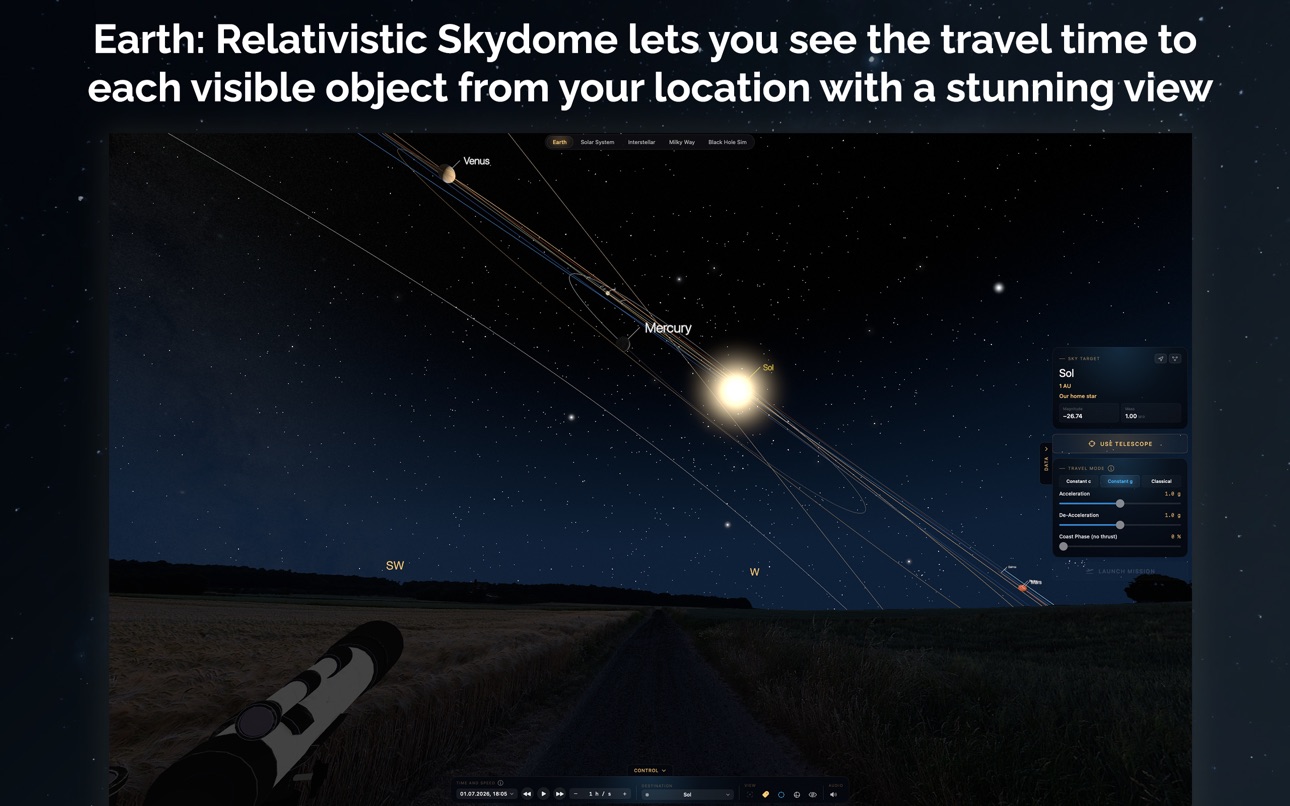
- In „Constant g“ mode you can set g values for each phase of your space travel, the acceleration phase and de-acceleration phase to simulate a real spaceship.
- Classical Spaceflight now calculates journeys in our solar system with a departure burn, coast the transfer arc in real time, then flip around and fire a capture burn into orbit at the destination, all calculated with real distances and real physics.
- Simulate getting closer to the event horizon, change the spin of the black hole disc and watch 2 different clocks run different times fast.
- See the effects of time dilation, the Lorentz factor, and near-light-speed travel, where weeks, months and even years pass by faster on earth than in your ship.
- View exoplanet host stars and relevant stellar metadata
- Turn on ambient Space Music to relax and see the universe unfold
Use it on Mac, iPad and iPhone — a native app on every platform, fully offline, with no account and no tracking.
Accessibility
ipadiphonemacrealityDevicetvoswatch
Version history 19 versions
Build 887971625v1.5.92026-07-09 01:41:14
What's New in 1.5.9
Explore more deep-sky wonders through the telescope
- Point the Earth telescope at famous nebulae and galaxies, now shown as real imagery at their true place in the sky: the Lagoon (M8), Eagle (M16), Trifid (M20) and Dumbbell (M27) nebulae, plus the Triangulum (M33) and Whirlpool (M51) galaxies. Andromeda, Orion, the Crab and the Ring are sharper and better placed too.
A truer night sky
• All ~8,000 skydome stars now glow in their real spectral colours: orange-red Betelgeuse, blue-white Rigel and Vega, yellow Capella, with the brightest stars standing out as chunky orbs for a natural, Stellarium-style sky.
• The Milky Way band now sits correctly against the stars, its bright galactic centre glowing behind Sagittarius where it belongs.
Smoother, more polished
• Looking around the skydome now runs at your display's full refresh rate (up to 120 Hz on ProMotion) for fluid panning.
• The telescope eyepiece view keeps its size when you rotate an iPad to landscape.
• Swapping eyepieces now gives a satisfying known tube sound.
• changed one song to a more modern one
Fixed
• A Solar-System mission no longer keeps running invisibly after you switch to the Earth view.
Build 887821225v1.5.82026-07-07 06:24:54
Look up through a telescope, right where you're standing.
The Earth view's new telescope mode lets you observe the real night sky the way an amateur astronomer does:
• Planets and moons are now clickable sky targets: pick them, or any star or Messier object, from the new Planets / Stars / Messier list, and the view slews straight to it.
• EQ Tracking holds your target centred as the sky rotates, like an equatorial mount.
• Manual focus: switch Autofocus off and rack the focus wheel by hand to find the perfect sharp point, every eyepiece change nudges it out, just like the real thing.
• Redlight night-vision mode washes the whole app deep red to protect your dark-adapted eyes.
• Zoom now reaches 20×, so you can inspect Andromeda and the Messier clusters without an eyepiece.
Solar System: real mission physics.
• Gravity-assist routes are rebuilt the way NASA plots them: two transfer arcs meeting at Jupiter, bending around the correct side, with live flyby telemetry (approach speed, required bend, periapsis radius).
• Better launch windows: the planner tells you when no real slingshot exists and scans 14 years ahead for the next one.
• Planet positions now use JPL ephemerides, matching the real sky across centuries.
Also in this update
• Andromeda now sits the right way up.
• Smoother, faster performance and a quicker first load of the Earth view.
• Fixes for an iPhone crash and the telescope view in landscape.
Clear skies!
Build 887746493v1.5.72026-07-04 04:06:46
A full observatory in Telescope Mode
• 8 eyepieces, from a 3.2mm planetary to an ultra-wide 38mm — each labeled with its true apparent field of view (AFOV)
• Realistic optics: higher magnification darkens the field of view, just like the exit pupil of a real telescope
• Atmospheric seeing: the image shimmers and sharpens in moments of steady air — adjustable from perfect to poor
All 55 Messier star clusters in your sky
• 29 globular and 26 open clusters, each rendered as thousands of individual stars that resolve as you zoom in
• The Crab Nebula (M1), Orion Nebula (M42) and Ring Nebula (M57) join Andromeda as fully placed deep-sky objects
• New Messier target list — jump to any object and it is marked in the sky
• Objects brighten realistically by magnitude: bright showpieces appear first, faint ones need more zoom
Also in this update
• Accurate Moon position for your location, based on a full lunar theory
• Meteors and aircraft now stay true to the landscape at any time-lapse speed
• New toggle for sky hover markers, refined star glow, smoother Milky Way zoom
• Many stability and performance improvements
Build 887524387v1.5.62026-07-02 04:36:15
Look up: Earth - the Relativistic Skydome is here
Stand on Earth and look up at the real night sky for your location and the current moment. A true horizon with a gold compass, star positions from real astronomy with names and brightness, the Sun at its true altitude, the Milky Way overhead, and gentle night-time crickets. Tap any star to mark it as a destination and read its relativistic Onboard (OTT) and Earth (ETT) travel times. Opens in real time, in Constant-g mode.
- Constellations in 3 different modes
- Use your real GPS location (optional)
- Calculate relativistic travel time to each target in your night sky
Look through a telescope.
- From the night sky on Earth, step up to the telescope beside you and look through the eyepiece. Start wide in the finderscope, then switch between four eyepieces to zoom in on whatever you've centred.
Real atmospheric seeing.
- A Seeing slider recreates the shimmer of the real sky — the image softens and drifts, and sharp, steady moments arrive at irregular intervals, just like waiting for the air to settle. Turn it up and it never fully sharpens.
A sea of stars.
- The eyepiece reveals far more faint catalogue stars than the naked eye, brightening as you raise the magnification — the rich field you actually see through a scope.
True-to-life optics.
- The eyepiece shows the left-right mirrored image of a refractor with a star diagonal, while the finder stays upright and true. A live Altitude / Azimuth readout for the centred star or deep-sky object lets you dial it in on an Alt-Az or Dobsonian mount.
Deep-sky objects coming
- The full Messier catalogue will shortly be implemented, starting with the Andromeda Galaxy (M31) rendered in place
Also in this update:
- Interstellar: a new Classic-view toggle, plus a chase camera that flies along with your ship.
- Play/Pause and Stop now appear while a journey is running, in every scene.
- Solar System: Titan limb haze and Venus cloud super-rotation; the Moon now lines up correctly under the day/night line.
- Added a privacy manifest — NearLight collects no data and does no tracking.
Build 887396740v1.5.52026-06-25 15:31:24
Huge visual update!
- The Interstellar star field now glows: every star carries a soft halo, and the brightest, most luminous stars sparkle with diffraction spikes.
- The Sun blazes in the Solar System with a warm glow that grows as you pull the camera back
- New 3-stage Labels button (Solar System & Interstellar)
- Richer planets: real moon meshes, sharper 8K textures, Uranus's rings, a Saturn ring shadow, and 8K surface maps for Uranus, Neptune and Venus.
- Deimos and Phobos now absolutely real
- Earth, Mars and Venus gain a thin atmospheric glow along their sunlit edge.
- Interstellar adds optional orientation lines to the reference plane.
- Full keyboard control and VoiceOver support on Mac, a Milky Way target reticle, consistent +/− keys on every slider, and info popovers that explain the whole control bar.
- Lighter, clearer travel visuals: smoother route ribbons, a smaller ship and a closer follow-cam.
Fixes
- Solar System two-finger zoom now keeps your target centred.
- Fixed a crash when changing travel speed mid-flight in Interstellar.
Build 887258254v1.5.42026-06-22 03:26:18
NearLight is now fully keyboard-controllable on Mac, with clearer in-app help and a new way to read the sky.
- Full keyboard control (Mac): Fly the 3D scenes with W/A/S/D, zoom with Page Up/Down, and use shortcuts for Reset, Labels, Orbits, Audio and Play/Pause. Fine-tune any slider with + / −.
- Milky Way: pick a target by keyboard. A blue 3D reticle glides over the galactic plane; steer with the arrow keys, press Return to select.
- Black Hole Sim: smooth keyboard camera. Orbit, raise/lower, tilt and change observer distance, all with gentle easing.
- Interstellar: orientation lines. Nearby stars drop a thin line to Sol's reference plane with a marker where it lands, so you can read each star's height at a glance.
- VoiceOver support. The 3D scenes are now described aloud (selected target + travel status), and info popovers stay in focus.
- Clearer help. Every "i" now explains its whole control bar, with a plain-language note for each slider.
- Plus softer bloom, clearer travel routes, and many small fixes.
Build 887192501v1.5.32026-06-19 21:54:18
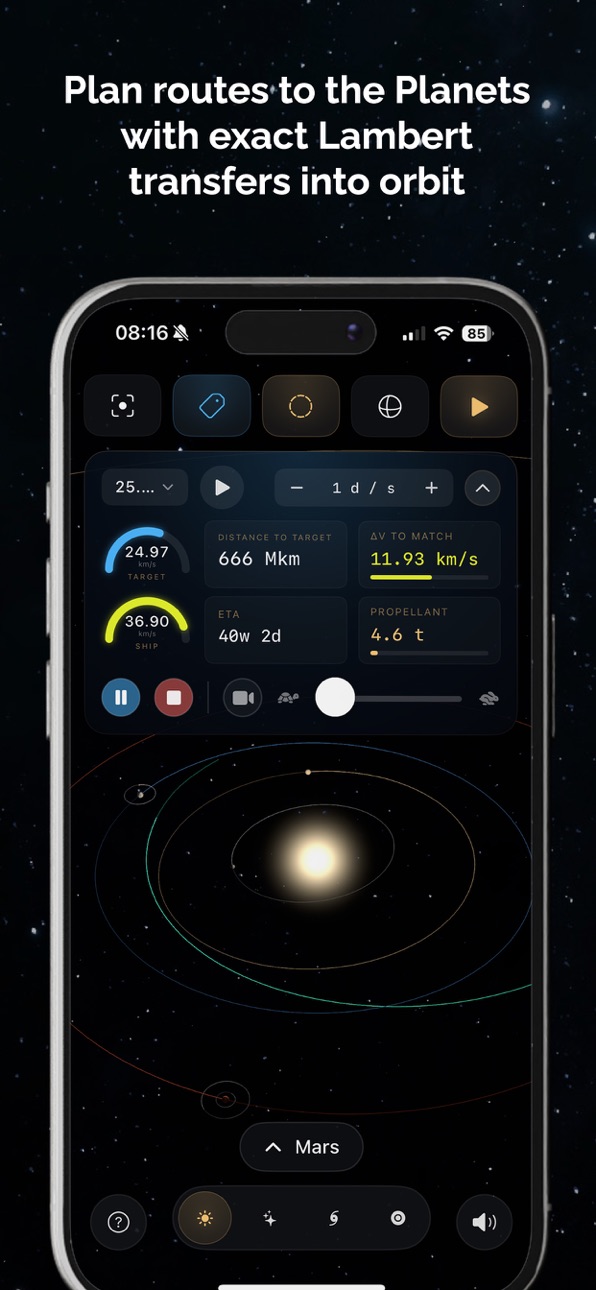
- LIVE Mission Data window (Solar System) — while a mission flies, a compact panel shows speedometer gauges for the destination's and the ship's speed (matching turns the ship gauge green), distance, a live ETA countdown, a Δv‑to‑match readout and a propellant gauge — with the flight controls built in. The iPhone Travel Simulation panel now matches.
- More correct arrivals — in Constant‑g the ship brakes to the destination's orbital speed and a classical transfer speeds up to match an outer planet on approach — so the gauges read "matched" on arrival, and the ship only flips to brake when it's actually arriving too fast.
- Interstellar — gentler, easier‑to‑aim rotation, and a running trip now ends only via Stop
- iPhone & fixes — Solar System and Interstellar panels collapse to a tidy pill; rotating the device no longer interrupts a running mission; fixed an iPad crash opening the Solar System tab.
Build 887099863v1.5.22026-06-17 21:12:36
• Fresh new look: a unified gold-and-blue design across all four views. Floating panels now read as clean glass windows that lift off the starfield, with a calmer, more data-forward layout.
• Cleaner data panels: each view's data drawer is now split into separate windows (Destination · Travel Mode · Travel Data), matching the Black Hole Sim layout.
• Smoother performance: eliminated frame-rate drops when panels are open, and tab switching on iPhone is now instant.
• Refined iPhone layout: top and bottom controls, sheets, and landscape panels polished for a consistent feel.
• Solar System labels: labels and route markers are now hidden behind planets and moons as you orbit, and turning Labels off hides every marker.
• Stability & crash fixes: resolved a crash some users hit in the Milky Way view, plus several reliability improvements.
Build 887002359v1.5.12026-06-16 05:08:19
- Renamed the two relativistic travel modes to Constant c and Constant g (clearer than the old names) across Solar System, Interstellar and Milky Way.
- Milky Way live trip clock: during a flight you now see onboard time elapsed (Time passed) and the advancing Earth Date — with physically correct relativistic time dilation.
- Milky Way Current Speed now shows the true (near–light-speed) velocity, so speed and time dilation finally agree.
- Milky Way flights now pause on arrival (instead of stopping), so the final readouts stay on screen until you press Stop.
- Solar System, Interstellar and Milky Way trips now start at a calm 0.2× pace; speed up any time with the tortoise/hare slider.
- Interstellar now opens in the follow camera on launch (free look returns when you stop).
- Solar System engine flame is now a warm chemical-rocket flame (was blue).
- Fixed the classical launch date drifting while a mission was flying.
- Layout polish: fixed-width telemetry values and consistent row spacing so the panels no longer jitter.
Build 886943461v1.5.02026-06-14 22:05:43
NearLight 1.5.0
Classical Spaceflight — a whole new way to travel
A third travel mode in the Solar System, next to Acceleration ∞ and Acceleration in g. Instead of sci-fi star-drives, fly real present-day missions with honest orbital mechanics:
• Pick a launch date and a Fast or Efficient transfer — NearLight solves the actual transfer orbit from Earth's live position to the planet's, sized to real chemical-rocket limits.
• Watch the ship leave a 300 km parking orbit with a departure burn, coast the transfer arc in real time, then flip around and fire a capture burn into orbit at the destination.
• The 3-D transfer arc is annotated with departure, coast, flyby and capture-burn markers, and live telemetry shows distance to target, distance travelled, heliocentric speed, transfer duration, ETA and arrival date — plus a propellant gauge sized by the staged rocket equation.
• Gravity assists: where a planetary slingshot is the real-world route (Mercury via Venus; Saturn, Uranus and Neptune via Jupiter), choose Direct or a flyby route. NearLight flies the two-leg trajectory, wraps the ship smoothly around the assist planet, and compares both routes' travel time and fuel — validated against Voyager 2's Jupiter-to-Neptune sling.
• Launch windows: when the planets aren't aligned for your date, NearLight suggests the next real launch window and its fuel cost, one tap away. Targets Mercury through Neptune. (Pluto honestly reports it's beyond chemical rockets.)
A dedicated Solar System spacecraft
The Solar System tab now flies a new, detailed exploration craft with its own real life engine and chemical propellant.
Also improved
• Every Solar System journey opens in the follow camera and starts at a calm 0.2× pace — speed up any time with the tortoise/hare slider (now down to 0.01× for slow motion).
• Calmer scene: a dimmer starfield and brighter orbit trails that fade around each loop, so a planet's direction of travel reads at a glance.
• The Milky Way shows a "Building Milky Way…" notice the first time you open it, since building a half million Star Galaxy needs a bit of time
• The black hole disc now can be shifted to blue, as of latest studies
Fixed
• Rotating an iPhone with the Milky Way open no longer freezes for several seconds — the galaxy stays put and re-lays out instantly.
• Free look is restored the moment you stop a Solar System journey.
Build 886831156v1.4.12026-06-11 21:25:31
The biggest update since launch — NearLight has a completely new interface!
• New "Mission Dock": all controls now live in one compact bar at the bottom — time, mission and view clearly separated. The 3D scene is finally all yours.
• Data on demand: destination, travel and physics data slide in as a side drawer when you need them — and get out of the way when you don't.
• Cinema mode: one tap on the eye hides the entire interface.
• Collect every world: each unvisited destination carries a blue dot — completing a journey clears it for good. Can you clear them all?
• The real night sky: the star map now shows NASA's Milky Way panorama, astronomically aligned — every star sits in front of its actual patch of sky.
• Milky Way: a more organic look with dust filaments and glow — and seen edge-on it darkens realistically like a real galaxy.
• Black holes: every pick from the catalog gets a fresh cinematic framing — viewing angle, tilt and proximity vary like movie shots.
• Finer time control in the Solar System: 15 steps from real-time up to 1 year/second, plus a quick calendar picker.
• Instant tab switching: scenes and camera positions are preserved.
• Plus: fixed audio dropouts, iPad stability improvements and lower energy use.
Build 886727637v1.4.02026-06-09 19:58:45
The Milky Way got a major makeover.
• Photo-matched galaxy — the galaxy view was rebuilt to resemble a real face-on spiral: hundreds of thousands of stars tracing the arms, bright blue-white clusters, glowing pink star-forming regions, and a warm golden core.
• Dust lanes — dark, gently curved dust lanes now weave through the spiral arms, giving the disc real depth as you orbit and fly through it.
• Softer glow, calmer motion — a gentle interstellar glow fills the disc and fades as you dive inside, and the galaxy now spins more slowly and smoothly.
Also improved: the Milky Way tab opens instantly again, no more brief flash when picking a destination, and the spaceship now correctly disappears when you stop a travel simulation.
Build 886631158v1.3.22026-06-07 19:03:11
This update polishes the Black Hole Sim and fixes the Interstellar layout on iPad.
• Doppler Beaming: a new slider tilts the disc's brightness and colour to one side — the part rotating towards you turns brighter and blue-white, the part rotating away dims and reddens.
• A bright photon ring now hugs the event horizon, correctly hidden behind the accretion disc.
• Get much closer: the camera can now descend almost all the way down to the horizon.
• Richer, deeper-red disc colours and more organic, swirling smoke.
• Sharper and faster: anti-aliasing plus adaptive resolution keep the black hole crisp on every device at a smooth 60 fps.
• Fixed faint radial "spokes" across the disc and the jagged outer-rim edge.
• iPad (landscape): the Interstellar side panel now scrolls, and the Destination Data panel no longer covers the Travel Mode controls.
Build 886498156v1.3.12026-06-04 23:01:12
Added
- Background music — three looping space-ambience tracks with rewind / mute / skip controls. Small audio panel at the top of the collapsible left column on Mac/iPad; a fold-out audio window via a speaker button on iPhone. One sound effect is exclusive to the Black Hole Sim. Playback is user-initiated (no auto-start).
- Black Hole Sim camera controls — pinch / trackpad-magnify to change Observer Distance (zoom), right-mouse-drag to tilt the disc (roll)
- Zoom-out range at the black hole was doubled so it fits fully in an iPhone-portrait viewport.
Changed
- Solar System orbit insertion reworked — arriving at a planet or moon is now one continuous fly-by capture: the ship matches the destination's orbital velocity, swings around it, and settles into a geostationary orbit in the body's own spin direction
- Black Hole Sim camera roll now eases out with inertia and rotates in the natural direction.
- Small UI changes
Fixed
- Milky Way onboard view — fixed a black rectangle flashing over the galactic core during coast
- Solar System turn-around (no coast) — in g-mode with the coast slider at zero, the ship now completes its 180° flip before the De-Accel point and brakes already facing the right way.
- Black Hole Sim observer distance — the camera now sits where the readout says: "at the event horizon" in the panel means visually at the horizon, and the closest approach adapts to the black hole's spin
Build 886331435v1.3.02026-05-31 01:37:46
What's New in 1.3.0
• The black hole, rebuilt from the ground up
The Black Hole Simulation now runs on a brand-new native metal renderer. It bends light around the black hole in real time — gravitational lensing, a glowing accretion disc with relativistic Doppler beaming, bloom and cinematic tone-mapping — and it now works reliably on every supported iPhone and iPad, including devices where it previously couldn't start.
• Brighter, more vivid accretion discs
Every black hole in the catalogue now shows a brighter, richer disc, making the differences between them easier to see.
• A cleaner, more consistent interface
Polished the dark theme and the in-app info panels across all tabs, and fixed a display issue where some text could be hard to read on certain devices.
Build 886184465v1.2.02026-05-29 08:23:58
NEW TABS
• Solar System — a Kepler-accurate 3D Sun, 8 planets and 8 major moons on real JPL orbits. Fly a simulation from Earth to any body with a far-side orbit capture, scrub the date, and read live cruise speed, remaining distance and energy.
• Milky Way — a procedurally generated spiral galaxy at realistic scale (~100,000 ly, ~300,000 stars). Tap anywhere to plot a route from Sol and compute its relativistic travel times.
3D SPACESHIP & TRAVEL SIMULATION
• A detailed spaceship now flies your route in every tab — nose-first, four engine flames, a spinning habitat ring.
• Real Play / Pause / Stop; watch the ship accelerate, coast and brake.
• Three onboard cameras plus a relativistic cockpit view at near-light speed: aberration, Doppler shift, beaming and camera shake.
BIGGER, RICHER DATA
• The catalogue grew from 2,456 to 8,151 real stars out to 1,000 light-years, with matching exoplanet host data.
• Travel Times now add Earth & contracted distance, the Lorentz factor, peak speed and the estimated energy needed.
• New Coast Phase for a realistic accelerate-coast-brake profile.
BLACK HOLE SIM
• Orbital time dilation shown next to the stationary value — reproduces the Interstellar 1 hour = 7 years scenario near a spinning black hole.
EVERYWHERE
• Now a native app on Mac, iPad and iPhone (was iPhone-only), still fully offline — no account, no tracking.
Build 886288060v1.2.12026-05-29 20:43:31
Polish & comfort release.
• Pluto is now in the Solar System with its real orbit, current position and tipped-over axial spin.
• Realistic axial tilt for every planet and major moon — Earth 23.4°, Saturn 26.7° with its rings, Uranus on its side, retrograde Venus and Triton, all driven by real obliquity data.
• New Follow cameras for Solar System and Interstellar (and a rebuilt one in Milky Way): drag to orbit the travel ship, scroll to zoom, with the view always kept on the ship.
• Solar System "Reset View" button swings the camera back to the selected destination, and trips now launch from a parking orbit outside Earth so the ship no longer flies out through the planet.
• Milky Way route line and ring markers thin down as you fly close so they stop hiding the travel ship; the travel ship itself is now properly opaque against the bright galactic backdrop. The habitat wheel responds to the speed slider in both modes.
• Several smaller fixes: Mac rotate dead-zone, Solar System coast-phase engines, Interstellar arrival pose, Milky Way Reset View, Black Hole Sim Earth clock no longer races or rewinds when you move the Observer Distance slider, label collisions on close binary stars, iPhone landscape icon. App now opens on Solar System.
Build 886304361v1.2.22026-05-29 22:11:57
- Small Hotfix for route calculation in Solar System
- Route line is properly hidden behind planets it passes behind.
- Energy readout in Unlimited mode now holds steady during flight.
- Black Hole Sim shows a clearer message on older devices that can't run the WebGL renderer.
Build 885258340v1.02026-05-26 06:39:18
Price history by region
Currency
Show
Columns
Search
Availability 1 of 1 storefronts
| Region | Language | Price | Ratings | Avg | Version |
|---|---|---|---|---|---|
| US | en-US | USD 3.99 | 0 | — | 1.5.9 |
Change log 23 changes · US
✎
releaseNotes updated
What's New in 1.5.9
Explore more deep-sky wonders through the telescope
- Point the Earth telescope at famous nebulae and galaxies, now shown as real imagery a
✎
description updated
NearLight is a 3D space simulator for exploring nearby star systems, visualizing interstellar distances in our galaxy, and calculating travel times with both cl
✎
subtitle updated
3D Space Sim & Time Dilation
✎
name updated
NearLight
◆
Version 1.5.9 released
What's New in 1.5.9
Explore more deep-sky wonders through the telescope
- Point the Earth telescope at famous nebulae and galaxies, now shown as real imagery at their true place in the sky: the Lagoon (M8), Eagle (M16), Trifid (M20) and Du
◆
Version 1.5.8 released
Look up through a telescope, right where you're standing.
The Earth view's new telescope mode lets you observe the real night sky the way an amateur astronomer does:
• Planets and moons are now clickable sky targets: pick them, or any sta
◆
Version 1.5.7 released
A full observatory in Telescope Mode
• 8 eyepieces, from a 3.2mm planetary to an ultra-wide 38mm — each labeled with its true apparent field of view (AFOV)
• Realistic optics: higher magnification darkens the field of view, just like the ex
◆
Version 1.5.6 released
Look up: Earth - the Relativistic Skydome is here
Stand on Earth and look up at the real night sky for your location and the current moment. A true horizon with a gold compass, star positions from real astronomy with names and brightness,
◆
Version 1.5.5 released
Huge visual update!
- The Interstellar star field now glows: every star carries a soft halo, and the brightest, most luminous stars sparkle with diffraction spikes.
- The Sun blazes in the Solar System with a warm glow that grows as you pu
◆
Version 1.5.4 released
NearLight is now fully keyboard-controllable on Mac, with clearer in-app help and a new way to read the sky.
- Full keyboard control (Mac): Fly the 3D scenes with W/A/S/D, zoom with Page Up/Down, and use shortcuts for Reset, Labels, Orbits
◆
Version 1.5.3 released
- LIVE Mission Data window (Solar System) — while a mission flies, a compact panel shows speedometer gauges for the destination's and the ship's speed (matching turns the ship gauge green), distance, a live ETA countdown, a Δv‑to‑match read
◆
Version 1.5.2 released
• Fresh new look: a unified gold-and-blue design across all four views. Floating panels now read as clean glass windows that lift off the starfield, with a calmer, more data-forward layout.
• Cleaner data panels: each view's data drawer is
◆
Version 1.5.1 released
- Renamed the two relativistic travel modes to Constant c and Constant g (clearer than the old names) across Solar System, Interstellar and Milky Way.
- Milky Way live trip clock: during a flight you now see onboard time elapsed (Time passe
◆
Version 1.5.0 released
NearLight 1.5.0
Classical Spaceflight — a whole new way to travel
A third travel mode in the Solar System, next to Acceleration ∞ and Acceleration in g. Instead of sci-fi star-drives, fly real present-day missions with honest orbital mecha
◆
Version 1.4.1 released
The biggest update since launch — NearLight has a completely new interface!
• New "Mission Dock": all controls now live in one compact bar at the bottom — time, mission and view clearly separated. The 3D scene is finally all yours.
• Data
◆
Version 1.4.0 released
The Milky Way got a major makeover.
• Photo-matched galaxy — the galaxy view was rebuilt to resemble a real face-on spiral: hundreds of thousands of stars tracing the arms, bright blue-white clusters, glowing pink star-forming regions, and
◆
Version 1.3.2 released
This update polishes the Black Hole Sim and fixes the Interstellar layout on iPad.
• Doppler Beaming: a new slider tilts the disc's brightness and colour to one side — the part rotating towards you turns brighter and blue-white, the part r
◆
Version 1.3.1 released
Added
- Background music — three looping space-ambience tracks with rewind / mute / skip controls. Small audio panel at the top of the collapsible left column on Mac/iPad; a fold-out audio window via a speaker button on iPhone. One sound ef
◆
Version 1.3.0 released
What's New in 1.3.0
• The black hole, rebuilt from the ground up
The Black Hole Simulation now runs on a brand-new native metal renderer. It bends light around the black hole in real time — gravitational lensing, a glowing accretion disc w
◆
Version 1.2.2 released
- Small Hotfix for route calculation in Solar System
- Route line is properly hidden behind planets it passes behind.
- Energy readout in Unlimited mode now holds steady during flight.
- Black Hole Sim shows a clearer message on older dev
◆
Version 1.2.1 released
Polish & comfort release.
• Pluto is now in the Solar System with its real orbit, current position and tipped-over axial spin.
• Realistic axial tilt for every planet and major moon — Earth 23.4°, Saturn 26.7° with its rings, Uranus on it
◆
Version 1.2.0 released
NEW TABS
• Solar System — a Kepler-accurate 3D Sun, 8 planets and 8 major moons on real JPL orbits. Fly a simulation from Earth to any body with a far-side orbit capture, scrub the date, and read live cruise speed, remaining distance and e
◆
Version 1.0 released