Home › Health & Fitness

 US
US
1 of 1 storefronts
Content in en-US
Content in en-US
Information
Preview 2 platforms
iPhone 8 images


Apple Watch 3 images


What’s New Version 1.1.0
Your strength workouts now count toward Apple Health Training Load.
Finish a session and Cadence asks how hard it was — Easy, Moderate, Hard, or All Out — pre-picked from your hardest set's RPE if you logged one. It writes Workout Effort to Apple Health, so lifting finally shows up in Fitness Training Load instead of stuck on "Add Effort." It never overwrites a score you set yourself, and you can turn the prompt off anytime in Settings → Health.
More in this update:
• Your AI coach now sees the bigger picture — your consistency streak, 30-day volume by muscle group, and all-time PRs — plus the training goal you picked, so it can answer "is my bench trending up?" without you re-explaining.
• Share a workout as a web link, straight into Messages or anywhere — alongside the existing Markdown and JSON exports.
• On Apple Watch: start any of your workouts from the wrist, not just the next one up. The app now stays put through your rest instead of dropping to the watch face, and heart-rate setup is clearer.
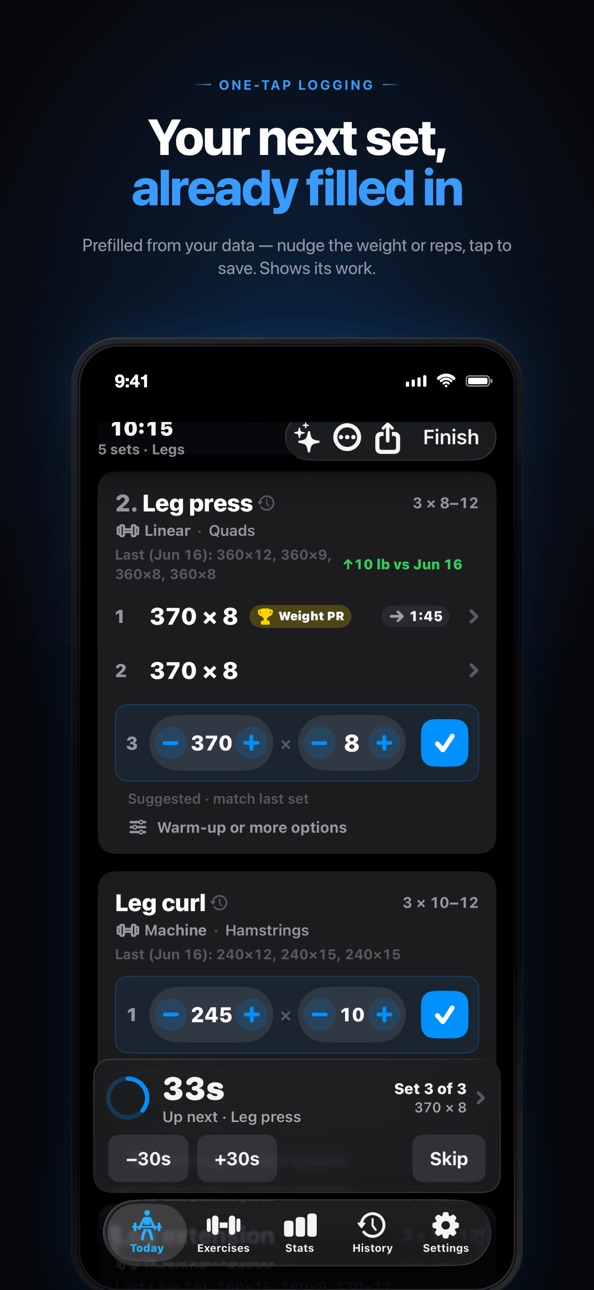
• Rest timer: Skip and −30s / +30s controls, a calmer card, and a spoken "Rest complete" for VoiceOver.
• Hit a PR and the finish screen celebrates it — a haptic, an entrance animation, and a one-tap way to share it.
• Log heavier machine work: the per-set ceiling went from 1,000 to 5,000 lb.
• Accessibility and readability: bigger tap targets on the set steppers, a clear one-line readout per set with Edit and Delete, and a light-mode contrast fix for PR badges and rest labels.
Fixes:
• Fixed a crash when opening an exercise's history or trend.
• Tougher CSV import (Strong, Hevy, FitNotes) and JSON backup and restore — a bad import can't poison your PRs or body-weight trends.
Description
Cadence Lift is a lifting logger built around three numbers: weight, reps, and time. More weight is progress; more reps is progress; the same work in less time is progress too. Every screen makes those three numbers impossible to ignore.
LOG IN A TAP OR THREE
The default action on every screen is "log the next set" — nothing else competes for taps mid-workout. Tap to nudge the prefilled weight, tap to nudge reps, tap save — and when the suggestion is already right, one tap logs the set. Tap a number to type. Built-in plate calculator. Five-second undo on every save.
WHAT'S NOT HERE
— No account. Open the app and lift.
— No ads. Not anywhere, ever, especially not during the active workout flow.
— No third-party analytics, ad SDKs, or trackers. Nothing profiles you.
— No social feed, no friends list, no leaderboard. Your training is your business.
SEE EVERY REP COUNT
Every exercise card shows your last session inline ("185×8, 185×7, 175×6") and a trend arrow flagging whether you're up on weight or reps versus your last top set. Personal records — heaviest, best Epley e1RM, best single-set volume — are calculated automatically and badged on the row that holds them. Per-exercise charts plot your top-set weight over time, and every session lists its estimated 1RM.
SUGGESTIONS THAT SHOW THEIR WORK
Every set comes with a suggested weight and reps, plus a label that tells you where the number came from — "from yesterday," a specific date, or "starting estimate" if the app has no history yet. No black box. You see the source, you trust the number, you decide whether to push.
ASK YOUR COACH (FREE WHILE IN BETA)
A coach that reads only the sets you've logged and tells you what to push, hold, or fix — grounded on your training, nothing else. Each reply sends that context to our server; it's never stored, used to profile you, or used to train AI. No account.
TIMING THAT MATCHES YOUR GOAL
Pick hypertrophy, strength, or conditioning at first launch and the rest timer adapts. Override per modifier or per exercise when you want to push density on a specific lift. The timer keeps running through backgrounding via local notifications, with a push-updated Live Activity on the Lock Screen and Dynamic Island so you never have to check the app.
ON YOUR WRIST
The Apple Watch companion installs automatically. Log sets with a Digital Crown weight scrubber, and double-tap to repeat your last set on Series 9 and later. It shows live heart rate during the session and can use it to manage the rest timer. Smart Stack widgets and complications keep status a glance away on watchOS 11+.
DROP SETS AND REST-PAUSE, IF YOU LIFT THAT WAY
Techniques most loggers make you fake with notes. Tag any set as a drop set or rest-pause to push past failure — each with its own rest: none between drops, a short pause between rest-pause bursts.
WHAT ELSE IS IN THE APP
— Pick a starter routine on first launch — Push/Pull/Legs, Upper/Lower, Arnold Split, PHUL, Bro Split, or Full Body — all editable, with a curated library of 100+ exercises.
— From Strong, Hevy, or FitNotes? Import via CSV; re-importing is safe.
— Add an exercise mid-workout and it's auto-adopted into the underlying template. Next session, it's already there.
— 12-week activity heatmap, tonnage trend, volume by muscle group, and sessions per week.
— Workout reminders per weekday.
— Body-weight log with chart and 30-day delta.
— Apple Health (optional). Finished workouts land in Apple Health; body weight syncs both directions.
— Share any session as Markdown or JSON.
Your training data lives on your iPhone and syncs to your Apple Watch. Back up to your private iCloud (Settings → Data); only you can read it. Apple Health gets your workouts only if you say yes. Uninstalling deletes everything locally; your iCloud backup stays yours until you delete it.
Built for iPhone (iOS 18+) and Apple Watch (watchOS 10+). Made by LightPath Apps. Questions: steve@lightpathapps.com.
Accessibility
ipadiphonemacrealityDevicetvoswatch
Version history 2 versions
Build 887174285v1.1.02026-06-23 09:19:56
Your strength workouts now count toward Apple Health Training Load.
Finish a session and Cadence asks how hard it was — Easy, Moderate, Hard, or All Out — pre-picked from your hardest set's RPE if you logged one. It writes Workout Effort to Apple Health, so lifting finally shows up in Fitness Training Load instead of stuck on "Add Effort." It never overwrites a score you set yourself, and you can turn the prompt off anytime in Settings → Health.
More in this update:
• Your AI coach now sees the bigger picture — your consistency streak, 30-day volume by muscle group, and all-time PRs — plus the training goal you picked, so it can answer "is my bench trending up?" without you re-explaining.
• Share a workout as a web link, straight into Messages or anywhere — alongside the existing Markdown and JSON exports.
• On Apple Watch: start any of your workouts from the wrist, not just the next one up. The app now stays put through your rest instead of dropping to the watch face, and heart-rate setup is clearer.
• Rest timer: Skip and −30s / +30s controls, a calmer card, and a spoken "Rest complete" for VoiceOver.
• Hit a PR and the finish screen celebrates it — a haptic, an entrance animation, and a one-tap way to share it.
• Log heavier machine work: the per-set ceiling went from 1,000 to 5,000 lb.
• Accessibility and readability: bigger tap targets on the set steppers, a clear one-line readout per set with Edit and Delete, and a light-mode contrast fix for PR badges and rest labels.
Fixes:
• Fixed a crash when opening an exercise's history or trend.
• Tougher CSV import (Strong, Hevy, FitNotes) and JSON backup and restore — a bad import can't poison your PRs or body-weight trends.
Build 885218215v1.0.02026-06-14 16:26:24
No pricing data captured yet — comparisons appear once the app has paid storefronts or in-app purchases.
Availability 1 of 1 storefronts
| Region | Language | Price | Ratings | Avg | Version |
|---|---|---|---|---|---|
| US | en-US | Free | 0 | — | 1.1.0 |
Change log 6 changes · US
✎
releaseNotes updated
Your strength workouts now count toward Apple Health Training Load.
Finish a session and Cadence asks how hard it was — Easy, Moderate, Hard, or All Out — pre-
✎
description updated
Cadence Lift is a lifting logger built around three numbers: weight, reps, and time. More weight is progress; more reps is progress; the same work in less time
✎
subtitle updated
Strength Log & Workout Tracker
✎
name updated
Cadence Lift: Gym Rest Timer
◆
Version 1.1.0 released
Your strength workouts now count toward Apple Health Training Load.
Finish a session and Cadence asks how hard it was — Easy, Moderate, Hard, or All Out — pre-picked from your hardest set's RPE if you logged one. It writes Workout Effort t
◆
Version 1.0.0 released