Home › Navigation

 US
US
 AUen-AU
 AEen-GB
 AFen-GB
 ALen-GB
 AMen-GB
 ATde-DE
 AZen-GB
 BAen-GB
 BEen-GB
 BGen-GB
 BHen-GB
 BMen-GB
 BNen-GB
 BTen-GB
 BYen-GB
 CAen-CA
 CHde-CH
 CNzh-Hans-CN
 CYen-GB
 CZen-GB
 DEde-DE
 DKen-GB
 EEen-GB
 EGen-GB
 ESes-ES
 FIen-GB
 FJen-GB
 FMen-GB
 FRfr-FR
 GBen-GB
 GEen-GB
 GRen-GB
 HKzh-Hant-HK
 HRen-GB
 HUen-GB
 IDen-GB
 IEen-GB
 ILen-GB
 INen-GB
 IQen-GB
 ISen-GB
 ITit
ITit JOen-GB
 JPja
JPja KGen-GB
 KHen-GB
 KRko
KRko KWen-GB
 KZen-GB
 LAen-GB
 LBen-GB
 LKen-GB
 LTen-GB
 LUen-GB
 LVen-GB
 MDen-GB
 MEen-GB
 MKen-GB
 MMen-GB
 MNen-GB
 MOzh-Hant-HK
 MRen-GB
 MTen-GB
 MVen-GB
 MYen-GB
 NLnl
NLnl NOen-GB
 NPen-GB
 NRen-GB
 NZen-AU
 OMen-GB
 PGen-GB
 PHen-GB
 PKen-GB
 PLen-GB
 PTpt-PT
 PWen-GB
 QAen-GB
 ROen-GB
 RSen-GB
 RUru
RUru SAen-GB
 SBen-GB
 SEsv
SEsv SGen-GB
 SIen-GB
 SKen-GB
 THen-GB
 TJen-GB
 TMen-GB
 TOen-GB
 TRen-GB
 TWzh-Hant-TW
 UAen-GBUSen-US
 UZen-GB
 VNen-GB
 VUen-GB
 XKen-GB
 YEen-GB
 ZAen-GB
101 of 101 storefronts
Content in en-US
Content in en-US
Information
Preview 3 platforms
iPhone 7 images




iPad 3 images


Apple Watch 4 images


What’s New Version 1.5
This update adds an Apple Watch companion app. The Watch app requires the paired iPhone app to be installed and logged in.
Key features:
• Displays nearby geocaches using the Watch's own GPS
• Shows cache details (name, type, difficulty/terrain, size, hint)
• Allows logging a "Found It" or DNF directly from the Watch
• Logs are queued on the Watch and synced to the iPhone via WatchConnectivity for final submission to the geocaching server
Description
GCA Play is a native iOS and companion watchOS app for Geocaching Australia geocachers — built for the field, not the desk.
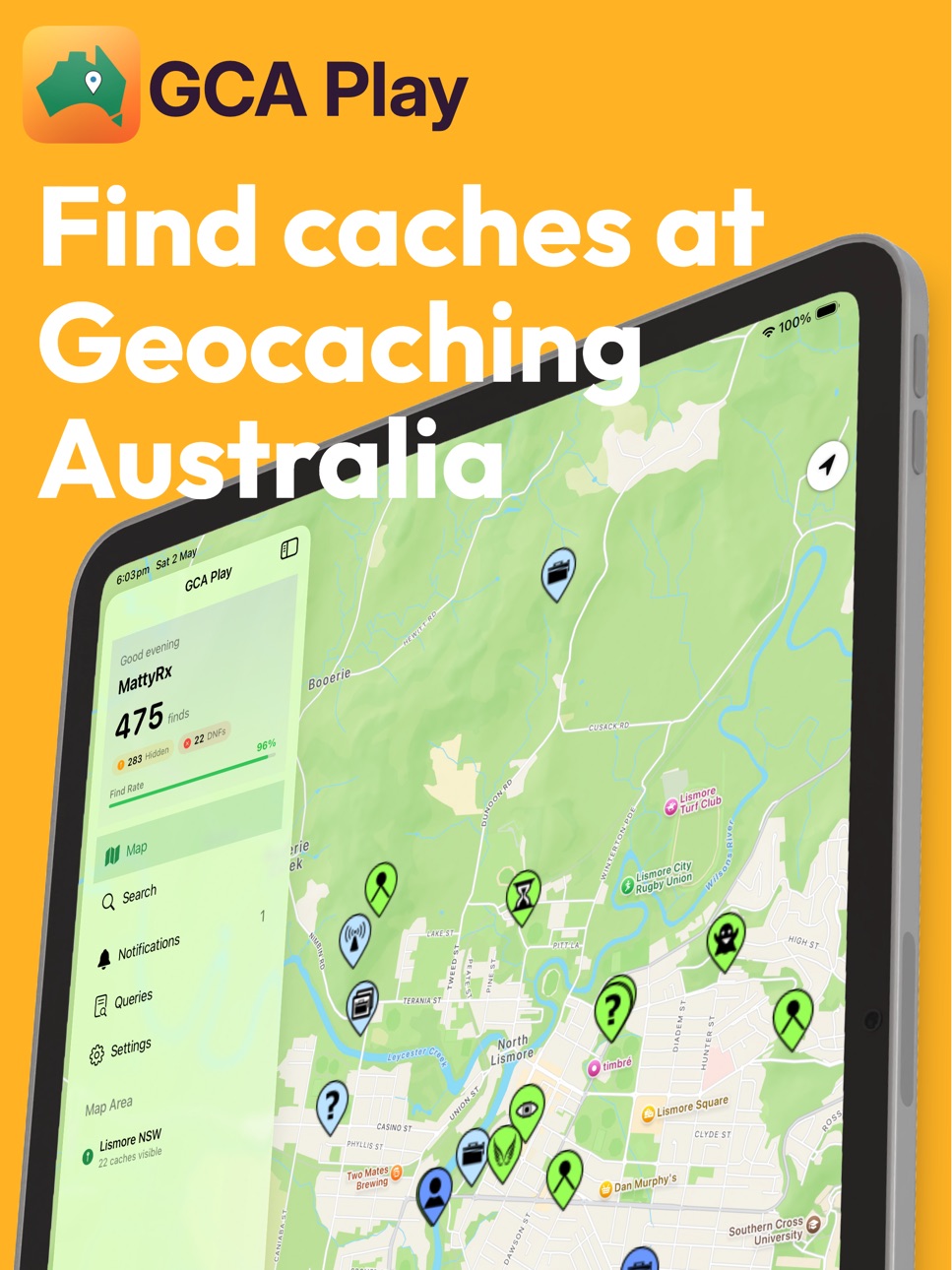
Browse thousands of GCA geocaches on an interactive map, navigate to them with a live compass, and log your finds without leaving the app.
FIND CACHES
• Interactive map showing caches near you
• Search and filter by type, difficulty, terrain, size, and status
• Difficulty, terrain, and size ratings at a glance
• View descriptions, hints, recent logs, and coordinates
• Support for Traditional, Multi, Mystery, Night, Gadget, GeoArt, Locationless, History, Earth Science, Webcam and more
• Works online and offline with Apple Watch, for untethered geocaching!
NAVIGATE
• Built-in compass with live bearing and distance
• Animated navigation dial with proximity pulses
• Tap coordinates to copy, or open in Apple Maps for driving directions
• GeoArt and corrected coordinate support
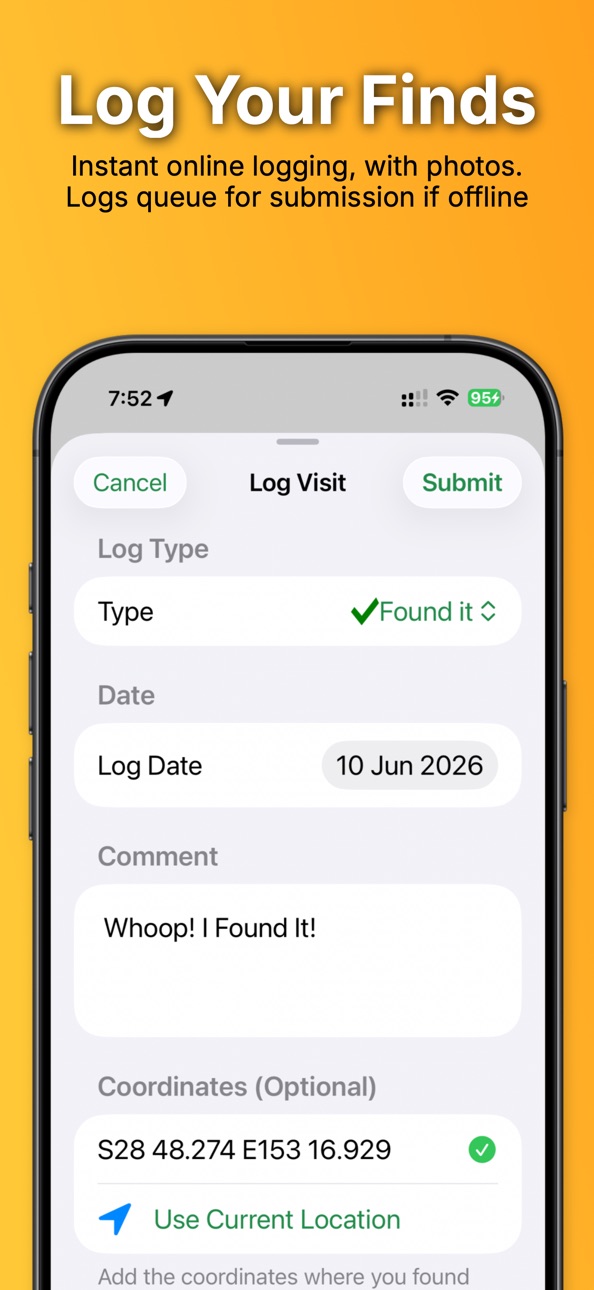
LOG YOUR FINDS
• Log finds, DNFs, and attended events directly in the app
• Offline logging — no signal? No problem. Logs queue automatically and submit when you're back online
• Q&A and codeword cache support
• Waypoint manager for multi-cache stages
• Attach photos and leave a rating
YOUR PROFILE
• View your find count, DNFs, and find rate
• Track your achievements and progress toward the next level
• Browse your recent activity and log history
• Browse and run your saved Pocket Queries
• Everything works offline
STAY IN THE LOOP
• In-app Geocaching Australia news feed
GCA Play is free for all Geocaching Australia cachers. A free Geocaching Australia account is required.
Accessibility
ipadiphonemacrealityDevicetvoswatch
Version history 5 versions
Build 887360204v1.52026-06-24 23:05:36
This update adds an Apple Watch companion app. The Watch app requires the paired iPhone app to be installed and logged in.
Key features:
• Displays nearby geocaches using the Watch's own GPS
• Shows cache details (name, type, difficulty/terrain, size, hint)
• Allows logging a "Found It" or DNF directly from the Watch
• Logs are queued on the Watch and synced to the iPhone via WatchConnectivity for final submission to the geocaching server
Build 886568242v1.32026-06-08 22:52:01
• Offline Logging — No signal? No problem. Log your finds in the field and they'll submit automatically when you're back online. Check Field Notes (in your Profile menu) to view, edit, or retry pending logs. You can turn this off in settings if you don't like it.
• Log submission visuals — Logging a cache should be celebrated, and now it is! You'll also see progress in obtaining the next level achievement with certain cache types.
• What's New Screen — A summary of new features now appears after each update. Revisit it any time in Settings → Help.
• Cake and Balloons
• Bug Fixes & Improvements — Fixed a crash on iOS 26 (thanks James!), and added VoiceOver support for several interactive elements.
Build 886219681v1.22026-05-28 16:57:48
Bug Fixes:
* News readability issues fixed if using dark mode.
Build 886185002v1.12026-05-27 19:07:36
New features:
• Achievements screen with honeycomb grid layout and gemstone level names
• Follow Me mode on the map — keeps the camera locked to your location
• In-app News section with unread tracking and badge on the Profile tab
• Recent Activity — view your last 10 cache logs
• Multi-photo upload when logging — attach multiple photos with optional captions
• Notifications now appear as an instant popup on launch
Improvements:
• Filter settings are now shared between the Map and Search screens
• Active filters are applied server-side for faster, more accurate search results
• iPad sidebar tidied up
Bug fixes:
• Follow Me no longer snaps back when dragging the map while moving
• Log photo EXIF orientation corrected before upload
Build 885183449v1.02026-05-13 01:05:30
No pricing data captured yet — comparisons appear once the app has paid storefronts or in-app purchases.
Availability 101 of 101 storefronts
| Region | Language | Price | Ratings | Avg | Version |
|---|---|---|---|---|---|
| AU | en-AU | Free | 2 | 5.0 | 1.5 |
| AE | en-GB | Free | 0 | — | 1.5 |
| AF | en-GB | Free | 0 | — | 1.5 |
| AL | en-GB | Free | 0 | — | 1.5 |
| AM | en-GB | Free | 0 | — | 1.5 |
| AT | de-DE | Free | 0 | — | 1.5 |
| AZ | en-GB | Free | 0 | — | 1.5 |
| BA | en-GB | Free | 0 | — | 1.5 |
| BE | en-GB | Free | 0 | — | 1.5 |
| BG | en-GB | Free | 0 | — | 1.5 |
| BH | en-GB | Free | 0 | — | 1.5 |
| BM | en-GB | Free | 0 | — | 1.5 |
| BN | en-GB | Free | 0 | — | 1.5 |
| BT | en-GB | Free | 0 | — | 1.5 |
| BY | en-GB | Free | 0 | — | 1.5 |
| CA | en-CA | Free | 0 | — | 1.5 |
| CH | de-CH | Free | 0 | — | 1.5 |
| CN | zh-Hans-CN | Free | 0 | — | 1.5 |
| CY | en-GB | Free | 0 | — | 1.5 |
| CZ | en-GB | Free | 0 | — | 1.5 |
| DE | de-DE | Free | 0 | — | 1.5 |
| DK | en-GB | Free | 0 | — | 1.5 |
| EE | en-GB | Free | 0 | — | 1.5 |
| EG | en-GB | Free | 0 | — | 1.5 |
| ES | es-ES | Free | 0 | — | 1.5 |
| FI | en-GB | Free | 0 | — | 1.5 |
| FJ | en-GB | Free | 0 | — | 1.5 |
| FM | en-GB | Free | 0 | — | 1.5 |
| FR | fr-FR | Free | 0 | — | 1.5 |
| GB | en-GB | Free | 0 | — | 1.5 |
| GE | en-GB | Free | 0 | — | 1.5 |
| GR | en-GB | Free | 0 | — | 1.5 |
| HK | zh-Hant-HK | Free | 0 | — | 1.5 |
| HR | en-GB | Free | 0 | — | 1.5 |
| HU | en-GB | Free | 0 | — | 1.5 |
| ID | en-GB | Free | 0 | — | 1.5 |
| IE | en-GB | Free | 0 | — | 1.5 |
| IL | en-GB | Free | 0 | — | 1.5 |
| IN | en-GB | Free | 0 | — | 1.5 |
| IQ | en-GB | Free | 0 | — | 1.5 |
| IS | en-GB | Free | 0 | — | 1.5 |
| IT | it | Free | 0 | — | 1.5 |
| JO | en-GB | Free | 0 | — | 1.5 |
| JP | ja | Free | 0 | — | 1.5 |
| KG | en-GB | Free | 0 | — | 1.5 |
| KH | en-GB | Free | 0 | — | 1.5 |
| KR | ko | Free | 0 | — | 1.5 |
| KW | en-GB | Free | 0 | — | 1.5 |
| KZ | en-GB | Free | 0 | — | 1.5 |
| LA | en-GB | Free | 0 | — | 1.5 |
| LB | en-GB | Free | 0 | — | 1.5 |
| LK | en-GB | Free | 0 | — | 1.5 |
| LT | en-GB | Free | 0 | — | 1.5 |
| LU | en-GB | Free | 0 | — | 1.5 |
| LV | en-GB | Free | 0 | — | 1.5 |
| MD | en-GB | Free | 0 | — | 1.5 |
| ME | en-GB | Free | 0 | — | 1.5 |
| MK | en-GB | Free | 0 | — | 1.5 |
| MM | en-GB | Free | 0 | — | 1.5 |
| MN | en-GB | Free | 0 | — | 1.5 |
| MO | zh-Hant-HK | Free | 0 | — | 1.5 |
| MR | en-GB | Free | 0 | — | 1.5 |
| MT | en-GB | Free | 0 | — | 1.5 |
| MV | en-GB | Free | 0 | — | 1.5 |
| MY | en-GB | Free | 0 | — | 1.5 |
| NL | nl | Free | 0 | — | 1.5 |
| NO | en-GB | Free | 0 | — | 1.5 |
| NP | en-GB | Free | 0 | — | 1.5 |
| NR | en-GB | Free | 0 | — | 1.5 |
| NZ | en-AU | Free | 0 | — | 1.5 |
| OM | en-GB | Free | 0 | — | 1.5 |
| PG | en-GB | Free | 0 | — | 1.5 |
| PH | en-GB | Free | 0 | — | 1.5 |
| PK | en-GB | Free | 0 | — | 1.5 |
| PL | en-GB | Free | 0 | — | 1.5 |
| PT | pt-PT | Free | 0 | — | 1.5 |
| PW | en-GB | Free | 0 | — | 1.5 |
| QA | en-GB | Free | 0 | — | 1.5 |
| RO | en-GB | Free | 0 | — | 1.5 |
| RS | en-GB | Free | 0 | — | 1.5 |
| RU | ru | Free | 0 | — | 1.5 |
| SA | en-GB | Free | 0 | — | 1.5 |
| SB | en-GB | Free | 0 | — | 1.5 |
| SE | sv | Free | 0 | — | 1.5 |
| SG | en-GB | Free | 0 | — | 1.5 |
| SI | en-GB | Free | 0 | — | 1.5 |
| SK | en-GB | Free | 0 | — | 1.5 |
| TH | en-GB | Free | 0 | — | 1.5 |
| TJ | en-GB | Free | 0 | — | 1.5 |
| TM | en-GB | Free | 0 | — | 1.5 |
| TO | en-GB | Free | 0 | — | 1.5 |
| TR | en-GB | Free | 0 | — | 1.5 |
| TW | zh-Hant-TW | Free | 0 | — | 1.5 |
| UA | en-GB | Free | 0 | — | 1.5 |
| US | en-US | Free | 0 | — | 1.5 |
| UZ | en-GB | Free | 0 | — | 1.5 |
| VN | en-GB | Free | 0 | — | 1.5 |
| VU | en-GB | Free | 0 | — | 1.5 |
| XK | en-GB | Free | 0 | — | 1.5 |
| YE | en-GB | Free | 0 | — | 1.5 |
| ZA | en-GB | Free | 0 | — | 1.5 |
Change log 9 changes · US
✎
releaseNotes updated
This update adds an Apple Watch companion app. The Watch app requires the paired iPhone app to be installed and logged in.
Key features:
• Displays nearby geoc
✎
description updated
GCA Play is a native iOS and companion watchOS app for Geocaching Australia geocachers — built for the field, not the desk.
Browse thousands of GCA geocaches o
✎
subtitle updated
Find. Log. Play. GCA.
✎
name updated
GCA Play
◆
Version 1.5 released
This update adds an Apple Watch companion app. The Watch app requires the paired iPhone app to be installed and logged in.
Key features:
• Displays nearby geocaches using the Watch's own GPS
• Shows cache details (name, type, difficulty/te
◆
Version 1.3 released
• Offline Logging — No signal? No problem. Log your finds in the field and they'll submit automatically when you're back online. Check Field Notes (in your Profile menu) to view, edit, or retry pending logs. You can turn this off in setting
◆
Version 1.2 released
Bug Fixes:
* News readability issues fixed if using dark mode.
◆
Version 1.1 released
New features:
• Achievements screen with honeycomb grid layout and gemstone level names
• Follow Me mode on the map — keeps the camera locked to your location
• In-app News section with unread tracking and badge on the Profile tab
• Recent
◆
Version 1.0 released