Home › Photo & Video

 US
US
 DEde-DE
 CNzh-Hans-CN
 ILen-GB
 AEen-GB
 AFen-GB
 AGen-GB
 AIen-GB
 ALen-GB
 AMen-GB
 AOen-GB
 ARes-MX
 ATde-DE
 AUen-AU
 AZen-GB
 BAen-GB
 BBen-GB
 BEen-GB
 BFen-GB
 BGen-GB
 BHen-GB
 BJen-GB
 BMen-GB
 BNen-GB
 BOes-MX
 BRpt-BR
 BSen-GB
 BTen-GB
 BWen-GB
 BYen-GB
 BZen-GB
 CAen-CA
 CDen-GB
 CGen-GB
 CHde-CH
 CIfr-FR
 CLes-MX
 CMfr-FR
 COes-MX
 CRes-MX
 CVen-GB
 CYen-GB
 CZen-GB
 DKen-GB
 DMen-GB
 DOes-MX
 DZen-GB
 ECes-MX
 EEen-GB
 EGen-GB
 ESes-ES
 FIen-GB
 FJen-GB
 FMen-GB
 FRfr-FR
 GAfr-FR
 GBen-GB
 GDen-GB
 GEen-GB
 GHen-GB
 GMen-GB
 GRen-GB
 GTes-MX
 GWen-GB
 GYen-GB
 HKzh-Hant-HK
 HNes-MX
 HRen-GB
 HUen-GB
 IDen-GB
 IEen-GB
 INen-GB
 IQen-GB
 ISen-GB
 ITit
ITit JMen-GB
 JOen-GB
 JPja
JPja KEen-GB
 KGen-GB
 KHen-GB
 KNen-GB
 KRko
KRko KWen-GB
 KYen-GB
 KZen-GB
 LAen-GB
 LBen-GB
 LCen-GB
 LKen-GB
 LRen-GB
 LTen-GB
 LUen-GB
 LVen-GB
 LYen-GB
 MAen-GB
 MDen-GB
 MEen-GB
 MGen-GB
 MKen-GB
 MLen-GB
 MMen-GB
 MNen-GB
 MOzh-Hant-HK
 MRen-GB
 MSen-GB
 MTen-GB
 MUen-GB
 MVen-GB
 MWen-GB
 MXes-MX
 MYen-GB
 MZen-GB
 NAen-GB
 NEen-GB
 NGen-GB
 NIes-MX
 NLnl
NLnl NOen-GB
 NPen-GB
 NRen-GB
 NZen-AU
 OMen-GB
 PAes-MX
 PEes-MX
 PGen-GB
 PHen-GB
 PKen-GB
 PLen-GB
 PTpt-PT
 PWen-GB
 PYes-MX
 QAen-GB
 ROen-GB
 RSen-GB
 RUru
RUru RWen-GB
 SAen-GB
 SBen-GB
 SCen-GB
 SEsv
SEsv SGen-GB
 SIen-GB
 SKen-GB
 SLen-GB
 SNen-GB
 SRen-GB
 STen-GB
 SVes-MX
 SZen-GB
 TCen-GB
 TDen-GB
 THen-GB
 TJen-GB
 TMen-GB
 TNen-GB
 TOen-GB
 TRen-GB
 TTen-GB
 TWzh-Hant-TW
 TZen-GB
 UAen-GB
 UGen-GBUSen-US
 UYen-GB
 UZen-GB
 VCen-GB
 VEes-MX
 VGen-GB
 VNen-GB
 VUen-GB
 XKen-GB
 YEen-GB
 ZAen-GB
 ZMen-GB
 ZWen-GB
175 of 175 storefronts
Content in en-US
Content in en-US
Information
Preview 3 platforms
iPhone 10 images




iPad 10 images





Mac 8 images





What’s New Version 2.0
VERSION 2.0
• Clean one album at a time — Point SwipePhotos at any album instead of your whole library. Tackle your Screenshots, a shared trip album, or just last month's camera roll first.
• Faster duplicate finding — A rebuilt photo index spots duplicates and near-identical bursts more quickly, so Smart Stacks group your look-alikes with less waiting.
• Invite friends, unlock for free — Share your invite link and unlock SwipePhotos for free when friends join. Just getting started? Paste a friend's code right in the welcome flow.
Improvements
• A range of behind-the-scenes fixes to keep everything running quickly and reliably.
Description
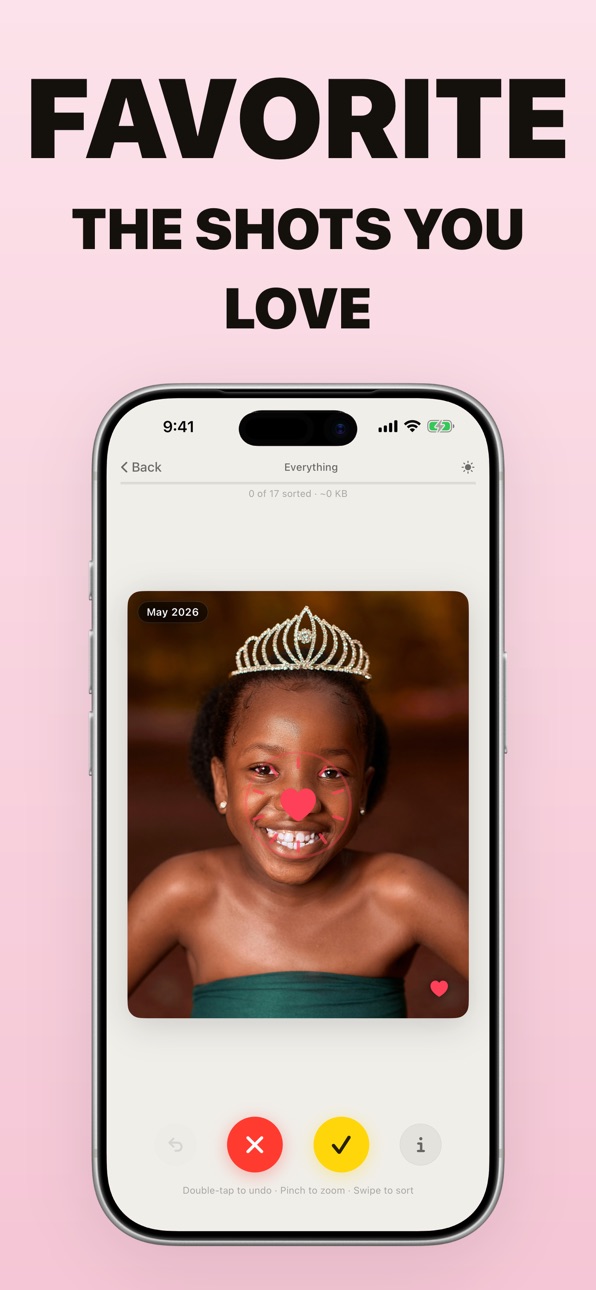
Clean up duplicate photos, blurry bursts, screenshots and camera-roll clutter with quick swipes. Swipe right to keep, left to delete, up to favorite. Work month by month, review before deleting, and free up space without uploading your photos.
WHY SWIPEPHOTOS WORKS
• Month-by-month decks. Instead of scrolling through thousands of tiny thumbnails, start with one month at a time and pick up exactly where you left off.
• Smart Stack for similar shots. When SwipePhotos finds a burst or a run of near-duplicates, it shows them together in a grid. Tap the weaker shots, keep the best one, and move on.
• Review before you delete. Undo the last swipe with a long press. Photos marked for deletion go into a review tray first, then move to Apple's Recently Deleted album only after you confirm.
• Mac app included. Use Y to keep, X to delete, and C to favorite. Same photo library, same progress, faster sorting when you want a keyboard.
• Private by design. SwipePhotos reads your Apple Photos library with PhotoKit and processes everything on your device. Your photos are not uploaded, and there are no photo-processing servers.
WORKS WITH ICLOUD PHOTOS
If you use iCloud Photos, SwipePhotos works with the same library the Photos app sees. Your decisions sync across devices like other changes to your library.
PRICING
Your first collection of photos is free to sort. To delete sorted photos and keep cleaning, subscribe monthly or yearly. Referral codes can add free trial time: you and a friend each get a free week after the friend's first cleanup, with a free-month bonus at three qualified friends. The current price is shown in the App Store before you subscribe. One subscription covers iPhone and Mac. No ads, no separate Pro tier, and you can cancel anytime in App Store settings.
Subscriptions renew automatically unless turned off at least 24 hours before the end of the current period. Your account is charged for renewal within 24 hours before the current period ends. Manage or cancel your subscription in your App Store account settings.
— Privacy Policy: https://swipephotos.com/privacy-policy
— Terms of Use: https://swipephotos.com/terms
— Support: hi@swipephotos.com
In-App Purchases US pricing
SwipePhotos Pro Subscription
(monthly) · Monthly$2.99
(yearly) · Yearly$39.99
Capabilities
In-App Purchases
Accessibility
ipadiphonemacrealityDevicetvoswatch
Version history 7 versions
Build 886609370v1.62026-06-10 08:18:41
VERSION 2.0
• Live Photos come to the Mac — Hover over a Live Photo while you sort and it plays right there in the reviewer, and a new LIVE badge marks them inside smart stacks so the moving shots are easy to spot.
• Now in seven more languages — SwipePhotos is fully translated into Italian, Japanese, Korean, Turkish, Indonesian, Brazilian Portuguese, and European Portuguese.
Improvements
• Various behind-the-scenes improvements to keep everything running smoothly.
Build 886767841v2.02026-06-10 19:04:01
VERSION 2.0
• Clean one album at a time — Point SwipePhotos at any album instead of your whole library. Tackle your Screenshots, a shared trip album, or just last month's camera roll first.
• Faster duplicate finding — A rebuilt photo index spots duplicates and near-identical bursts more quickly, so Smart Stacks group your look-alikes with less waiting.
• Invite friends, unlock for free — Share your invite link and unlock SwipePhotos for free when friends join. Just getting started? Paste a friend's code right in the welcome flow.
Improvements
• A range of behind-the-scenes fixes to keep everything running quickly and reliably.
Build 886467891v1.52026-06-03 17:22:20
VERSION 1.5
• Sort your first month free, no limits — The daily swipe cap is gone. Pick your most recent month and sort the whole thing from start to finish at no cost. Subscribe when you're ready to delete what you've marked and to tidy up the rest of your library.
• A warmer welcome — First launch now opens with a quick demo of SwipePhotos in action and a couple of fast questions, then walks you through your first few swipes before asking for photo access — so you know exactly how it works before you start.
Improvements
• Cleaner photo preview — Press and hold a photo in a smart stack and it now floats over a soft frosted backdrop, so the photo stands out and the grid fades gently behind it.
Bug fixes
• Labels stay put when you zoom — Pinch-zooming a photo no longer drags the date and video badges around with it; they stay anchored in the corners while the photo scales and pans.
• Videos no longer play out of sight — Opening a smart stack now pauses the video on the card behind it and picks it back up the moment you tap back, instead of leaving it running where you can't see it.
Build 886326898v1.42026-05-30 20:57:36
VERSION 1.4
• Now in 8 languages — SwipePhotos is fully translated into English, German, Spanish, French, Chinese, Hindi, Arabic, and Russian.
• Invite friends, earn free Pro — Share your personal invite link. Your friend gets a free week of Pro, and you get a free month free when they install and finish their first cleanup. Redeemed right through the App Store, and the app reminds you to share once you've gotten into the swing of things.
Improvements
• Starts with your latest photos — Reviewing a stack now opens on your most recent photo instead of the oldest, so you tidy up what you actually just shot first.
• No more blank screen on iCloud photos — A loading spinner now shows while a photo downloads from iCloud, so you always know it's on its way.
Bug fixes
• Fixed scrolling in large stacks — You can now scroll all the way through a smart stack to reach photos that were previously cut off at the bottom.
• Press-and-hold no longer misselects — Holding a photo to preview it, then letting go, no longer accidentally flips it between keep and delete.
Build 886121977v1.32026-05-26 20:21:55
UPDATE 1.3
• Daily free swipes. Free tier is now 10 swipes per day (resets at midnight) instead of a one-time cap. More forgiving if you're just trying the app for a few minutes a day.
• Pinch to zoom. Spread two fingers on a photo to check the detail before you decide. Pan around while zoomed, then release to snap back and keep swiping.
• Video sound, on your terms. Tap the speaker on a video card to unmute. The choice sticks across cards and across launches, and it plays even with the silent switch on. Long-press a video in Smart Stack and it loops in the preview.
• Better on iPad. Cards, tutorials, and the library no longer stretch across the screen — they're sized and centered properly in split view and on the 12.9". Smart Stack shows three columns on bigger screens.
• Sharper progress. The reviewer now shows "X of Y sorted · ~ZZ MB" so you can feel the storage you're freeing in real time.
• Trophies are here. Hit milestones — first 100 sorted, a 7-day streak, a gigabyte freed — and they pop in as you swipe. There's a Trophy Cabinet in Settings with 17 trophies across Swipe Volume, Streaks, Declutter, Curator, and a few hidden Habits ones you'll have to find. Each locked tile shows how close you are.
Build 885777961v1.22026-05-19 09:41:54
UPDATE 1.2
• Overall improvements in speed and consistency.
• New subscription offers available.
• Tutorial shows you how to triage similar photos so you can clean up your library faster.
Build 885155437v1.02026-05-16 15:37:17
Price history by region
Currency
Show
Columns
Search
Availability 175 of 175 storefronts
| Region | Language | Price | Ratings | Avg | Version |
|---|---|---|---|---|---|
| DE | de-DE | Free | 7 | 5.0 | 2.0 |
| CN | zh-Hans-CN | Free | 1 | 5.0 | 2.0 |
| IL | en-GB | Free | 1 | 3.0 | 2.0 |
| AE | en-GB | Free | 0 | — | 2.0 |
| AF | en-GB | Free | 0 | — | 2.0 |
| AG | en-GB | Free | 0 | — | 2.0 |
| AI | en-GB | Free | 0 | — | 2.0 |
| AL | en-GB | Free | 0 | — | 2.0 |
| AM | en-GB | Free | 0 | — | 2.0 |
| AO | en-GB | Free | 0 | — | 2.0 |
| AR | es-MX | Free | 0 | — | 2.0 |
| AT | de-DE | Free | 0 | — | 2.0 |
| AU | en-AU | Free | 0 | — | 2.0 |
| AZ | en-GB | Free | 0 | — | 2.0 |
| BA | en-GB | Free | 0 | — | 2.0 |
| BB | en-GB | Free | 0 | — | 2.0 |
| BE | en-GB | Free | 0 | — | 2.0 |
| BF | en-GB | Free | 0 | — | 2.0 |
| BG | en-GB | Free | 0 | — | 2.0 |
| BH | en-GB | Free | 0 | — | 2.0 |
| BJ | en-GB | Free | 0 | — | 2.0 |
| BM | en-GB | Free | 0 | — | 2.0 |
| BN | en-GB | Free | 0 | — | 2.0 |
| BO | es-MX | Free | 0 | — | 2.0 |
| BR | pt-BR | Free | 0 | — | 2.0 |
| BS | en-GB | Free | 0 | — | 2.0 |
| BT | en-GB | Free | 0 | — | 2.0 |
| BW | en-GB | Free | 0 | — | 2.0 |
| BY | en-GB | Free | 0 | — | 2.0 |
| BZ | en-GB | Free | 0 | — | 2.0 |
| CA | en-CA | Free | 0 | — | 2.0 |
| CD | en-GB | Free | 0 | — | 2.0 |
| CG | en-GB | Free | 0 | — | 2.0 |
| CH | de-CH | Free | 0 | — | 2.0 |
| CI | fr-FR | Free | 0 | — | 2.0 |
| CL | es-MX | Free | 0 | — | 2.0 |
| CM | fr-FR | Free | 0 | — | 2.0 |
| CO | es-MX | Free | 0 | — | 2.0 |
| CR | es-MX | Free | 0 | — | 2.0 |
| CV | en-GB | Free | 0 | — | 2.0 |
| CY | en-GB | Free | 0 | — | 2.0 |
| CZ | en-GB | Free | 0 | — | 2.0 |
| DK | en-GB | Free | 0 | — | 2.0 |
| DM | en-GB | Free | 0 | — | 2.0 |
| DO | es-MX | Free | 0 | — | 2.0 |
| DZ | en-GB | Free | 0 | — | 2.0 |
| EC | es-MX | Free | 0 | — | 2.0 |
| EE | en-GB | Free | 0 | — | 2.0 |
| EG | en-GB | Free | 0 | — | 2.0 |
| ES | es-ES | Free | 0 | — | 2.0 |
| FI | en-GB | Free | 0 | — | 2.0 |
| FJ | en-GB | Free | 0 | — | 2.0 |
| FM | en-GB | Free | 0 | — | 2.0 |
| FR | fr-FR | Free | 0 | — | 2.0 |
| GA | fr-FR | Free | 0 | — | 2.0 |
| GB | en-GB | Free | 0 | — | 2.0 |
| GD | en-GB | Free | 0 | — | 2.0 |
| GE | en-GB | Free | 0 | — | 2.0 |
| GH | en-GB | Free | 0 | — | 2.0 |
| GM | en-GB | Free | 0 | — | 2.0 |
| GR | en-GB | Free | 0 | — | 2.0 |
| GT | es-MX | Free | 0 | — | 2.0 |
| GW | en-GB | Free | 0 | — | 2.0 |
| GY | en-GB | Free | 0 | — | 2.0 |
| HK | zh-Hant-HK | Free | 0 | — | 2.0 |
| HN | es-MX | Free | 0 | — | 2.0 |
| HR | en-GB | Free | 0 | — | 2.0 |
| HU | en-GB | Free | 0 | — | 2.0 |
| ID | en-GB | Free | 0 | — | 2.0 |
| IE | en-GB | Free | 0 | — | 2.0 |
| IN | en-GB | Free | 0 | — | 2.0 |
| IQ | en-GB | Free | 0 | — | 2.0 |
| IS | en-GB | Free | 0 | — | 2.0 |
| IT | it | Free | 0 | — | 2.0 |
| JM | en-GB | Free | 0 | — | 2.0 |
| JO | en-GB | Free | 0 | — | 2.0 |
| JP | ja | Free | 0 | — | 2.0 |
| KE | en-GB | Free | 0 | — | 2.0 |
| KG | en-GB | Free | 0 | — | 2.0 |
| KH | en-GB | Free | 0 | — | 2.0 |
| KN | en-GB | Free | 0 | — | 2.0 |
| KR | ko | Free | 0 | — | 2.0 |
| KW | en-GB | Free | 0 | — | 2.0 |
| KY | en-GB | Free | 0 | — | 2.0 |
| KZ | en-GB | Free | 0 | — | 2.0 |
| LA | en-GB | Free | 0 | — | 2.0 |
| LB | en-GB | Free | 0 | — | 2.0 |
| LC | en-GB | Free | 0 | — | 2.0 |
| LK | en-GB | Free | 0 | — | 2.0 |
| LR | en-GB | Free | 0 | — | 2.0 |
| LT | en-GB | Free | 0 | — | 2.0 |
| LU | en-GB | Free | 0 | — | 2.0 |
| LV | en-GB | Free | 0 | — | 2.0 |
| LY | en-GB | Free | 0 | — | 2.0 |
| MA | en-GB | Free | 0 | — | 2.0 |
| MD | en-GB | Free | 0 | — | 2.0 |
| ME | en-GB | Free | 0 | — | 2.0 |
| MG | en-GB | Free | 0 | — | 2.0 |
| MK | en-GB | Free | 0 | — | 2.0 |
| ML | en-GB | Free | 0 | — | 2.0 |
| MM | en-GB | Free | 0 | — | 2.0 |
| MN | en-GB | Free | 0 | — | 2.0 |
| MO | zh-Hant-HK | Free | 0 | — | 2.0 |
| MR | en-GB | Free | 0 | — | 2.0 |
| MS | en-GB | Free | 0 | — | 2.0 |
| MT | en-GB | Free | 0 | — | 2.0 |
| MU | en-GB | Free | 0 | — | 2.0 |
| MV | en-GB | Free | 0 | — | 2.0 |
| MW | en-GB | Free | 0 | — | 2.0 |
| MX | es-MX | Free | 0 | — | 2.0 |
| MY | en-GB | Free | 0 | — | 2.0 |
| MZ | en-GB | Free | 0 | — | 2.0 |
| NA | en-GB | Free | 0 | — | 2.0 |
| NE | en-GB | Free | 0 | — | 2.0 |
| NG | en-GB | Free | 0 | — | 2.0 |
| NI | es-MX | Free | 0 | — | 2.0 |
| NL | nl | Free | 0 | — | 2.0 |
| NO | en-GB | Free | 0 | — | 2.0 |
| NP | en-GB | Free | 0 | — | 2.0 |
| NR | en-GB | Free | 0 | — | 2.0 |
| NZ | en-AU | Free | 0 | — | 2.0 |
| OM | en-GB | Free | 0 | — | 2.0 |
| PA | es-MX | Free | 0 | — | 2.0 |
| PE | es-MX | Free | 0 | — | 2.0 |
| PG | en-GB | Free | 0 | — | 2.0 |
| PH | en-GB | Free | 0 | — | 2.0 |
| PK | en-GB | Free | 0 | — | 2.0 |
| PL | en-GB | Free | 0 | — | 2.0 |
| PT | pt-PT | Free | 0 | — | 2.0 |
| PW | en-GB | Free | 0 | — | 2.0 |
| PY | es-MX | Free | 0 | — | 2.0 |
| QA | en-GB | Free | 0 | — | 2.0 |
| RO | en-GB | Free | 0 | — | 2.0 |
| RS | en-GB | Free | 0 | — | 2.0 |
| RU | ru | Free | 0 | — | 2.0 |
| RW | en-GB | Free | 0 | — | 2.0 |
| SA | en-GB | Free | 0 | — | 2.0 |
| SB | en-GB | Free | 0 | — | 2.0 |
| SC | en-GB | Free | 0 | — | 2.0 |
| SE | sv | Free | 0 | — | 2.0 |
| SG | en-GB | Free | 0 | — | 2.0 |
| SI | en-GB | Free | 0 | — | 2.0 |
| SK | en-GB | Free | 0 | — | 2.0 |
| SL | en-GB | Free | 0 | — | 2.0 |
| SN | en-GB | Free | 0 | — | 2.0 |
| SR | en-GB | Free | 0 | — | 2.0 |
| ST | en-GB | Free | 0 | — | 2.0 |
| SV | es-MX | Free | 0 | — | 2.0 |
| SZ | en-GB | Free | 0 | — | 2.0 |
| TC | en-GB | Free | 0 | — | 2.0 |
| TD | en-GB | Free | 0 | — | 2.0 |
| TH | en-GB | Free | 0 | — | 2.0 |
| TJ | en-GB | Free | 0 | — | 2.0 |
| TM | en-GB | Free | 0 | — | 2.0 |
| TN | en-GB | Free | 0 | — | 2.0 |
| TO | en-GB | Free | 0 | — | 2.0 |
| TR | en-GB | Free | 0 | — | 2.0 |
| TT | en-GB | Free | 0 | — | 2.0 |
| TW | zh-Hant-TW | Free | 0 | — | 2.0 |
| TZ | en-GB | Free | 0 | — | 2.0 |
| UA | en-GB | Free | 0 | — | 2.0 |
| UG | en-GB | Free | 0 | — | 2.0 |
| US | en-US | Free | 0 | — | 2.0 |
| UY | en-GB | Free | 0 | — | 2.0 |
| UZ | en-GB | Free | 0 | — | 2.0 |
| VC | en-GB | Free | 0 | — | 2.0 |
| VE | es-MX | Free | 0 | — | 2.0 |
| VG | en-GB | Free | 0 | — | 2.0 |
| VN | en-GB | Free | 0 | — | 2.0 |
| VU | en-GB | Free | 0 | — | 2.0 |
| XK | en-GB | Free | 0 | — | 2.0 |
| YE | en-GB | Free | 0 | — | 2.0 |
| ZA | en-GB | Free | 0 | — | 2.0 |
| ZM | en-GB | Free | 0 | — | 2.0 |
| ZW | en-GB | Free | 0 | — | 2.0 |
Change log 11 changes · US
✎
releaseNotes updated
VERSION 2.0
• Clean one album at a time — Point SwipePhotos at any album instead of your whole library. Tackle your Screenshots, a shared trip album, or just l
✎
description updated
Clean up duplicate photos, blurry bursts, screenshots and camera-roll clutter with quick swipes. Swipe right to keep, left to delete, up to favorite. Work month
✎
subtitle updated
Delete duplicates, free space
✎
name updated
SwipePhotos: Photo Cleaner
◆
Version 2.0 released
VERSION 2.0
• Clean one album at a time — Point SwipePhotos at any album instead of your whole library. Tackle your Screenshots, a shared trip album, or just last month's camera roll first.
• Faster duplicate finding — A rebuilt photo inde
◆
Version 1.6 released
VERSION 2.0
• Live Photos come to the Mac — Hover over a Live Photo while you sort and it plays right there in the reviewer, and a new LIVE badge marks them inside smart stacks so the moving shots are easy to spot.
• Now in seven more lang
◆
Version 1.5 released
VERSION 1.5
• Sort your first month free, no limits — The daily swipe cap is gone. Pick your most recent month and sort the whole thing from start to finish at no cost. Subscribe when you're ready to delete what you've marked and to tidy u
◆
Version 1.4 released
VERSION 1.4
• Now in 8 languages — SwipePhotos is fully translated into English, German, Spanish, French, Chinese, Hindi, Arabic, and Russian.
• Invite friends, earn free Pro — Share your personal invite link. Your friend gets a free week
◆
Version 1.3 released
UPDATE 1.3
• Daily free swipes. Free tier is now 10 swipes per day (resets at midnight) instead of a one-time cap. More forgiving if you're just trying the app for a few minutes a day.
• Pinch to zoom. Spread two fingers on a photo to chec
◆
Version 1.2 released
UPDATE 1.2
• Overall improvements in speed and consistency.
• New subscription offers available.
• Tutorial shows you how to triage similar photos so you can clean up your library faster.
◆
Version 1.0 released