Home › Business

 US
US
1 of 1 storefronts
Content in en-US
Content in en-US
Information
Preview 2 platforms
iPhone 6 images



iPad 3 images


What’s New Version 1.0.8
Host parity updates for the iOS app: guest ETA changes now show in the live waitlist, reservations show when guests move their time, completed history distinguishes guest cancellations, and replay analytics include cancelled-party counts.
Description
OSH is the restaurant operating system for the front desk. Staff sign in with their OSH account and land in the right workspace for their role: host, admin, or owner. Guests can open the same app into a branded queue tracker for the specific restaurant they are visiting.
WAITING TAB
• Live queue: every party in position order, with promised time and a second-by-second "waiting" clock.
• Guest ETA changes: when a guest moves their ETA from the guest queue tracker, hosts see the updated time and whether it happened after a call.
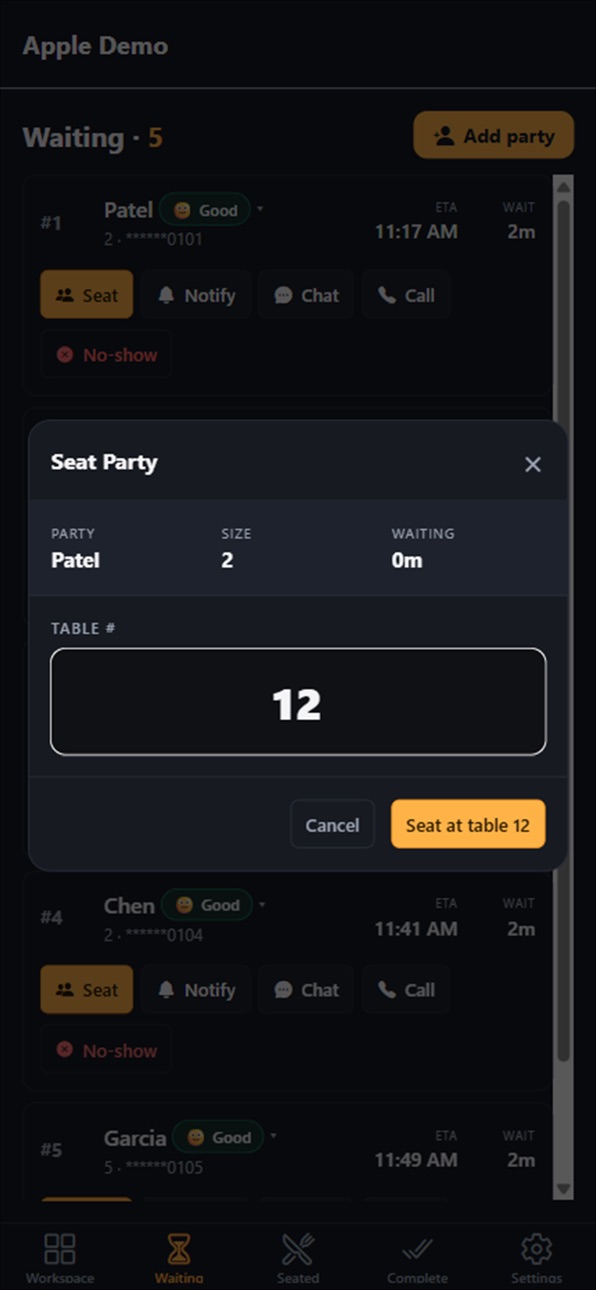
• One-tap Seat: tap Seat on any party, enter the physical table number, and confirm. The party moves to the Seated tab and your turn-time tracking starts.
• One-tap Chat: a two-way SMS thread with the guest, including three quick replies — "Your table is almost ready," "Need 5 more minutes?" and "We lost you — are you still here?"
• One-tap Call: dial the guest's phone directly from the row. No paste, no dialer. The call is logged on the party record.
• Notify, Custom SMS, Custom Call, No-show: the existing host actions are preserved.
• Rows whose phone number is missing or invalid disable messaging and calling automatically so you can't accidentally reach the wrong party.
SEATED TAB
• Every seated row shows its table number in the leftmost cell so anyone at the stand can answer "where is the Patel party sitting?" in half a second.
• Advance turn states — Ordered / Served / Checkout / Departed — so your downstream Avg Order, Avg Serve, and Avg Checkout rollups stay accurate.
SEAT-WITH-TABLE DIALOG
• Table number is required on seat. Recent tables are quick-pick chips.
• If you try to seat a party at a table that is already occupied, you see the conflict (which party is currently there), and an explicit override is required to proceed. Mistakes are caught; emergencies are not blocked.
ROLE-AWARE ACCESS
• Hosts land directly in the live floor view.
• Admins and owners get a workspace for guest settings, messaging identity, and front-desk controls.
• Guests can enter a restaurant slug and optionally a party code to open that restaurant's branded queue tracker.
BUILT FOR THE STAND
• Rich mobile-first UI with restaurant branding after login.
• iPad-primary, iPhone-secondary.
• Polls every 15 seconds while the app is in the foreground; pauses automatically while backgrounded so it doesn't burn battery on a locked tablet.
• Staff sign in with a named OSH account, with multi-restaurant selection when needed.
OSH is an internal hospitality tool. It does not collect or display data beyond what the restaurant already manages in the OSH dashboard today.
Accessibility
ipadiphonemacrealityDevicetvoswatch
Version history 9 versions
Build 887769522v1.0.82026-07-04 07:01:47
Host parity updates for the iOS app: guest ETA changes now show in the live waitlist, reservations show when guests move their time, completed history distinguishes guest cancellations, and replay analytics include cancelled-party counts.
Build 886617898v1.0.72026-06-07 15:26:55
Improves host call reliability and call bridge diagnostics.
Build 886543495v1.0.62026-06-05 00:21:03
• Photo upload for menu items and signature dishes
• Spiciness levels and dietary labels (Veg / Vegan / GF) on menu items
• Phone numbers redesigned — external facing number and call routing
• Website preview link in Settings
• Dashboard tab rename
• Bug fixes and performance improvements
Build 885976027v1.0.52026-05-22 00:24:24
• No ETA mode: hosts can hide wait time estimates entirely for walkin-only or unpredictable nights
• Adjustment tender: charge adjustments now carry a tender-type field (cash, card, comp) for accurate reconciliation
• Last notification display: host row shows the timestamp of the last SMS sent to each party
• Biometric login: Face ID / Touch ID sign-in on supported devices
• Seat warning when a table is already occupied
• Max party size enforcement at the front desk
• Account identity and forgot-password flow
Build 885832375v1.0.42026-05-19 16:29:45
Full party event timeline. The Complete tab now shows a chronological log of every event a party went through - joined, no-show, recovered, restored to queue, seated, ordered, served, and more. Multiple no-show/recovery cycles are all preserved. The Replay screen also shows these events as markers and in the hover tooltip.
Build 885736641v1.0.32026-05-16 17:14:11
Late-arrival no-show recovery. Same-day no-shows can now be recovered directly from the Complete tab, with Seat, Notify, Chat, Call, and Restore actions preserved across web and iOS. Guest no-show guidance is also clearer for late arrivals.
Build 885690771v1.0.22026-05-15 16:00:10
Reservation management for hosts:
• New Reserve tab (enabled when queue mode is set to Reservation or Both)
• Check in arriving guests; ARRIVED badge tracks them until seated
• Queue mode setting in Settings → admins can switch between Waitlist, Reservation, or Both
• Reservation source badge on Seated tab for reservation-originated parties
Build 885146128v1.0.12026-05-01 17:08:21
Improved App Store search metadata and prepared the 1.0.1 release.
Build 884949277v1.0.02026-04-29 19:38:24
No pricing data captured yet — comparisons appear once the app has paid storefronts or in-app purchases.
Availability 1 of 1 storefronts
| Region | Language | Price | Ratings | Avg | Version |
|---|---|---|---|---|---|
| US | en-US | Free | 3 | 5.0 | 1.0.8 |
Change log 13 changes · US
✎
releaseNotes updated
Host parity updates for the iOS app: guest ETA changes now show in the live waitlist, reservations show when guests move their time, completed history distingui
✎
description updated
OSH is the restaurant operating system for the front desk. Staff sign in with their OSH account and land in the right workspace for their role: host, admin, or
✎
subtitle updated
Restaurant OS
✎
name updated
OSH Host Stand
◆
Version 1.0.8 released
Host parity updates for the iOS app: guest ETA changes now show in the live waitlist, reservations show when guests move their time, completed history distinguishes guest cancellations, and replay analytics include cancelled-party counts.
◆
Version 1.0.7 released
Improves host call reliability and call bridge diagnostics.
◆
Version 1.0.6 released
• Photo upload for menu items and signature dishes
• Spiciness levels and dietary labels (Veg / Vegan / GF) on menu items
• Phone numbers redesigned — external facing number and call routing
• Website preview link in Settings
• Dashboard ta
◆
Version 1.0.5 released
• No ETA mode: hosts can hide wait time estimates entirely for walkin-only or unpredictable nights
• Adjustment tender: charge adjustments now carry a tender-type field (cash, card, comp) for accurate reconciliation
• Last notification disp
◆
Version 1.0.4 released
Full party event timeline. The Complete tab now shows a chronological log of every event a party went through - joined, no-show, recovered, restored to queue, seated, ordered, served, and more. Multiple no-show/recovery cycles are all prese
◆
Version 1.0.3 released
Late-arrival no-show recovery. Same-day no-shows can now be recovered directly from the Complete tab, with Seat, Notify, Chat, Call, and Restore actions preserved across web and iOS. Guest no-show guidance is also clearer for late arrivals.
◆
Version 1.0.2 released
Reservation management for hosts:
• New Reserve tab (enabled when queue mode is set to Reservation or Both)
• Check in arriving guests; ARRIVED badge tracks them until seated
• Queue mode setting in Settings → admins can switch between Wait
◆
Version 1.0.1 released
Improved App Store search metadata and prepared the 1.0.1 release.
◆
Version 1.0.0 released