Home › Music

 US
US
1 of 1 storefronts
Content in en-US
Content in en-US
Information
Preview 5 platforms
iPhone 10 images




iPad 10 images




Mac 9 images


Apple TV 7 images


Apple Watch 5 images


What’s New Version 1.2.1
Version 1.2.1 is a big reliability update, with a major focus on smooth, uninterrupted playback.
PLAYBACK RELIABILITY
We rebuilt how NaviBeat streams and buffers audio, so playback is far more resilient, especially on cellular and on the latest iOS:
- Fixed freezes and unexpected app closes that could happen under memory pressure.
- Fixed cases where a song could stall, rewind, or fail to advance to the next track.
- Faster playback start and smoother, gap-free transitions between songs.
- If the system audio service is interrupted, NaviBeat now recovers on its own and keeps playing.
- More accurate seeking inside transcoded streams.
MAC
- The main window now remembers its size and position when you close and reopen it.
- The menu-bar icon stays in place across launches.
- Add to Playlist is now available right in the player menu.
APPLE WATCH
- More reliable downloads, including a fallback through your iPhone when a direct download is not possible.
- Cover art now loads in the browse views.
- Now Playing controls fit correctly on smaller watches.
APPLE TV
- Play Next and Add to Queue are now on the song menu, matching iPhone and Mac.
EVERYWHERE
- Settings are unified and consistent across all your devices.
- Download All now queues multiple albums instead of ignoring the next one while a download is in progress.
- Favorites shuffle now starts on a random song.
- Ratings update instantly when you change them.
- A broad round of stability and polish fixes across every platform.
Thank you for using NaviBeat. Made with love by Nenad Jokic.
Description
NaviBeat brings your own music library to every Apple device you own — iPhone, iPad, Mac, Apple TV, and Apple Watch — as a single Universal Purchase. Pay once. Own it.
No subscriptions. No ads. No tracking. No NaviBeat cloud. Your music stays on your own server, exactly where you put it. NaviBeat just plays it — beautifully.
ABOUT NAVIDROME
NaviBeat is a premium client for Navidrome, the free and open-source self-hosted music streaming server. You run Navidrome on a NAS, Raspberry Pi, VPS, or any machine you control. NaviBeat connects to it and streams your collection across every Apple device you own with a polished, native-feel experience.
ON iPHONE & iPAD
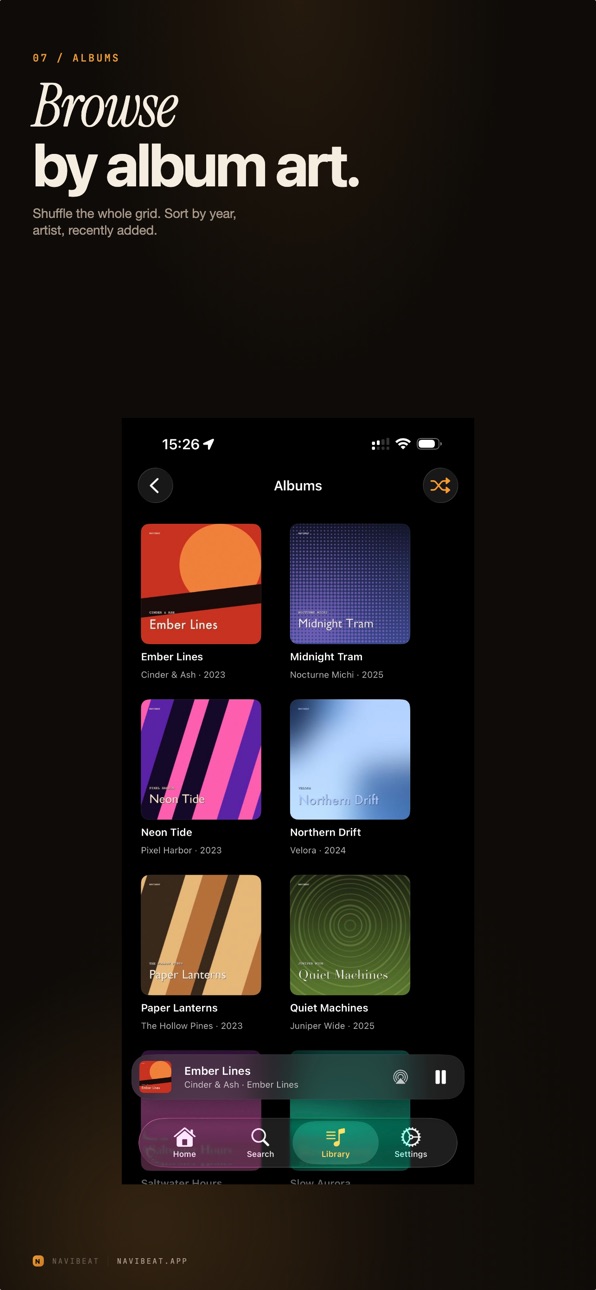
- Full library browsing: artists, albums, playlists, genres
- Voice search and text search with live results
- Now Playing with synced and plain lyrics
- Background audio, Control Center integration, AirPlay
- Offline listening for downloaded albums and playlists
ON MAC
- Native macOS app with MiniPlayer mode
- Keyboard shortcuts, multi-window browsing
- Full library browsing with large artwork
ON APPLE TV
- Cinema-scale artwork UI with smart discovery shelves
- Recently Played, Most Played, Rediscover, On This Day, Because You Listened To…
- Voice search via the Siri Remote
- Full-screen Now Playing with synced lyrics
ON APPLE WATCH
- Now Playing complications on every watch face
- Standalone queue control from the wrist
- Download albums and playlists straight to Watch storage
CORE FEATURES
- Gapless playback
- Scrobbles back to your Navidrome server
- Lossless streaming when your server and network allow
- Beautiful dark UI throughout
- Optional iCloud Keychain sync for credentials across your Apple devices
REQUIREMENTS
NaviBeat requires a running Navidrome server (v0.50 or later, free and open source) accessible from your Apple device. Self-host it on a home NAS, a Raspberry Pi, a VPS, or any machine you control. See navibeat.app for setup tips.
NaviBeat is a third-party client and is not affiliated with the Navidrome project.
PRIVACY
NaviBeat collects zero data. There is no NaviBeat backend, no analytics, no telemetry, no third-party SDKs. Your credentials live in your device's Keychain. Your listening history stays on device. See navibeat.app/privacy.
Capabilities
Siri
Accessibility
ipadiphonemacrealityDevicetvoswatch
Version history 7 versions
Build 887552606v1.2.12026-07-03 17:58:46
Version 1.2.1 is a big reliability update, with a major focus on smooth, uninterrupted playback.
PLAYBACK RELIABILITY
We rebuilt how NaviBeat streams and buffers audio, so playback is far more resilient, especially on cellular and on the latest iOS:
- Fixed freezes and unexpected app closes that could happen under memory pressure.
- Fixed cases where a song could stall, rewind, or fail to advance to the next track.
- Faster playback start and smoother, gap-free transitions between songs.
- If the system audio service is interrupted, NaviBeat now recovers on its own and keeps playing.
- More accurate seeking inside transcoded streams.
MAC
- The main window now remembers its size and position when you close and reopen it.
- The menu-bar icon stays in place across launches.
- Add to Playlist is now available right in the player menu.
APPLE WATCH
- More reliable downloads, including a fallback through your iPhone when a direct download is not possible.
- Cover art now loads in the browse views.
- Now Playing controls fit correctly on smaller watches.
APPLE TV
- Play Next and Add to Queue are now on the song menu, matching iPhone and Mac.
EVERYWHERE
- Settings are unified and consistent across all your devices.
- Download All now queues multiple albums instead of ignoring the next one while a download is in progress.
- Favorites shuffle now starts on a random song.
- Ratings update instantly when you change them.
- A broad round of stability and polish fixes across every platform.
Thank you for using NaviBeat. Made with love by Nenad Jokic.
Build 887036230v1.22026-06-18 21:32:41
NaviBeat 1.2
Offline mode. Your downloaded music and playlists now work with no connection to your server at all. Metadata is cached, so browsing, playlists and playback keep working on a plane, on the subway, or anywhere with no signal.
Client certificate support. Connect to a server that sits behind a client-certificate (mTLS) reverse proxy.
Sort everything. Albums, artists, songs and playlists can be sorted the way you want: by name, rating, loved, play count, year and more, on iPhone, iPad, Mac and Apple TV.
More streaming quality options. New lower-bandwidth tiers (down to 64 and 96 kbps) for slow or remote connections, alongside the existing higher ones.
Queue control. Add a whole album or playlist to the queue as Play Next or Add to Queue without wiping what is already playing. Playback also keeps the queue topped up continuously, so Next always has something ready.
Ratings on iPhone. Rate a song and see the rating right there on Now Playing.
Storage and downloads. A new Download in progress screen with honest stats, a much higher offline cache limit bounded by your device's free space, and new Storage, Cache and Server Information settings, including your server's type, version and capabilities, and a library scan.
Find albums fast. An A to Z fast-scroll index on the Albums list (iPhone and iPad).
Lyrics. Apple-style active-line focus with smooth transitions, plus animated dots during instrumental gaps.
iPad player. A clean player-only full-screen mode that no longer forces the lyrics or queue pane open.
Apple TV. A new Songs section to browse every track, plus more sorting and consistency across the app.
Apple Watch. Plays you make on the Watch, including downloaded tracks played offline, are now counted toward your listening history once a connection returns. Plus Shuffle right on the Watch.
Fixes and polish. More accurate play counts, steadier connecting and playback, and many smaller refinements across every platform.
Thank you for owning your music with NaviBeat. Found something or want a feature? Email support@navibeat.app.
Build 886774002v1.1.32026-06-12 19:37:05
- Home: fixed a "couldn't reach your music server" error that could show on a brand new or freshly scanned library even when the server was connected and working. Empty sections (no favourites yet, nothing recently played) now count as simply empty, not as an error, so Home loads cleanly from the first launch.
- iPhone: in a playlist's Select mode, the bottom buttons were cramped and hard to read. Queue, Add to Playlist and Download now sit on their own row as clear, full-width buttons, with Select All / Deselect All above.
- Mac: a large drop in CPU usage. The desktop Now Playing widget and the small "now playing" animated bars on the track list were both using far too much CPU; both are fixed and now stay light.
- Mac: the desktop Now Playing widget is more compact, closer to the iPhone one, and the large size leaves more room for the Up Next list.
- Mac: Play Next and Play Last are now right in a track's menu instead of tucked inside a submenu.
- Mac: closing the Mini Player now keeps your main window at the size and position you left it.
- Mac: an album's year no longer shows with a separator (it now reads 2025, not 2.025).
- Mac: the pointer no longer stays a link hand after you click an artist name to open the artist.
- Mac: the Downloads list now uses the same frosted background as the rest of the app instead of a flat grey.
- Mac: tidied the first sidebar button height and a Settings toggle that was out of line.
- Apple TV: pressing Play on an artist now plays all of their albums, not just the first one.
- CarPlay: an artist now has Play and Shuffle for all of their albums at once, not just within a single album.
- CarPlay: starting a list with the Play or Shuffle button now opens the Now Playing screen right away instead of leaving you on the list.
Also since build 101: no more brief distorted sound when quitting while music is playing; on the AudioStreaming engine the scrubber no longer flashes to 0:00 when you seek an unbuffered track; and Year in Review now shows real artist and song names instead of internal codes.
Build 886404082v1.1.22026-06-04 20:04:31
NaviBeat 1.1.2
Play History. Recently Played now has an Albums / Tracks switch. The Tracks side is your real cross-device listening history; tap any row to play it.
Pick up where you left off. The Home banner resumes the exact track and position you stopped on, and also surfaces your last playlist and last mix. Continue plays it; Open playlist jumps to it.
Album art zoom. Pinch and double-tap to zoom and pan the cover (iPhone and Mac).
Siri voice playback. Play music, shuffle your library, play favorites, like the current track, toggle AutoMix.
New iPhone widgets. A large Playlists widget, a Transport widget (previous / play / next), and an option to hide widget titles.
Show on Last.fm. Open an artist or album on Last.fm straight from its artwork menu (iPhone, iPad, Mac).
Genres in Search on iPhone, iPad, and Mac.
Mac extras. Gapless playback, an option to launch straight into the Mini Player, lower CPU when viewing the album that is playing, and a Recently Played header that scrolls with the content.
Radio now-playing bar on Mac and iPhone.
Apple Watch. Downloads are much faster and now continue with the screen off or your wrist down, finishing in the background. Downloads are organized into Artists, Albums, Playlists, and Songs, with the real downloaded count per playlist, plus a new Download Quality choice (Optimized or Original).
Apple TV Now Playing. Layout and font-size options, hide the Up Next panel, show the whole queue or only what is unplayed, richer track details, and re-entering a playlist focuses the track you last played. Timeline seek keeps focus on the bar, the Up Next / Queue / History buttons are tidier, text sizes are correct, radio Stop keeps the station screen, and the playlists list refreshes on return.
CarPlay. An artist now shows all of their albums, the artists list is browsable by letter so you can reach every artist, and voice search waits for you to start speaking.
Now Playing names. Tap the artist or album name on iPhone and iPad to open it.
Improvements. AutoMix stays within your selected libraries. Swiping a song no longer also starts playing it. Per-playlist resume points survive app updates. At the end of a queue, Play restarts the queue. The next track's album art is ready sooner when you skip. A faster, smoother engine reduces a brief volume jump on skip. Plus a crash fix for talking to a paired Apple Watch, a cleaner app icon animation, a steadier playlist list, and many smaller polish fixes across every platform.
Build 886284301v1.1.12026-05-29 22:33:00
NaviBeat 1.1.1 build 93
==== WHAT TO TEST ====
First connect (critical fix, please test first)
- Delete the app, reinstall, then log in to your server for the first time: app connects without crashing
- Also: Settings, reset pairing, then log in again: no crash
- Test on both iPhone and iPad, repeat a few times
Widgets and Live Activities (new)
- Add a Home Screen widget: Now Playing and Recently Played
- Lock Screen and StandBy widget show the current track
- Dynamic Island and Live Activity appear during playback (iPhone)
- macOS desktop widget shows Now Playing
Apple TV
- Open a large playlist (1,000+ tracks): commands respond and scrolling keeps up
AudioStreaming engine (Settings, Playback, Advanced)
- Quit the app while music is playing: no distorted sound on exit
macOS
- Settings has a Downloads & Storage section
- Menu-bar popover stays anchored on play / pause
- Title scrolls with content on Artists, Songs, Genres (no sticky band)
==== WHAT'S NEW IN 1.1.1 (build 93) ====
Widgets and Live Activities
NaviBeat now has widgets. On iPhone and iPad: Home Screen Now Playing and Recently Played widgets, a Lock Screen and StandBy widget, and a Live Activity with Dynamic Island so the current track stays in reach while the app is in the background. On macOS there is a desktop Now Playing widget.
Stability
Fixed a crash that could happen the first time you connected to your server on iPhone or iPad (initial login on a fresh install, or after resetting pairing). Connecting now lands you in the library cleanly. The AudioStreaming beta engine no longer produces a short distorted sound when you quit during playback.
Apple TV responsiveness
Large playlists on Apple TV got a responsiveness pass so commands and scrolling keep up better on very long lists.
macOS polish
The macOS Settings now has a Downloads & Storage section, matching iOS. The menu-bar popover stays anchored when you play or pause. The page title on Artists, Songs and Genres scrolls with the content again instead of sticking, matching the Albums page. Plus sidebar drag-handle, queue focus and album-art hover refinements.
Thanks for all the reports and feedback. Keep them coming.
==== KNOWN ISSUES (reference only) ====
- macOS fullscreen sidebar toggle can still overlap the traffic-light buttons on some external displays (#97, under investigation, architectural rework planned for 1.1.2).
- Multi-library artist view may still show albums from both libraries on some setups (#43, client-side workaround pending OpenSubsonic PR opensubsonic/open-subsonic-api#162).
- AudioStreaming engine: Now Playing title / art can show the next track on some transitions (#104, under investigation).
- AudioStreaming engine cannot start a very large playlist on macOS (#105, under investigation). Workaround: default AVPlayer engine.
- Default AVPlayer cellular path: rare rewind to 0:00 on stall. Workaround: switch engine to AudioStreaming (beta).
- AudioStreaming: no crossfade yet (queued for 1.1.2).
- Apple Watch: always AVPlayer (library has no watchOS slice).
- Navidrome-transcoded MP3 streams: server ignores seek=, audio will not jump. Workaround: Stream Quality, Original.
- iPad bulk Queue / Download multi-select missing (Add to Playlist works), queued for 1.1.2.
- Now Playing layout toggle (F38), backlog for 1.2.
Build 886051428v1.12026-05-28 18:18:21
What's New in NaviBeat 1.1
Made for You · Last.fm
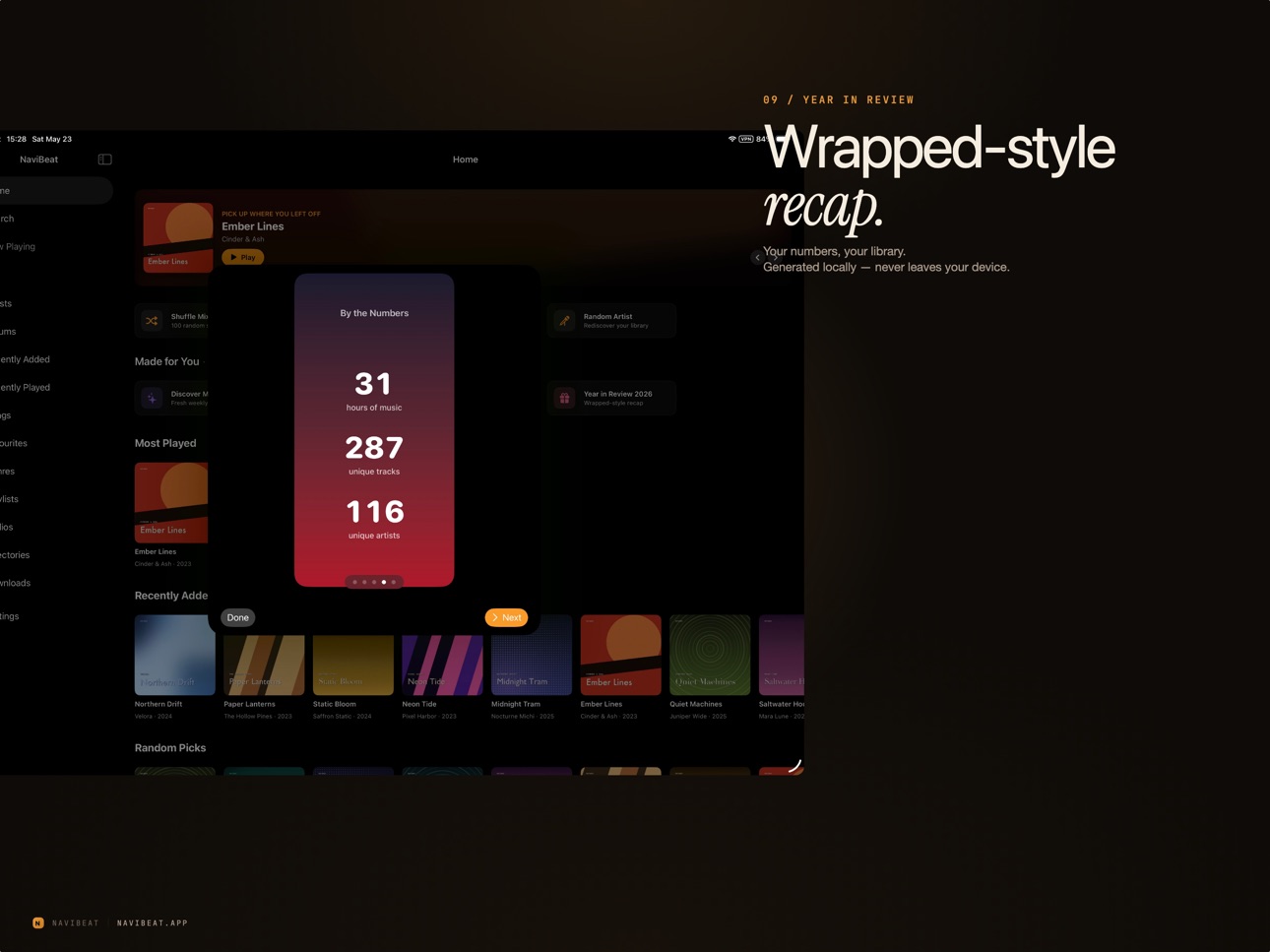
A new Home shelf with four tiles powered by your Last.fm account: Discover Mix (a fresh weekly mix based on your listening), Time Machine (pick any date range and play what you scrobbled then), Replay 2026 (your most-played tracks this year), and Year in Review 2026 (a Wrapped-style recap of your top artist, track, and listening totals). Last.fm acts as the source of truth so the shelf stays consistent across every device you use.
AudioStreaming engine (beta opt-in)
A new playback engine built on AVAudioEngine and URLSession byte-range reads, designed for users on cellular. The old AVPlayer route would sometimes restart a stream after a network hiccup, which on cellular felt like the song rewinding. AudioStreaming holds the position and just buffers more. Find it under Settings, Advanced, Playback engine. AVPlayer stays the default for now; opt in if you want to help us validate the beta.
ReplayGain
Per-track and per-album loudness normalization across all five platforms. Off, Auto, Track, or Album mode plus a preamp from -15 to +15 dB. Auto picks album gain on single-album queues and track gain on mixed content like playlists or shuffles.
Buffering indicator
A new "Buffering..." overlay appears across all five platforms when audio stalls, so a long stall on cellular is visible instead of silent. Buffered horizon visible in the Now Playing bar shows how far ahead you are buffered.
Editable Up Next queue on macOS
The Up Next panel now lets you drag-reorder tracks, remove individual tracks, and clear the queue. A Previously Played section above Up Next lets you rewind through what already played without losing what is coming.
Multi-select on playlists and albums
A new Select mode on the playlist and album toolbars lets you tick multiple tracks and bulk-add them to a playlist. iPhone and iPad got the Queue and Download bulk actions in 1.0.2; Mac now has Add to Playlist on multi-select, with Queue and Download fanout landing in the next update.
Library reorder on iPhone
Drag the rows in the Library tab to put Downloads, Playlists, or whichever sections you use most at the top. Order is per device and survives launches.
Acknowledgements
A new Acknowledgements sheet in Settings, About surfaces every MIT and BSD redistribution notice for the open-source components NaviBeat builds on.
Quality of life
Sidebar drag-to-reorder on macOS keeps the row icons and labels readable in the drag chip instead of going black. Mini Player toggle (Cmd+Shift+M) reliably switches back to the main window. Main window size and position persist across launches and Cmd+Q + reopen. Last.fm Similar Albums no longer flashes its skeleton placeholders on empty results. Recent Searches only commits an entry when you actually use a result, not on every typing pause. Escape clears the macOS search field. Playlists you do not own no longer surface a Rename or Edit affordance that would error.
Fullscreen on macOS
The grey strip at the top of the screen in fullscreen mode is gone. The toolbar is hidden in fullscreen and a floating sidebar toggle plus Back overlay keeps navigation available.
Performance
Cover-art cache rebudgeted to a 200-entry / 150 MB ceiling. Large playlists (1,000+ tracks) now virtualize their list view so scrolling stays smooth and memory stays flat. The playback engine holds at most a small sliding window of queued items instead of materializing the whole playlist tail, which keeps memory predictable on multi-thousand-track queues.
Build 884887274v1.02026-05-22 07:22:12
Price history by region
Currency
Show
Columns
Search
Availability 1 of 1 storefronts
| Region | Language | Price | Ratings | Avg | Version |
|---|---|---|---|---|---|
| US | en-US | USD 5.99 | 5 | 5.0 | 1.2.1 |
Change log 11 changes · US
✎
releaseNotes updated
Version 1.2.1 is a big reliability update, with a major focus on smooth, uninterrupted playback.
PLAYBACK RELIABILITY
We rebuilt how NaviBeat streams and buffe
✎
description updated
NaviBeat brings your own music library to every Apple device you own — iPhone, iPad, Mac, Apple TV, and Apple Watch — as a single Universal Purchase. Pay once.
✎
subtitle updated
Own your music, every device
✎
name updated
NaviBeat
◆
Version 1.2.1 released
Version 1.2.1 is a big reliability update, with a major focus on smooth, uninterrupted playback.
PLAYBACK RELIABILITY
We rebuilt how NaviBeat streams and buffers audio, so playback is far more resilient, especially on cellular and on the l
◆
Version 1.2 released
NaviBeat 1.2
Offline mode. Your downloaded music and playlists now work with no connection to your server at all. Metadata is cached, so browsing, playlists and playback keep working on a plane, on the subway, or anywhere with no signal.
◆
Version 1.1.3 released
- Home: fixed a "couldn't reach your music server" error that could show on a brand new or freshly scanned library even when the server was connected and working. Empty sections (no favourites yet, nothing recently played) now count as simp
◆
Version 1.1.2 released
NaviBeat 1.1.2
Play History. Recently Played now has an Albums / Tracks switch. The Tracks side is your real cross-device listening history; tap any row to play it.
Pick up where you left off. The Home banner resumes the exact track and p
◆
Version 1.1.1 released
NaviBeat 1.1.1 build 93
==== WHAT TO TEST ====
First connect (critical fix, please test first)
- Delete the app, reinstall, then log in to your server for the first time: app connects without crashing
- Also: Settings, reset pairing, then
◆
Version 1.1 released
What's New in NaviBeat 1.1
Made for You · Last.fm
A new Home shelf with four tiles powered by your Last.fm account: Discover Mix (a fresh weekly mix based on your listening), Time Machine (pick any date range and play what you scrobbled t
◆
Version 1.0 released