Home › Lifestyle

 US
US
 AIen-GB
 AOen-GB
 ATde-DE
 AUen-AU
 BBen-GB
 BEen-GB
 BFen-GB
 BGen-GB
 BJen-GB
 BOes-MX
 BSen-GB
 BWen-GB
 BZen-GB
 CAen-CA
 CDen-GB
 CGen-GB
 CHde-CH
 CIfr-FR
 CMfr-FR
 COes-MX
 CVen-GB
 DEde-DE
 DKen-GB
 DMen-GB
 ECes-MX
 EEen-GB
 ESes-ES
 FIen-GB
 FRfr-FR
 GAfr-FR
 GBen-GB
 GDen-GB
 GHen-GB
 GRen-GB
 GTes-MX
 GWen-GB
 GYen-GB
 HNes-MX
 HRen-GB
 IEen-GB
 ITit
ITit JMen-GB
 KEen-GB
 KNen-GB
 KYen-GB
 LCen-GB
 LUen-GB
 LVen-GB
 MLen-GB
 MSen-GB
 MUen-GB
 MZen-GB
 NAen-GB
 NEen-GB
 NGen-GB
 NIes-MX
 NLnl
NLnl NOen-GB
 NZen-AU
 PAes-MX
 PTpt-PT
 SEsv
SEsv SIen-GB
 SLen-GB
 SNen-GB
 SRen-GB
 STen-GB
 SVes-MX
 TCen-GB
 TDen-GB
 TTen-GB
 TZen-GB
 UGen-GBUSen-US
 UYen-GB
 VCen-GB
 VGen-GB
 ZMen-GB
 ZWen-GB
79 of 79 storefronts
Content in en-US
Content in en-US
Information
Preview 2 platforms
iPhone 9 images


iPad 9 images




What’s New Version 1.9.2
1.9.2 — your journal, harder to lose.
This release closes the gaps that could let an entry quietly go missing — important for a record you may one day rely on.
• Instant save warnings. If a change can't be saved — for example when your device is out of storage — SoloFamily now tells you right away instead of looking like it saved. No more silent gaps.
• Automatic daily backups. On top of the snapshot taken at each app update, SoloFamily now keeps a rolling daily backup, so you can always roll back to a recent copy — not just to the last time you updated the app.
• Safer recovery. If the app ever can't open your data, restoring or resetting no longer deletes your existing records — your store is kept aside and preserved, never the casualty of a recovery step.
• If iCloud storage is full, SoloFamily now tells you your changes are saved on this device but aren't syncing — instead of failing quietly.
Plus stability fixes.
Description
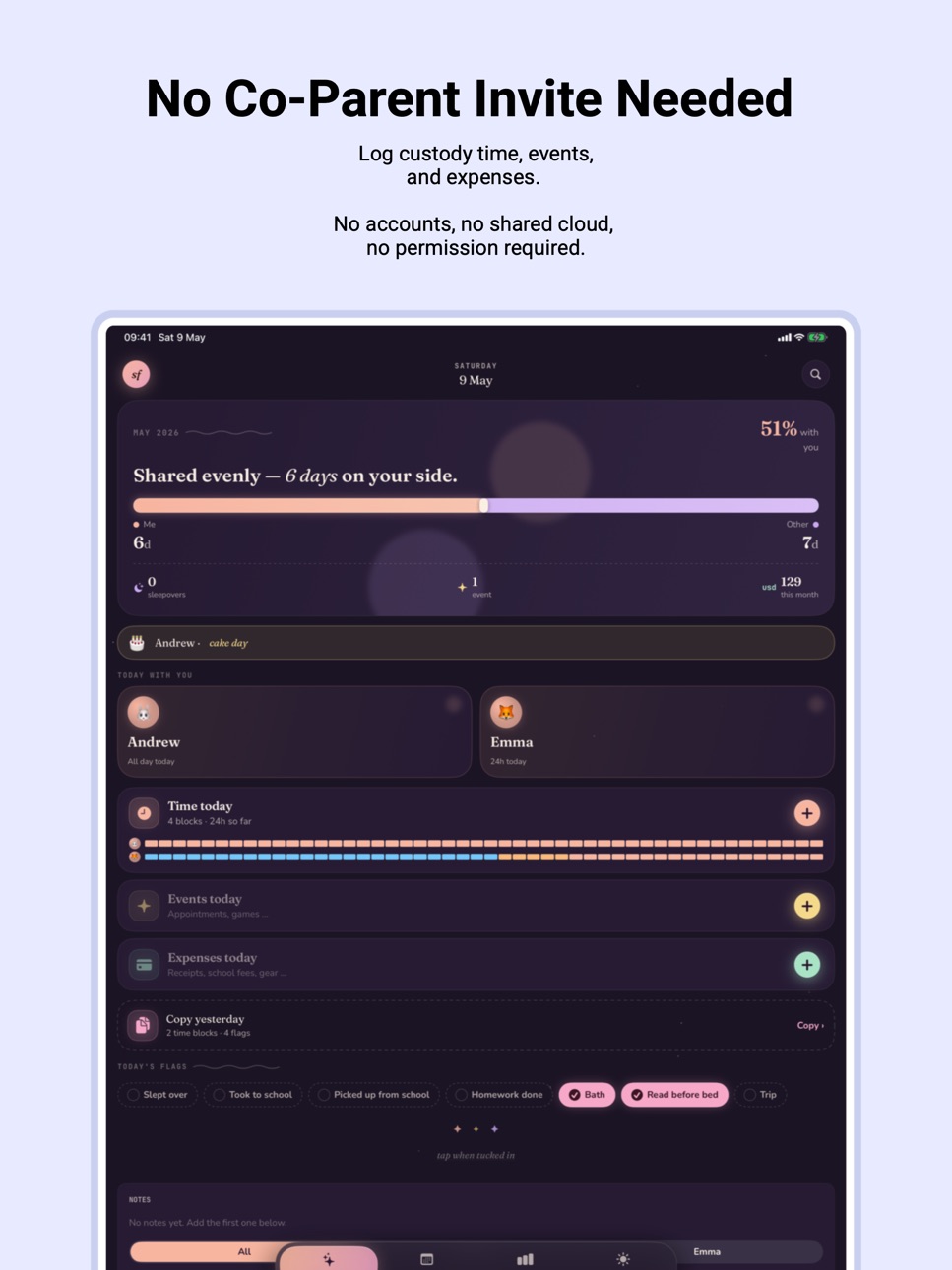
Custody tracker for solo parents. Log who had the kids, save receipts, and keep a private record you can hand to a lawyer if it ever comes to that. Built by a single dad — works on its own, no co-parent invite needed.
Whether you're navigating shared custody, separation, or single parenting on your own, SoloFamily quietly tracks the hours, expenses, and moments that matter. No accounts. No invites. No cloud-shared data. Just you and your phone.
THE DAILY LOG
• Time with the kids — start, end, all-day, who was on, who dropped off and who picked up, overnight stays.
• Events — doctor visits, school runs, activities, milestones. Attach photos and notes.
• Expenses — what you bought, who paid, receipts you can keep. Attach a photo of the receipt.
• Daily flags — "Took to school", "Homework done", "Read before bed" — yes/no toggles you define.
• Bedtime — tap to stamp when they went to sleep.
SEE THE PATTERN
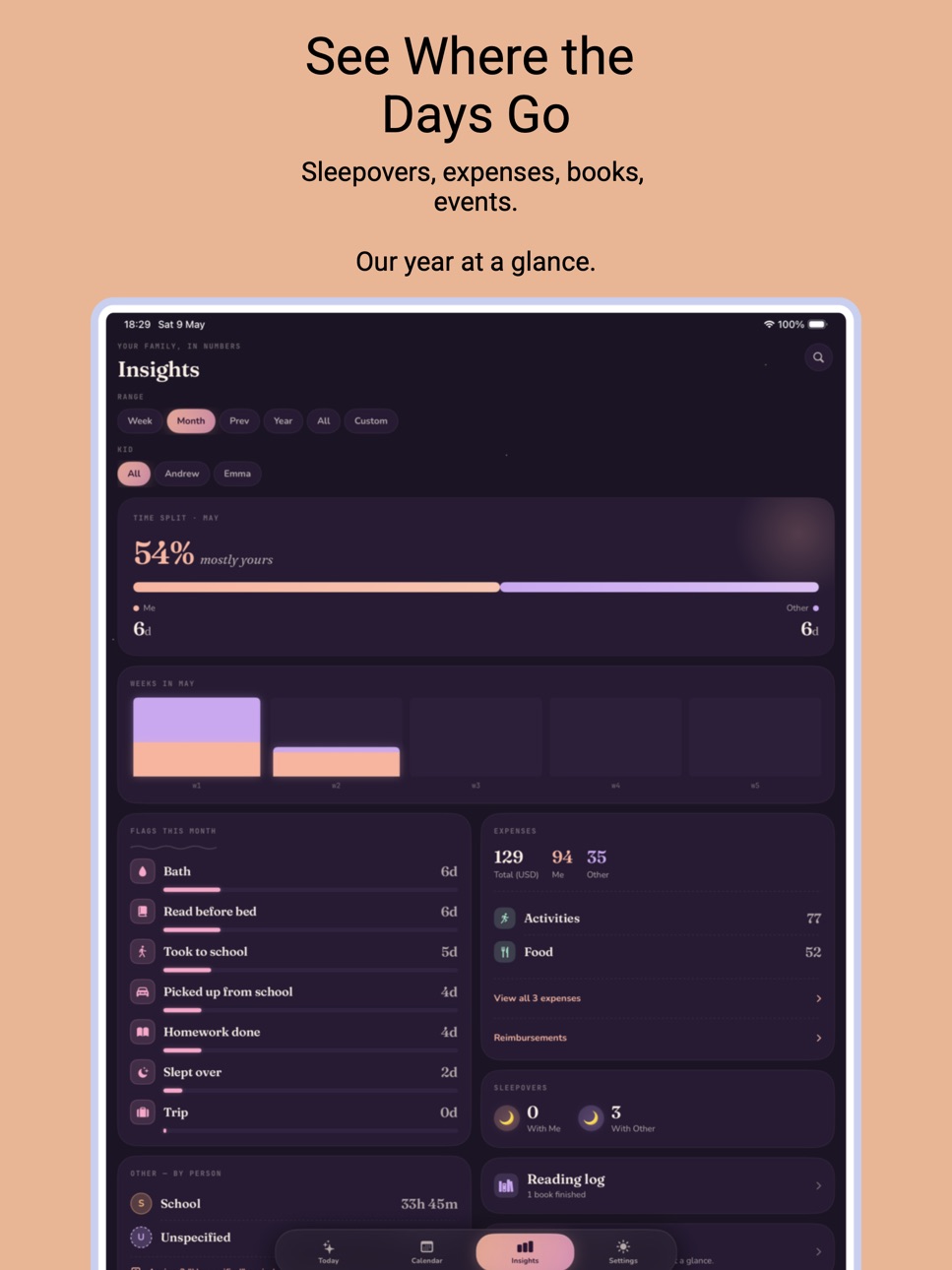
• A monthly split showing who had the kids and for how long.
• Pebble-garden calendar that colour-codes every day at a glance.
• Time-split bars adapt to week, month, year, or a custom range.
• Weeks-in-April style breakdowns so you see the shape of the month.
• Filter everything to a single kid.
MADE WITH CARE
• Two colour moods (Storybook / Fieldbook / Glacier / Journal) plus your own custom picks.
• Two copy tones (Storybook / Neutral) so the app reads warm or plain, your choice.
• Dark-mode plum background throughout; no adverts, no accounts, no tracking.
• Full Dynamic Type + VoiceOver + Reduce Motion + Reduce Transparency support.
• Today and Last-7-Days widgets that deep-link to the right tab.
PRIVATE BY DESIGN
• Your log lives on your device. No servers, no accounts, no sign-ups.
• Face ID / Touch ID app lock (Pro) so the record stays private even if the phone is shared.
• Every Pro feature above runs entirely on your device — even the receipt OCR uses Apple's on-device text recognition. Nothing leaves your iPhone.
SOLOFAMILY PRO
One-time or yearly. Unlocks:
• Monthly PDF — a beautifully formatted document with your notes, photos and receipts. For yourself, a co-parent, or legal use if it ever matters.
• CSV export — open your log in Numbers, Excel, or hand it off to a lawyer.
• Face ID / Touch ID app lock — keep the record private, even if the phone is shared.
• Daily reminder — a nightly nudge so you don't forget to log the day.
• Receipt OCR — snap a receipt, the amount and date auto-fill, on-device.
• Siri & Shortcuts — "Log time with the kids" or "Log an expense" from Siri or any automation.
The free tier stays generous forever: unlimited entries, every calendar and chart, widgets and notes. Pro is for when you need the record to go out into the world.
Built for parents who carry a lot.
Terms of Use (EULA): https://zbencz3.github.io/solofamily-site/terms.html
Privacy Policy: https://zbencz3.github.io/solofamily-site/privacy.html
In-App Purchases US pricing
SoloFamily Pro Subscription
— Yearly · Yearly 7-day free trial$4.99
One-Time Purchases
SoloFamily Pro — Lifetime$14.99
Capabilities
In-App Purchases
Accessibility
ipadiphonemacrealityDevicetvoswatch
Version history 14 versions
Build 887375009v1.9.22026-06-24 21:27:52
1.9.2 — your journal, harder to lose.
This release closes the gaps that could let an entry quietly go missing — important for a record you may one day rely on.
• Instant save warnings. If a change can't be saved — for example when your device is out of storage — SoloFamily now tells you right away instead of looking like it saved. No more silent gaps.
• Automatic daily backups. On top of the snapshot taken at each app update, SoloFamily now keeps a rolling daily backup, so you can always roll back to a recent copy — not just to the last time you updated the app.
• Safer recovery. If the app ever can't open your data, restoring or resetting no longer deletes your existing records — your store is kept aside and preserved, never the casualty of a recovery step.
• If iCloud storage is full, SoloFamily now tells you your changes are saved on this device but aren't syncing — instead of failing quietly.
Plus stability fixes.
Build 885750962v1.9.12026-05-18 19:11:50
1.9.1 — small polish on top of 1.9.
• Events on Today and Insights now show "4:00 PM – 5:00 PM" when you've set an end time, not just the start.
• Search auto-opens the keyboard when you tap it from Today or Insights. One less tap.
• Tapping an event or expense in Search lands you on its editor — the day opens AND the entity sheet pops up, so you edit straight from the result.
Build 885696152v1.9.02026-05-15 22:59:17
1.9.0 — events with a duration.
Events can now carry an end time. Soccer 4–5pm, 45-min therapy, an hour at the dentist — captured as ranges, not just instants.
• Tap "+ Add end time" under the start picker on any event to add it. Events without an end time keep working exactly as before.
• Event rows now show "4:00 PM → 5:00 PM" when a duration is set, so you can tell what was instant and what took a chunk of the day.
• Court-ready PDF and CSV exports both surface the end time. PDF inlines it on the event line; CSV gains the `end` column for events.
• JSON backups carry the new field. Pre-1.9 backups still restore cleanly — events come back as instants.
Build 885678650v1.8.02026-05-14 20:47:12
1.8.0 — school schedule per kid, one-tap fill on Paint Time.
• Set each kid's school hours once on their profile (Settings → Kids → School schedule). Different hours per weekday supported; "Apply Monday's hours to Tue–Fri" copies the common pattern in one tap.
• Paint Time learned a new "Fill school time" tap. When the kid you're painting for is in school today, one tap fills their school hours with the built-in "School" caregiver — you only paint the before-school and after-school stretch.
• Copy Yesterday no longer copies events and expenses, only time blocks and daily flags. Episodic stuff like a doctor's visit or a one-off receipt shouldn't duplicate.
Build 885460203v1.6.22026-05-11 13:29:25
1.6.2 — better on iPad.
Three iPad-only layout fixes so the bigger screen actually feels bigger.
• Reading log uses the full canvas — three book columns instead of two, no more narrow strip down the middle.
• Insights breaks into two balanced columns — Flags / Per-person / Events on the left, Expenses / Sleepovers / Books / Year-in-Review on the right. No more tall single column with empty space beside
it.
• Paint Time opens near-full-screen, so the painter is visible without scrolling. Cells are bigger too — easier to tap precisely at desk distance.
Build 885528595v1.7.02026-05-11 21:40:15
1.7.0 — now in seven more languages.
SoloFamily speaks Magyar, Română, Español, Deutsch, Français, Italiano, and Português — alongside English.
• Every screen, every label, every alert — 662 strings translated end-to-end. Onboarding, Today, Calendar, Insights, Settings, all add/edit sheets.
• Pick per-app language: iOS Settings → SoloFamily → Preferred Language. Or change the device language for the whole iPhone.
• Plurals work properly — Romanian's one/few/other, Hungarian's no-plural-after-a-number form, French's count-of-zero-as-singular. "3 blocuri", "3 bloques", "3 időblokk", "0 événement".
• Tone follows the locale: warm storybook variant in Hungarian and Romanian feels native; Romance languages use the informal "tu" throughout.
• Dates, currencies, month names follow the chosen locale automatically.
Build 885418952v1.6.12026-05-08 16:13:23
Receipt scanning now picks the right number on tightly-spaced receipts where the printed total label and the amount sit far apart on the paper. Common on Romanian / Hungarian grocery receipts where "CARD" or "TOTAL" sits on the left margin and the amount on the far right — the actual total wins again instead of a line item.
Search results now jump to the matched day on the Calendar tab every time, not just the first time you searched after launching the app.
Plus a bigger time bubble in Paint Time so the painted time stays visible above your finger as you drag.
Build 885265662v1.5.02026-05-05 16:21:49
1.5.0 — voice notes you can transcribe.
• Record a voice note onto an event. Up to five per event. Stays on your phone.
• Tap Transcribe on any note: Apple's on-device speech model turns it into searchable text. Audio never leaves the phone.
• Voice-note transcripts are searchable from the Insights search box.
• Edit any auto-transcript inline. Re-transcribe or clear from the row menu.
• Storage screen in Settings → Backup shows per-kind attachment tallies and free-space warnings.
• Drag-to-reorder photos in the event editor.
• Open a photo full-screen and swipe left/right between event photos.
• Fix: adding an expense or event always defaults the date to right now.
Build 885292655v1.6.02026-05-05 19:48:09
1.6.0 — Essentials per kid + court-ready upgrades.
• New per-kid Essentials section — insurance, doctors, school, sitters, sizes, custom — with one-tap PDF share for the babysitter or school nurse. Tap any phone number, email, or website to call / mail / open straight from the row.
• Voice memos can be shared to SoloFamily from the iOS share sheet — pick a recent event to attach to or save for a new one. Languages without on-device speech recognition (Hungarian and others) can opt in to use Apple's server for transcription.
• Receipt OCR now reads multilingual totals (Romanian, Hungarian, German, Dutch, French, Spanish, Italian) plus EU and US thousand-separator formats. When the receipt has no TOTAL keyword, falls back to the largest amount in the bottom half. Date parser disambiguates dd-MM vs MM-dd by picking the reading closest to today.
• Court-ready PDF export now lets you choose photo size — thumbnails or full-size — and ends with a SHA-256 document fingerprint so a reviewer can verify the document text wasn't altered after export.
• Insights expense breakdown groups by store name when you've titled the row, falling back to category for untitled ones. Books finished now has a Month / Year / All scope picker.
• Tap-to-call / tap-to-open works inline on Essentials values; book-cover OCR joins multi-line titles and converts ALL-CAPS to Title Case.
Build 885217394v1.4.02026-05-04 20:47:05
1.4.0 — multiple photos per event.
Events can now hold up to five photos. Add the book cover, the dedication page, the school report, the bedtime drawing — all on one entry.
• Tap any photo to open the viewer; swipe between photos when zoomed out.
• Long-press + drag to reorder photos in the strip.
• Long-press → context menu to remove a photo.
• Existing single-photo events keep working unchanged. The first photo you add stays the one OCR reads for book-title autofill (Pro).
Plus: small fix for the new-expense / new-event date defaulting to "right now" or the day you're viewing in Calendar — older builds could keep showing yesterday's date if you reopened the sheet without closing the app.
Build 885194133v1.2.02026-05-03 01:57:44
1.2.0 — track what's owed you, a place for kids' health info, and AirDrop your data between devices.
• Mark any expense as "shared with co-parent" and SoloFamily keeps a running tally of what they owe you. Tap "mark paid" the day they settle up.
• A new Reimbursements screen on the Insights tab gathers every shared expense — per-currency totals, paid and unpaid filters, and tap any row to edit.
• A health log per kid: allergies, current and past medications (with dosage), doctor visits, and vaccinations. Recent three at a glance, full history searchable.
• Backup files now AirDrop straight to SoloFamily — send to your other iPhone or iPad and it asks if you want to restore. (Pro; free path through Settings → Restore Backup still works.)
• Smarter receipt scanning — the amount detector waits for "Total / Card / Visa / Cash" cues and ignores subtotal, tax, and change-due lines.
• On iPad, every screen now caps to a centred column instead of stretching edge-to-edge.
• Navigation bar now uses the Fraunces typeface to match the rest of the app.
• Settings reordered: Siri & Shortcuts moved up so the Danger Zone isn't the first thing you scroll into.
Build 885200056v1.3.02026-05-03 19:11:36
1.3.0 — your year at a glance, child support tracking, and a faster way to open exports.
• Year in review on Insights — one screen of the year: hours together, books finished, events logged, sleepover nights, expenses by currency, busiest month, and your longest unbroken stretch of logged days. Flip back to last year (or further) once you've been at it a while.
• A "Child support" expense category, and a Spent / Received toggle so money the OTHER parent sends YOU shows up as income on the year-in-review and the court-ready PDF — not as another expense.
• When the export is ready (PDF, CSV, or backup), the prompt now offers Open alongside Share. Open uses Quick Look — PDFs preview inline, CSV opens in your default handler.
• Court-ready PDF grew a small "Logged on …" line under every entry — a reviewer can see at a glance that entries weren't backdated. The footer also names the app version, build, and export timestamp.
• Open SoloFamily after midnight and Today now shows today's flags, not yesterday's.
• Notification banners now use the apricot brand colour instead of system green.
Build 884669676v1.02026-05-02 07:57:30
Build 885181753v1.1.02026-05-02 18:58:30
1.1.0 brings per-kid daily flags, expense names, an on-demand backup button, and a clearer Pro paywall.
• Set daily flags per-kid — useful when one kid sleeps over and the other doesn't. Tap to set everyone at once; long-press for per-kid.
• Give expenses a short name like "Target" or "DM" so a quick scroll tells you what's what.
• After you've named a few expenses, the names you use most appear as quick-tap chips below the field.
• Currency picker now covers every world currency, with full names alongside the codes.
• "Back up now" in Settings creates a fresh on-device snapshot whenever you want.
• Quick links to Terms of Use and Privacy Policy from the About screen.
• Today summary is more honest about what counts as "a big month."
• Pro paywall now clearly shows the trial length and exactly what you'll be charged after.
Plus: backups taken in this version include all the new fields, and deleting a custom daily flag now clears it from every day you'd ticked.
Price history by region
Currency
Show
Columns
Search
Availability 79 of 79 storefronts
| Region | Language | Price | Ratings | Avg | Version |
|---|---|---|---|---|---|
| AI | en-GB | Free | 0 | — | 1.9.2 |
| AO | en-GB | Free | 0 | — | 1.9.2 |
| AT | de-DE | Free | 0 | — | 1.9.2 |
| AU | en-AU | Free | 0 | — | 1.9.2 |
| BB | en-GB | Free | 0 | — | 1.9.2 |
| BE | en-GB | Free | 0 | — | 1.9.2 |
| BF | en-GB | Free | 0 | — | 1.9.2 |
| BG | en-GB | Free | 0 | — | 1.9.2 |
| BJ | en-GB | Free | 0 | — | 1.9.2 |
| BO | es-MX | Free | 0 | — | 1.9.2 |
| BS | en-GB | Free | 0 | — | 1.9.2 |
| BW | en-GB | Free | 0 | — | 1.9.2 |
| BZ | en-GB | Free | 0 | — | 1.9.2 |
| CA | en-CA | Free | 0 | — | 1.9.2 |
| CD | en-GB | Free | 0 | — | 1.9.2 |
| CG | en-GB | Free | 0 | — | 1.9.2 |
| CH | de-CH | Free | 0 | — | 1.9.2 |
| CI | fr-FR | Free | 0 | — | 1.9.2 |
| CM | fr-FR | Free | 0 | — | 1.9.2 |
| CO | es-MX | Free | 0 | — | 1.9.2 |
| CV | en-GB | Free | 0 | — | 1.9.2 |
| DE | de-DE | Free | 0 | — | 1.9.2 |
| DK | en-GB | Free | 0 | — | 1.9.2 |
| DM | en-GB | Free | 0 | — | 1.9.2 |
| EC | es-MX | Free | 0 | — | 1.9.2 |
| EE | en-GB | Free | 0 | — | 1.9.2 |
| ES | es-ES | Free | 0 | — | 1.9.2 |
| FI | en-GB | Free | 0 | — | 1.9.2 |
| FR | fr-FR | Free | 0 | — | 1.9.2 |
| GA | fr-FR | Free | 0 | — | 1.9.2 |
| GB | en-GB | Free | 0 | — | 1.9.2 |
| GD | en-GB | Free | 0 | — | 1.9.2 |
| GH | en-GB | Free | 0 | — | 1.9.2 |
| GR | en-GB | Free | 0 | — | 1.9.2 |
| GT | es-MX | Free | 0 | — | 1.9.2 |
| GW | en-GB | Free | 0 | — | 1.9.2 |
| GY | en-GB | Free | 0 | — | 1.9.2 |
| HN | es-MX | Free | 0 | — | 1.9.2 |
| HR | en-GB | Free | 0 | — | 1.9.2 |
| IE | en-GB | Free | 0 | — | 1.9.2 |
| IT | it | Free | 0 | — | 1.9.2 |
| JM | en-GB | Free | 0 | — | 1.9.2 |
| KE | en-GB | Free | 0 | — | 1.9.2 |
| KN | en-GB | Free | 0 | — | 1.9.2 |
| KY | en-GB | Free | 0 | — | 1.9.2 |
| LC | en-GB | Free | 0 | — | 1.9.2 |
| LU | en-GB | Free | 0 | — | 1.9.2 |
| LV | en-GB | Free | 0 | — | 1.9.2 |
| ML | en-GB | Free | 0 | — | 1.9.2 |
| MS | en-GB | Free | 0 | — | 1.9.2 |
| MU | en-GB | Free | 0 | — | 1.9.2 |
| MZ | en-GB | Free | 0 | — | 1.9.2 |
| NA | en-GB | Free | 0 | — | 1.9.2 |
| NE | en-GB | Free | 0 | — | 1.9.2 |
| NG | en-GB | Free | 0 | — | 1.9.2 |
| NI | es-MX | Free | 0 | — | 1.9.2 |
| NL | nl | Free | 0 | — | 1.9.2 |
| NO | en-GB | Free | 0 | — | 1.9.2 |
| NZ | en-AU | Free | 0 | — | 1.9.2 |
| PA | es-MX | Free | 0 | — | 1.9.2 |
| PT | pt-PT | Free | 0 | — | 1.9.2 |
| SE | sv | Free | 0 | — | 1.9.2 |
| SI | en-GB | Free | 0 | — | 1.9.2 |
| SL | en-GB | Free | 0 | — | 1.9.2 |
| SN | en-GB | Free | 0 | — | 1.9.2 |
| SR | en-GB | Free | 0 | — | 1.9.2 |
| ST | en-GB | Free | 0 | — | 1.9.2 |
| SV | es-MX | Free | 0 | — | 1.9.2 |
| TC | en-GB | Free | 0 | — | 1.9.2 |
| TD | en-GB | Free | 0 | — | 1.9.2 |
| TT | en-GB | Free | 0 | — | 1.9.2 |
| TZ | en-GB | Free | 0 | — | 1.9.2 |
| UG | en-GB | Free | 0 | — | 1.9.2 |
| US | en-US | Free | 0 | — | 1.9.2 |
| UY | en-GB | Free | 0 | — | 1.9.2 |
| VC | en-GB | Free | 0 | — | 1.9.2 |
| VG | en-GB | Free | 0 | — | 1.9.2 |
| ZM | en-GB | Free | 0 | — | 1.9.2 |
| ZW | en-GB | Free | 0 | — | 1.9.2 |
Change log 18 changes · US
✎
releaseNotes updated
1.9.2 — your journal, harder to lose.
This release closes the gaps that could let an entry quietly go missing — important for a record you may one day rely on.
✎
description updated
Custody tracker for solo parents. Log who had the kids, save receipts, and keep a private record you can hand to a lawyer if it ever comes to that. Built by a s
✎
subtitle updated
Custody log for solo parents
✎
name updated
SoloFamily
◆
Version 1.9.2 released
1.9.2 — your journal, harder to lose.
This release closes the gaps that could let an entry quietly go missing — important for a record you may one day rely on.
• Instant save warnings. If a change can't be saved — for example when your de
◆
Version 1.9.1 released
1.9.1 — small polish on top of 1.9.
• Events on Today and Insights now show "4:00 PM – 5:00 PM" when you've set an end time, not just the start.
• Search auto-opens the keyboard when you tap it from Today or Insights. One less tap.
• Tappi
◆
Version 1.9.0 released
1.9.0 — events with a duration.
Events can now carry an end time. Soccer 4–5pm, 45-min therapy, an hour at the dentist — captured as ranges, not just instants.
• Tap "+ Add end time" under the start picker on any event to add it. Events w
◆
Version 1.8.0 released
1.8.0 — school schedule per kid, one-tap fill on Paint Time.
• Set each kid's school hours once on their profile (Settings → Kids → School schedule). Different hours per weekday supported; "Apply Monday's hours to Tue–Fri" copies the commo
◆
Version 1.7.0 released
1.7.0 — now in seven more languages.
SoloFamily speaks Magyar, Română, Español, Deutsch, Français, Italiano, and Português — alongside English.
• Every screen, every label, every alert — 662 strings translated end-to-end. Onboarding, Toda
◆
Version 1.6.2 released
1.6.2 — better on iPad.
Three iPad-only layout fixes so the bigger screen actually feels bigger.
• Reading log uses the full canvas — three book columns instead of two, no more narrow strip down the middle.
• Insights breaks into two b
◆
Version 1.6.1 released
Receipt scanning now picks the right number on tightly-spaced receipts where the printed total label and the amount sit far apart on the paper. Common on Romanian / Hungarian grocery receipts where "CARD" or "TOTAL" sits on the left margin
◆
Version 1.6.0 released
1.6.0 — Essentials per kid + court-ready upgrades.
• New per-kid Essentials section — insurance, doctors, school, sitters, sizes, custom — with one-tap PDF share for the babysitter or school nurse. Tap any phone number, email, or website t
◆
Version 1.5.0 released
1.5.0 — voice notes you can transcribe.
• Record a voice note onto an event. Up to five per event. Stays on your phone.
• Tap Transcribe on any note: Apple's on-device speech model turns it into searchable text. Audio never leaves the phon
◆
Version 1.4.0 released
1.4.0 — multiple photos per event.
Events can now hold up to five photos. Add the book cover, the dedication page, the school report, the bedtime drawing — all on one entry.
• Tap any photo to open the viewer; swipe between photos when zo
◆
Version 1.3.0 released
1.3.0 — your year at a glance, child support tracking, and a faster way to open exports.
• Year in review on Insights — one screen of the year: hours together, books finished, events logged, sleepover nights, expenses by currency, busiest
◆
Version 1.2.0 released
1.2.0 — track what's owed you, a place for kids' health info, and AirDrop your data between devices.
• Mark any expense as "shared with co-parent" and SoloFamily keeps a running tally of what they owe you. Tap "mark paid" the day they sett
◆
Version 1.1.0 released
1.1.0 brings per-kid daily flags, expense names, an on-demand backup button, and a clearer Pro paywall.
• Set daily flags per-kid — useful when one kid sleeps over and the other doesn't. Tap to set everyone at once; long-press for per-kid.
◆
Version 1.0 released