Home › Business

Atmosphere Business Manager
Remote Control & Signage Tool
 US
US
1 of 1 storefronts
Content in en-US
Content in en-US
Information
Preview 1 platform
iPhone 6 images



What’s New Version 1.3.1
• Fixed the US support phone number so calls now reach the Atmosphere support team.
• Device lists are cleaner. Cancelled, lost, and stolen devices no longer appear.
Description
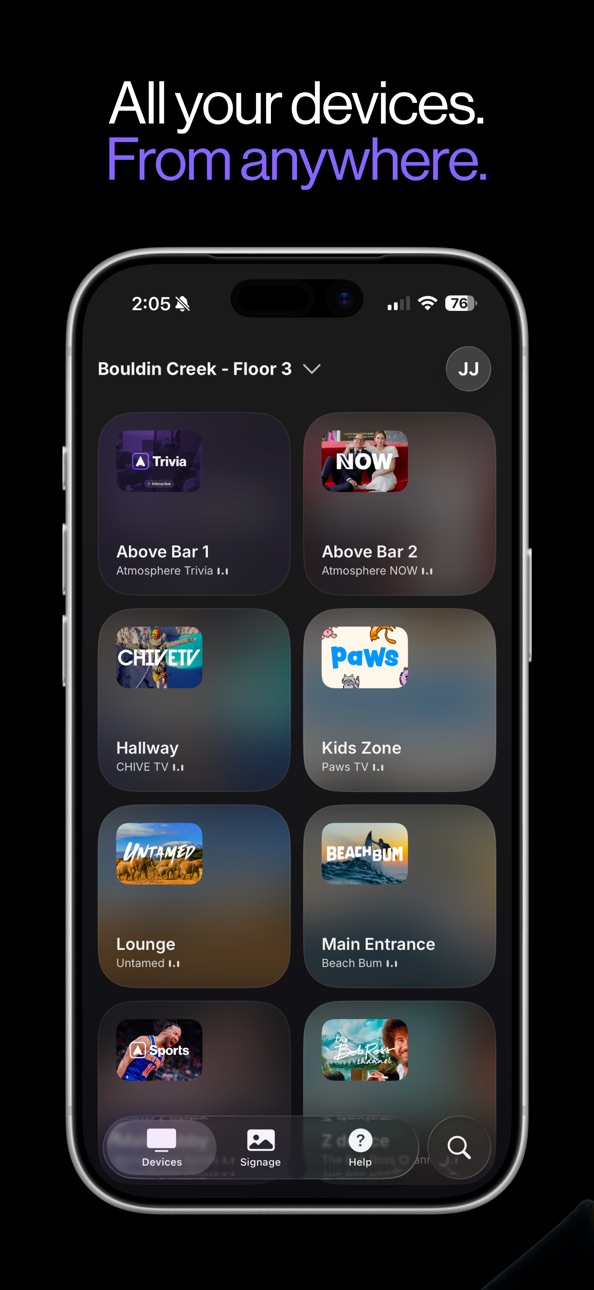
Atmosphere Business Manager is the official operator app for Atmosphere TV, the largest streaming TV platform built for businesses. Manage every TV inside your venue, right from your phone.
If you run Atmosphere TV at your bar, restaurant, gym, or other commercial location, this app gives you complete control over what's on screen. Switch channels, run digital signage, and keep tabs on every device across all your locations.
Run your channels
Browse the full Atmosphere TV lineup and pick what plays on each screen. Find sports, viral videos with Chive TV, nature, news, entertainment, and more, all programmed for out-of-home viewing.
Run your signage
Upload your own photos and videos to display alongside Atmosphere's content. Promote happy hour, menu specials, events, and announcements directly on your TVs. Schedule when each campaign runs and assign it to one location or all of them.
Run all your locations
Operate more than one venue? Switch between them in seconds. Devices, channels, and signage stay organized per location.
Get help when you need it
Run built-in troubleshooting tools to quickly diagnose and resolve common device issues right from the app. Browse our Help Center for step-by-step guides, or chat directly with our support team whenever you need a hand.
Why Atmosphere Business Manager?
See live device status across every location
Change channels with a tap
Upload and schedule digital signage in minutes
Troubleshoot devices and reach support in-app
Built for owners, managers, and staff
You'll need an active Atmosphere TV account to use Atmosphere Business Manager. New to Atmosphere? Visit atmosphere.tv. It's free when you stream 40+ hours per month.
Accessibility
ipadiphonemacrealityDevicetvoswatch
Version history 6 versions
Build 887727258v1.3.12026-07-07 14:50:18
• Fixed the US support phone number so calls now reach the Atmosphere support team.
• Device lists are cleaner. Cancelled, lost, and stolen devices no longer appear.
Build 887448029v1.3.02026-06-30 16:18:47
• Email-first login. Sign in, finish your profile, or reset your password right in the app, just start with your email.
• New role: Marketer. Marketers can edit devices and create signage. Members are now view-only for digital signage.
Build 885910311v1.1.02026-05-21 15:56:29
• Invite teammates. Send an invite right from Profile → Invite User. Pick a role and the locations they can manage.
• Faster device renaming. Tap the pencil next to the device name to edit it inline.
Build 885581291v1.0.22026-05-13 14:46:31
• Updated support hours
• Fixed Forgot Password URL
Build 885532811v1.0.12026-05-12 15:37:06
Logic to enable deep-linking for marketing assets
Build 884641043v1.0.02026-05-11 14:49:31
No pricing data captured yet — comparisons appear once the app has paid storefronts or in-app purchases.
Availability 1 of 1 storefronts
| Region | Language | Price | Ratings | Avg | Version |
|---|---|---|---|---|---|
| US | en-US | Free | 4 | 5.0 | 1.3.1 |
Change log 10 changes · US
✎
releaseNotes updated
• Fixed the US support phone number so calls now reach the Atmosphere support team.
• Device lists are cleaner. Cancelled, lost, and stolen devices no longer ap
✎
description updated
Atmosphere Business Manager is the official operator app for Atmosphere TV, the largest streaming TV platform built for businesses. Manage every TV inside your
✎
subtitle updated
Remote Control & Signage Tool
✎
name updated
Atmosphere Business Manager
◆
Version 1.3.1 released
• Fixed the US support phone number so calls now reach the Atmosphere support team.
• Device lists are cleaner. Cancelled, lost, and stolen devices no longer appear.
◆
Version 1.3.0 released
• Email-first login. Sign in, finish your profile, or reset your password right in the app, just start with your email.
• New role: Marketer. Marketers can edit devices and create signage. Members are now view-only for digital signage.
◆
Version 1.1.0 released
• Invite teammates. Send an invite right from Profile → Invite User. Pick a role and the locations they can manage.
• Faster device renaming. Tap the pencil next to the device name to edit it inline.
◆
Version 1.0.2 released
• Updated support hours
• Fixed Forgot Password URL
◆
Version 1.0.1 released
Logic to enable deep-linking for marketing assets
◆
Version 1.0.0 released