Home › Photo & Video

 US
US
1 of 1 storefronts
Content in en-US
Content in en-US
Information
Apple ID6762454834
Bundle IDcom.huncut.pixelresize
SellerSeller
Min iOS17.0
Min macOS14.0
Device familiesiphone, ipad
Released2026-04-25
Copyright© HunCut
Privacy policyLink ↗
Preview 2 platforms
iPhone 6 images



iPad 1 image

What’s New Version 1.5.2
This update makes PixelResize faster and clearer to use.
New ready-made sizes are now available for App Store landscape screenshots, iPhone wallpapers and profile photos, so you can resize images with fewer manual steps.
After exporting, the app now shows a clearer summary with the number of images, output size, format and file size when available.
History is easier to use too: previous exports now make it clearer that you can tap them to reuse the same settings.
We also improved reliability behind the scenes for a smoother resizing experience.
Description
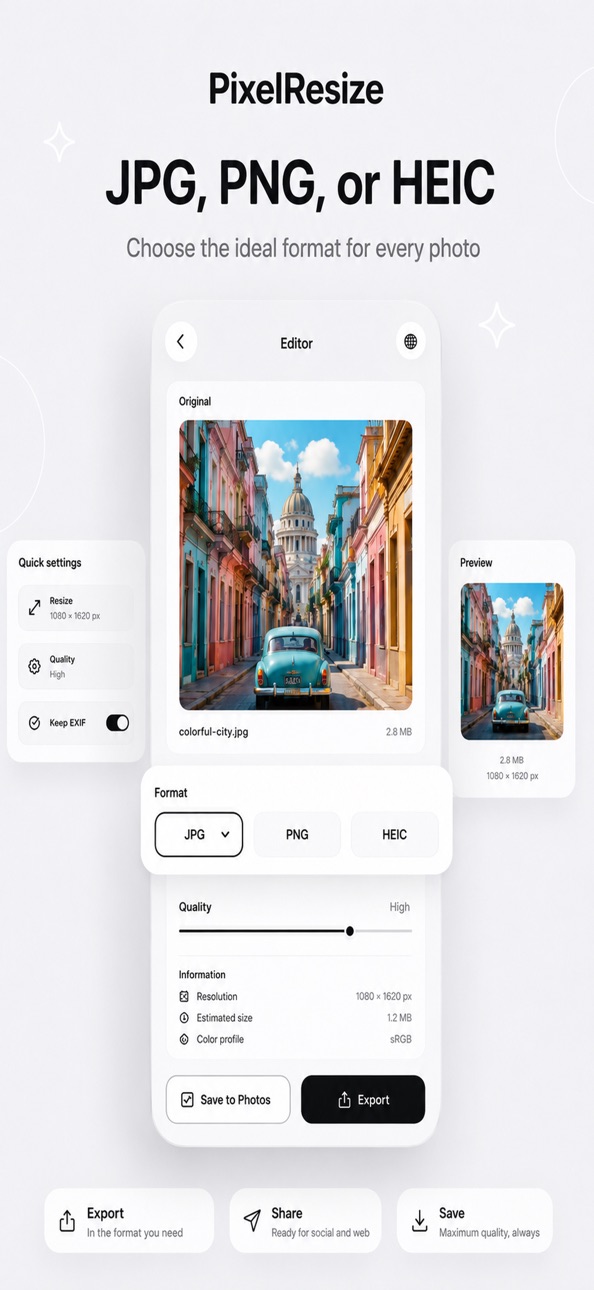
Resize photos to exact pixel sizes in seconds, with JPG, PNG, HEIC, quality control and batch tools.
Adjust image size in seconds by setting exact width and height in pixels. Keep proportions with aspect ratio lock or freely customize dimensions. Export high-quality images optimized for social media, websites, apps, or storage.
Perfect for creators, developers, and everyday use.
Key features:
• Resize images to exact dimensions (pixels)
• Lock or unlock aspect ratio
• High-quality image output
• Fast and smooth performance
• Export as JPG or PNG
Premium features:
• Batch resize multiple images at once
Batch resizing is available with a Premium subscription.
Subscription required to access Premium features.
Terms of Use (EULA): https://www.apple.com/legal/internet-services/itunes/dev/stdeula/
Resize photos, change image size, compress images, and optimize files in seconds with full control over quality and resolution.
In-App Purchases US pricing
Premium Subscription
PixelResize Premium Monthly · Monthly 3-day free trial$2.99
Capabilities
In-App Purchases
Accessibility
ipadiphonemacrealityDevicetvoswatch
Version history 9 versions
Build 887778723v1.5.22026-07-04 05:03:48
This update makes PixelResize faster and clearer to use.
New ready-made sizes are now available for App Store landscape screenshots, iPhone wallpapers and profile photos, so you can resize images with fewer manual steps.
After exporting, the app now shows a clearer summary with the number of images, output size, format and file size when available.
History is easier to use too: previous exports now make it clearer that you can tap them to reuse the same settings.
We also improved reliability behind the scenes for a smoother resizing experience.
Build 887422093v1.5.12026-06-25 18:07:17
PixelResize now gives free users more control when resizing.
Fit and Fill modes are now free.
Stretch remains a Premium resize mode.
The App Store preset now uses the correct large iPhone size: 1320 × 2868 px.
Single-image exports on iOS can now be saved as files, not only to Photos.
Free/Premium wording is clearer across the app.
Build 887033921v1.5.02026-06-16 14:32:26
New HEIC export for Premium users.
The format picker now shows only export formats supported by the device.
Clearer error messages when a format cannot be exported.
Internal improvements to format validation and export tests.
Build 886760805v1.4.02026-06-10 16:51:42
PixelResize now gives everyone unlimited basic resizing.
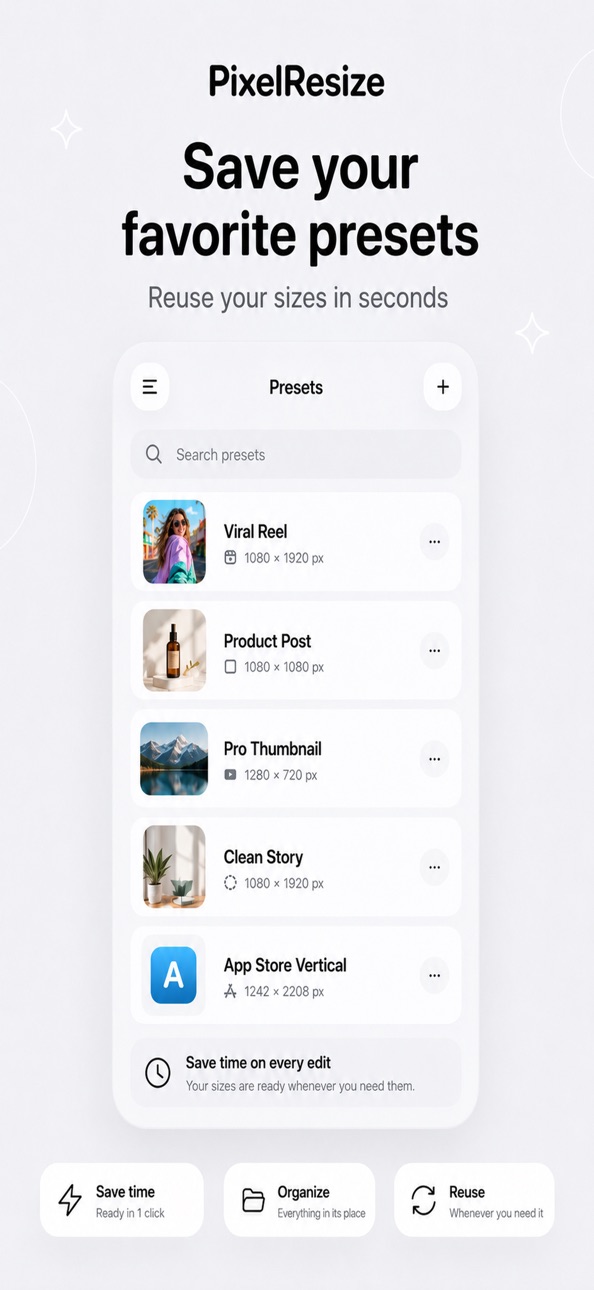
Free users can resize as much as they want with the simple JPEG workflow. Premium now focuses on advanced editing power: bigger batches, PNG export, saved presets, manual quality control, and advanced fit modes.
Premium also now starts with a 3-day free trial when the App Store offer is available.
Build 886378186v1.3.12026-06-01 19:02:48
PixelResize has a refreshed App Store look with new screenshots made to feel clearer, calmer, and easier to trust at a glance.
This update is about that first moment: seeing the app, understanding what it can do for your photos, and feeling ready to resize without friction.
Build 886018549v1.3.02026-05-23 01:47:59
This update adds Quick Sizes in the resize editor. Choose common output dimensions like Square, Story/Reel, YouTube thumbnail, Web preview, and App Store with one tap. The update also includes localized labels and small interface refinements.
Build 885604584v1.2.02026-05-13 17:52:14
What’s New:
We improved temporary file handling during export.
• Temporary files are now cleaned automatically when an export finishes (success, cancellation, or error).
• Each batch export now uses its own isolated temp job folder.
• On app launch, PixelResize automatically purges stale temp files older than 24 hours.
• Safe cleanup guardrails: only files inside PixelResize temp storage are removed.
• Internal logging was improved for better diagnostics and stability.
Build 885250606v1.12026-05-04 21:36:38
Fixed the crash when tapping “Save to Photos”.
Fixed blank image previews after selecting an image.
Optimized image decoding and caching.
Improved history preparation to reduce UI blocking.
Added tests for Photos saving, previews, and Premium validation.
Build 884628440v1.02026-04-25 07:35:48
Price history by region
Currency
Show
Columns
Search
Availability 1 of 1 storefronts
| Region | Language | Price | Ratings | Avg | Version |
|---|---|---|---|---|---|
| US | en-US | Free | 0 | — | 1.5.2 |
Change log 13 changes · US
✎
releaseNotes updated
This update makes PixelResize faster and clearer to use.
New ready-made sizes are now available for App Store landscape screenshots, iPhone wallpapers and prof
✎
description updated
Resize photos to exact pixel sizes in seconds, with JPG, PNG, HEIC, quality control and batch tools.
Adjust image size in seconds by setting exact width and he
✎
subtitle updated
Image Size, JPG PNG HEIC
✎
name updated
PixelResize: Photo Resizer
◆
Version 1.5.2 released
This update makes PixelResize faster and clearer to use.
New ready-made sizes are now available for App Store landscape screenshots, iPhone wallpapers and profile photos, so you can resize images with fewer manual steps.
After exporting,
◆
Version 1.5.1 released
PixelResize now gives free users more control when resizing.
Fit and Fill modes are now free.
Stretch remains a Premium resize mode.
The App Store preset now uses the correct large iPhone size: 1320 × 2868 px.
Single-image exports on iOS c
◆
Version 1.5.0 released
New HEIC export for Premium users.
The format picker now shows only export formats supported by the device.
Clearer error messages when a format cannot be exported.
Internal improvements to format validation and export tests.
◆
Version 1.4.0 released
PixelResize now gives everyone unlimited basic resizing.
Free users can resize as much as they want with the simple JPEG workflow. Premium now focuses on advanced editing power: bigger batches, PNG export, saved presets, manual quality cont
◆
Version 1.3.1 released
PixelResize has a refreshed App Store look with new screenshots made to feel clearer, calmer, and easier to trust at a glance.
This update is about that first moment: seeing the app, understanding what it can do for your photos, and feelin
◆
Version 1.3.0 released
This update adds Quick Sizes in the resize editor. Choose common output dimensions like Square, Story/Reel, YouTube thumbnail, Web preview, and App Store with one tap. The update also includes localized labels and small interface refinement
◆
Version 1.2.0 released
What’s New:
We improved temporary file handling during export.
• Temporary files are now cleaned automatically when an export finishes (success, cancellation, or error).
• Each batch export now uses its own isolated temp job folder.
• On
◆
Version 1.1 released
Fixed the crash when tapping “Save to Photos”.
Fixed blank image previews after selecting an image.
Optimized image decoding and caching.
Improved history preparation to reduce UI blocking.
Added tests for Photos saving, previews, and Premi
◆
Version 1.0 released