Home › Business

 US
US
1 of 1 storefronts
Content in en-US
Content in en-US
Information
Preview 2 platforms
iPhone 5 images



iPad 3 images


What’s New Version 1.0.05
• Operating mode: app shows Vendor or Customer labels. Sales orders follow CustomerFirst (party picker, Van) or SellerFirst (Seller). Delivery date on order list & detail.
• Today's profit hidden by default — tap the eye on the dashboard to show or hide.
Description
Stoccoz is a powerful van sales and field distribution management app designed for delivery drivers, sales representatives, and warehouse teams. Manage your entire sales workflow from the palm of your hand - from customer visits to invoice generation, all in real time.
KEY FEATURES
Dashboard
Get a quick overview of your day: sales summary, van stock levels, and recent invoices, all in one glance. Pull down to refresh for the latest data.
Sales and Invoicing
Create sales invoices on the spot. Add products, adjust quantities, apply discounts, and submit instantly. Full support for partial orders and mixed-product deliveries.
Sales Returns
Record product returns directly against invoices. Handle return quantities per line item without disrupting the original sale, keeping your records accurate and up to date.
Sales Orders
Raise pre-sales orders for future fulfillment. View and manage all pending and completed orders with date-based filtering for quick lookup.
Customer Management
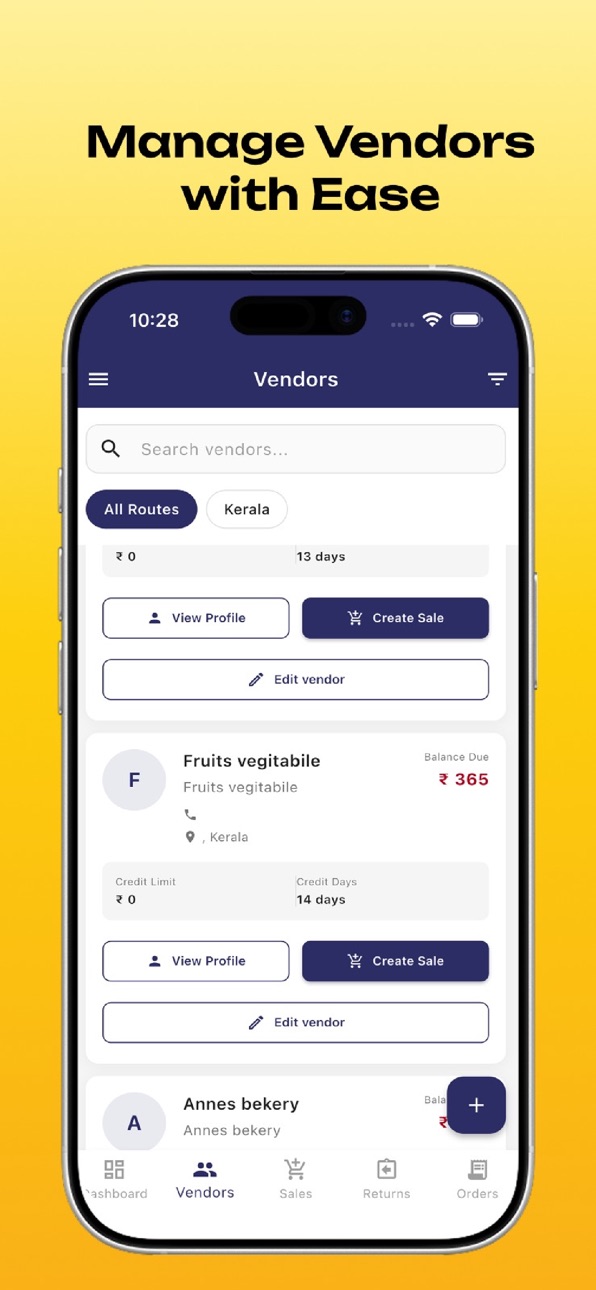
Browse your full customer list, view detailed vendor profiles, check credit limits, balance dues, and credit days at a glance. Access complete invoice history per customer with date filters.
Van Stock Management
Keep track of your van inventory in real time. View current stock levels, request refills, and ensure you always have the right products loaded.
Expense Tracking
Log daily field expenses on the go and maintain a clear record of operational costs associated with each route or trip.
Attendance and Check-In
Mark attendance with a selfie and automatic GPS location stamp, giving management full visibility of driver field activity.
Bluetooth Printing
Connect to a Bluetooth printer directly from the app to print invoices and receipts on delivery, providing customers with instant proof of purchase.
Reports
Access sales performance reports to track productivity and route efficiency over time.
Notifications
Stay informed with real-time notifications on approvals, updates, and important alerts.
Secure and Reliable
Enterprise-grade token-based authentication with automatic session refresh ensures your data stays secure. Works seamlessly with your company's Stoccoz backend.
WHO IS THIS APP FOR?
Van sales drivers managing daily delivery routes
Field sales representatives visiting customers
Warehouse and distribution managers overseeing stock and collections
Accessibility
ipadiphonemacrealityDevicetvoswatch
Version history 6 versions
Build 887716414v1.0.052026-07-02 18:49:19
• Operating mode: app shows Vendor or Customer labels. Sales orders follow CustomerFirst (party picker, Van) or SellerFirst (Seller). Delivery date on order list & detail.
• Today's profit hidden by default — tap the eye on the dashboard to show or hide.
Build 887604714v1.0.042026-06-29 22:59:46
Operating mode labels — OperatingMode setting (SellerFirst / CustomerFirst) controls UI text: Vendor vs Customer across list, nav, forms, and dropdowns. Sales orders use Seller type without party picker in SellerFirst; in CustomerFirst, party selection is required, customer_id is sent, and type is Van.
Sales order dates — Expected delivery shows as dd/mm/yyyy on order list cards and the order detail screen.
Build 887452381v1.0.032026-06-25 22:52:43
Vendors: filter by outstanding balance; list refreshes after payment; QR visit scan offers create sale or shows rejection when visit is not approved.
Sales summary report simplified (total sales, collection, outstanding, cash/credit, invoice count); invoice PDF sharing to WhatsApp fixed on Android
Build 886039932v1.0.022026-05-23 20:03:33
Added QR customer visit scan from dashboard (when enabled in settings), plus smoother attendance check-in with already-marked UI and faster camera open. Sales orders, vendor search, and order detail screens now use Provider state instead of local setState for more stable UI
Build 885737904v1.0.012026-05-16 22:31:50
Driver attendance — Check-in opens the camera sooner (location is requested after you take your selfie). If you’ve already checked in today, you’ll see a clear “You’re checked in” screen with optional time info, pull-to-refresh, and a path back to the dashboard instead of a confusing empty check-in flow.
Vendors & sales — Add payment is available from the vendor list (and no longer doubles as edit there), while Edit vendor stays on the profile screen. For add sales order, product loading shows a proper loader, and product rows support clearer quantity controls and unit-based pricing when you pick different units.
Build 884603616v1.02026-04-30 18:19:35
No pricing data captured yet — comparisons appear once the app has paid storefronts or in-app purchases.
Availability 1 of 1 storefronts
| Region | Language | Price | Ratings | Avg | Version |
|---|---|---|---|---|---|
| US | en-US | Free | 0 | — | 1.0.05 |
Change log 10 changes · US
✎
releaseNotes updated
• Operating mode: app shows Vendor or Customer labels. Sales orders follow CustomerFirst (party picker, Van) or SellerFirst (Seller). Delivery date on order lis
✎
description updated
Stoccoz is a powerful van sales and field distribution management app designed for delivery drivers, sales representatives, and warehouse teams. Manage your ent
✎
subtitle updated
Van sales management.
✎
name updated
Stoccoz - Van Sale
◆
Version 1.0.05 released
• Operating mode: app shows Vendor or Customer labels. Sales orders follow CustomerFirst (party picker, Van) or SellerFirst (Seller). Delivery date on order list & detail.
• Today's profit hidden by default — tap the eye on the dashboard to
◆
Version 1.0.04 released
Operating mode labels — OperatingMode setting (SellerFirst / CustomerFirst) controls UI text: Vendor vs Customer across list, nav, forms, and dropdowns. Sales orders use Seller type without party picker in SellerFirst; in CustomerFirst, par
◆
Version 1.0.03 released
Vendors: filter by outstanding balance; list refreshes after payment; QR visit scan offers create sale or shows rejection when visit is not approved.
Sales summary report simplified (total sales, collection, outstanding, cash/credit, invoic
◆
Version 1.0.02 released
Added QR customer visit scan from dashboard (when enabled in settings), plus smoother attendance check-in with already-marked UI and faster camera open. Sales orders, vendor search, and order detail screens now use Provider state instead of
◆
Version 1.0.01 released
Driver attendance — Check-in opens the camera sooner (location is requested after you take your selfie). If you’ve already checked in today, you’ll see a clear “You’re checked in” screen with optional time info, pull-to-refresh, and a path
◆
Version 1.0 released