Home › Lifestyle

 US
US
1 of 1 storefronts
Content in en-US
Content in en-US
Information
Preview 1 platform
iPhone 10 images




What’s New Version 1.0.19
What's new:
• lock out the child keypad after repeated wrong PINs
• allow 4-to-10-digit override PINs
• center block screens, add exits, kill transition flashes
Description
PearGuard is a privacy-first parental control app that runs entirely on your family's devices. No accounts. No cloud servers. No data collection.
Parents set policies on their iPhone; children's non-iOS devices enforce them locally. Devices sync directly over an end-to-end encrypted peer-to-peer connection whenever they can reach each other, and everything keeps working offline.
FEATURES
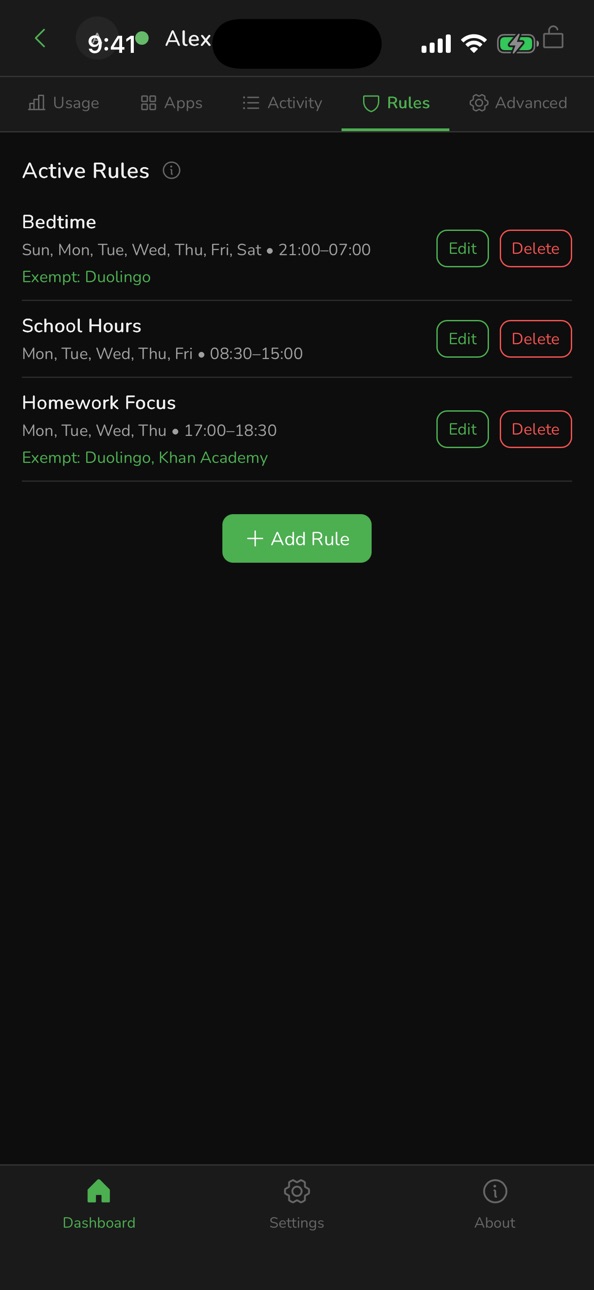
• Screen time limits: daily time budgets and bedtime windows on the child device
• Per-app policies: allow, block or time-limit individual apps
• Activity view: see what has been used and when, from the parent device
• Time requests: child asks for extra time; parent approves or denies
• Offline-first: policies apply immediately on the child device and sync when devices reconnect
• No accounts: identity is a cryptographic key pair generated on your device, not tied to an email or phone number
• No data collection: PeerLoom, Google, Apple and no third party ever sees your family's activity
HOW IT WORKS
The parent app pairs with the child app using a one-time invite link. After pairing, the two devices exchange signed, encrypted messages directly. There is no intermediary server storing your family's data.
REQUIREMENTS
• Parent device: iPhone running iOS 16 or later
• Child device: Not applicable to iOS devices
• Both devices need internet access to sync (any network, including mobile data)
PearGuard is built by PeerLoom LLC. We cannot see your data because it never leaves your devices.
Accessibility
ipadiphonemacrealityDevicetvoswatch
Version history 16 versions
Build 888067843v1.0.172026-07-10 02:29:40
What's new:
- update settings menu UI/UX
Build 888111833v1.0.182026-07-10 18:06:03
What's new:
- exempt specific apps from the total limit
- let the child request more general time
Build 888129830v1.0.192026-07-10 22:02:00
What's new:
• lock out the child keypad after repeated wrong PINs
• allow 4-to-10-digit override PINs
• center block screens, add exits, kill transition flashes
Build 887929878v1.0.162026-07-07 15:59:52
What's new:
- update settings menu UI/UX
Build 887880413v1.0.152026-07-06 21:18:20
What's new:
- stop counting screen-off time as app usage
- stop network swaps triggering false bypass warnings
Build 887607242v1.0.142026-06-30 03:27:44
What's new:
- cumulative daily screen-time limit
Build 887289552v1.0.132026-06-22 20:25:13
What's new:
• restore block overlay when extra-time picker is cancelled
• show "Request More Time" for category-limit blocks
Build 887060166v1.0.112026-06-17 14:16:43
What's new:
• restore block overlay when extra-time picker is cancelled
• show "Request More Time" for category-limit blocks
Build 887100342v1.0.122026-06-17 21:53:25
What's new:
• restore block overlay when extra-time picker is cancelled
• show "Request More Time" for category-limit blocks
Build 886708026v1.0.102026-06-09 18:11:44
What's new:
• overlay hardening (Alt+F4 + isOwnWindow exePath fallback)
• restore block overlay when extra-time picker is cancelled
• show "Request More Time" for category-limit blocks
Build 886163895v1.0.92026-05-26 21:49:52
What's new:
• overlay hardening (Alt+F4 + isOwnWindow exePath fallback)
• restore block overlay when extra-time picker is cancelled
• show "Request More Time" for category-limit blocks
Build 885310061v1.0.82026-05-06 18:27:59
What's new:
• overlay hardening (Alt+F4 + isOwnWindow exePath fallback)
• restore block overlay when extra-time picker is cancelled
• show "Request More Time" for category-limit blocks
Build 885194598v1.0.72026-05-03 01:57:53
What's new:
• overlay hardening (Alt+F4 + isOwnWindow exePath fallback)
• restore block overlay when extra-time picker is cancelled
• show "Request More Time" for category-limit blocks
Build 885137820v1.0.62026-05-01 00:03:30
** Improvements
-per-day aggregates for Trends and Category reports
** Bug Fixes
-rolling 7-day window for weekly query
Build 884995998v1.0.52026-04-28 18:40:07
Bug Fixes
-reset Dashboard and Usage tab "today" totals at midnight
Build 884522712v1.0.22026-04-27 02:18:37
No pricing data captured yet — comparisons appear once the app has paid storefronts or in-app purchases.
Availability 1 of 1 storefronts
| Region | Language | Price | Ratings | Avg | Version |
|---|---|---|---|---|---|
| US | en-US | Free | 0 | — | 1.0.19 |
Change log 20 changes · US
✎
releaseNotes updated
What's new:
• lock out the child keypad after repeated wrong PINs
• allow 4-to-10-digit override PINs
• center block screens, add exits, kill transition flashe
✎
description updated
PearGuard is a privacy-first parental control app that runs entirely on your family's devices. No accounts. No cloud servers. No data collection.
✎
subtitle updated
No servers. No accounts.
✎
name updated
PearGuard
◆
Version 1.0.19 released
What's new:
• lock out the child keypad after repeated wrong PINs
• allow 4-to-10-digit override PINs
• center block screens, add exits, kill transition flashes
◆
Version 1.0.18 released
What's new:
- exempt specific apps from the total limit
- let the child request more general time
◆
Version 1.0.17 released
What's new:
- update settings menu UI/UX
◆
Version 1.0.16 released
What's new:
- update settings menu UI/UX
◆
Version 1.0.15 released
What's new:
- stop counting screen-off time as app usage
- stop network swaps triggering false bypass warnings
◆
Version 1.0.14 released
What's new:
- cumulative daily screen-time limit
◆
Version 1.0.13 released
What's new:
• restore block overlay when extra-time picker is cancelled
• show "Request More Time" for category-limit blocks
◆
Version 1.0.12 released
What's new:
• restore block overlay when extra-time picker is cancelled
• show "Request More Time" for category-limit blocks
◆
Version 1.0.11 released
What's new:
• restore block overlay when extra-time picker is cancelled
• show "Request More Time" for category-limit blocks
◆
Version 1.0.10 released
What's new:
• overlay hardening (Alt+F4 + isOwnWindow exePath fallback)
• restore block overlay when extra-time picker is cancelled
• show "Request More Time" for category-limit blocks
◆
Version 1.0.9 released
What's new:
• overlay hardening (Alt+F4 + isOwnWindow exePath fallback)
• restore block overlay when extra-time picker is cancelled
• show "Request More Time" for category-limit blocks
◆
Version 1.0.8 released
What's new:
• overlay hardening (Alt+F4 + isOwnWindow exePath fallback)
• restore block overlay when extra-time picker is cancelled
• show "Request More Time" for category-limit blocks
◆
Version 1.0.7 released
What's new:
• overlay hardening (Alt+F4 + isOwnWindow exePath fallback)
• restore block overlay when extra-time picker is cancelled
• show "Request More Time" for category-limit blocks
◆
Version 1.0.6 released
** Improvements
-per-day aggregates for Trends and Category reports
** Bug Fixes
-rolling 7-day window for weekly query
◆
Version 1.0.5 released
Bug Fixes
-reset Dashboard and Usage tab "today" totals at midnight
◆
Version 1.0.2 released