Home › Productivity

 US
US
1 of 1 storefronts
Content in en-US
Content in en-US
Information
Preview 3 platforms
iPhone 9 images




iPad 3 images


Apple Watch 2 images


What’s New Version 1.2.29
Welcome to Version 1.2!
We are incredibly excited to bring you our biggest update yet. Nota is no longer just a place to catch your thoughts—it is now an active, intelligent workspace partner that helps you shape them. This release is packed with magical new AI capabilities, major collaboration upgrades, and buttery-smooth performance improvements.
Here is what’s new in Version 1.2:
• Meet Nota Assist
Say hello to your personal workspace agent. AI should feel like a seamless teammate, not a distraction. Nota Assist runs quietly in the background with a relaxed rainbow glow, ready to organize, tag, and execute requests for you. Whenever Nota Assist drafts or organizes, additions are clearly stamped with a premium timeline header, so you always know exactly what your assistant wrote.
• Live Collaboration & Custom Pings (Pro)
Working together just got a massive upgrade. You can now instantly toggle shared notes between Collaborative Mode and View Only. Keep track of who is in the note with live counters. Need to get someone’s attention? Send a custom push notification directly to their Lock Screen, bringing them instantly into the exact note.
• Custom Speed Action Presets (Pro)
Build your ultimate personalized AI toolkit. Tap the "+" icon on the floating glass menu to save your favorite AI prompts under single-word names. Trigger complex workflows anytime with one tap, synced perfectly across all your devices.
• The Recently Deleted Safety Net
Never panic about losing a great idea again. We added a dedicated Recently Deleted folder that safely keeps discarded notes for 30 days before permanently clearing them. Restoring a tossed draft takes just one tap.
• Smart Tags & Collections
Organizing your ideas is effortless. Choose from pre-created tags, or let Nota Assist scan your writing and suggest the perfect smart tags for you.
• Polished & Perfected
- Rebuilt Sync Engine: Enjoy buttery-smooth typing with zero lag or stuttering as your notes back up.
- Thumb-Dismiss Keyboard: Effortlessly slide the keyboard out of your view while scrolling.
- Rock-Solid Scrolling: Fixed the bug where the screen would randomly jump to the bottom.
- Perfected Agent Interface: Refined touch layers so buttons are always clickable without accidentally tapping the note text behind them.
- Apple Watch Crowns: The recording screen now reacts dynamically to the physical turn of your Digital Crown.
- Full-Screen HTML: Live HTML Preview now occupies the entire screen again for optimal layout testing.
If you love Nota, please leave a quick review on the App Store! It helps our small team more than you know. Keep those ideas flowing!
Description
Nota is built for the way your mind actually moves—not always linear, not always tidy. It starts as a sentence, a voice memo, a sketch, a photo, a meeting, or a passing thought.
Nota gives those thoughts a home.
Type for structure, speak when your hands are busy, or dictate to your Apple Watch. Sketch with Apple Pencil when words aren't enough. Scan whiteboards, receipts, or textbooks and turn them into searchable, editable text.
Bring in AI when you need momentum. Nota starts with your words, voice, and ideas—AI is only there when you ask, right where your thinking already lives.
GO PRO: UNLEASH YOUR SECOND BRAIN
Upgrade to Nota Pro for the ultimate organized workspace, cross-device sync, and unlimited AI power:
• Custom Speed Actions: Save prompts as custom commands and trigger workflows with one tap.
• Uncapped Brainstorming: Massive monthly AI limits to write, translate, and brainstorm.
• Limitless Voice Capture: Record long meetings and lectures with dictation in 45 languages.
• Premier AI Models: Exclusive access to the world's smartest reasoning models.
• Collaborative Workspaces: Co-author notes in real-time and ping lock screens.
• Auto-Organize: Let Nota Assist automatically tag and organize notes into collections.
• Apple Watch App: Dictate on a run; notes instantly transcribe and sync to all devices.
• Digital Second Brain: Sync notes to a designated folder in a local Markdown vault. Give offline CLIs and AIs instant context and access to your entire note universe, keeping your thoughts connected in clean, portable Markdown.
• Web Publishing: Turn any note into a live, beautifully formatted webpage with a secure link.
• Custom Aesthetics: Personalize your app with premium themes, icons, and accent colors.
• 30-Day Recovery Vault: Recover deleted notes within 30 days from a dedicated folder.
START FREE: CAPTURE IDEAS LOCALLY
Nota Free is packed with premium tools to organize your thoughts on-device:
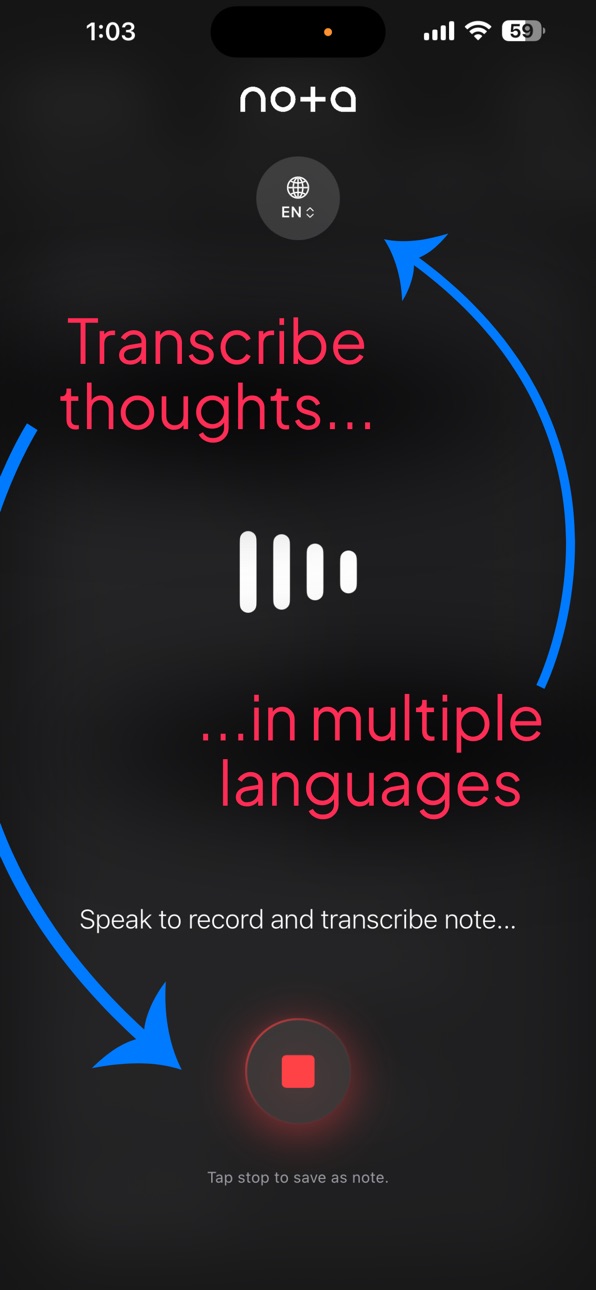
• Voice Transcription: Capture thoughts with fast dictation in your preferred language.
• Quick Action AI: Highlight any text to rewrite, expand, or summarize in one tap.
• Walkie-Talkie Mode: Press and hold the glowing Orb to talk directly to Nota Assist.
• Sketch & Draw: Draw over notes with Apple Pencil or finger using responsive tools.
• Scan & OCR: Point your camera at whiteboards, receipts, or books to extract text.
• Audio Player: Music-style player to scrub, skip, and rename voice notes.
• Auto-Titles: Let AI read your first sentence and automatically name your note.
• Clean Markdown: Copy or export notes formatted in clean Markdown for emails, blogs, or offline use.
• Pin, Sort & Search: Organize your library and find any note in milliseconds.
• Local Auto-Save: Notes save automatically in the background so you never lose a word.
Nota is for founders, creatives, students, operators, writers, builders, and anyone who thinks faster than a blank page can keep up.
Terms of Service:
https://nota.talk/terms
Privacy Policy:
https://nota.talk/privacy
Have feedback? Contact us at:
https://nota.talk/support
We use the Standard Apple EULA:
https://www.apple.com/legal/internet-services/itunes/dev/stdeula/
In-App Purchases US pricing
Nota Pro Subscription
Monthly · Monthly 14-day free trial$7.99
Annually · Yearly 14-day free trial$69.99
Capabilities
In-App Purchases
Accessibility
ipadiphonemacrealityDevicetvoswatch
Version history 3 versions
Build 886144299v1.2.292026-06-24 06:29:22
Welcome to Version 1.2!
We are incredibly excited to bring you our biggest update yet. Nota is no longer just a place to catch your thoughts—it is now an active, intelligent workspace partner that helps you shape them. This release is packed with magical new AI capabilities, major collaboration upgrades, and buttery-smooth performance improvements.
Here is what’s new in Version 1.2:
• Meet Nota Assist
Say hello to your personal workspace agent. AI should feel like a seamless teammate, not a distraction. Nota Assist runs quietly in the background with a relaxed rainbow glow, ready to organize, tag, and execute requests for you. Whenever Nota Assist drafts or organizes, additions are clearly stamped with a premium timeline header, so you always know exactly what your assistant wrote.
• Live Collaboration & Custom Pings (Pro)
Working together just got a massive upgrade. You can now instantly toggle shared notes between Collaborative Mode and View Only. Keep track of who is in the note with live counters. Need to get someone’s attention? Send a custom push notification directly to their Lock Screen, bringing them instantly into the exact note.
• Custom Speed Action Presets (Pro)
Build your ultimate personalized AI toolkit. Tap the "+" icon on the floating glass menu to save your favorite AI prompts under single-word names. Trigger complex workflows anytime with one tap, synced perfectly across all your devices.
• The Recently Deleted Safety Net
Never panic about losing a great idea again. We added a dedicated Recently Deleted folder that safely keeps discarded notes for 30 days before permanently clearing them. Restoring a tossed draft takes just one tap.
• Smart Tags & Collections
Organizing your ideas is effortless. Choose from pre-created tags, or let Nota Assist scan your writing and suggest the perfect smart tags for you.
• Polished & Perfected
- Rebuilt Sync Engine: Enjoy buttery-smooth typing with zero lag or stuttering as your notes back up.
- Thumb-Dismiss Keyboard: Effortlessly slide the keyboard out of your view while scrolling.
- Rock-Solid Scrolling: Fixed the bug where the screen would randomly jump to the bottom.
- Perfected Agent Interface: Refined touch layers so buttons are always clickable without accidentally tapping the note text behind them.
- Apple Watch Crowns: The recording screen now reacts dynamically to the physical turn of your Digital Crown.
- Full-Screen HTML: Live HTML Preview now occupies the entire screen again for optimal layout testing.
If you love Nota, please leave a quick review on the App Store! It helps our small team more than you know. Keep those ideas flowing!
Build 885293951v1.12026-05-11 08:00:16
Welcome to Version 1.1!
We’ve been working relentlessly to make Nota the fastest, most beautiful way to catch and shape your ideas. We believe you should expect more from the software you use every day, which is why we engineered this update to be a massive leap forward in both design and capability.
Here is everything new in this release:
• Available Everywhere: Mac, iPad, and iOS 17
Nota is no longer just for your iPhone. We’ve brought a flawless, desktop-class experience to the Mac and iPad. Your notes, sketches, and audio now sync seamlessly across your entire Apple ecosystem. Plus, we’ve expanded support back to iOS 17 so everyone can join in.
• Nota for Apple Watch
Leave your phone in your pocket. You can now record and transcribe voice notes directly from your wrist. Ideas captured on your Watch instantly sync to your other devices.
• Choose Your Favorite AI
Pro users now have access to the world's premier AI models. You can easily toggle between the smartest models available in your region directly inside the editor to get the exact results you expect.
• Instant Collaboration & Link Sharing
Collaboration made simple. Generate a secure web link with a single tap to share your notes with anyone, or work together just like you expect from a premium notes app.
• Transcribe in 45 Languages
Speak your mind in the language you prefer. Our lightning-fast voice transcription now supports 45 different languages, easily togglable right from the recording interface.
• The Floating Audio Tray
Your voice notes just got a massive upgrade. We’ve introduced a gorgeous, Apple Music-style floating player. Scrub through your audio with the new liquid-glass slider, skip forward or back 10 seconds, and rename recordings on the fly.
• Custom Tabs & Deeper Organization
Organize your workspace, your way. You can now assign custom neon, pastel, or dark colors to your tags, seamlessly drag to reorder them, and even sort your main list by your custom Tabs for a perfectly structured workflow.
• Export Notes as Images
Want to share your thoughts visually? You can now save any note as a beautiful, high-res image directly to your camera roll. If you’ve drawn over your text with Apple Pencil, the ink overlays perfectly.
• Floating AI Glass Menu & Quick Actions
Highlighting text now summons a sleek, floating glass menu. Use our new Quick Action pills—Cleanup, Expand, Professional, Genius, and Summarize—to instantly refine your thoughts.
• Live HTML Preview
For the developers and tinkerers: no more bouncing between text editors and FTP apps. Write or paste HTML code into Nota, hit the new play button, and instantly view the rendered output right inside the app.
• Polished & Perfected
• Added highly-requested Undo/Redo controls for Apple Pencil sketches.
• Auto-title generation is now smarter, pulling exactly what you need from your first spoken or typed sentence.
• Deepened the "liquid glass" UI aesthetic across the entire app for a truly gorgeous, premium feel.
Thank you for capturing your thoughts with Nota! If you’re loving the app, please leave us a review—it helps more than you know. Keep the ideas flowing!
Build 884441131v1.02026-05-01 19:15:11
Price history by region
Currency
Show
Columns
Search
Availability 1 of 1 storefronts
| Region | Language | Price | Ratings | Avg | Version |
|---|---|---|---|---|---|
| US | en-US | Free | 2 | 5.0 | 1.2.29 |
Change log 7 changes · US
✎
releaseNotes updated
Welcome to Version 1.2!
We are incredibly excited to bring you our biggest update yet. Nota is no longer just a place to catch your thoughts—it is now an activ
✎
description updated
Nota is built for the way your mind actually moves—not always linear, not always tidy. It starts as a sentence, a voice memo, a sketch, a photo, a meeting, or a
✎
subtitle updated
Catch thoughts. Shape ideas.
✎
name updated
Nota: AI Notes & Voice
◆
Version 1.2.29 released
Welcome to Version 1.2!
We are incredibly excited to bring you our biggest update yet. Nota is no longer just a place to catch your thoughts—it is now an active, intelligent workspace partner that helps you shape them. This release is pack
◆
Version 1.1 released
Welcome to Version 1.1!
We’ve been working relentlessly to make Nota the fastest, most beautiful way to catch and shape your ideas. We believe you should expect more from the software you use every day, which is why we engineered this updat
◆
Version 1.0 released