Home › Lifestyle

 US
US
1 of 1 storefronts
Content in en-US
Content in en-US
Information
Preview 3 platforms
iPhone 5 images


iPad 4 images


Apple Watch 2 images


What’s New Version 1.4.0
You can now share your daily summary as an image — from the day view in Stats or right after stopping a record. Plus small improvements.
Description
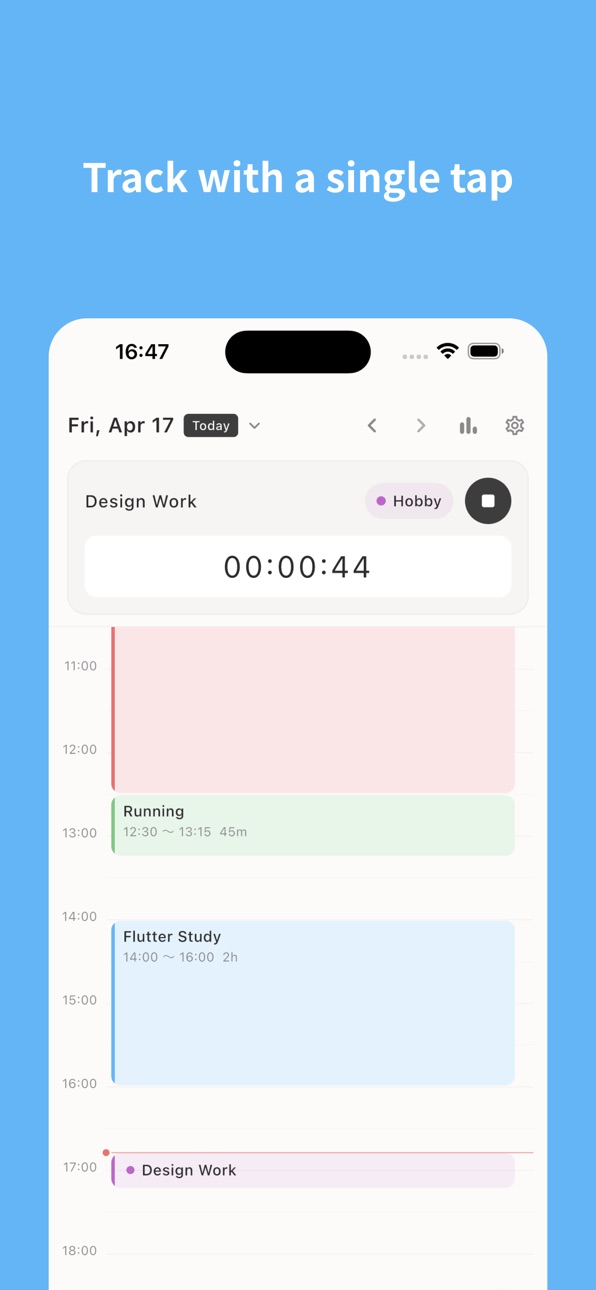
Track your work with a single tap. A simple time tracker that lets you review your day on a colorful timeline.
Key Features
・One-tap recording — Start/stop timer to log work sessions
・Timeline view — Visualize your day on a 24-hour timeline
・Categories — Organize work with preset colors
・Stats — Day/Weekly/monthly summaries by category
・Manual entry — Add or edit records anytime
・Dynamic Island — See elapsed time without opening the app
■ Terms of Use
https://www.apple.com/legal/internet-services/itunes/dev/stdeula/
In-App Purchases US pricing
Sync Subscription
Monthly · Monthly$2.99
Kiroku Sync Annual · Yearly$22.99
Capabilities
In-App Purchases
Accessibility
ipadiphonemacrealityDevicetvoswatch
Version history 17 versions
Build 886874950v1.4.02026-06-13 08:35:06
You can now share your daily summary as an image — from the day view in Stats or right after stopping a record. Plus small improvements.
Build 886632440v1.3.02026-06-08 14:30:16
Design refresh
Build 885947202v1.2.72026-05-27 16:48:52
Report function update
Build 885739183v1.2.52026-05-20 18:48:37
Added web integration functionality.
Build 885670212v1.2.42026-05-16 00:51:03
Added sync option
Build 885466091v1.2.32026-05-11 03:05:06
Added a note function.
Build 885390229v1.2.22026-05-08 21:21:29
Additional language support
Build 885315245v1.2.12026-05-06 18:33:41
Additional language support
Build 885229755v1.2.02026-05-04 18:19:01
Widget display change
Build 885206181v1.1.42026-05-03 19:12:03
bug fix
Build 885147431v1.1.32026-05-01 17:17:18
watch app integration
Build 885061759v1.1.22026-04-30 20:12:30
Supports home screen widgets, lock screen widgets, and Live Activity.
Build 885020669v1.1.12026-04-28 21:04:10
- Stats screen now lets you jump to a specific day, week, or month with a tap.
- Week-period labels include weekday markers (e.g. "Apr 27 (Mon) – May 3 (Sun)").
- The app now follows your device's system language by default.
Build 884960072v1.1.02026-04-27 20:29:33
Improved display of aggregated data
Build 884855615v1.0.22026-04-24 19:23:10
- Added home screen widget functionality
- Improved the display design for overlapping tasks
Build 884811561v1.0.12026-04-22 21:20:17
Add review link
Build 884427234v1.02026-04-21 07:29:56
Price history by region
Currency
Show
Columns
Search
Availability 1 of 1 storefronts
| Region | Language | Price | Ratings | Avg | Version |
|---|---|---|---|---|---|
| US | en-US | Free | 0 | — | 1.4.0 |
Change log 21 changes · US
✎
releaseNotes updated
You can now share your daily summary as an image — from the day view in Stats or right after stopping a record. Plus small improvements.
✎
description updated
Track your work with a single tap. A simple time tracker that lets you review your day on a colorful timeline.
✎
subtitle updated
Simple time tracker & timer
✎
name updated
Kiroku - Time Log
◆
Version 1.4.0 released
You can now share your daily summary as an image — from the day view in Stats or right after stopping a record. Plus small improvements.
◆
Version 1.3.0 released
Design refresh
◆
Version 1.2.7 released
Report function update
◆
Version 1.2.5 released
Added web integration functionality.
◆
Version 1.2.4 released
Added sync option
◆
Version 1.2.3 released
Added a note function.
◆
Version 1.2.2 released
Additional language support
◆
Version 1.2.1 released
Additional language support
◆
Version 1.2.0 released
Widget display change
◆
Version 1.1.4 released
bug fix
◆
Version 1.1.3 released
watch app integration
◆
Version 1.1.2 released
Supports home screen widgets, lock screen widgets, and Live Activity.
◆
Version 1.1.1 released
- Stats screen now lets you jump to a specific day, week, or month with a tap.
- Week-period labels include weekday markers (e.g. "Apr 27 (Mon) – May 3 (Sun)").
- The app now follows your device's system language by default.
◆
Version 1.1.0 released
Improved display of aggregated data
◆
Version 1.0.2 released
- Added home screen widget functionality
- Improved the display design for overlapping tasks
◆
Version 1.0.1 released
Add review link
◆
Version 1.0 released