Home › Music

Information
Preview 2 platforms
iPhone 5 images


iPad 4 images


What’s New Version 1.1.10
• String labels now use harp-convention register numbering (e.g. 0G, 1E) — the same notation harpists use, not scientific octave numbers.
• Faster playing is detected reliably — notes played in quick succession are no longer missed.
• Auto mode always snaps to the nearest harp string name and never shows sharps, so the displayed note always matches the highlighted string.
• Gauge cleaned up: note names no longer show octave numbers. Circle clipping has also been fixed on iPhone screens.
• Pitch analysis moved to a background thread — no more brief UI stutters while the tuner processes audio.
Description
DESIGNED FOR HARPISTS
Harpie is not a generic chromatic tuner with a harp mode bolted on. Every detail — the lever and pedal harp string list, the reference tone synthesis, all-flats note display, the A4 calibration — was built around how harpists actually tune.
Whether you're tuning up before a rehearsal or dialing in precise calibration before a performance, Harpie gives you the clean, responsive feedback you need.
TUNER
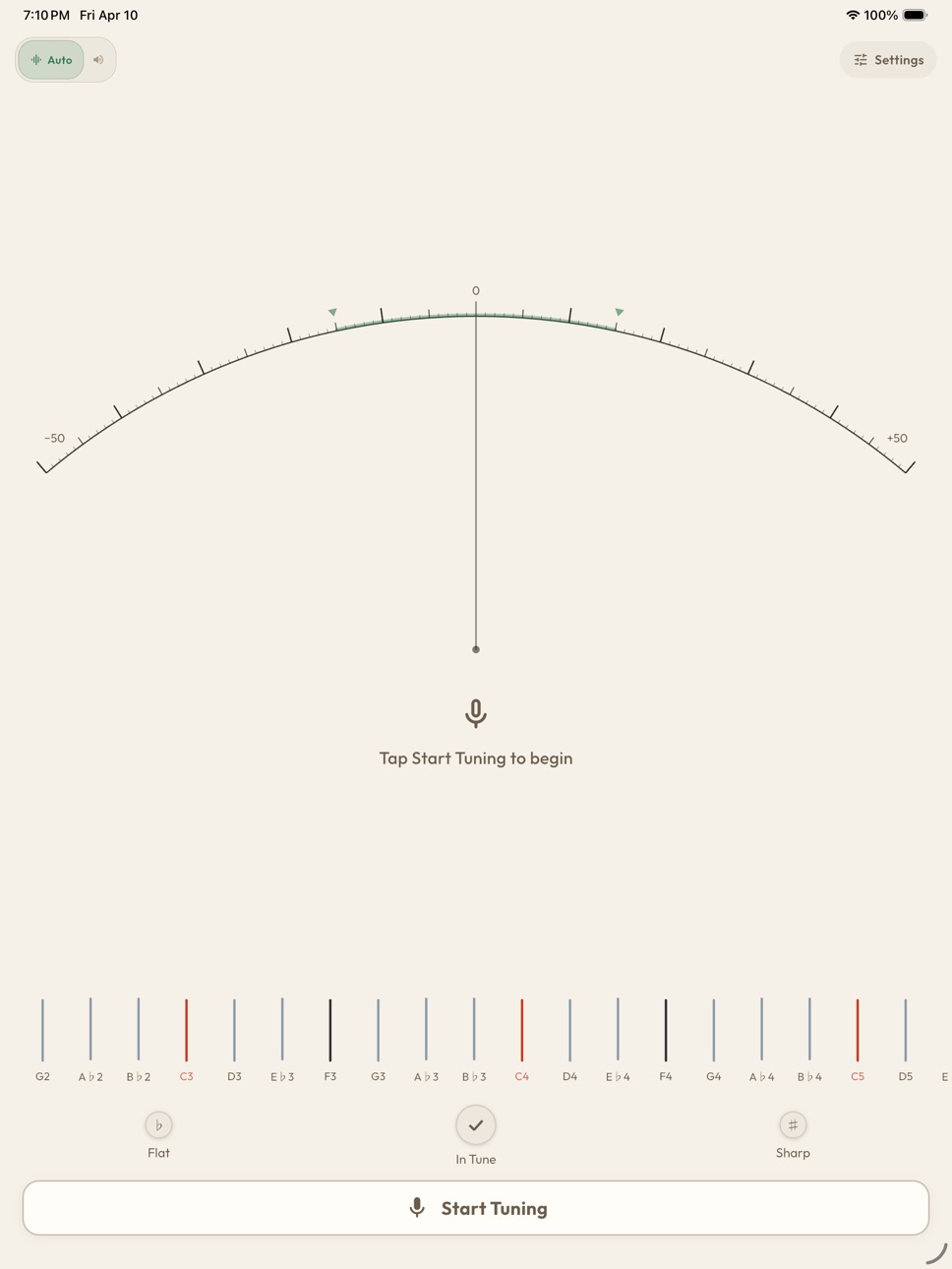
The arc gauge shows exactly how sharp or flat each string is, with a clear indicator so you know at a glance whether to tighten or loosen.
REFERENCE MODE
Tap any string in the list to play back a pure harp reference tone. Tune by ear or let the gauge guide you - your choice.
PEDAL HARP
Full 47-string layout, with all pedals set to flat as a starting point.
LEVER HARP
Configurable 19 to 40 strings. Choose the layout that matches your instrument.
CALIBRATION
Set A4 anywhere from 430 Hz to 450 Hz in 1 Hz steps. Preference for flats or sharps. Octave display on or off.
DARK MODE
Full dark theme support — easy on the eyes in low-light rehearsal spaces and pit orchestras.
TUNING REMINDER
Before each session, Harpie reminds pedal harp players to set all pedals to flat and lever harp players to disengage all levers — so your starting point is always consistent.
Supports English, German, French, Italian, Simplified Chinese, and Traditional Chinese.
Accessibility
ipadiphonemacrealityDevicetvoswatch
Version history 5 versions
Build 886298671v1.1.102026-05-29 20:38:59
• String labels now use harp-convention register numbering (e.g. 0G, 1E) — the same notation harpists use, not scientific octave numbers.
• Faster playing is detected reliably — notes played in quick succession are no longer missed.
• Auto mode always snaps to the nearest harp string name and never shows sharps, so the displayed note always matches the highlighted string.
• Gauge cleaned up: note names no longer show octave numbers. Circle clipping has also been fixed on iPhone screens.
• Pitch analysis moved to a background thread — no more brief UI stutters while the tuner processes audio.
Build 886237484v1.1.42026-05-28 16:53:42
In-tune indicator redesign
The separate pitch indicator row is gone. Pitch feedback is now built directly into the note display, tuning bulbs appear on either side of the detected note, and the note lights up inside a soft sage-green circle when you're in tune — everything you need is in one place.
Visual polish
Fixed a clipping issue on iOS where the note letter could overflow the circle edge. The in-tune circle is now a medium sage green with better text contrast, and the gauge card stays its normal color, so the in-tune state is clear without the whole card changing color.
Build 885704744v1.1.12026-05-21 20:26:25
App libraries upgrades.
Build 885676247v1.12026-05-14 23:09:32
The tuner now glows when you're in tune.
When your pitch lands within ±15 cents of the target, the gauge section and note name light up in the accent color — a clear, satisfying signal that matches the indicator lights below it.
The tuning reminder is also much easier to dismiss. Tap anywhere on the banner (not just the small button) to clear it, and the text is larger so you can read it at a glance before you start.
A few settings refinements:
The "Always show flats" toggle is now permanently on when a harp is selected — harps are always notated in flats, so there's nothing to configure.
The instrument card on the main screen has been simplified too, combining harp type and string count into a single display.
Build 884354732v1.02026-04-13 18:12:12
Price history by region
Currency
Show
Columns
Search
Availability 10 of 10 storefronts
| Region | Language | Price | Ratings | Avg | Version |
|---|---|---|---|---|---|
 AU AU | en-AU | AUD 4.99 | 0 | — | 1.1.10 |
 CA CA | en-CA | CAD 3.99 | 0 | — | 1.1.10 |
 DE DE | de-DE | EUR 2.99 | 0 | — | 1.1.10 |
 FR FR | fr-FR | EUR 2.99 | 0 | — | 1.1.10 |
 GB GB | en-GB | GBP 2.99 | 0 | — | 1.1.10 |
 IE IE | en-GB | EUR 2.99 | 0 | — | 1.1.10 |
 IT IT | it | EUR 2.99 | 0 | — | 1.1.10 |
 NG NG | en-GB | NGN 4900 | 0 | — | 1.1.10 |
 NZ NZ | en-AU | NZD 4.99 | 0 | — | 1.1.10 |
 US US | en-US | USD 2.99 | 0 | — | 1.1.10 |
Change log 9 changes · US
✎
releaseNotes updated
• String labels now use harp-convention register numbering (e.g. 0G, 1E) — the same notation harpists use, not scientific octave numbers.
• Faster playing is de
✎
description updated
DESIGNED FOR HARPISTS
Harpie is not a generic chromatic tuner with a harp mode bolted on. Every detail — the lever and pedal harp string list, the reference ton
✎
subtitle updated
Tune Lever & Pedal Harps
✎
name updated
Harpie – Harp Tuner
◆
Version 1.1.10 released
• String labels now use harp-convention register numbering (e.g. 0G, 1E) — the same notation harpists use, not scientific octave numbers.
• Faster playing is detected reliably — notes played in quick succession are no longer missed.
• Auto
◆
Version 1.1.4 released
In-tune indicator redesign
The separate pitch indicator row is gone. Pitch feedback is now built directly into the note display, tuning bulbs appear on either side of the detected note, and the note lights up inside a soft sage-green circle
◆
Version 1.1.1 released
App libraries upgrades.
◆
Version 1.1 released
The tuner now glows when you're in tune.
◆
Version 1.0 released