Home › Navigation

 US
US
1 of 1 storefronts
Content in en-US
Content in en-US
Information
Preview 3 platforms
iPhone 5 images

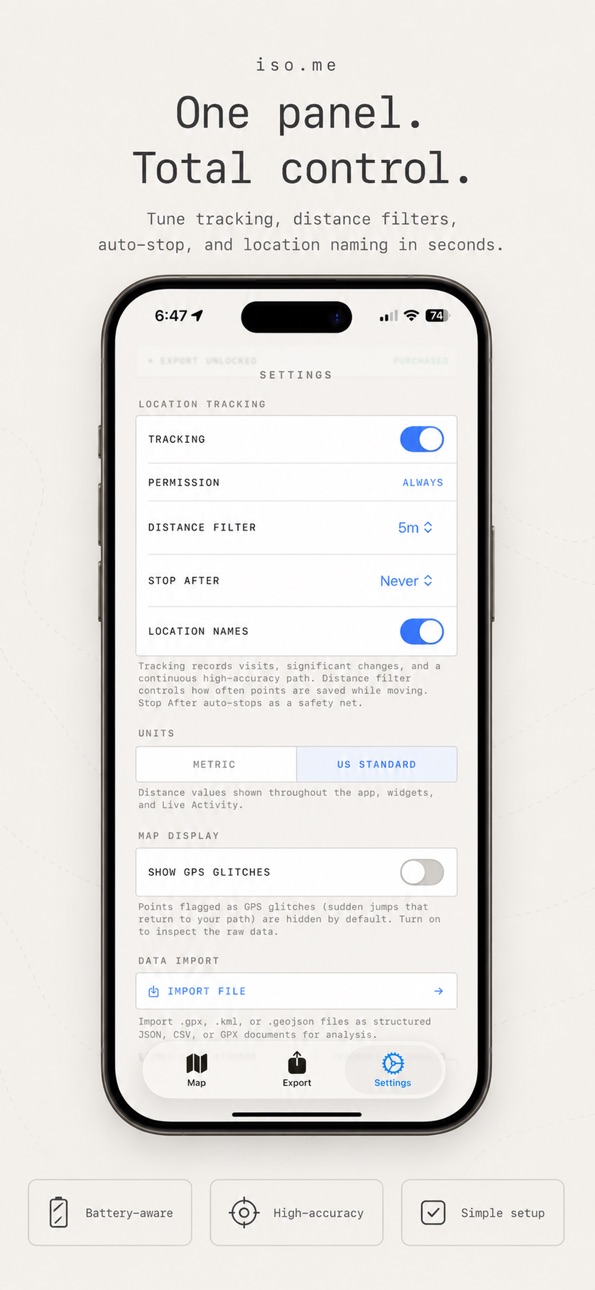


iPad 4 images


Apple Watch 1 image

What’s New Version 1.7.2
Saved places make repeat visits easier. Add reusable locations like Home or Work once, reuse them when logging future visits, and let nearby automatic visits use those names before any online place lookup.
New
• Rename the current outing from Shortcuts or Siri while a route is recording.
Improved
• Export remembers your selected formats, data type, filters, dates, and one-file-per-day preference.
• The Save Place sheet now has a clearer reusable-location control.
Fixed
• File path previews now handle {title} and {name} correctly for Visits, Points, and All exports, using the data type when no outing title exists.
Description
iso.me uses GPS to track your location visits and movement paths — all stored privately on your device.
Features:
• Automatic visit detection with place names and addresses
• High-accuracy GPS tracking with path recording
• Live Activity showing real-time tracking on your Lock Screen
• Interactive map with visit markers, travel paths, and date filtering
• Export your data in JSON, CSV, or Markdown format
• Import previously exported data
• Apple Watch companion app
• Free to use; unlock data export with a one-time purchase
Great for privacy-minded geolocation history, travel journals, routes, trips, every journey, hikes, walks, and commutes.
Your data never leaves your device. No accounts, no servers, no tracking of you.
Capabilities
In-App Purchases
Accessibility
ipadiphonemacrealityDevicetvoswatch
Version history 19 versions
Build 888023041v1.7.22026-07-09 19:50:05
Saved places make repeat visits easier. Add reusable locations like Home or Work once, reuse them when logging future visits, and let nearby automatic visits use those names before any online place lookup.
New
• Rename the current outing from Shortcuts or Siri while a route is recording.
Improved
• Export remembers your selected formats, data type, filters, dates, and one-file-per-day preference.
• The Save Place sheet now has a clearer reusable-location control.
Fixed
• File path previews now handle {title} and {name} correctly for Visits, Points, and All exports, using the data type when no outing title exists.
Build 887609646v1.7.12026-06-30 21:06:11
This update makes the new Timeline easier to use when today is empty. iso.me now keeps the date controls visible, automatically opens the most recent day with saved visits or movement, and offers a quick jump back to your latest data. It also includes the latest Notelet release-note improvements.
Build 887563416v1.72026-06-29 15:11:49
Version 1.7 adds a daily timeline that brings visits and movement sessions together by date. You can now save current or past places from the map, confirm detected visits, correct them with nearby suggestions, and edit arrival or departure times. Exports also preserve richer visit correction metadata, plan outing filenames more accurately, and present the share sheet more reliably. Map prompts now stay dismissed around the same area and add-place controls hide while filters are open.
Build 887250285v1.6.32026-06-21 22:43:07
Apple Watch recordings now sync back to your iPhone. Record from the watch while your phone is away, then iso.me imports the saved route points and outing session when the devices reconnect. This update also improves reliability around Watch tracking state and offline delivery.
Build 887061584v1.6.22026-06-17 17:52:36
Outings are here. Recorded sessions now live in a dedicated Outings tab with totals, sorting, live/current status, and optional inferred outings from older GPS points. Open an outing to replay its route with a moving playhead, scrubber, elapsed time, duration, and distance. Show any outing on the map to focus its path, start/finish markers, and road-matched route layer. Visit naming is faster too: pick from nearby business suggestions, filter them, or reset to the detected location. We also cleaned up current visit markers and added help for map layer controls.
Build 886904442v1.6.12026-06-13 04:25:52
Outings are here. Recorded sessions now live in a dedicated Outings tab with totals, sorting, live/current status, and optional inferred outings from older GPS points. Open an outing to replay its route with a moving playhead, scrubber, elapsed time, duration, and distance. Show any outing on the map to focus its path, start/finish markers, and road-matched route layer. Visit naming is faster too: pick from nearby business suggestions, filter them, or reset to the detected location. We also cleaned up current visit markers and added help for map layer controls.
Build 886893562v1.6.02026-06-12 21:51:26
Outings are here. Recorded sessions now live in a dedicated Outings tab with totals, sorting, live/current status, and optional inferred outings from older GPS points. Open an outing to replay its route with a moving playhead, scrubber, elapsed time, duration, and distance. Show any outing on the map to focus its path, start/finish markers, and road-matched route layer. Visit naming is faster too: pick from nearby business suggestions, filter them, or reset to the detected location. We also cleaned up current visit markers and added help for map layer controls.
Build 886680233v1.5.12026-06-08 21:09:38
iso.me now asks for App Store reviews at a better moment: after you've used the app on separate days and completed an export, rather than after a fixed amount of foreground time. This should make review prompts less intrusive and more relevant.
Build 886584681v1.5.02026-06-05 20:07:51
Exporting your location history is now clearer and more dependable. Preview destinations, file names, counts, warnings, and contents before exporting; scheduled daily exports run closer to your chosen time with a retry notification when needed; folder path templates and new date tokens keep archives tidy; Yesterday filters make reviewing and exporting the previous day faster. Plus a refreshed app icon and polish across iso.me.
Build 886304637v1.4.42026-05-31 18:18:14
This update improves import reliability for files that include location points, so your full-resolution history stays in sync after importing data.
Build 886207317v1.4.32026-05-27 19:04:33
This update improves import reliability for files that include location points, so your full-resolution history stays in sync after importing data.
Build 885547700v1.4.22026-05-12 19:24:50
You can now control the Live Activity monitor from Settings. Turn it on or off for tracking sessions, and iso.me remembers your choice for the future. This update also improves how Settings toggles respond to taps.
Build 885469296v1.4.12026-05-10 17:04:46
GeoJSON export joins the lineup — your visits and tracks now load straight into QGIS, Leaflet, Mapbox, and other mapping tools as a standards-compliant FeatureCollection. Plus the Export Today and Export Yesterday Shortcuts now let you pick any format we ship: JSON, CSV, Markdown, GeoJSON, GPX, OwnTracks, or Overland.
Build 885354365v1.4.02026-05-07 16:41:47
GeoJSON export joins the lineup — your visits and tracks now load straight into QGIS, Leaflet, Mapbox, and other mapping tools as a standards-compliant FeatureCollection. Plus the Export Today and Export Yesterday Shortcuts now let you pick any format we ship: JSON, CSV, Markdown, GeoJSON, GPX, OwnTracks, or Overland.
Build 885329587v1.3.02026-05-06 18:27:33
Webhook delivery — iso.me can now stream your location updates to any HTTP endpoint you control, so you can pipe them into your own server, Home Assistant, or scripts in real time. Auth secrets are stored in the iOS Keychain and never leave the device unencrypted. Plus reliability fixes across the webhook pipeline.
Build 885221510v1.2.02026-05-05 19:05:49
GPX export — your location data now exports as standard GPX 1.1, ready for Garmin, Strava, gpx.studio, GPSBabel, OpenStreetMap, and any other mapping tool. Visits become waypoints; points become tracks with timestamps and elevation.
Build 885145035v1.1.02026-05-01 14:52:07
• Daily auto-export. Save a fresh export to your folder every day, hands-free.
• Siri & Shortcuts support. Trigger exports with your voice or run them from your automations.
• Customizable filename templates with date, format, and data tokens.
• Export now has its own dedicated tab for quicker access.
Build 884346762v1.02026-04-29 16:20:57
Build 885086436v1.0.12026-04-29 21:12:00
You can now join the iso.me Discord community right from the app. Tap Join on the new banner at the top of the map, or find the link in Settings → Support, to chat with us.
No pricing data captured yet — comparisons appear once the app has paid storefronts or in-app purchases.
Availability 1 of 1 storefronts
| Region | Language | Price | Ratings | Avg | Version |
|---|---|---|---|---|---|
| US | en-US | Free | 2 | 5.0 | 1.7.2 |
Change log 23 changes · US
✎
releaseNotes updated
Saved places make repeat visits easier. Add reusable locations like Home or Work once, reuse them when logging future visits, and let nearby automatic visits us
✎
description updated
iso.me uses GPS to track your location visits and movement paths — all stored privately on your device.
Features:
• Automatic visit detection with place names
✎
subtitle updated
GPS Location & Visit Tracker
✎
name updated
iso.me
◆
Version 1.7.2 released
Saved places make repeat visits easier. Add reusable locations like Home or Work once, reuse them when logging future visits, and let nearby automatic visits use those names before any online place lookup.
New
• Rename the current outing f
◆
Version 1.7.1 released
This update makes the new Timeline easier to use when today is empty. iso.me now keeps the date controls visible, automatically opens the most recent day with saved visits or movement, and offers a quick jump back to your latest data. It al
◆
Version 1.7 released
Version 1.7 adds a daily timeline that brings visits and movement sessions together by date. You can now save current or past places from the map, confirm detected visits, correct them with nearby suggestions, and edit arrival or departure
◆
Version 1.6.3 released
Apple Watch recordings now sync back to your iPhone. Record from the watch while your phone is away, then iso.me imports the saved route points and outing session when the devices reconnect. This update also improves reliability around Watc
◆
Version 1.6.2 released
Outings are here. Recorded sessions now live in a dedicated Outings tab with totals, sorting, live/current status, and optional inferred outings from older GPS points. Open an outing to replay its route with a moving playhead, scrubber, ela
◆
Version 1.6.1 released
Outings are here. Recorded sessions now live in a dedicated Outings tab with totals, sorting, live/current status, and optional inferred outings from older GPS points. Open an outing to replay its route with a moving playhead, scrubber, ela
◆
Version 1.6.0 released
Outings are here. Recorded sessions now live in a dedicated Outings tab with totals, sorting, live/current status, and optional inferred outings from older GPS points. Open an outing to replay its route with a moving playhead, scrubber, ela
◆
Version 1.5.1 released
iso.me now asks for App Store reviews at a better moment: after you've used the app on separate days and completed an export, rather than after a fixed amount of foreground time. This should make review prompts less intrusive and more relev
◆
Version 1.5.0 released
Exporting your location history is now clearer and more dependable. Preview destinations, file names, counts, warnings, and contents before exporting; scheduled daily exports run closer to your chosen time with a retry notification when nee
◆
Version 1.4.4 released
This update improves import reliability for files that include location points, so your full-resolution history stays in sync after importing data.
◆
Version 1.4.3 released
This update improves import reliability for files that include location points, so your full-resolution history stays in sync after importing data.
◆
Version 1.4.2 released
You can now control the Live Activity monitor from Settings. Turn it on or off for tracking sessions, and iso.me remembers your choice for the future. This update also improves how Settings toggles respond to taps.
◆
Version 1.4.1 released
GeoJSON export joins the lineup — your visits and tracks now load straight into QGIS, Leaflet, Mapbox, and other mapping tools as a standards-compliant FeatureCollection. Plus the Export Today and Export Yesterday Shortcuts now let you pick
◆
Version 1.4.0 released
GeoJSON export joins the lineup — your visits and tracks now load straight into QGIS, Leaflet, Mapbox, and other mapping tools as a standards-compliant FeatureCollection. Plus the Export Today and Export Yesterday Shortcuts now let you pick
◆
Version 1.3.0 released
Webhook delivery — iso.me can now stream your location updates to any HTTP endpoint you control, so you can pipe them into your own server, Home Assistant, or scripts in real time. Auth secrets are stored in the iOS Keychain and never leave
◆
Version 1.2.0 released
GPX export — your location data now exports as standard GPX 1.1, ready for Garmin, Strava, gpx.studio, GPSBabel, OpenStreetMap, and any other mapping tool. Visits become waypoints; points become tracks with timestamps and elevation.
◆
Version 1.1.0 released
• Daily auto-export. Save a fresh export to your folder every day, hands-free.
• Siri & Shortcuts support. Trigger exports with your voice or run them from your automations.
• Customizable filename templates with date, format, and data toke
◆
Version 1.0.1 released
You can now join the iso.me Discord community right from the app. Tap Join on the new banner at the top of the map, or find the link in Settings → Support, to chat with us.
◆
Version 1.0 released