Home › Productivity

 US
US
1 of 1 storefronts
Content in en-US
Content in en-US
Information
Apple ID6761893930
Bundle IDcom.duck.leetao.knowledgeReaderMobile
SellerSeller
Min iOS17.6
Min macOS14.6
Device familiesiphone, ipad
Released2026-04-20
Copyright© 2026 @leetao
Privacy policyLink ↗
Preview 2 platforms
iPhone 10 images





iPad 5 images


What’s New Version 1.0.7
LightYou is now fully free to use.
AI Client, link-to-book import, and WebDAV sync are available to everyone.
Added an optional one-time $1.99 support tip for users who want to support development.
Reorganized Settings with a cleaner structure and dedicated subpages for Reading, AI, Sync, Storage, and About & Support.
Added a desktop version link in Settings for quicker cross-platform discovery.
Description
LightYou — Your Reading Library, Reimagined
Save every article worth reading. Highlight what matters. Ask AI anything about your library. LightYou turns the web into your personal, searchable knowledge
vault.
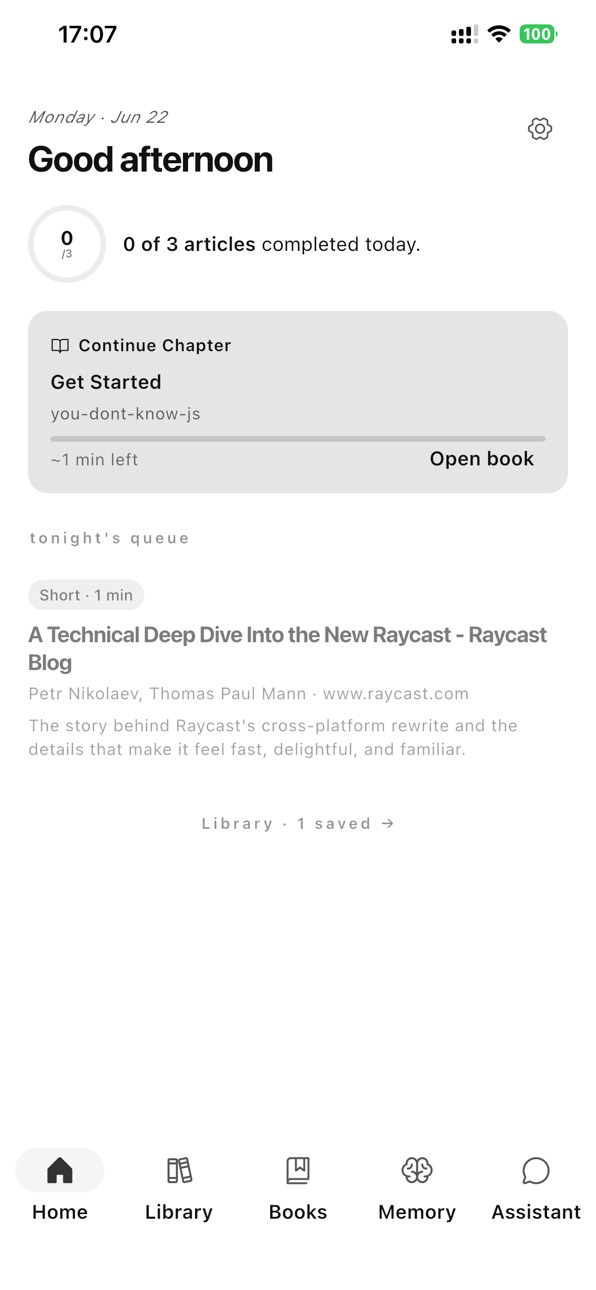
▸ SAVE IN ONE TAP
Share from Safari, Twitter, or anywhere on iOS. LightYou extracts the article content — no ads, no clutter, just the words.
▸ BEAUTIFUL READER
Customize font, size, and theme (light, sepia, dark). Reader view strips out distractions so you can focus on what matters.
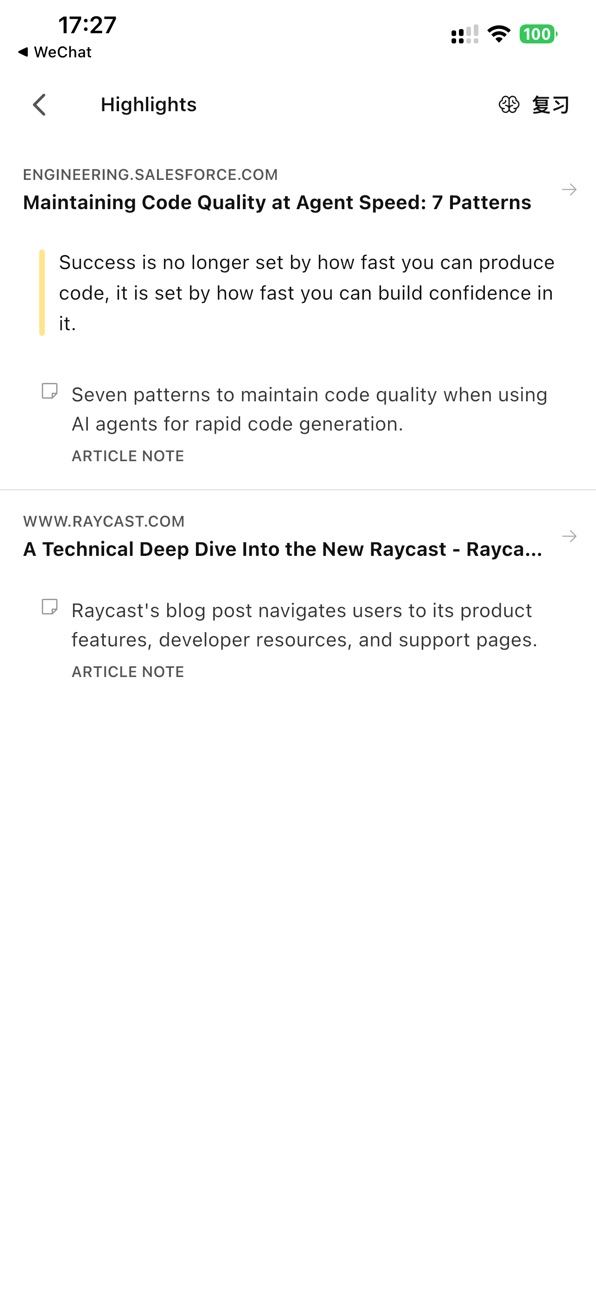
▸ HIGHLIGHT & ANNOTATE
Select any text to highlight it in three colors. Add private notes. Your highlights become a searchable knowledge base.
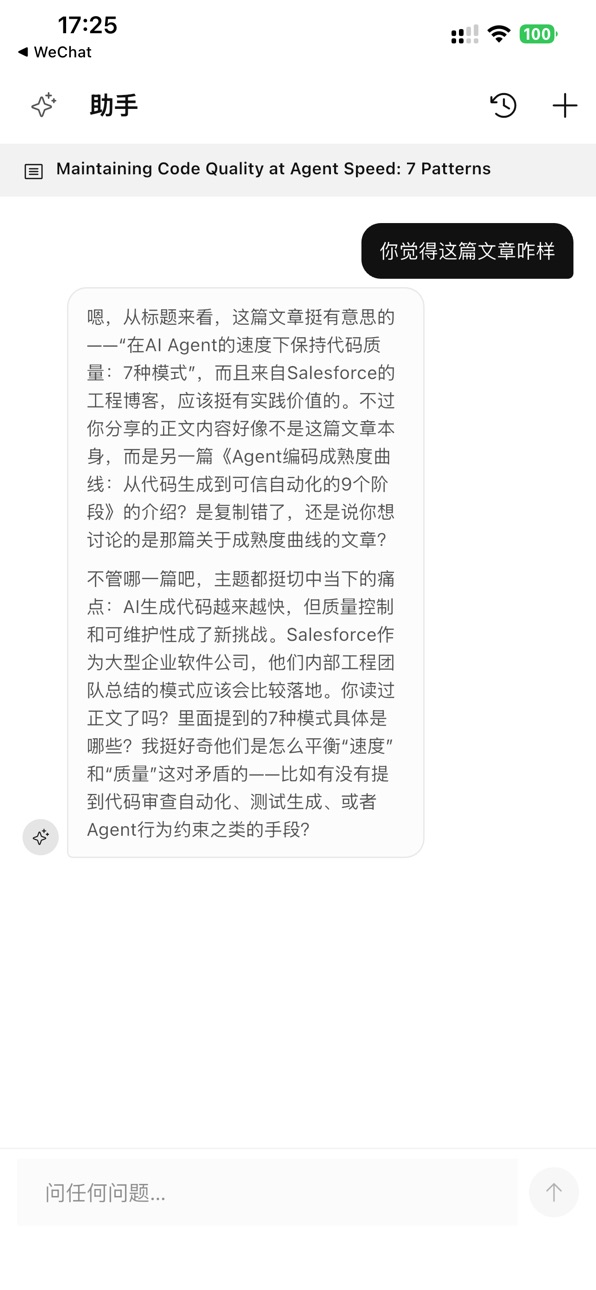
▸ AI-POWERED UNDERSTANDING
Chat with any article — ask questions, get summaries, translate passages, or explain difficult concepts. Powered by your choice of LLM API.
▸ SPACED REPETITION REVIEW
LightYou surfaces articles worth revisiting on a spaced schedule, so the ideas you care about stay with you long-term.
▸ HOME SCREEN WIDGET
A beautiful iOS widget keeps your top review items one glance away — with native dark mode support.
▸ WEBDAV SYNC
Sync articles, highlights, and notes across all your devices via your own WebDAV server. Your data stays yours — no third-party accounts required.
▸ PRIVACY FIRST
All articles stored locally on your device. AI requests use your own API keys. Optional WebDAV sync uses your own server. We never see your data.
▸ OFFLINE READING
Saved articles are cached locally — read anytime, anywhere, with no connection.
▸ BEAUTIFUL IN BOTH LANGUAGES
Full Chinese and English support, with typography that respects each language.
Whether you're a researcher, student, writer, or just a curious reader, LightYou helps you go from "I'll read this later" to actually reading, understanding, and
remembering.
Start building your library today.
In-App Purchases US pricing
One-Time Purchases
LightYou Support Tip$1.99
Capabilities
In-App Purchases
Accessibility
ipadiphonemacrealityDevicetvoswatch
Version history 8 versions
Build 886481214v1.0.72026-06-23 11:55:21
LightYou is now fully free to use.
AI Client, link-to-book import, and WebDAV sync are available to everyone.
Added an optional one-time $1.99 support tip for users who want to support development.
Reorganized Settings with a cleaner structure and dedicated subpages for Reading, AI, Sync, Storage, and About & Support.
Added a desktop version link in Settings for quicker cross-platform discovery.
Build 886368718v1.0.62026-06-01 17:54:24
What's New:
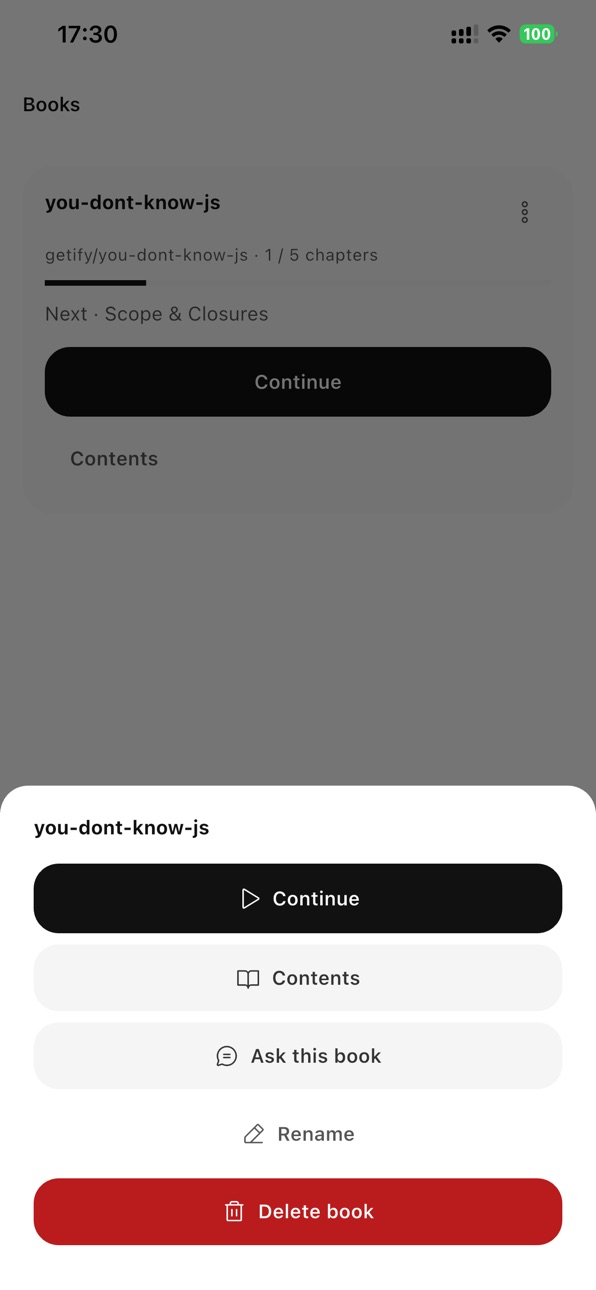
• Import books from GitHub & docs: paste a URL, preview discovered chapters, pick what to import.
• New Books FAB: Import from URL · Create from saved links.
• Smoother feedback: loading indicator, unified toasts, auto-refresh after import.
• AI-assisted chapter cleaning runs only for public repos (privacy‑gated).
Build 885612754v1.0.52026-05-13 20:27:53
Read-state tracking is finally less dramatic: hit the end of an article or open Summary, and it stays read, even if you scroll back up later.
Home got smarter: once you finish today’s picks, refresh brings in fresh unread articles instead of serving the same ones again.
Daily goals now count articles, not minutes. It’s cleaner, more natural, and yes, overachieving counts too.
Stats got the memo: article completions now take center stage, with reading time staying in the background where it belongs.
Reader typography got a tune-up: fonts, sizing, and spacing feel better for long-form reading.
App fonts and Reader fonts have officially stopped stepping on each other’s toes: only “Follow App” keeps them linked.
AI Summary now actually sticks around: no more reopening an article and finding only a lonely TL;DR.
Summary rendering is much cleaner too: raw tags have been shown the door.
A few smaller fixes while we were here: reminder copy now follows your daily goal, and diagnostics only get attached to feedback when you opt in.
Build 885465647v1.0.42026-05-09 18:08:21
What's New:
- Refined article cards, Library section labels, and Reader typography for better readability across English, Chinese, and mixed-language content.
- Improved the AI Summary layout so summaries are easier to scan and read.
- Improved translation language handling to reduce repeated language selection.
- Fixed a first-launch flicker where the Home screen could briefly appear before onboarding.
- Improved Settings theme switching so theme changes apply immediately.
- Added a feedback entry point to make it easier to report save or import issues.
- Fixed several stability issues around sync, settings, and AI conversations.
Build 885285084v1.0.32026-05-05 19:12:48
AI Reading Assistant
Chat with an AI that has actually read your article — ask questions, request explanations, and get answers grounded in the content you're reading.
Smarter Summaries
Completely reworked summarization with a best-practice prompt. Summaries are now longer, more structured, and follow the app language setting.
Images Now Display Correctly
Articles with images — including Chinese blogs and personal sites — now render with full image support in the native reader.
Highlights Improvements
Highlights now support lazy loading for large libraries (thousands of entries), and tapping a highlight navigates directly to that passage in the article.
Cleaner Reader Experience
The reader typography panel has been simplified — only font size, line height, and font style remain. Theme follows the system automatically.
Stats Follow Your Theme
The reading stats bar chart and streak indicator now use your chosen theme color instead of a fixed accent.
Vocabulary Review Fully Localized
The Wordbook review session ("Skip / Hard / Good") is now fully translated in both English and Chinese.
Bug Fixes
• Fixed summary not saving after regeneration
• Fixed reading completion overlay reappearing on re-read
• Fixed assistant chat input showing Android-style focus border
• Removed all paywall logic — AI features included with purchase
Build 885102061v1.0.22026-04-30 19:14:32
What's new:
• Translation upgrade: powered by iOS 17.4+ on-device Translation — select text in the Reader for an inline
translation card, no pop-ups needed. Wordbook also supports on-demand and auto-filled translations.
• Reader: new one-tap AI summary button in the toolbar; context menu now includes Translate, Explain, and Copy.
• Library: flat chronological default view with a sort & group sheet and tag filter row.
• WebDAV sync fix: resolved an authentication error that affected some servers; sync now only imports articles saved
via the browser extension.
• Polish: long article sources are truncated cleanly in cards; WebDAV settings simplified.
Build 884917170v1.0.12026-04-26 05:50:42
What's new in this update:
• Smarter Translation: now powered by Apple's on-device Translation framework (iOS 17.4+) — silent, instant, and private. Older devices fall back to Google Translate
automatically.
• Reader Selection Menu: select any text to Translate, Explain, or Copy. Translations appear inline as a card — no pop-ups, no detours.
• One-Tap AI Summary: a new AI button in the Reader toolbar generates a full-article summary in a single tap.
• Wordbook Redesigned: a clean two-tab layout (Learning / Mastered), tap any word to expand its detail. New words are auto-translated when saved, with on-demand
re-translation available.
• Library Refreshed: a flat, chronological default view plus a sort & group sheet and a tag filter row — find what you saved, faster.
• Polish & Fixes: unified toast style, clearer input contrast, and various stability improvements.
Thanks for using LightYou — your reviews on the App Store help us keep improving!
Build 884316192v1.0.02026-04-20 10:08:06
Price history by region
Currency
Show
Columns
Search
Availability 1 of 1 storefronts
| Region | Language | Price | Ratings | Avg | Version |
|---|---|---|---|---|---|
| US | en-US | Free | 1 | 5.0 | 1.0.7 |
Change log 11 changes · US
✎
releaseNotes updated
LightYou is now fully free to use.
AI Client, link-to-book import, and WebDAV sync are available to everyone.
Added an optional one-time $1.99 support tip for u
✎
description updated
LightYou — Your Reading Library, Reimagined
Save every article worth reading. Highlight what matters. Ask AI anything about your library. LightYou turns the
✎
name updated
LightYou
◆
Version 1.0.7 released
LightYou is now fully free to use.
AI Client, link-to-book import, and WebDAV sync are available to everyone.
Added an optional one-time $1.99 support tip for users who want to support development.
Reorganized Settings with a cleaner struct
◆
Version 1.0.6 released
What's New:
• Import books from GitHub & docs: paste a URL, preview discovered chapters, pick what to import.
• New Books FAB: Import from URL · Create from saved links.
• Smoother feedback: loading indicator, unified toasts, auto-refresh a
◆
Version 1.0.5 released
Read-state tracking is finally less dramatic: hit the end of an article or open Summary, and it stays read, even if you scroll back up later.
Home got smarter: once you finish today’s picks, refresh brings in fresh unread articles instead o
◆
Version 1.0.4 released
What's New:
- Refined article cards, Library section labels, and Reader typography for better readability across English, Chinese, and mixed-language content.
- Improved the AI Summary layout so summaries are easier to scan and read.
- Imp
◆
Version 1.0.3 released
AI Reading Assistant
Chat with an AI that has actually read your article — ask questions, request explanations, and get answers grounded in the content you're reading.
Smarter Summaries
Completely reworked summarization with a best-pr
◆
Version 1.0.2 released
What's new:
• Translation upgrade: powered by iOS 17.4+ on-device Translation — select text in the Reader for an inline
translation card, no pop-ups needed. Wordbook also supports on-demand and auto-filled translations.
• Reader: n
◆
Version 1.0.1 released
What's new in this update:
• Smarter Translation: now powered by Apple's on-device Translation framework (iOS 17.4+) — silent, instant, and private. Older devices fall back to Google Translate
automatically.
• Reader Selecti
◆
Version 1.0.0 released