Home › Weather

 US
US
USen-US AENot Available
 AFNot Available
 ALNot Available
 AMNot Available
 ATNot Available
 AUNot Available
 AZNot Available
 BANot Available
 BENot Available
 BGNot Available
 BHNot Available
 BMNot Available
 BNNot Available
 BTNot Available
 BYNot Available
 CANot Available
 CHNot Available
 CNNot Available
 CYNot Available
 CZNot Available
 DENot Available
 DKNot Available
 EENot Available
 EGNot Available
 ESNot Available
 FINot Available
 FJNot Available
 FMNot Available
 FRNot Available
 GBNot Available
 GENot Available
 GRNot Available
 HKNot Available
 HRNot Available
 HUNot Available
 IDNot Available
 IENot Available
 ILNot Available
 INNot Available
 IQNot Available
 ISNot Available
 ITNot Available
 JONot Available
 JPNot Available
 KGNot Available
 KHNot Available
 KRNot Available
 KWNot Available
 KZNot Available
 LANot Available
 LBNot Available
 LKNot Available
 LTNot Available
 LUNot Available
 LVNot Available
 MDNot Available
 MENot Available
 MKNot Available
 MMNot Available
 MNNot Available
 MONot Available
 MRNot Available
 MTNot Available
 MVNot Available
 MYNot Available
 NLNot Available
 NONot Available
 NPNot Available
 NRNot Available
 NZNot Available
 OMNot Available
 PGNot Available
 PHNot Available
 PKNot Available
 PLNot Available
 PTNot Available
 PWNot Available
 QANot Available
 RONot Available
 RSNot Available
 RUNot Available
 SANot Available
 SBNot Available
 SENot Available
 SGNot Available
 SINot Available
 SKNot Available
 THNot Available
 TJNot Available
 TMNot Available
 TONot Available
 TRNot Available
 TWNot Available
 UANot Available
 UZNot Available
 VNNot Available
 VUNot Available
 XKNot Available
 YENot Available
 ZANot Available
1 of 101 storefronts
Content in en-US
Content in en-US
Information
Preview 3 platforms
iPhone 8 images


iPad 1 image

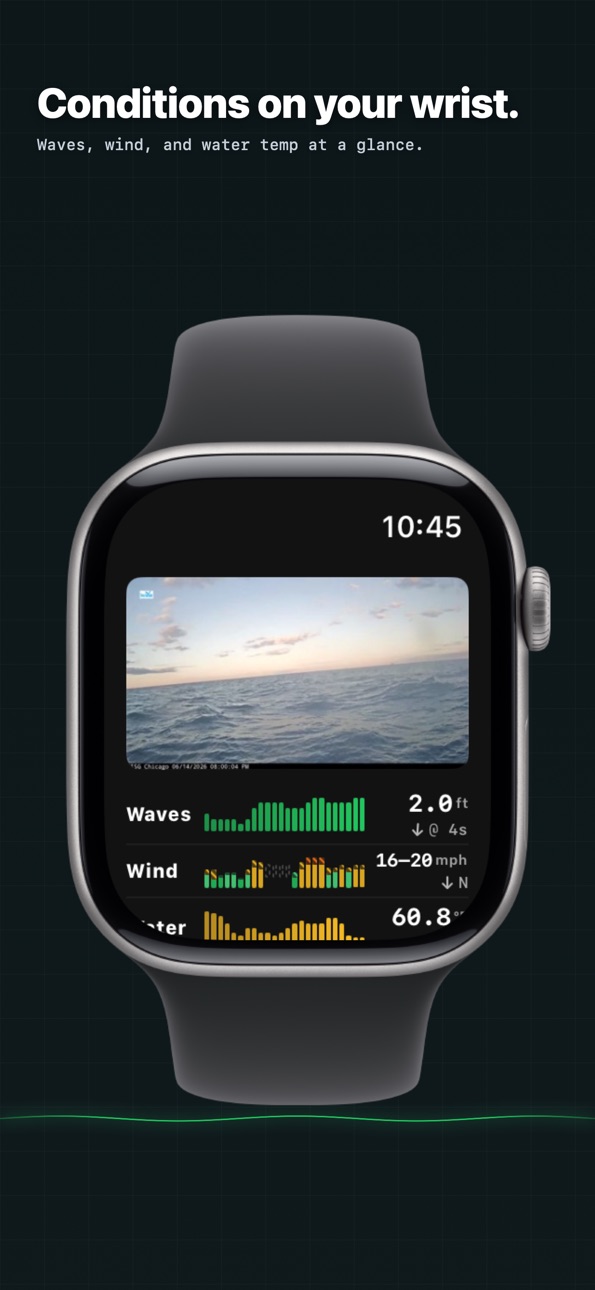
Apple Watch 3 images


What’s New Version 2026.6.2
- Radar, right on your buoy — A last-hour radar loop you can expand, zoom, pan, and scrub without leaving the Buoy tab.
- Tap any buoy on the map — Switch your active buoy straight from the map
- Clear buoy style - premium buoys with cameras clearly called out vs the more simple buoys that just report data.
- A cleaner, more honest buoy list — Long-silent stations are hidden and briefly-offline ones badged, so you only see buoys that are actually reporting.
- Polished & more reliable — On-brand loading, heading-aware map arrows, fresher Apple Watch data, and a smoother recovery after a force-quit.
- Condition notifications — Get notified of conditions on the water you'll want to see for yourself
Description
Good Buoy is a new kind of boating app — one built around the experience of being on the water, not just getting there. We bring together buoy, phone, and watch data into a clean, glanceable dashboard so you can plan smarter days and capture the ones worth remembering.
Conditions dashboard
Four metrics that matter — wave height, wind speed, water temperature, and air pressure — each with trend charts and instant, color-coded ratings. Know before you go.
Buoy cameras
Numbers describe the ocean. Cameras show it. Browse live imagery from offshore NOAA buoy cams for visual context on sea state, visibility, and the conditions data alone can't convey.
Nautical chart overlay
Chart data and navigational marks, layered cleanly over Apple Maps.
Trip recording
Turn your iPhone into a trip recorder. GPS routes with distance, speed, and a roughness-colored gradient trail that shows where the ride got bumpy.
Motion & stress sensing
Numbers fade. The memory of a rough ride doesn't. Your iPhone measures how rough the water felt, while your Apple Watch tracks how your body responded to it. Every trip ends with a picture of how the day really felt — so you can look back, learn, and plan smarter ones ahead.
Spend less time checking apps. Spend more time on the water.
Accessibility
ipadiphonemacrealityDevicetvoswatch
Version history 6 versions
Build 886682101v2026.6.22026-06-15 22:47:18
- Radar, right on your buoy — A last-hour radar loop you can expand, zoom, pan, and scrub without leaving the Buoy tab.
- Tap any buoy on the map — Switch your active buoy straight from the map
- Clear buoy style - premium buoys with cameras clearly called out vs the more simple buoys that just report data.
- A cleaner, more honest buoy list — Long-silent stations are hidden and briefly-offline ones badged, so you only see buoys that are actually reporting.
- Polished & more reliable — On-brand loading, heading-aware map arrows, fresher Apple Watch data, and a smoother recovery after a force-quit.
- Condition notifications — Get notified of conditions on the water you'll want to see for yourself
Build 886217308v2026.6.12026-06-08 14:25:20
- Share your conditions — Tap to share current buoy conditions as a short video clip — including real live camera footage when the station has one — plus a link friends can tap.
- Marine forecast — The NWS marine forecast now appears in its own card below the conditions, in your preferred units, and a link to the full NWS forecast.
- Rain & precipitation forecast — A new precipitation row and rain charts on a consistent 0–100% scale.
- Boat management — Add and manage your boats from the Trips tab. Trips are now attributed to the boat you're on, and comfort ratings are calibrated to that boat.
- Smarter sea-state rating — A reworked roll-based, boat-calibrated comfort score that fixes trips that previously showed up as misleadingly "all red."
- Trips survive interruptions — An in-progress trip now resumes automatically after a force-quit or device restart, so you won't lose a recording.
- Map controls overhaul — New discrete zoom buttons that no longer snap back, a cleaner recenter crosshair, regrouped trip controls, and a unified sea-state legend.
- Live readouts on the map by default — Wind and wave readouts now show on the map all the time, not just while recording a trip.
- Active-buoy hero card — Your active buoy now gets a prominent card, with a clearer layout for tide and weather sources and friendlier source names.
- Apple Watch parity — The watch now shows the sustained–gust wind range and wave direction matching the phone, honors your wind-range chart style, stays awake during trips, and refreshes stale conditions.
- Camera availability clarity — Stations without a camera now show a clear "no camera" notice.
- More accurate buoy data — Inactive buoys are now marked, the parameters shown are tailored to what each buoy actually reports, and station search ignores punctuation and accents.
- Consistent units everywhere — Marine forecast and "other sources" readings now convert to your chosen unit preferences.
- Stay signed in — Fixed an issue that could sign you out after a brief network or keychain hiccup at launch.
Build 886036887v2026.5.22026-05-27 22:26:17
- new buoy choices for buoys with no cameras (+hundreds of options)
- speed, wave and wind readout while in trip
- improved buoy selection user interface
- improved keyboard interaction with entry fields
- improved watch refresh
- improved buoy list loading
Build 885942896v2026.5.12026-05-22 22:03:14
Now supports alternative sources of data. Pick your home buoy and add additional weather station sources to compliment
Pick your own buoy parameters — show/hide the rows you care about
Forecast overlay is on by default for new users.
Lots of chart polish: cleaner overlay dots, condition-colored gusts, anchored aggregation lines, and consistent forecast tint across all rows.
Build 885889846v26.5.02026-05-21 03:43:04
New Features:
- Wind Range chart — speed→gust stacked bars in a single row, with direction arrows
- Air temp + dew point overlay chart
- New buoy parameters supported: pressure, wind gusts, dew point
- Redesigned buoy customization drawer
Improvements:
- Forecast fills the dashboard when observations are missing — rows no longer go blank for offshore/quiet stations
- Faster buoy load time via loading screen prefetch
- Map settings drawer — toggles for community trails + stress overlays behind a gear icon
- Less-intrusive onboarding — community/stress opt-in drawers now defer to first trip start instead of first app launch
- Detail-chart polish — wind chart shows speed/gust as a two-line overlay and triangle dots distinguish the secondary series
Build 884254568v1.02026-05-16 23:36:14
No pricing data captured yet — comparisons appear once the app has paid storefronts or in-app purchases.
Availability 1 of 101 storefronts
| Region | Language | Price | Ratings | Avg | Version |
|---|---|---|---|---|---|
| US | en-US | Free | 4 | 5.0 | 2026.6.2 |
Not available in: AE, AF, AL, AM, AT, AU, AZ, BA, BE, BG, BH, BM, BN, BT, BY, CA, CH, CN, CY, CZ, DE, DK, EE, EG, ES, FI, FJ, FM, FR, GB, GE, GR, HK, HR, HU, ID, IE, IL, IN, IQ, IS, IT, JO, JP, KG, KH, KR, KW, KZ, LA, LB, LK, LT, LU, LV, MD, ME, MK, MM, MN, MO, MR, MT, MV, MY, NL, NO, NP, NR, NZ, OM, PG, PH, PK, PL, PT, PW, QA, RO, RS, RU, SA, SB, SE, SG, SI, SK, TH, TJ, TM, TO, TR, TW, UA, UZ, VN, VU, XK, YE, ZA
Change log 10 changes · US
✎
releaseNotes updated
- Radar, right on your buoy — A last-hour radar loop you can expand, zoom, pan, and scrub without leaving the Buoy tab.
- Tap any buoy on the map — Switch your
✎
description updated
Good Buoy is a new kind of boating app — one built around the experience of being on the water, not just getting there. We bring together buoy, phone, and watch
✎
subtitle updated
Feel the water
✎
name updated
Good Buoy
◆
Version 2026.6.2 released
- Radar, right on your buoy — A last-hour radar loop you can expand, zoom, pan, and scrub without leaving the Buoy tab.
- Tap any buoy on the map — Switch your active buoy straight from the map
- Clear buoy style - premium buoys with camera
◆
Version 2026.6.1 released
- Share your conditions — Tap to share current buoy conditions as a short video clip — including real live camera footage when the station has one — plus a link friends can tap.
- Marine forecast — The NWS marine forecast now appears in it
◆
Version 2026.5.2 released
- new buoy choices for buoys with no cameras (+hundreds of options)
- speed, wave and wind readout while in trip
- improved buoy selection user interface
- improved keyboard interaction with entry fields
- improved watch refresh
- improved
◆
Version 2026.5.1 released
Now supports alternative sources of data. Pick your home buoy and add additional weather station sources to compliment
Pick your own buoy parameters — show/hide the rows you care about
Forecast overlay is on by default for new users.
Lots
◆
Version 26.5.0 released
New Features:
- Wind Range chart — speed→gust stacked bars in a single row, with direction arrows
- Air temp + dew point overlay chart
- New buoy parameters supported: pressure, wind gusts, dew point
- Redesigned buoy customization drawer
◆
Version 1.0 released