Home › Travel

Haunt - Snap & Save Places
Bookmark Your Favorite Spots
 US
US
1 of 1 storefronts
Content in en-US
Content in en-US
Information
Preview 2 platforms
iPhone 4 images


iPad 4 images


What’s New Version 1.11.0
Share your collections
Your best finds are meant to be shared. Now you can send any collection — your Tokyo trip, your ramen shortlist, your date-night spots — to friends and family with a simple link.
• Share a collection right from its page — anyone with an Apple account can view it
• Friends see your places on a map, with your photos and notes
• They can save any place to their own Haunt with one tap
• Your collection stays live: add or update places and everyone sees the changes
• You're always in control — stop sharing anytime
Sharing is free for everyone. Happy haunting!
Description
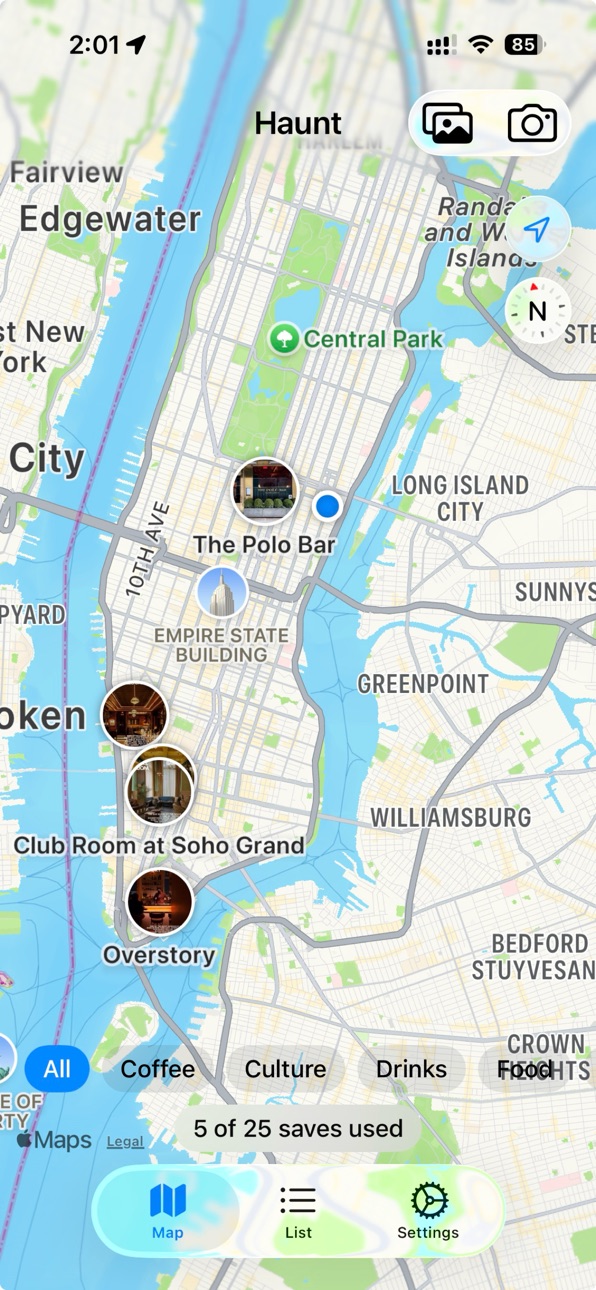
The fastest way to remember a place you saw online.
See a restaurant on TikTok? A cafe on Instagram? A bar on Reddit?
Screenshot it, share to Haunt, and Haunt finds the location and pins
it to your personal map — no copy-pasting addresses, no leaving the
app you're scrolling.
Or snap your own photo when you're actually there. Haunt reads the
GPS from the image and saves the spot.
Walk past a place you've saved? Haunt taps you on the shoulder so
you don't forget it again.
For food lovers, travelers, and urban explorers who keep losing track
of the good stuff.
Snap. Share. Save. Never forget.
In-App Purchases US pricing
Haunt Premium Subscription
Monthly · Monthly$1.99
Yearly · Yearly$9.99
One-Time Purchases
Lifetime$19.99
Capabilities
In-App Purchases
Accessibility
ipadiphonemacrealityDevicetvoswatch
Version history 10 versions
Build 888167019v1.11.02026-07-12 16:01:13
Share your collections
Your best finds are meant to be shared. Now you can send any collection — your Tokyo trip, your ramen shortlist, your date-night spots — to friends and family with a simple link.
• Share a collection right from its page — anyone with an Apple account can view it
• Friends see your places on a map, with your photos and notes
• They can save any place to their own Haunt with one tap
• Your collection stays live: add or update places and everyone sees the changes
• You're always in control — stop sharing anytime
Sharing is free for everyone. Happy haunting!
Build 888131403v1.10.02026-07-11 17:28:59
Introducing Collections.
Group your places into collections — a trip you're planning, a food crawl, a wishlist. Find them in the new Collections tab.
• Create collections with a name, emoji, and notes
• Add places from the collection, or from any place's detail view
• Each collection gets its own focused map of just those spots
• A place can live in as many collections as you like — everything stays on your main map
• Collections sync privately through iCloud like everything else
Plus small fixes and polish.
Build 887798928v1.9.02026-07-03 20:29:10
Your places now sync across your devices.
• iCloud sync: bookmarks, photos, and tags are stored privately in your iCloud account and stay in sync on every device signed in with your Apple ID.
• Full-resolution photos are backed up too — reinstall or switch phones without losing a thing.
• New iCloud Sync section in Settings lets you turn sync on or off anytime.
• Fixed an issue where tags could appear duplicated after adding a new device.
Build 886201953v1.8.22026-05-27 21:19:34
Sharper proximity alerts.
Tapping a "you're near a saved spot" notification now reliably opens Haunt directly to that bookmark on the map, with the camera centered and the pin highlighted. Before this release, the alert could occasionally dismiss without bringing the app forward.
Build 886117325v1.8.12026-05-25 20:39:47
Smarter screenshot imports.
Saving a place from a screenshot now picks up the name far more reliably — including @handles, hashtags, short names like "Yu" or "St," and multi-line venue titles that used to confuse the recognizer. When Haunt isn't sure, it shows you exactly what it read from the screenshot so you can tap to confirm.
Build 886028786v1.7.02026-05-23 02:15:13
List sharing is here. Share your saved places with friends, and import lists they send back.
• Filter the List tab by tag — tap a chip at the top to focus on one category at a time.
• Share a list: with a tag selected, tap the Share button (top-right) to send the list via Messages, AirDrop, Mail, or Save to Files.
• Receive a list: tap the .haunt file in your conversation, then tap Share → Haunt to import. Bookmarks you already have are skipped automatically; tags are matched by name.
• Two new starter tags: Brunch and Date Night.
Build 886056280v1.8.02026-05-23 22:43:08
Home screen widgets are here.
• Small — your nearest saved place at a glance, with its photo as the background.
• Medium — three nearest places over a live map. Tap a place to open it, or tap the map to jump to your full map view.
Both widgets refresh automatically as you save, edit, or delete places — even when the app isn't open.
Plus small fixes under the hood.
Build 885931637v1.6.02026-05-20 23:09:23
Filter your list by tag — tap a chip at the top of the List tab to focus on one category.
Saved places now have separate Name and Caption fields. Names appear in proximity notifications, search results, and at the top of each place card.
Replace the photo on an existing place without re-creating it.
Mute proximity alerts for individual places with a new bell-icon toggle in place details.
Fine-tune your alert radius and cooldown from Settings.
Optional: delete the original photo from your Photos library after saving it to Haunt.
Improved background reliability on iOS 18.
Build 884901961v1.5.12026-05-08 16:04:18
• Fixed: sharing a screenshot to Haunt right after launching the app could silently drop the save. Now opens the save form reliably.
• Improved: when a screenshot's location can't be detected automatically, you can now search by name right in the save form. Search results are biased to your current area for better matches.
Build 884245235v1.02026-04-22 23:23:48
Price history by region
Currency
Show
Columns
Search
Availability 1 of 1 storefronts
| Region | Language | Price | Ratings | Avg | Version |
|---|---|---|---|---|---|
| US | en-US | Free | 3 | 5.0 | 1.11.0 |
Change log 14 changes · US
✎
releaseNotes updated
Share your collections
Your best finds are meant to be shared. Now you can send any collection — your Tokyo trip, your ramen shortlist, your date-night spots
✎
description updated
The fastest way to remember a place you saw online.
See a restaurant on TikTok? A cafe on Instagram? A bar on Reddit?
Screenshot it, share to Haunt, and Haunt
✎
subtitle updated
Bookmark Your Favorite Spots
✎
name updated
Haunt - Snap & Save Places
◆
Version 1.11.0 released
Share your collections
Your best finds are meant to be shared. Now you can send any collection — your Tokyo trip, your ramen shortlist, your date-night spots — to friends and family with a simple link.
• Share a collection right from its
◆
Version 1.10.0 released
Introducing Collections.
Group your places into collections — a trip you're planning, a food crawl, a wishlist. Find them in the new Collections tab.
• Create collections with a name, emoji, and notes
• Add places from the collection, or
◆
Version 1.9.0 released
Your places now sync across your devices.
• iCloud sync: bookmarks, photos, and tags are stored privately in your iCloud account and stay in sync on every device signed in with your Apple ID.
• Full-resolution photos are backed up too — re
◆
Version 1.8.2 released
Sharper proximity alerts.
Tapping a "you're near a saved spot" notification now reliably opens Haunt directly to that bookmark on the map, with the camera centered and the pin highlighted. Before this release, the alert could occasionally
◆
Version 1.8.1 released
Smarter screenshot imports.
Saving a place from a screenshot now picks up the name far more reliably — including @handles, hashtags, short names like "Yu" or "St," and multi-line venue titles that used to confuse the recognizer. When Haunt
◆
Version 1.8.0 released
Home screen widgets are here.
• Small — your nearest saved place at a glance, with its photo as the background.
• Medium — three nearest places over a live map. Tap a place to open it, or tap the map to jump to your full map view.
Both wi
◆
Version 1.7.0 released
List sharing is here. Share your saved places with friends, and import lists they send back.
• Filter the List tab by tag — tap a chip at the top to focus on one category at a time.
• Share a list: with a tag selected, tap the Share button
◆
Version 1.6.0 released
Filter your list by tag — tap a chip at the top of the List tab to focus on one category.
Saved places now have separate Name and Caption fields. Names appear in proximity notifications, search results, and at the top of each place card.
◆
Version 1.5.1 released
• Fixed: sharing a screenshot to Haunt right after launching the app could silently drop the save. Now opens the save form reliably.
• Improved: when a screenshot's location can't be detected automatically, you can now search by name righ
◆
Version 1.0 released