Home › Education

 US
US
1 of 1 storefronts
Content in en-US
Content in en-US
Information
Preview 2 platforms
iPhone 7 images



iPad 5 images


What’s New Version 1.1.7
- Multiple Profiles
- Vocab List: Flash Card / Quizzes
- Vocab SRS Review & Learn
- Search kanji & vocab by English meaning
- SRS Due Chart
- Quality of Life Updates
- Bug fixes
Description
Tegaki is a kanji writing app focused on helping you actually remember how to write.
Instead of just tapping through flashcards, you practice by writing. Open a notebook, pick a page, and fill each square by hand. Writing reinforces memory in a way passive study never does.
The app is built around simple, structured notebooks. Each page uses a grid so you can practice consistently and build a rhythm. Move through pages, go back to earlier ones, and repeat characters until they stick.
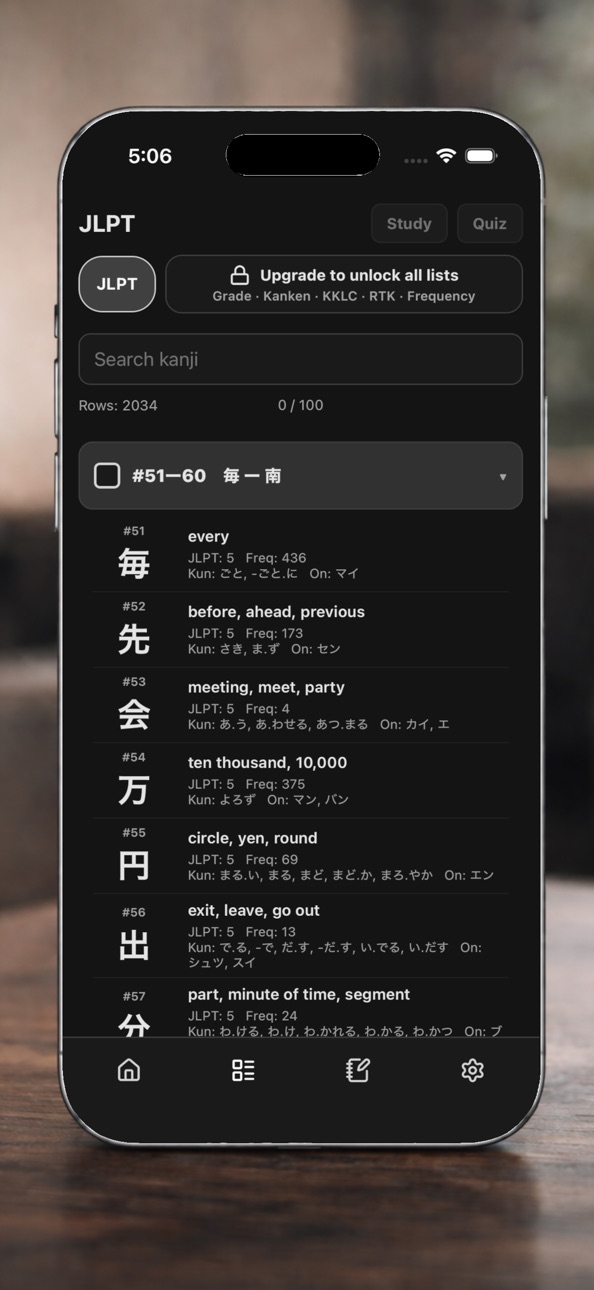
You can study using common kanji lists such as KKLC, RTK, and other standard learning sets. This makes it easy to follow along with whatever system you are already using.
Everything is designed to stay out of your way. The app is fast, responsive, and focused on writing. No clutter, no distractions, just practice.
Key features:
• Handwritten kanji practice in structured notebook grids
• Smooth drawing with low latency
• Organized pages for repetition and review
• Support for common kanji lists like KKLC and RTK
• Clean interface built for daily use
If you want to improve your kanji writing, the only real way is to write more. Tegaki gives you a simple place to do that every day.
In-App Purchases US pricing
One-Time Purchases
Sumi Pro$14.99
Capabilities
In-App Purchases
Accessibility
ipadiphonemacrealityDevicetvoswatch
Version history 14 versions
Build 886946071v1.1.72026-06-14 22:07:48
- Multiple Profiles
- Vocab List: Flash Card / Quizzes
- Vocab SRS Review & Learn
- Search kanji & vocab by English meaning
- SRS Due Chart
- Quality of Life Updates
- Bug fixes
Build 886731558v1.1.62026-06-09 21:14:27
- Multiple Profiles
- Vocab List: Flash Card / Quizzes
- Vocab SRS Review & Learn
- Search kanji & vocab by English meaning
- SRS Due Chart
- Bug fixes
Build 886637323v1.1.52026-06-07 22:52:02
- Multiple Profiles
- Vocab List: Flash Card / Quizzes
- Vocab SRS Review & Learn
- Search kanji & vocab by English meaning
- SRS Due Chart
- Bug fixes
Build 886074174v1.1.12026-05-25 18:12:27
* Added Homework Notebooks with automatic kanji adding after SRS reviews
* Added Vocab Notebooks
* Added Custom Vocab Lists
* Added percentage-based SRS progression with hint penalties
* Added SRS Free Writing
* Added rearrangeable notebooks
* Added collapse repeated columns toggle for Ordered Notebooks
* Various bug fixes
Build 885911697v1.0.92026-05-20 20:25:02
- Apple Pen Mode
- Bug fixes
Build 885554542v1.0.82026-05-12 19:20:10
- Hotfix for KKLC list
- Changes to kanji details
Build 885452709v1.0.72026-05-10 17:00:34
- Bug fixes
- Quality of life updates
Build 885206613v1.0.62026-05-03 19:13:17
- Bug fixes in notebook creation and SRS
Build 885100608v1.0.52026-04-30 18:41:55
- Scrollable Notebooks
- Space repetition System (SRS)
- Auto-Grading
- Kanji Overlay in Notebooks
- Pen Stroke Width
- Custom List
Build 884807211v1.0.42026-04-22 22:04:51
- New Word Writing Quiz Mode
- Notebook writing and loading optimizations
Build 884717409v1.0.32026-04-20 20:06:01
- 2 New Themes
- Sentences in Kanji Details
- Manual mode for palm guard
- Bug fixes
Build 884591637v1.0.22026-04-16 20:42:49
- Handwriting Grading in Notebooks
- Hiragana / Katana
- Smoother Writing
Build 884419592v1.0.12026-04-12 21:45:54
New Features
1) Palm Rejection Shield: A shield blocking the right portion of the kanji grid. As you complete columns, it will slide over automatically. This is to help prevent false positives resting a palm on the screen.
2) Scroll to last location for kanji lists
Bug fixes:
Fixed bug where time wasn't always tracking correctly on quizzes.
Build 884242848v1.02026-04-09 12:46:18
Price history by region
Currency
Show
Columns
Search
Availability 1 of 1 storefronts
| Region | Language | Price | Ratings | Avg | Version |
|---|---|---|---|---|---|
| US | en-US | Free | 2 | 5.0 | 1.1.7 |
Change log 18 changes · US
✎
releaseNotes updated
- Multiple Profiles
- Vocab List: Flash Card / Quizzes
- Vocab SRS Review & Learn
- Search kanji & vocab by English meaning
- SRS Due Chart
- Quality of Life Up
✎
description updated
Tegaki is a kanji writing app focused on helping you actually remember how to write.
Instead of just tapping through flashcards, you practice by writing. Open
✎
subtitle updated
Write Kanji by Hand
✎
name updated
Tegaki - Kanji Writing
◆
Version 1.1.7 released
- Multiple Profiles
- Vocab List: Flash Card / Quizzes
- Vocab SRS Review & Learn
- Search kanji & vocab by English meaning
- SRS Due Chart
- Quality of Life Updates
- Bug fixes
◆
Version 1.1.6 released
- Multiple Profiles
- Vocab List: Flash Card / Quizzes
- Vocab SRS Review & Learn
- Search kanji & vocab by English meaning
- SRS Due Chart
- Bug fixes
◆
Version 1.1.5 released
- Multiple Profiles
- Vocab List: Flash Card / Quizzes
- Vocab SRS Review & Learn
- Search kanji & vocab by English meaning
- SRS Due Chart
- Bug fixes
◆
Version 1.1.1 released
* Added Homework Notebooks with automatic kanji adding after SRS reviews
* Added Vocab Notebooks
* Added Custom Vocab Lists
* Added percentage-based SRS progression with hint penalties
* Added SRS Free Writing
* Added rearrangeable notebook
◆
Version 1.0.9 released
- Apple Pen Mode
- Bug fixes
◆
Version 1.0.8 released
- Hotfix for KKLC list
- Changes to kanji details
◆
Version 1.0.7 released
- Bug fixes
- Quality of life updates
◆
Version 1.0.6 released
- Bug fixes in notebook creation and SRS
◆
Version 1.0.5 released
- Scrollable Notebooks
- Space repetition System (SRS)
- Auto-Grading
- Kanji Overlay in Notebooks
- Pen Stroke Width
- Custom List
◆
Version 1.0.4 released
- New Word Writing Quiz Mode
- Notebook writing and loading optimizations
◆
Version 1.0.3 released
- 2 New Themes
- Sentences in Kanji Details
- Manual mode for palm guard
- Bug fixes
◆
Version 1.0.2 released
- Handwriting Grading in Notebooks
- Hiragana / Katana
- Smoother Writing
◆
Version 1.0.1 released
New Features
1) Palm Rejection Shield: A shield blocking the right portion of the kanji grid. As you complete columns, it will slide over automatically. This is to help prevent false positives resting a palm on the screen.
2) Scroll to last
◆
Version 1.0 released