Home › Productivity

 US
US
1 of 1 storefronts
Content in en-US
Content in en-US
Information
Preview 2 platforms
iPhone 7 images


iPad 5 images



What’s New Version 1.11.6
ONE PDF, YOUR WHOLE SHOOT
Upload a multi-day call sheet or schedule and it splits into separate days automatically, with a day switcher, a "Day X of N" strip, and tomorrow's call time and weather at a glance.
MADE FOR YOU
Tell the app who you are on set and every day opens with your own call time, not just the general call. Filter the schedule by unit so you only see your team's day.
STAY IN SYNC
Pin the day's most important note to the top and push it to the whole crew as a notification. Crew members can open a share link straight away, no account needed to view.
ALSO NEW
- Real time pickers when editing. Move one schedule item and everything after it shifts along
- Private notes with photos, plus a branded PDF export of your notes
- Reorder crew by dragging
- Upload several files at once, with a clear retry if one fails
- Send Word, Excel and photos to the app from other apps, not just PDFs
- Dates now display in your language, and Traditional Chinese joins the app
- Show password toggle at login, a friendlier first-run setup, and many small fixes
The call sheet, finally usable.
Description
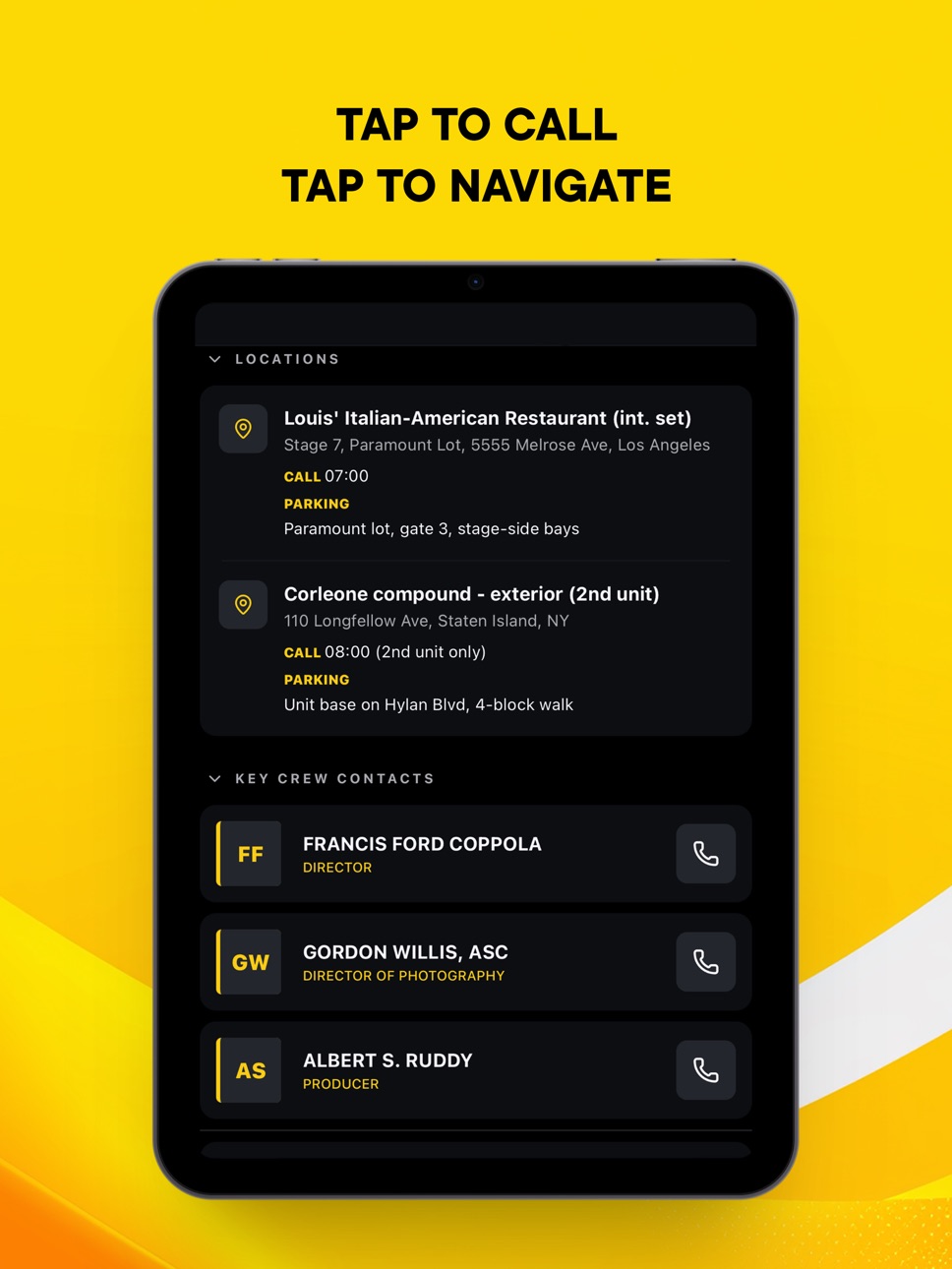
Callsheet Pro turns any call sheet into an instant, interactive shoot day. Crew contacts, locations, schedule, and scenes, all at your fingertips. One tap to call any crew member. One tap to navigate to set.
UPLOAD ANY FORMAT
Drop in a PDF, Word, or Excel call sheet. Or snap a photo of a printed one. AI reads it and extracts everything: call times, crew, locations with parking, shooting schedule, scenes, and notes. Works in any language.
EDIT ANY FIELD
Tap the pencil and tap any row. Locations, schedule, scenes, crew, warnings, all editable. Your edits sync to everyone you've shared with in seconds. (Pro)
GROUP MULTI-DAY SHOOTS
Wrap a full production into one place. Add days as the schedule arrives. Crew, locations, and defaults carry across.
FIND ANYTHING INSTANTLY
Ask in plain language. "Which day is the hospital scene?" or "Who's the gaffer on Thursday?" AI search finds it across every callsheet you've opened, past shoots too.
LIVE SHOOT DAY
See what's shooting now, what's next, and when you wrap. Swipe through scenes in real time.
SHARE WITH YOUR CREW
Share a link, code, or QR. Your crew taps once and the call sheet opens straight in the app. Recipients on web see live edits without reinstalling anything.
NOTIFY YOUR CREW
Push a notification to everyone with your share link the moment a schedule, location, or call time changes. Tag it as a schedule update, location change, warning, or general note. (Pro)
EMAIL FORWARDING
Pro accounts get a personal forwarding address that starts with your name. Send or forward any call sheet email to it and the app reads the PDF straight from the attachment. (Pro)
WORKS OFFLINE
Everything syncs to your device. No signal on set? No problem.
BUILT FOR FILM AND TV CREWS
Directors, DPs, ADs, producers, sound, grip, gaffer. Everyone on set needs this.
• AI parsing of PDF, Word, Excel, and printed call sheets
• AI search across all your call sheets
• Edit any field with one tap (Pro)
• Multi-day production grouping
• Live scene status and schedule tracking
• Crew contacts with one-tap calling
• Locations with Google address search, maps, and parking info
• Share via code, link, or QR
• Push notifications when anything changes (Pro)
• Email forwarding from your inbox (Pro)
• Live weather for your shoot location
• Works offline after first sync
• Dark mode designed for on-set use
Terms of Use (EULA): https://www.apple.com/legal/internet-services/itunes/dev/stdeula/
Privacy Policy: https://callsheetpro.app/privacy.html
In-App Purchases US pricing
Callsheet Pro Subscriptions Subscription
Callsheet Pro Monthly · Monthly$1.99
Callsheet Pro Yearly · Yearly$19.99
Capabilities
In-App Purchases
Accessibility
ipadiphonemacrealityDevicetvoswatch
Version history 10 versions
Build 887872000v1.11.62026-07-07 18:53:39
ONE PDF, YOUR WHOLE SHOOT
Upload a multi-day call sheet or schedule and it splits into separate days automatically, with a day switcher, a "Day X of N" strip, and tomorrow's call time and weather at a glance.
MADE FOR YOU
Tell the app who you are on set and every day opens with your own call time, not just the general call. Filter the schedule by unit so you only see your team's day.
STAY IN SYNC
Pin the day's most important note to the top and push it to the whole crew as a notification. Crew members can open a share link straight away, no account needed to view.
ALSO NEW
- Real time pickers when editing. Move one schedule item and everything after it shifts along
- Private notes with photos, plus a branded PDF export of your notes
- Reorder crew by dragging
- Upload several files at once, with a clear retry if one fails
- Send Word, Excel and photos to the app from other apps, not just PDFs
- Dates now display in your language, and Traditional Chinese joins the app
- Show password toggle at login, a friendlier first-run setup, and many small fixes
The call sheet, finally usable.
Build 887381013v1.11.52026-06-24 20:59:44
- Shared with you: call sheets people share with you now appear in their own shelf and stay up to date.
- Fixed a freeze that could happen when previewing attached documents.
- More reliable importing and sharing of files.
- Expired share links now show a clear message instead of loading forever.
- Stability and polish fixes.
Build 886434945v1.11.32026-06-02 19:59:01
- Faster sign-in: the app now fills in your saved password automatically.
- Opening attached documents and shared files is more reliable.
- Phone, call, and messaging links hand off correctly to your apps.
- Profile changes save with a clear Save button and sync across devices.
- Stability and polish fixes.
Build 886146234v1.11.02026-05-26 18:48:23
EDIT ANY FIELD
Tap the pencil in the top bar, then tap any row to edit it. Locations, schedule, scenes, crew, warnings, all editable. Pro only.
NEW WAYS TO IMPORT
Upload Word or Excel call sheets, not just PDFs. Or snap a photo of a printed call sheet and Callsheet Pro reads it the same way.
NOTIFY CREW
Push a notification to everyone with the share link the moment a schedule, location, or call time changes. Pro only.
GOOGLE ADDRESS SEARCH
Edit any location and start typing an address. Built-in Google suggestions fill name and address in one tap. Free for everyone.
EMAIL FORWARDING (PRO)
Pro accounts get a personal forwarding address that starts with your name. Forward any callsheet email and we read the PDF for you. Find your address in Settings.
TIPS & SHORTCUTS
A new screen in Settings with a guided tour of features you might have missed.
PRODUCTIONS
Multi-day productions now look distinct from single callsheets at a glance.
FASTER LIVE SHARES
Edits made on Pro iOS reach Free web viewers in seconds.
Plus various polish and reliability improvements.
Build 885116236v1.9.12026-04-30 18:46:33
What's new in 1.9.1
• Faster PDF parsing
• Web and mobile now sync seamlessly. Web version now fully operational.
• Fixed: sharing PDFs into the app from Files or Mail now works for all filenames, including those with "#" in the title.
• Fixed: email/password sign-in occasionally hanging on the "Please wait" screen.
Build 884943734v1.72026-04-27 01:07:43
Snap a photo of your callsheet - we'll read it instantly. No more PDF hunting.
Working from an Excel sheet? We handle those now too.
Crew calling at different times? Each person now shows their own call time, right where you'd expect it.
Got a share code from your producer? Type it straight into the upload screen - no more digging.
Plus a bunch of small things that just work better: faster uploads, clearer progress, and verification emails that actually land in your inbox.
Made for crew.
Build 884768719v1.42026-04-22 00:26:57
Invite a colleague to Pro — redeem an invite code to unlock 3 months, then pass on 3 single-use codes from your own Settings. Also: reset your password from the login screen, and a faster, more reliable Apple Sign-In.
Build 884648296v1.32026-04-17 22:11:04
This is a major update with new features, a refreshed design, and a more reliable experience on set.
New
AI search across all your callsheets — find any scene, cast member, or location instantly
Shareable links — send a callsheet with one tap; recipients open it straight into the app
Sign in with Apple and Google
Expanded Today view with a time-aware "Next Up" scene card
Improved
Refreshed design with a softer brand palette built for on-set lighting
Faster, more responsive scene carousel
Smarter day and scene titles throughout the app
New speed-dial button stays reachable anywhere in the app
Fixed
More stable sign-in and session handling
Better offline handling — your edits sync when you're back online
Resolved crashes reported during the 1.1 release
Thanks for the feedback from the crews testing on real shoots
Build 884546493v1.12026-04-15 20:16:52
Bug fixes, design improvements.
Build 884148585v1.02026-04-13 20:01:16
Price history by region
Currency
Show
Columns
Search
Availability 1 of 1 storefronts
| Region | Language | Price | Ratings | Avg | Version |
|---|---|---|---|---|---|
| US | en-US | Free | 0 | — | 1.11.6 |
Change log 14 changes · US
✎
releaseNotes updated
ONE PDF, YOUR WHOLE SHOOT
Upload a multi-day call sheet or schedule and it splits into separate days automatically, with a day switcher, a "Day X of N" strip, a
✎
description updated
Callsheet Pro turns any call sheet into an instant, interactive shoot day. Crew contacts, locations, schedule, and scenes, all at your fingertips. One tap to ca
✎
subtitle updated
The callsheet, finally usable.
✎
name updated
Callsheet Pro
◆
Version 1.11.6 released
ONE PDF, YOUR WHOLE SHOOT
Upload a multi-day call sheet or schedule and it splits into separate days automatically, with a day switcher, a "Day X of N" strip, and tomorrow's call time and weather at a glance.
MADE FOR YOU
Tell the app who
◆
Version 1.11.5 released
- Shared with you: call sheets people share with you now appear in their own shelf and stay up to date.
- Fixed a freeze that could happen when previewing attached documents.
- More reliable importing and sharing of files.
- Expired share l
◆
Version 1.11.3 released
- Faster sign-in: the app now fills in your saved password automatically.
- Opening attached documents and shared files is more reliable.
- Phone, call, and messaging links hand off correctly to your apps.
- Profile changes save with a clea
◆
Version 1.11.0 released
EDIT ANY FIELD
Tap the pencil in the top bar, then tap any row to edit it. Locations, schedule, scenes, crew, warnings, all editable. Pro only.
NEW WAYS TO IMPORT
Upload Word or Excel call sheets, not just PDFs. Or snap a photo of a printe
◆
Version 1.9.1 released
What's new in 1.9.1
• Faster PDF parsing
• Web and mobile now sync seamlessly. Web version now fully operational.
• Fixed: sharing PDFs into the app from Files or Mail now works for all filenames, including those with "#" in the title.
• F
◆
Version 1.7 released
Snap a photo of your callsheet - we'll read it instantly. No more PDF hunting.
Working from an Excel sheet? We handle those now too.
Crew calling at different times? Each person now shows their own call time, right where you'd expect it.
Go
◆
Version 1.4 released
Invite a colleague to Pro — redeem an invite code to unlock 3 months, then pass on 3 single-use codes from your own Settings. Also: reset your password from the login screen, and a faster, more reliable Apple Sign-In.
◆
Version 1.3 released
This is a major update with new features, a refreshed design, and a more reliable experience on set.
New
AI search across all your callsheets — find any scene, cast member, or location instantly
Shareable links — send a callsheet with one
◆
Version 1.1 released
Bug fixes, design improvements.
◆
Version 1.0 released