Home › Productivity

 US
US
1 of 1 storefronts
Content in en-US
Content in en-US
Information
Preview 2 platforms
iPhone 10 images


iPad 6 images



What’s New Version 1.0.16
• QR code sharing: your team (Road, Rigger) scans and sees their tasks in real time — no sign-up required.
• Cloud Sync: access your projects across all your devices, PC and Mac included, with up to 8 photos per project.
• Simpler sign-in: get a 6-digit code by email (passwordless), or sign in with Google or Apple.
• Free access to examples: explore and edit the sample projects right from the free version.
• Clearer, perfectly symmetrical system schematic.
• Default IP addresses (P1, Mac) for faster access to your amplifiers.
• Refined settings and many fixes.
Description
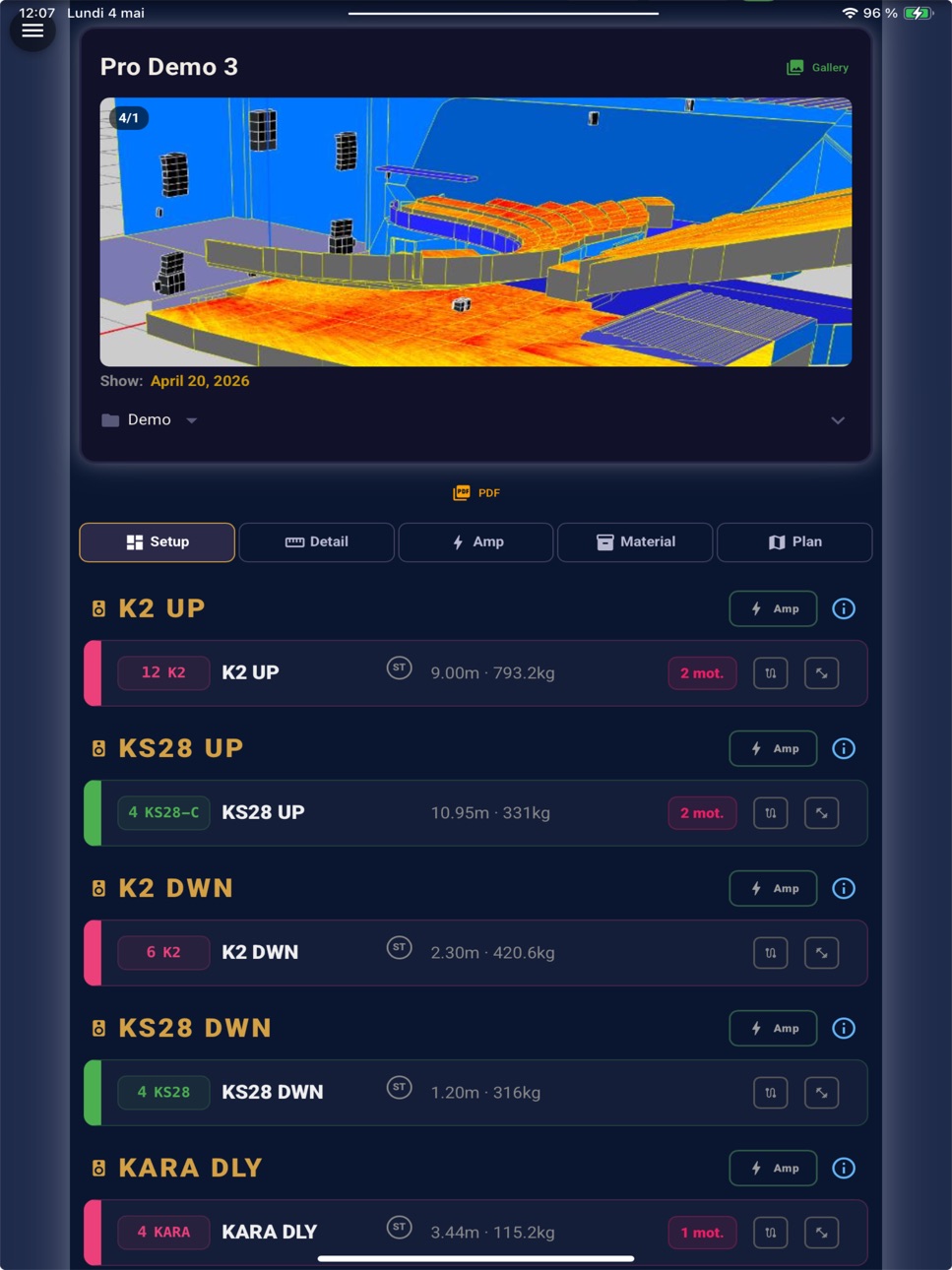
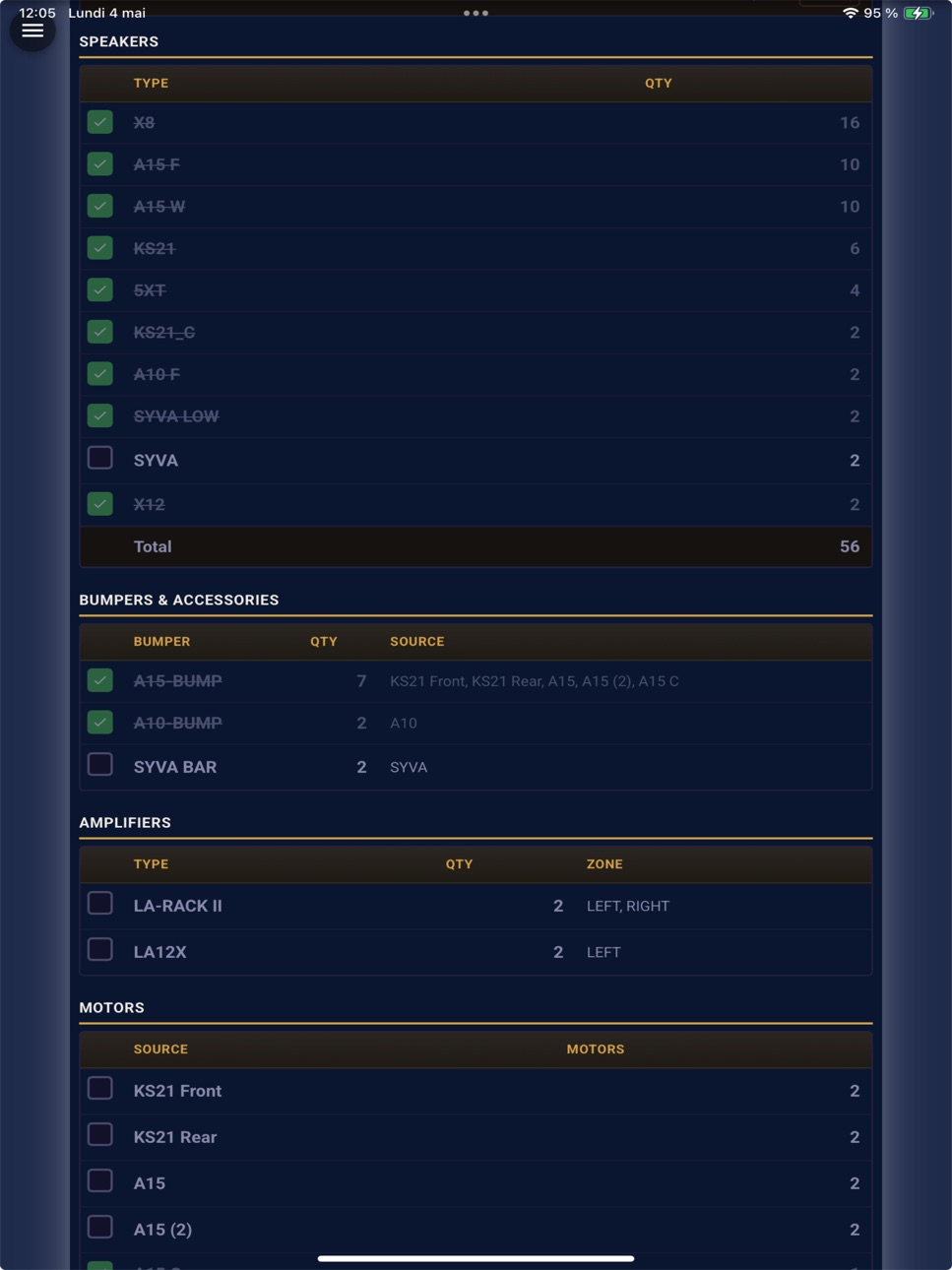
All data in the application is generated directly from your Soundvision report import. Cinod ensures total fidelity to your original project, enhanced with essential on-site tools.
1. Instant Access & Privacy (Zero Friction)
Sharing with your crew is designed for speed and total privacy:
* No Sign-up Required: We never ask technicians for emails, phone numbers, or personal data.
* Instant Web View: Scanning the QR code opens a web page immediately. The crew can view plans and data instantly without downloading anything.
* App Option: For a smoother experience and more features, they can choose to import the data into the free app later.
2. For Technicians (Free Version)
* Roads & Riggers: Direct access to inter-box angles, bumpers, heights, and motor loads from the report. Follow site progress in real-time.
* Instant Sharing: Share received information with the rest of the crew in one tap.
3. For Assistants & System Techs (Pro Version)
Deepen your technical management:
* Amps & IP Memory Aid: Exclusively in Pro. Use the app to log your amp assignments and IP addresses, centralizing technical details that aren't always in the PDF.
* Full Access: View all settings, cabling diagrams, and engineer comments.
* Personal Import & Demo: Import your own reports locally or explore Pro features through the built-in Pro Demo examples.
4. For the System Engineer (Pro Version + Cloud)
The ultimate workflow from office to stage:
* Web & Cloud Prep: Import your report via Web Browser or PC/Mac, add annotations and up to 8 photos. Everything syncs automatically to your mobile.
* Zero PC On-Site: Arrive with the full project in your pocket. Share it via QR code and start working immediately without ever opening your laptop.
* Live Control: Update a priority or a task; your team sees the change on their screen at "Time T".
Soundvision is a registered trademark of L-Acoustics. The Cinod application processes data from your imported reports to streamline on-site deployment.
Privacy Policy: https://cinod.fr/politique-de-confidentialite-about-soundvision
Terms of Use (EULA): https://www.apple.com/legal/internet-services/itunes/dev/stdeula/
In-App Purchases US pricing
Cloud Sync Subscription
. · Yearly 14-day free trial$22.99
One-Time Purchases
Pro version$11.99
Pro version$11.99
Capabilities
In-App Purchases
Accessibility
ipadiphonemacrealityDevicetvoswatch
Version history 10 versions
Build 887792167v1.0.162026-07-07 23:11:52
• QR code sharing: your team (Road, Rigger) scans and sees their tasks in real time — no sign-up required.
• Cloud Sync: access your projects across all your devices, PC and Mac included, with up to 8 photos per project.
• Simpler sign-in: get a 6-digit code by email (passwordless), or sign in with Google or Apple.
• Free access to examples: explore and edit the sample projects right from the free version.
• Clearer, perfectly symmetrical system schematic.
• Default IP addresses (P1, Mac) for faster access to your amplifiers.
• Refined settings and many fixes.
Build 887656361v1.0.152026-07-01 10:57:07
• The Pro version is now available to purchase directly in the app (import Soundvision reports, configure amplifiers).
• Interface improvements and bug fixes.
Build 887382052v1.0142026-06-25 08:03:53
L1 available
• Improved reliability of the Pro version purchase.
• Stability fixes and minor optimisations.
Build 886924925v1.0.132026-06-20 13:05:30
• Improved reliability of the Pro version purchase.
• Stability fixes and minor optimisations.
Build 886769757v1.0.122026-06-11 05:56:54
• Improved reliability of the Pro version purchase.
• Stability fixes and minor optimisations.
Build 886608033v1.0.112026-06-08 06:14:20
Bug Fixes
All data in the application is generated directly from your Soundvision report import. Cinod ensures total fidelity to your original project, enhanced with essential on-site tools.
1. Instant Access & Privacy (Zero Friction)
Sharing with your crew is designed for speed and total privacy:
* No Sign-up Required: We never ask technicians for emails, phone numbers, or personal data.
* Instant Web View: Scanning the QR code opens a web page immediately. The crew can view plans and data instantly without downloading anything.
* App Option: For a smoother experience and more features, they can choose to import the data into the free app later.
2. For Technicians (Free Version)
* Roads & Riggers: Direct access to inter-box angles, bumpers, heights, and motor loads from the report. Follow site progress in real-time.
* Instant Sharing: Share received information with the rest of the crew in one tap.
3. For Assistants & System Techs (Pro Version)
Deepen your technical management:
* Amps & IP Memory Aid: Exclusively in Pro. Use the app to log your amp assignments and IP addresses, centralizing technical details that aren't always in the PDF.
* Full Access: View all settings, cabling diagrams, and engineer comments.
* Personal Import & Demo: Import your own reports locally or explore Pro features through the built-in Pro Demo examples.
4. For the System Engineer (Pro Version + Cloud)
The ultimate workflow from office to stage:
* Web & Cloud Prep: Import your report via Web Browser or PC/Mac, add annotations and up to 8 photos. Everything syncs automatically to your mobile.
* Zero PC On-Site: Arrive with the full project in your pocket. Share it via QR code and start working immediately without ever opening your laptop.
* Live Control: Update a priority or a task; your team sees the change on their screen at "Time T".
Soundvision is a registered trademark of L-Acoustics. The Cinod application processes data from your imported reports to streamline on-site deployment.
Privacy Policy: https://cinod.fr/politique-de-confidentialite-about-soundvision
Terms of Use (EULA): https://www.apple.com/legal/internet-services/itunes/dev/stdeula/
Build 886537501v1.0.102026-06-05 16:32:39
Bug Fixes
All data in the application is generated directly from your Soundvision report import. Cinod ensures total fidelity to your original project, enhanced with essential on-site tools.
1. Instant Access & Privacy (Zero Friction)
Sharing with your crew is designed for speed and total privacy:
* No Sign-up Required: We never ask technicians for emails, phone numbers, or personal data.
* Instant Web View: Scanning the QR code opens a web page immediately. The crew can view plans and data instantly without downloading anything.
* App Option: For a smoother experience and more features, they can choose to import the data into the free app later.
2. For Technicians (Free Version)
* Roads & Riggers: Direct access to inter-box angles, bumpers, heights, and motor loads from the report. Follow site progress in real-time.
* Instant Sharing: Share received information with the rest of the crew in one tap.
3. For Assistants & System Techs (Pro Version)
Deepen your technical management:
* Amps & IP Memory Aid: Exclusively in Pro. Use the app to log your amp assignments and IP addresses, centralizing technical details that aren't always in the PDF.
* Full Access: View all settings, cabling diagrams, and engineer comments.
* Personal Import & Demo: Import your own reports locally or explore Pro features through the built-in Pro Demo examples.
4. For the System Engineer (Pro Version + Cloud)
The ultimate workflow from office to stage:
* Web & Cloud Prep: Import your report via Web Browser or PC/Mac, add annotations and up to 8 photos. Everything syncs automatically to your mobile.
* Zero PC On-Site: Arrive with the full project in your pocket. Share it via QR code and start working immediately without ever opening your laptop.
* Live Control: Update a priority or a task; your team sees the change on their screen at "Time T".
Soundvision is a registered trademark of L-Acoustics. The Cinod application processes data from your imported reports to streamline on-site deployment.
Privacy Policy: https://cinod.fr/politique-de-confidentialite-about-soundvision
Terms of Use (EULA): https://www.apple.com/legal/internet-services/itunes/dev/stdeula/
Build 886463566v1.0.92026-06-03 15:36:48
• Refined amp count for K1, K2, V-DOSC and KUDO: the "cabs per output" choice now correctly
drives the proposed amp count.
• Plan view: point labels S1, S2… auto-fill on first open — no need to click the "Auto" button.
Build 886332262v1.0.82026-05-31 01:37:54
• Pro and Cloud Sync in-app purchases now active with 14-day free trial.
• Improved QR sharing button.
• New collaborative Cloud Sync section in About.
• Language picker moved to the top bar.
• Enriched guided tour with clearer Share and Cloud Sync steps.
• Fixed P1 and PC IP address saving.
• 1/2/3 per output choice for line arrays.
Build 884108115v1.0.72026-05-18 09:00:56
Price history by region
Currency
Show
Columns
Search
Availability 1 of 1 storefronts
| Region | Language | Price | Ratings | Avg | Version |
|---|---|---|---|---|---|
| US | en-US | Free | 0 | — | 1.0.16 |
Change log 13 changes · US
✎
releaseNotes updated
• QR code sharing: your team (Road, Rigger) scans and sees their tasks in real time — no sign-up required.
• Cloud Sync: access your projects across all your de
✎
description updated
All data in the application is generated directly from your Soundvision report import. Cinod ensures total fidelity to your original project, enhanced with esse
✎
name updated
Cinod about Soundvision
◆
Version 1.0.16 released
• QR code sharing: your team (Road, Rigger) scans and sees their tasks in real time — no sign-up required.
• Cloud Sync: access your projects across all your devices, PC and Mac included, with up to 8 photos per project.
• Simpler sign-in:
◆
Version 1.0.15 released
• The Pro version is now available to purchase directly in the app (import Soundvision reports, configure amplifiers).
• Interface improvements and bug fixes.
◆
Version 1.014 released
L1 available
• Improved reliability of the Pro version purchase.
• Stability fixes and minor optimisations.
◆
Version 1.0.13 released
• Improved reliability of the Pro version purchase.
• Stability fixes and minor optimisations.
◆
Version 1.0.12 released
• Improved reliability of the Pro version purchase.
• Stability fixes and minor optimisations.
◆
Version 1.0.11 released
Bug Fixes
All data in the application is generated directly from your Soundvision report import. Cinod ensures total fidelity to your original project, enhanced with essential on-site tools.
1. Instant Access & Privacy (Zero Friction)
Shari
◆
Version 1.0.10 released
Bug Fixes
All data in the application is generated directly from your Soundvision report import. Cinod ensures total fidelity to your original project, enhanced with essential on-site tools.
1. Instant Access & Privacy (Zero Friction)
Shari
◆
Version 1.0.9 released
• Refined amp count for K1, K2, V-DOSC and KUDO: the "cabs per output" choice now correctly
drives the proposed amp count.
• Plan view: point labels S1, S2… auto-fill on first open — no need to click the "Auto" button.
◆
Version 1.0.8 released
• Pro and Cloud Sync in-app purchases now active with 14-day free trial.
• Improved QR sharing button.
• New collaborative Cloud Sync section in About.
• Language picker moved to the top bar.
• Enriched guided tour with clearer Shar
◆
Version 1.0.7 released