Home › Utilities

 US
US
1 of 1 storefronts
Content in en-US
Content in en-US
Information
Preview 2 platforms
iPhone 7 images


iPad 7 images


What’s New Version 3.1
Share glaze recipes directly from the app!
Description
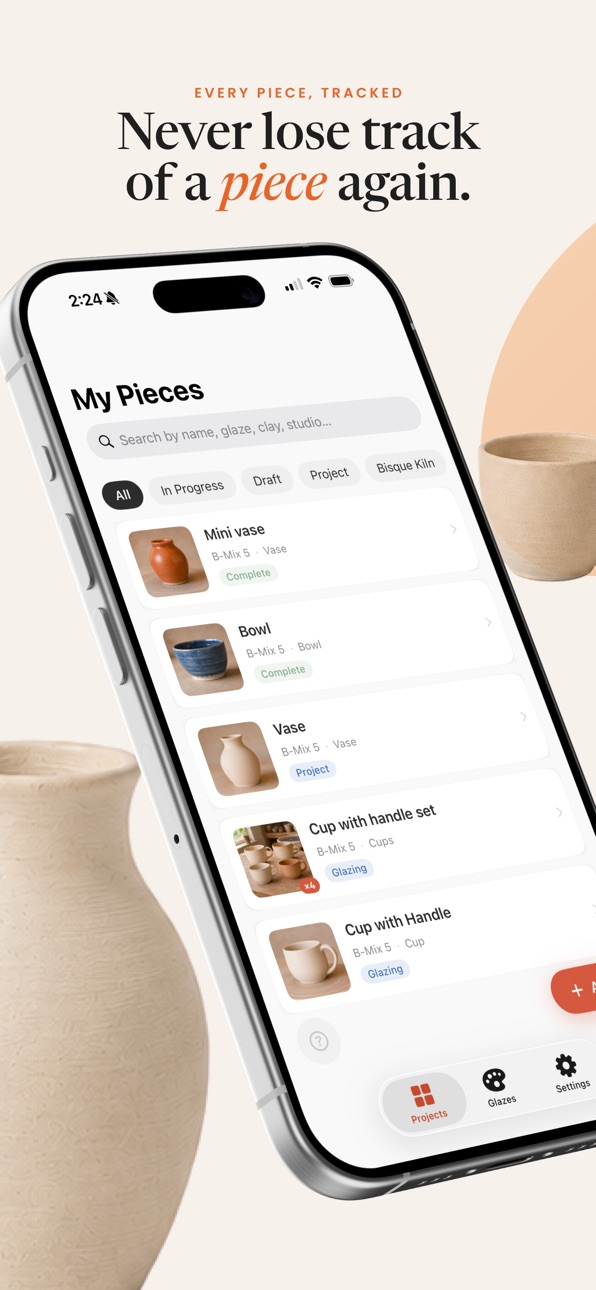
Pottery Tracker
Your all-in-one studio companion for documenting and managing your ceramic work.
Whether you're a beginner learning the basics or an experienced potter running production batches, Pottery Tracker helps you stay organized from the first pull to the final firing.
Track Every Piece, Every Step
Create projects and capture every detail of your work:
- Clay body, forming method, studio, and cone temperature
- Weight and dimensions (with flexible units)
- Photos throughout the process
- Notes, dates, and locations at every stage
Move each piece seamlessly through its lifecycle:
Project → Bisque Kiln → Glazing → Firing Kiln → Complete
Glaze Tracking & Recipes
Build a complete glaze system tailored to your workflow:
- Store glaze details: brand, cone range, surface, opacity, food safety
- Log full recipes with materials like silica, kaolin, feldspar, and whiting
- Support for grams, kg, lbs, oz, and weight % (auto-converted)
- Apply and track multiple glaze layers per piece
- Automatically detect and group glaze combinations
- See every project that used the same layering sequence
- Collections for Batch Work
Perfect for production runs and repeated forms:
- Group similar pieces into Collections
- Track items individually with their own photos and notes
- Apply glazes and move stages together or separately
- Instantly convert any item into its own standalone project
- Studio & Material Management
Stay consistent across your workspace:
- Set up multiple studios with kiln type and firing conditions
- Support for oxidation, reduction, soda, raku, pit, and wood firing
- Get warnings if clay bodies don’t match firing temperatures
- Manage clay bodies and glaze materials in one place
- Track clay costs by weight
- Data, Search & Backup
Your data stays organized and portable:
- Search across all projects by name, glaze, clay, or studio
- Export everything (including photos) as a ZIP + CSV
- Import to restore your full workspace on a new device
Free vs Pro
Free includes:
- Up to 20 projects
- 1 studio
- Up to 2 glaze layers per piece
- 3 photos per project
- Full glaze library access
Pottery Pro unlocks:
- Unlimited projects
- Multiple studios
- Unlimited glaze layers
- Unlimited photos
- Batch collections
- Data export/import
https://www.apple.com/legal/internet-services/itunes/dev/stdeula/
https://potterypal.my.canva.site/privacy
Capabilities
In-App Purchases
Accessibility
ipadiphonemacrealityDevicetvoswatch
Version history 5 versions
Build 888094139v3.12026-07-10 20:35:48
Share glaze recipes directly from the app!
Build 886937639v3.02026-07-01 19:52:21
NEW quick access widgets and Siri integration. Quickly create a new project from Home Screen, Lock Screen, or with Siri!
Build 886810826v2.02026-06-12 14:35:53
Take photos of your pieces from within the app. Improved collection details.
Build 886173501v1.022026-05-29 14:48:31
minor bug fixes
Build 884080400v1.012026-05-14 22:39:29
No pricing data captured yet — comparisons appear once the app has paid storefronts or in-app purchases.
Availability 1 of 1 storefronts
| Region | Language | Price | Ratings | Avg | Version |
|---|---|---|---|---|---|
| US | en-US | Free | 2 | 5.0 | 3.1 |
Change log 9 changes · US
✎
releaseNotes updated
Share glaze recipes directly from the app!
✎
description updated
Pottery Tracker
Your all-in-one studio companion for documenting and managing your ceramic work.
Whether you're a beginner learning the basics or an experience
✎
subtitle updated
Your digital pottery journal
✎
name updated
Pottery Pal
◆
Version 3.1 released
Share glaze recipes directly from the app!
◆
Version 3.0 released
NEW quick access widgets and Siri integration. Quickly create a new project from Home Screen, Lock Screen, or with Siri!
◆
Version 2.0 released
Take photos of your pieces from within the app. Improved collection details.
◆
Version 1.02 released
minor bug fixes
◆
Version 1.01 released