Home › Utilities

 US
US
1 of 1 storefronts
Content in en-US
Content in en-US
Information
Apple ID6761455176
Bundle IDcom.audioimpact.LipSync
SellerSeller
Min iOS17.6
Min macOS14.6
Device familiesiphone, ipad
Released2026-04-09
Copyright© Norwin Palme 2026
Privacy policyLink ↗
Preview 2 platforms
iPhone 7 images


iPad 3 images


What’s New Version 2.0
- added an optional QR code for long latencies > 500ms
- updated UI for better readability
- Live mode added — continuous latency updates while you measure
- not detected signals are now shown
- updated flash generation
Thanks for your support!
Description
Measure - don't guess!
Lip Sync is a precision tool for broadcast engineers, live production teams, and OB/streaming operators who need to verify and correct end-to-end AV sync across monitors, routers, encoders, and playout—before you go live or between segments.
Key features
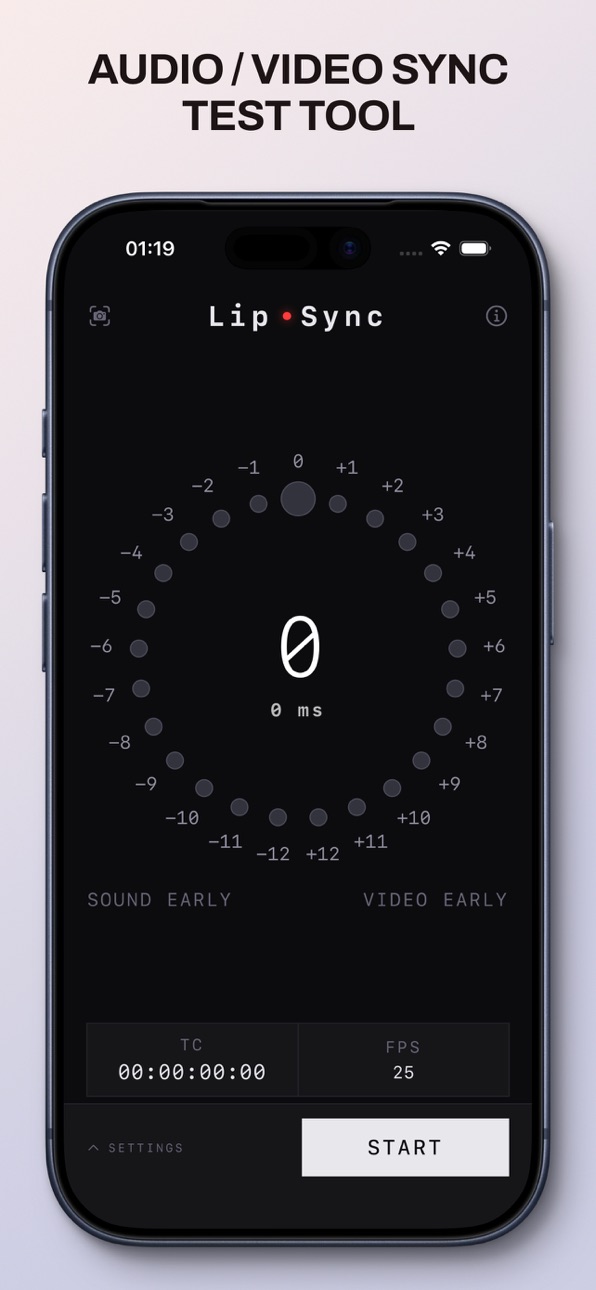
• Visual & audio test pattern – On-screen markers, beeps and flash cues so lip offset is obvious in control rooms.
• Customizable setup – Match FPS and tone frequency to your line standard or show format.
• Real-time feedback – Clear Sound early / Video early indicators plus timecode-style readouts in portrait and landscape for quick checks at the desk or in the truck.
• Event log – Recent sync-related events in one place for handover notes or troubleshooting during a show.
• Latency measure mode – Point a second iPhone (camera + mic) at the program monitor for an end-to-end delay readout in milliseconds and frames.
• QR anchor for long delays – Enable QR on the pattern device for frame-guided flash/beep pairing when latency exceeds 500 ms—accurate measurements on high-latency paths up to several seconds.
• Live measurement mode – Keep measuring after the first result; the offset updates continuously until you tap Stop—ideal for watching drift during line checks or while routing changes settle.
• Measurement history – Recent latency results saved in the Measure screen for quick comparison across runs, formats, or signal paths.
• Interface – Dark, minimal UI for dimmed galleries, OB trucks, and fast orientation changes on iPhone and iPad.
Why Lip Sync?
In live shows and broadcast, sync drift shows up as complaints, replays, and lost trust. Lip Sync gives you a repeatable, end-to-end check you can run on any path—not guesswork in the heat of a production.
Ideal for broadcast facilities, live sports and entertainment, houses of worship with IMAG, corporate live events, streaming ops, and systems integrators commissioning live signal chains.
Accessibility
ipadiphonemacrealityDevicetvoswatch
Version history 5 versions
Build 886445633v2.02026-06-16 23:44:09
- added an optional QR code for long latencies > 500ms
- updated UI for better readability
- Live mode added — continuous latency updates while you measure
- not detected signals are now shown
- updated flash generation
Thanks for your support!
Build 884957226v1.42026-04-30 18:50:56
- Added support for iOS 17 + 18
- Added 50 fps and 60 fps presets, plus a new horizontally scrollable FPS picker with haptics and edge hints
- New modes: Classic, Precision (fixed beep/flash length in ms with sub-ms readout) and Precision+Fixed (additional fixed transport tempo)
- Haptic feedback when changing FPS, Mode and Tone
- FPS now choosable directly from the mainmenu
- audio and video detection optimized
Build 884397930v1.32026-04-25 13:53:54
• New camera-based latency measurement with sub-frame accuracy
• Audio now handles calls/Siri and backgrounding automatically
• Timing, tone quality and stability improvements
Build 884344966v1.22026-04-10 13:24:41
- added the option to measure the sync with a second iPhone
Build 884003860v1.02026-04-07 11:27:34
Price history by region
Currency
Show
Columns
Search
Availability 1 of 1 storefronts
| Region | Language | Price | Ratings | Avg | Version |
|---|---|---|---|---|---|
| US | en-US | USD 8.99 | 0 | — | 2.0 |
Change log 9 changes · US
✎
releaseNotes updated
- added an optional QR code for long latencies > 500ms
- updated UI for better readability
- Live mode added — continuous latency updates while you measure
- n
✎
description updated
Measure - don't guess!
Lip Sync is a precision tool for broadcast engineers, live production teams, and OB/streaming operators who need to verify and correct
✎
subtitle updated
Sync Audio to Video
✎
name updated
LipSync Test Tool
◆
Version 2.0 released
- added an optional QR code for long latencies > 500ms
- updated UI for better readability
- Live mode added — continuous latency updates while you measure
- not detected signals are now shown
- updated flash generation
Thanks for your su
◆
Version 1.4 released
- Added support for iOS 17 + 18
- Added 50 fps and 60 fps presets, plus a new horizontally scrollable FPS picker with haptics and edge hints
- New modes: Classic, Precision (fixed beep/flash length in ms with sub-ms readout) and Precision+
◆
Version 1.3 released
• New camera-based latency measurement with sub-frame accuracy
• Audio now handles calls/Siri and backgrounding automatically
• Timing, tone quality and stability improvements
◆
Version 1.2 released
- added the option to measure the sync with a second iPhone
◆
Version 1.0 released