Home › Utilities

 US
US
1 of 1 storefronts
Content in en-US
Content in en-US
Information
Preview 2 platforms
iPhone 7 images


Mac 7 images




What’s New Version 1.6.3
Three of your most-requested features just landed — on iPhone and Mac.
NEW
• Open Kindle and FictionBook ebooks: convert MOBI, AZW3 and FB2 straight to EPUB, PDF or text and read them anywhere.
• Strip private data in one step: remove GPS location, device details and author tags from videos, audio and PDFs before you share.
• Pro-grade video conversion: set custom bitrate, H.264 profile, audio quality and web fast-start for perfectly tuned files.
IMPROVED
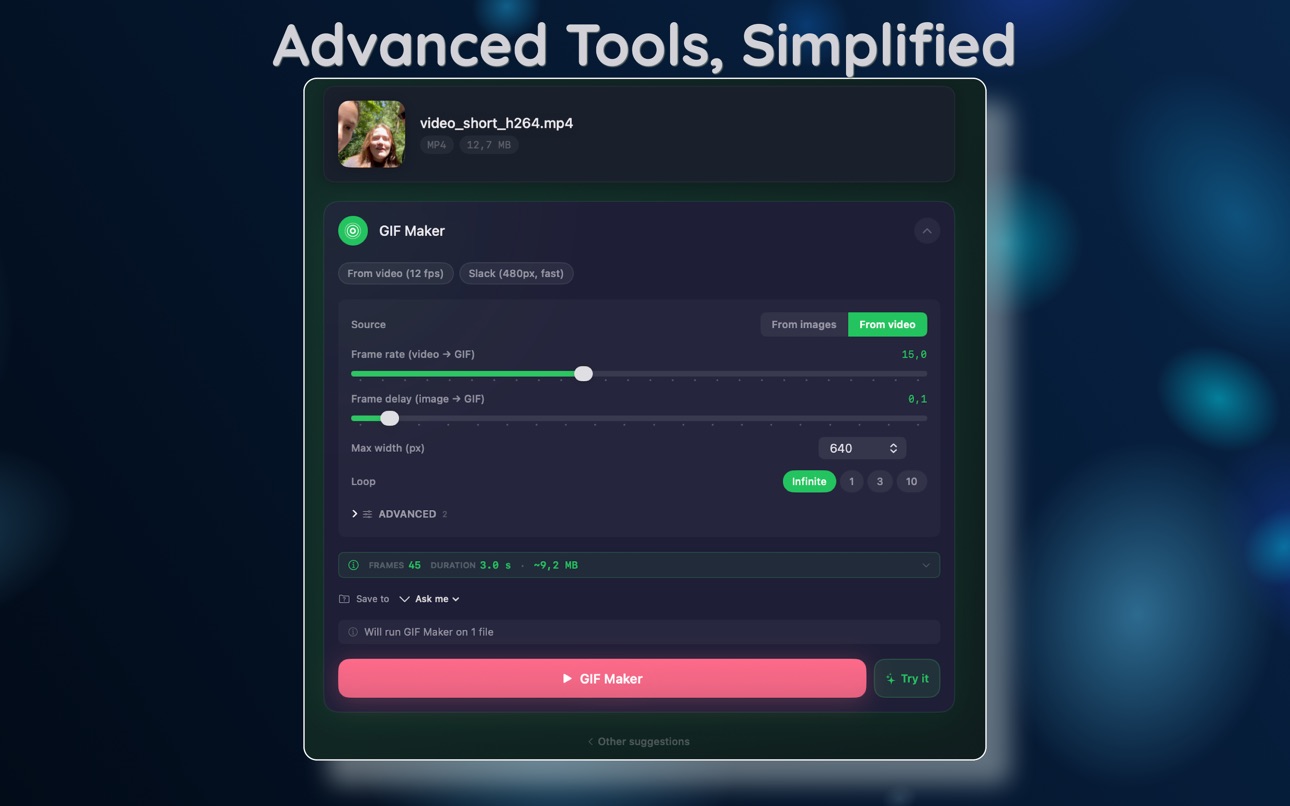
• See it before you run it: clear warnings and size and savings estimates now appear right on the tool screen. No surprises.
• Every tool shows Free or Pro at a glance.
FIXED
• Importing videos from Photos, including large iCloud clips, is now fast and reliable.
• Smoother MKV handling.
Everything runs 100% on your device — your files never leave it.
Enjoying the app? A quick rating genuinely helps us keep building. Thank you.
Description
Stop juggling ten apps to fix one file.
MediaKit is 152 media tools in a single app — video, audio, image, PDF, archive, and ebook utilities that finally work the way Apple's own apps should. Every operation runs locally on your iPhone or Mac. Nothing is uploaded. Nothing is logged. Drop a file. MediaKit does the rest.
THREE DAYS PRO, FREE
Install and use everything Pro for three days. No card, no trick.
Decide after.
ONE PURCHASE, EVERY DEVICE
Universal Purchase: buy on iPhone, use on Mac. Buy on Mac, use on iPhone. Family Sharing is included on every plan — one purchase covers your household.
VIDEO — 36 TOOLS
Compress, convert, trim, crop, rotate, merge, resize. Watermark. Burn in subtitles. Replace audio. Picture-in-picture. Side-by-side. Scene detect. Stabilize handheld footage. Denoise. HDR → SDR. Color grade. Fade. Loop. Reverse. Slow-mo. Frame-rate convert. ProRes and HEVC export. Scrub thumbnails. Transcribe captions on-device.
AUDIO — 23 TOOLS
Extract from any video. Convert MP3, M4A, WAV, FLAC, AIFF, ALAC, AAC, OGG, OPUS, AC3. Trim. Fade. Merge. Normalize to broadcast loudness (EBU R128). Reverse. Pitch shift. Speed change without chipmunk. Denoise. Equalizer. Silence-split. Ringtone maker. Waveform render. Spectrum. Speech-to-text.
IMAGE — 35 TOOLS
Compress and convert HEIC, JPG, PNG, WebP, TIFF, GIF, AVIF, BMP, plus 10 camera RAW formats (CR2, CR3, NEF, ARW, DNG, ORF, RW2, RAF, PEF, SRW). Background removal using Apple Vision. AI upscale. OCR. QR generate + read. Color palette extract. Watermark. Batch rename. App-icon set generator. Auto-enhance. Borders. Collage. ICO/ICNS for Windows and Mac icons.
PDF — 24 TOOLS
Compress, merge, split, encrypt, unlock, page numbers, header/footer, watermark, stamp, sign, reorder, rotate, crop, redact, flatten, OCR, extract text/pages/images. Vector content stays vector — PDFs remain searchable and crisp, not rasterized to images.
ARCHIVE — 14 TOOLS
ZIP, GZIP, TAR, TAR.GZ, XZ, BZIP2: create + extract. RAR4 and RAR5 extract (read-only). Path-traversal-safe by default.
EBOOK — 14 TOOLS
EPUB ↔ PDF ↔ HTML ↔ plain text. CBZ comic books: create + extract. Edit EPUB metadata. Validate against the EPUB spec.
PRIVATE BY DEFAULT
Sandboxed App Store app. Apple frameworks only — AVFoundation, CoreImage, PDFKit, Vision, Speech, Compression. No third-party services. No analytics SDK. No background uploads. The only non-Apple code is RARLAB's official open-source RAR-extraction library, statically linked.
Your files never leave the device.
FIVE TOOLS, ALWAYS FREE
Video compress, image compress, image resize, audio convert, PDF compress. No paywall, no account, no time limit. Use them forever on every device.
WORKS WITH SHORTCUTS
Six Apple Shortcuts intents — automate Compress Video, Convert Image, Compress Image, Merge PDFs, Create ZIP, and OCR from your existing workflows.
Built by one developer. Direct support. Every reply comes from the person who wrote the code.
Terms of Use: https://www.apple.com/legal/internet-services/itunes/dev/stdeula/
In-App Purchases US pricing
MediaKit Pro Subscription
Monthly · Monthly 3-day free trial$3.99
Yearly · Yearly 3-day free trial$22.99
One-Time Purchases
MediaKit Pro Lifetime$39.99
Capabilities
In-App Purchases
Accessibility
ipadiphonemacrealityDevicetvoswatch
Version history 6 versions
Build 887759025v1.6.32026-07-04 15:33:30
Three of your most-requested features just landed — on iPhone and Mac.
NEW
• Open Kindle and FictionBook ebooks: convert MOBI, AZW3 and FB2 straight to EPUB, PDF or text and read them anywhere.
• Strip private data in one step: remove GPS location, device details and author tags from videos, audio and PDFs before you share.
• Pro-grade video conversion: set custom bitrate, H.264 profile, audio quality and web fast-start for perfectly tuned files.
IMPROVED
• See it before you run it: clear warnings and size and savings estimates now appear right on the tool screen. No surprises.
• Every tool shows Free or Pro at a glance.
FIXED
• Importing videos from Photos, including large iCloud clips, is now fast and reliable.
• Smoother MKV handling.
Everything runs 100% on your device — your files never leave it.
Enjoying the app? A quick rating genuinely helps us keep building. Thank you.
Build 887198389v1.6.22026-06-24 06:15:46
Three of your most-requested features just landed — on iPhone and Mac.
NEW
• Open Kindle and FictionBook ebooks: convert MOBI, AZW3 and FB2 straight to EPUB, PDF or text and read them anywhere.
• Strip private data in one step: remove GPS location, device details and author tags from videos, audio and PDFs before you share.
• Pro-grade video conversion: set custom bitrate, H.264 profile, audio quality and web fast-start for perfectly tuned files.
IMPROVED
• See it before you run it: clear warnings and size and savings estimates now appear right on the tool screen. No surprises.
• Every tool shows Free or Pro at a glance.
FIXED
• Importing videos from Photos, including large iCloud clips, is now fast and reliable.
• Smoother MKV handling.
Everything runs 100% on your device — your files never leave it.
Enjoying the app? A quick rating genuinely helps us keep building. Thank you.
Build 887047291v1.62026-06-18 09:01:18
Three of your most-requested features just landed — on iPhone and Mac.
NEW
• Open Kindle and FictionBook ebooks: convert MOBI, AZW3 and FB2 straight to EPUB, PDF or text and read them anywhere.
• Strip private data in one step: remove GPS location, device details and author tags from videos, audio and PDFs before you share.
• Pro-grade video conversion: set custom bitrate, H.264 profile, audio quality and web fast-start for perfectly tuned files.
IMPROVED
• See it before you run it: clear warnings and size and savings estimates now appear right on the tool screen. No surprises.
• Every tool shows Free or Pro at a glance.
FIXED
• Importing videos from Photos, including large iCloud clips, is now fast and reliable.
• Smoother MKV handling.
Everything runs 100% on your device — your files never leave it.
Enjoying the app? A quick rating genuinely helps us keep building. Thank you.
Build 886682284v1.52026-06-09 01:40:35
This update is all about giving you more room to work.
• Adaptive workspace — Editors now scale to your window. Bigger screen, bigger canvas.
• Expand to fullscreen — One tap opens Crop, Trim, Signature, and Redact at full size for pixel-accurate edits.
• Smarter cropping — Aspect ratio presets (16:9, 1:1, 4:5, 9:16, 4:3) snap and lock as you drag the handles.
• Swap files in place — Hover any loaded file to Replace or Remove without leaving your tool.
• Polished throughout: smoother handles, sharper crop selection, faster previews.
Build 886160329v1.42026-05-30 11:43:08
This update is all about giving you more room to work.
• Adaptive workspace — Editors now scale to your window. Bigger screen, bigger canvas.
• Expand to fullscreen — One tap opens Crop, Trim, Signature, and Redact at full size for pixel-accurate edits.
• Smarter cropping — Aspect ratio presets (16:9, 1:1, 4:5, 9:16, 4:3) snap and lock as you drag the handles.
• Swap files in place — Hover any loaded file to Replace or Remove without leaving your tool.
• Polished throughout: smoother handles, sharper crop selection, faster previews.
Build 885139013v1.02026-05-07 15:21:45
Price history by region
Currency
Show
Columns
Search
Availability 1 of 1 storefronts
| Region | Language | Price | Ratings | Avg | Version |
|---|---|---|---|---|---|
| US | en-US | Free | 0 | — | 1.6.3 |
Change log 10 changes · US
✎
releaseNotes updated
Three of your most-requested features just landed — on iPhone and Mac.
NEW
• Open Kindle and FictionBook ebooks: convert MOBI, AZW3 and FB2 straight to EPUB, P
✎
description updated
Stop juggling ten apps to fix one file.
MediaKit is 152 media tools in a single app — video, audio, image, PDF, archive, and ebook utilities that finally work
✎
subtitle updated
Video, Audio, Image, PDF & ZIP
✎
name updated
MediaKit: Compress & Convert
◆
Version 1.6.3 released
Three of your most-requested features just landed — on iPhone and Mac.
NEW
• Open Kindle and FictionBook ebooks: convert MOBI, AZW3 and FB2 straight to EPUB, PDF or text and read them anywhere.
• Strip private data in one step: remove GPS
◆
Version 1.6.2 released
Three of your most-requested features just landed — on iPhone and Mac.
NEW
• Open Kindle and FictionBook ebooks: convert MOBI, AZW3 and FB2 straight to EPUB, PDF or text and read them anywhere.
• Strip private data in one step: remove GPS
◆
Version 1.6 released
Three of your most-requested features just landed — on iPhone and Mac.
NEW
• Open Kindle and FictionBook ebooks: convert MOBI, AZW3 and FB2 straight to EPUB, PDF or text and read them anywhere.
• Strip private data in one step: remove GPS
◆
Version 1.5 released
This update is all about giving you more room to work.
• Adaptive workspace — Editors now scale to your window. Bigger screen, bigger canvas.
• Expand to fullscreen — One tap opens Crop, Trim, Signature, and Redact at full size for pixel
◆
Version 1.4 released
This update is all about giving you more room to work.
• Adaptive workspace — Editors now scale to your window. Bigger screen, bigger canvas.
• Expand to fullscreen — One tap opens Crop, Trim, Signature, and Redact at full size for pixel
◆
Version 1.0 released