Home › Lifestyle

 US
US
USen-US ALNot Available
 ATNot Available
 AUNot Available
 BANot Available
 BENot Available
 BGNot Available
 BYNot Available
 CANot Available
 CHNot Available
 CYNot Available
 CZNot Available
 DENot Available
 DKNot Available
 EENot Available
 ESNot Available
 FINot Available
 FRNot Available
 GBNot Available
 GRNot Available
 HRNot Available
 HUNot Available
 IENot Available
 ISNot Available
 ITNot Available
 LTNot Available
 LUNot Available
 LVNot Available
 MDNot Available
 MKNot Available
 MTNot Available
 NLNot Available
 NONot Available
 NZNot Available
 PLNot Available
 PTNot Available
 RONot Available
 RSNot Available
 RUNot Available
 SENot Available
 SINot Available
 SKNot Available
 UANot Available
1 of 43 storefronts
Content in en-US
Content in en-US
Information
Preview 2 platforms
iPhone 4 images


iPad 5 images


What’s New Version 1.2.2a
ver1.2.3
・Adjusted the position of the delete button
・Fixed an issue where the bottom of the screen was not displayed
Description
Are you properly caring for and managing the plants in your home garden or flower beds?
Plandar is an app that lets you centrally manage tasks for each plant—such as fertilizing, pruning, and bud removal as well as watering, all through a calendar.
You can record your annual tasks and use that information to improve your gardening the following year.
<Plandar Features>
・Register and manage tasks for each plant
・Visualize watering frequency to prevent missed waterings
・Registered events are saved as annual events and displayed the following year
・Review notes from the previous year to improve cultivation accuracy
・Keep growth records with diary entries and photos
<Recommended for:>
・People who grow plants, such as home gardeners, hobbyists, and farmers
・People who look up plant cultivation calendars online every year
・People who are growing more plants and finding it difficult to manage them
・People who want to keep records of watering and other tasks
・People who want to track their plants’ growth
<Main Screens>
・Calendar: Register tasks for each plant
・Watering: Visually manage watering status
・Diary: Record plant growth with comments and photos
・Settings: Freely customize event details
<Detailed Usage Guide>
Calendar Screen
Tap the “Add Plant” button in the lower-left corner to add a row. Enter the plant’s name in the left column. To create an event, tap an empty row on the right to display the event creation screen.
The event creation screen offers predefined event options; selecting one allows you to quickly enter the event name, color, and icon. Of course, you can also enter details freely without selecting a preset.
You can set the event’s duration and add notes.
Another feature of this app is that all registered events are saved as annual events, so you can easily review your notes the following year.
Watering Screen
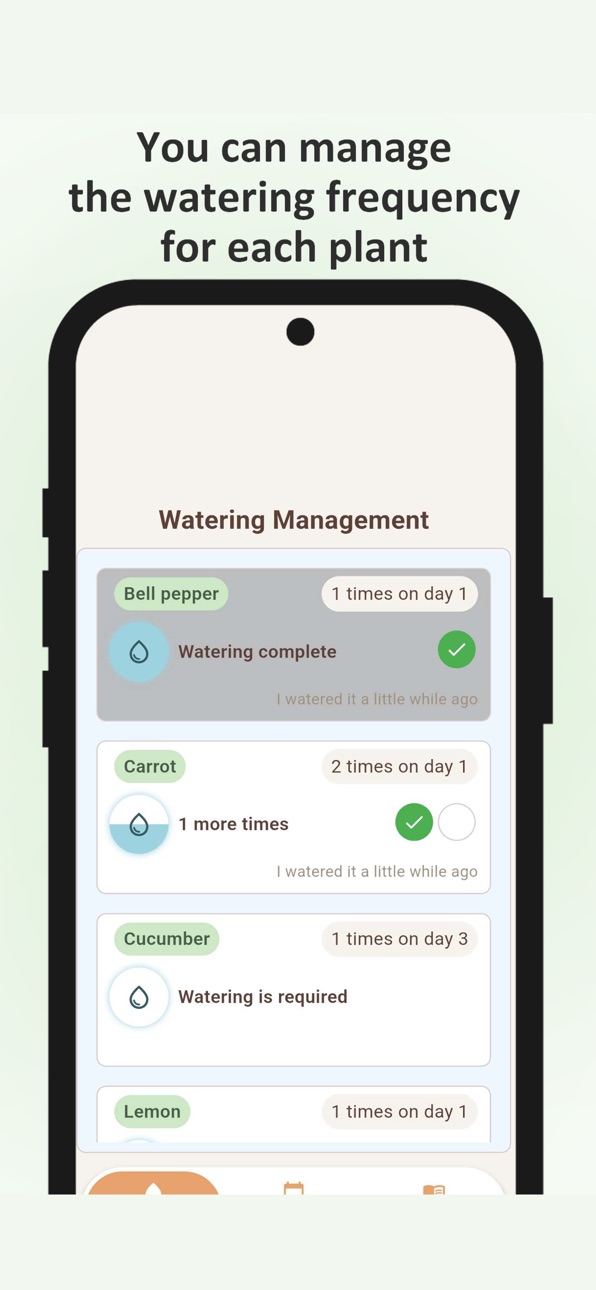
The plants you registered on the Calendar screen are displayed in a vertical list. Watering frequency can be set to either “how many times a day” or “once every X days,” and you can configure these settings from the plant name input field on the Calendar screen.
Tapping a plant’s card marks it as watered; the water icon on the left fills up, and the remaining amount decreases over time according to the set frequency.
Diary Screen
You can create a diary entry for each plant. Each entry allows you to save a comment and up to three images, which can be added from your device’s gallery or camera. You can enlarge or delete added images by tapping them.
Settings Screen
You can configure various app settings here. In the Event List Editor, you can customize the list of events available for registration on the Calendar screen in advance.
<Request>
Please leave a review for the app.
We aim to make this app as user-friendly as possible, so please feel free to share any feedback on areas that are difficult to use or features you’d like to see. Since I’m developing this as an independent developer, I’ll respond promptly to even minor requests.
<Terms of Use>
https://www.apple.com/legal/internet-services/itunes/dev/stdeula/
In-App Purchases US pricing
PremiumPlan Subscription
Monthly$4.00
Capabilities
In-App Purchases
Accessibility
ipadiphonemacrealityDevicetvoswatch
Version history 8 versions
Build 887097144v1.2.2a2026-06-22 14:55:25
ver1.2.3
・Adjusted the position of the delete button
・Fixed an issue where the bottom of the screen was not displayed
Build 886951429v1.2.22026-06-14 23:27:09
ver 1.2.2
・Adjusted the layout
・The keyboard now closes when tapped outside the input field
Build 886394366v1.2.02026-06-01 23:42:25
ver 1.2.0
・Added cold and heat tolerance alerts for each plant
・Fixed an issue with wind speed alerts
・Adjusted various layouts
Build 886066090v1.1.152026-05-24 16:37:16
ver 1.1.15
・Added a strong wind warning feature
・Made some changes to the specifications
Build 885952030v1.1.142026-05-21 16:20:17
ver 1.1.14
・Added a strong wind warning feature
Build 885202495v1.1.132026-05-03 16:59:20
ver 1.1.13
・Layout adjustments have been made
Build 884903789v1.1.122026-04-29 15:34:05
ver 1.1.12
・The file format for saving downloaded images has been changed.
Build 883886569v1.1.112026-04-22 04:43:51
Price history by region
Currency
Show
Columns
Search
Availability 1 of 43 storefronts
| Region | Language | Price | Ratings | Avg | Version |
|---|---|---|---|---|---|
| US | en-US | Free | 0 | — | 1.2.2a |
Not available in: AL, AT, AU, BA, BE, BG, BY, CA, CH, CY, CZ, DE, DK, EE, ES, FI, FR, GB, GR, HR, HU, IE, IS, IT, LT, LU, LV, MD, MK, MT, NL, NO, NZ, PL, PT, RO, RS, RU, SE, SI, SK, UA
Change log 12 changes · US
✎
releaseNotes updated
ver1.2.3
・Adjusted the position of the delete button
・Fixed an issue where the bottom of the screen was not displayed
✎
description updated
Are you properly caring for and managing the plants in your home garden or flower beds?
Plandar is an app that lets you centrally manage tasks for each plant—su
✎
subtitle updated
Easily Manage Your Plant Care
✎
name updated
Plandar Plant Care Calendar
◆
Version 1.2.2a released
ver1.2.3
・Adjusted the position of the delete button
・Fixed an issue where the bottom of the screen was not displayed
◆
Version 1.2.2 released
ver 1.2.2
・Adjusted the layout
・The keyboard now closes when tapped outside the input field
◆
Version 1.2.0 released
ver 1.2.0
・Added cold and heat tolerance alerts for each plant
・Fixed an issue with wind speed alerts
・Adjusted various layouts
◆
Version 1.1.15 released
ver 1.1.15
・Added a strong wind warning feature
・Made some changes to the specifications
◆
Version 1.1.14 released
ver 1.1.14
・Added a strong wind warning feature
◆
Version 1.1.13 released
ver 1.1.13
・Layout adjustments have been made
◆
Version 1.1.12 released
ver 1.1.12
・The file format for saving downloaded images has been changed.
◆
Version 1.1.11 released