Home › Productivity

 US
US
1 of 1 storefronts
Content in en-US
Content in en-US
Information
Apple ID6761300584
Bundle IDcom.saypop.SayDay
SellerSeller
Min iOS26.0
Min macOS26.0
Device familieswatch, iphone, ipad
Released2026-04-30
Copyright© 2026 SAYPOP
Privacy policyLink ↗
Preview 3 platforms
iPhone 5 images


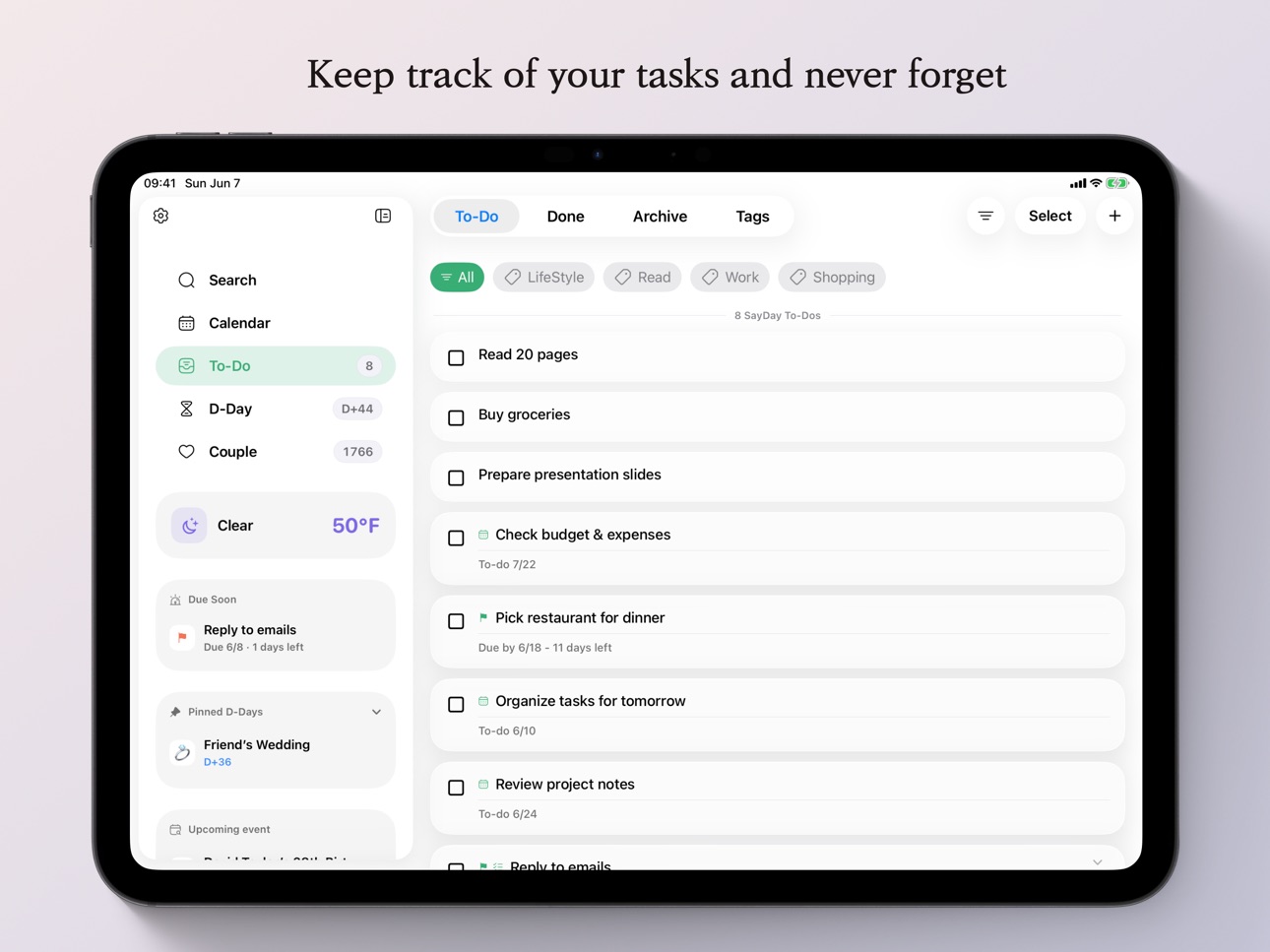
iPad 5 images



Apple Watch 4 images


What’s New Version 2.0.0
[v2.0.0]
• Completely redesigned the UI and UX
• Added a sidebar item filtering button
• Updated the sidebar to allow immediate access to the Settings page
• Added a “Due Soon” item to the sidebar
• Removed the “Pastel” app theme
• Updated the Couple tab so that disabling password use resets the previously set password
• Fixed an issue in Couple Notes where long notes without line breaks could break the layout
• Fixed an issue in Couple Notes where pasting an image inserted it at its original resolution, causing layout issues
• Updated the Completed and Archive tabs to allow items to be selected individually for deletion or restored as incomplete to-dos
• Changed the Complete All button in the To-Do tab’s selection mode to a Complete Selected Items button
• Added a button in the Completed tab to move items to the Archive
• Stabilized CalDAV connectivity
• Optimized the calendar conflict recovery system
• Added left and right swipe gestures to move between dates in the calendar day view
• Removed the “Compact” calendar layout
• Moved the weather card from the bottom of the calendar to the sidebar
• Added a “Grid View” option to the D-Day tab
• Added the ability to set a photo as the background of a D-Day item
• Added lunar calendar settings for D-Day items
• Added a “Daily” option for D-Day notifications
• Added notification message customization
• Added the ability to set the background of the couple card in the Couple Widget
• On iPhone, moved the Search tab from the bottom tab bar to the search bar at the bottom of the sidebar
• Added integration with Apple Reminders
• Added translations for some missing text
Description
SayDay is an all-in-one planner that brings your schedule, tasks, D-Days, weather, and couple moments into one seamless flow.
From today’s plans to important anniversaries, shared memories, and daily tasks, keep everything in one place and organized with clarity. With a clean calendar view, intuitive task management, reminders, widgets, and Apple Watch support, SayDay helps you build a habit of checking your day, every day.
Key Features
• Calendar
View your schedule and daily flow at a glance with a monthly calendar.
You can also check today’s weather alongside your plans for a more natural overview of your day.
• Tasks
Easily organize and check off your to-dos to keep your day light and manageable.
Add tags when needed, stay on top of important tasks, and quickly clear what you’ve completed.
• D-Day
Track birthdays, exams, trips, plans, project deadlines, and other important dates.
See how much time remains or how many days have passed at a glance, and set reminders so you don’t miss what matters.
• Couple
Keep track of your anniversary, special dates, partner details, bucket lists, and shared memories.
Save meaningful moments in a dedicated couple view and make your time together easier to remember.
• Weather
Check the weather based on your selected region or current location.
Plan your day more effectively by viewing weather alongside your schedule.
• Reminders & Customization
Set reminders for tasks, D-Days, anniversaries, and calendar events.
Customize themes, badges, notification text, and display options to fit the way you plan.
• iCloud Sync
Sync your data across devices using the same Apple ID for a seamless experience.
• Widgets
Quickly check D-Days, schedules, tasks, and calendars right from your Home Screen.
• watchOS Support
Use SayDay on your Apple Watch.
Quickly view upcoming schedules, tasks, D-Days, and couple events,
and manage your day with customizable complications.
Accessibility
ipadiphonemacrealityDevicetvoswatch
Version history 9 versions
Build 886636884v2.0.02026-06-07 17:05:01
[v2.0.0]
• Completely redesigned the UI and UX
• Added a sidebar item filtering button
• Updated the sidebar to allow immediate access to the Settings page
• Added a “Due Soon” item to the sidebar
• Removed the “Pastel” app theme
• Updated the Couple tab so that disabling password use resets the previously set password
• Fixed an issue in Couple Notes where long notes without line breaks could break the layout
• Fixed an issue in Couple Notes where pasting an image inserted it at its original resolution, causing layout issues
• Updated the Completed and Archive tabs to allow items to be selected individually for deletion or restored as incomplete to-dos
• Changed the Complete All button in the To-Do tab’s selection mode to a Complete Selected Items button
• Added a button in the Completed tab to move items to the Archive
• Stabilized CalDAV connectivity
• Optimized the calendar conflict recovery system
• Added left and right swipe gestures to move between dates in the calendar day view
• Removed the “Compact” calendar layout
• Moved the weather card from the bottom of the calendar to the sidebar
• Added a “Grid View” option to the D-Day tab
• Added the ability to set a photo as the background of a D-Day item
• Added lunar calendar settings for D-Day items
• Added a “Daily” option for D-Day notifications
• Added notification message customization
• Added the ability to set the background of the couple card in the Couple Widget
• On iPhone, moved the Search tab from the bottom tab bar to the search bar at the bottom of the sidebar
• Added integration with Apple Reminders
• Added translations for some missing text
Build 885820740v1.0.72026-05-18 22:17:18
[v1.0.7]
• Improved iCloud sync stability
• Added conflict protection logic for editing Couple Cards across multiple devices
• Improved responsiveness for Calendar and Couple Memo
• Added an option to choose the week number display standard between monthly and yearly basis
• Reduced the spacing between week numbers and dates to fix an issue where the selection highlight was clipped when selecting the last day of a week
• Fixed calendar event titles from being truncated on iPad
• Added an option to set the number of calendar events displayed from 3 to 5
• URLs can now be added to calendar events and D-Days
• Long-pressing notifications for events containing URLs now allows choosing actions such as opening the URL, opening the app, or dismissing the notification
• Improved filename handling when exporting long notes from Couple Memo
• Fixed the Couple Card edit sheet to allow only vertical scrolling
• Removed the splash screen
• Removed the app icon change feature (it will return later with more polished icons)
Build 885472226v1.0.62026-05-10 17:00:08
[v1.0.6]
• Starting with this version, the minimum supported OS versions have been raised to iOS 26 and watchOS 26 to ensure a more stable app experience.
• Fixed an issue where the app badge number would not update on the next day unless the app was launched when the badge display was set to "Today’s Date".
• Fixed an issue on watchOS where some complications did not refresh their values and continued to show outdated information.
• Added an option to hide past events.
• Added an option to change the heart icon on couple cards.
• Added Japanese language support.
Build 885109726v1.0.52026-04-30 18:42:06
[v1.0.5]
• Added tab switching via left/right swipe in the To-do / Couple tabs
• Added CalDAV support
• Updated so that selecting an event in the calendar shows a preview sheet instead of an edit sheet
• Added option to show/hide each D-Day item on the calendar
• Added Home Screen app quick actions
• Fixed an issue where system theme changes were not applied to the app immediately
• Added watchOS Control Center widget – Add To-do
• Added support for viewing the Couple Memo tab on watchOS (must enable tab view in Apple Watch settings within the iPhone app)
Build 884768369v1.0.42026-04-22 06:49:05
[v1.0.4]
• UI/UX improvements and performance optimizations
• Fixed an issue where the info panel in the expanded calendar displayed at maximum height
• Added bucket list editing
• Added daily, weekly, and yearly views in the calendar on iPhone, along with layout improvements
• Added grid view in monthly calendar view
• Added calendar event reminders
• Fixed a bug with recurring events in the calendar
• Updated so that when calendar sync is disabled, events cannot be added and a permission prompt is shown
• Added lock feature for the Couple tab
• Added ability to save or share couple cards as images
• Added option to change local fonts in couple cards
• Added couple memo feature
• Added multi-select delete for D-Days in edit mode
• Updated iPhone sidebar weather button to display based on visibility settings, with symbols and average temperature
• Fixed an issue on watchOS where tasks were not added in certain situations
• Added bucket list view on watchOS
• Updated so that the “Send to iPhone” message disappears after adding a task on watchOS
• Fixed incorrect display of the splash screen loading bar
• Added confirmation popup before deleting tasks
• Added app menu to the menu bar on iPad
• Added new app color themes
Build 884405347v1.0.32026-04-11 17:43:06
Build 884200993v1.0.22026-04-06 22:36:11
Build 883873829v1.02026-04-03 12:10:27
Build 884102452v1.0.12026-04-03 18:13:13
No pricing data captured yet — comparisons appear once the app has paid storefronts or in-app purchases.
Availability 1 of 1 storefronts
| Region | Language | Price | Ratings | Avg | Version |
|---|---|---|---|---|---|
| US | en-US | Free | 0 | — | 2.0.0 |
Change log 13 changes · US
✎
releaseNotes updated
[v2.0.0]
• Completely redesigned the UI and UX
• Added a sidebar item filtering button
• Updated the sidebar to allow immediate access to the Settings page
• Ad
✎
description updated
SayDay is an all-in-one planner that brings your schedule, tasks, D-Days, weather, and couple moments into one seamless flow.
From today’s plans to important a
✎
subtitle updated
All-in-One Schedule Manager
✎
name updated
SayDay: All-in-One Planner
◆
Version 2.0.0 released
[v2.0.0]
• Completely redesigned the UI and UX
• Added a sidebar item filtering button
• Updated the sidebar to allow immediate access to the Settings page
• Added a “Due Soon” item to the sidebar
• Removed the “Pastel” app theme
• Updated
◆
Version 1.0.7 released
[v1.0.7]
• Improved iCloud sync stability
• Added conflict protection logic for editing Couple Cards across multiple devices
• Improved responsiveness for Calendar and Couple Memo
• Added an option to choose the week number display standard
◆
Version 1.0.6 released
[v1.0.6]
• Starting with this version, the minimum supported OS versions have been raised to iOS 26 and watchOS 26 to ensure a more stable app experience.
• Fixed an issue where the app badge number would not update on the next day unless t
◆
Version 1.0.5 released
[v1.0.5]
• Added tab switching via left/right swipe in the To-do / Couple tabs
• Added CalDAV support
• Updated so that selecting an event in the calendar shows a preview sheet instead of an edit sheet
• Added option to show/hide each D-Day
◆
Version 1.0.4 released
[v1.0.4]
• UI/UX improvements and performance optimizations
• Fixed an issue where the info panel in the expanded calendar displayed at maximum height
• Added bucket list editing
• Added daily, weekly, and yearly views in the calendar on iP
◆
Version 1.0.3 released
◆
Version 1.0.2 released
◆
Version 1.0.1 released
◆
Version 1.0 released