Home › Education

 US
US
1 of 1 storefronts
Content in en-US
Content in en-US
Information
Preview 2 platforms
iPhone 4 images


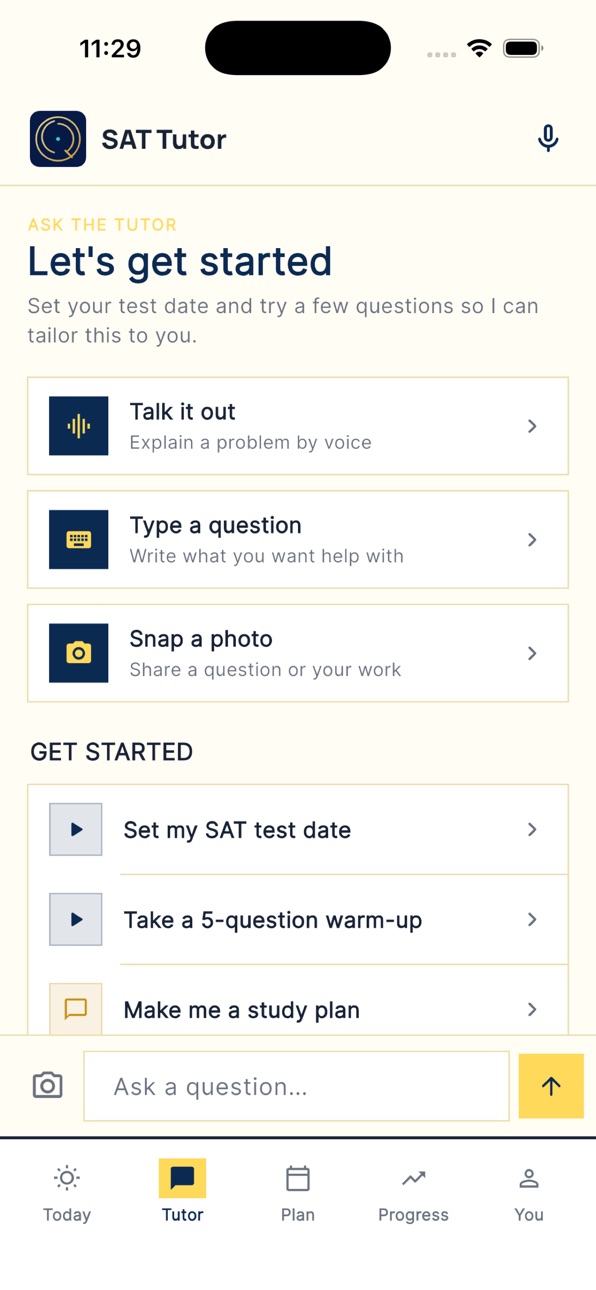

iPad 2 images


What’s New Version 1.0.7
New in this version:
• Guided Review — on the Tutor tab, tap "Review what's tripping you up" to get
quick, step-by-step lessons on the exact topics you keep missing: a clear
explanation, a worked example, and a check question to lock it in.
• A cleaner, more consistent look throughout the app.
• Performance improvements and bug fixes for a smoother study session.
Thanks for using TutorQ SAT! We read every piece of feedback.
Description
TutorQ SAT
Practice for the SAT every day with fresh Math and English questions, powered by AI tutoring that adapts to you.
Daily Practice
Get a new set of SAT Math and Reading & Writing questions every day. Track your streaks, accuracy, and progress over time.
AI Voice Tutor
Stuck on a problem? Tap the mic and talk it through with your AI tutor. It listens, asks guiding questions, and helps you figure out the answer — without just giving it away.
AI Chat
Type a question or snap a photo of a problem. Your AI tutor breaks it down step by step, helping you build real understanding.
What's included
- Daily SAT Math questions (calculator and no-calculator)
- Daily Reading & Writing passage-based questions
- AI voice tutoring — speak naturally, get real-time help
- AI chat with photo support — snap and solve
- Progress tracking with streaks and accuracy stats
- Works offline for reviewing past questions
Built for SAT students
Whether you're starting prep or in the final stretch, TutorQ gives you consistent daily practice with the support of an AI tutor that meets you where you are.
Subscription Details
SAT Premium — $29.99 USD per month, auto-renewing.
- Priority AI tutor, adaptive learning, full practice archive
- Subscription auto-renews unless turned off at least 24 hours before the end of the current period
- Manage or cancel anytime in iOS Settings → Apple ID → Subscriptions
- Payment will be charged to your Apple ID account at confirmation of purchase
Privacy Policy: https://tutorq.ai/privacy
Terms of Use (EULA): https://tutorq.ai/terms
In-App Purchases US pricing
SAT Premium Subscription
Monthly · Monthly$29.99
Capabilities
In-App Purchases
Accessibility
ipadiphonemacrealityDevicetvoswatch
Version history 6 versions
Build 887018136v1.0.72026-06-16 17:53:40
New in this version:
• Guided Review — on the Tutor tab, tap "Review what's tripping you up" to get
quick, step-by-step lessons on the exact topics you keep missing: a clear
explanation, a worked example, and a check question to lock it in.
• A cleaner, more consistent look throughout the app.
• Performance improvements and bug fixes for a smoother study session.
Thanks for using TutorQ SAT! We read every piece of feedback.
Build 885215556v1.0.42026-05-06 05:33:34
Changes in 1.0.4:
• The tutor now draws inline diagrams when a visual helps — circles, parabolas, geometry sketches appear right in the chat.
• Practice questions render data tables properly, and step-by-step explanations are easier to read in dark mode.
• Refreshed Home, Settings, and Subscription pages with a tighter, late-night-study look.
• Smaller fixes: cleaner dialogs, ember-accent bottom nav, and a clearer reminder + timezone setup.
Build 884480919v1.0.32026-04-14 17:16:41
What's New in Version 1.0.3
- Redesigned home screen with clearer messaging and tappable feature cards
- Unified color scheme across the entire app for a polished, consistent look
- Improved question rendering: italic text, underlined words, and dollar signs now display correctly
- Fixed Google sign-in icon on the login screen
- App no longer crashes when daily practice data is temporarily unavailable
- Transparent app icon in headers for a cleaner look
Build 884380639v1.0.22026-04-10 22:55:38
+ Voice button always available during chat session
+ Clear existing session and start a new session
Build 884148173v1.0.12026-04-05 19:10:06
What's New in Version 1.0.1
- Talk to your AI tutor — voice sessions now greet you by name and respond more naturally
- Share photos mid-conversation — snap a picture and discuss it with your tutor in real time
- Interrupt anytime — speak up and the tutor stops to listen
- Practice questions now render tables and math formulas correctly
- Improved session stability — fewer disconnections when resuming the app
- Adjustable font size in Settings (Default, Large, Extra Large)
Build 883847174v1.02026-04-01 20:46:03
Price history by region
Currency
Show
Columns
Search
Availability 1 of 1 storefronts
| Region | Language | Price | Ratings | Avg | Version |
|---|---|---|---|---|---|
| US | en-US | Free | 1 | 5.0 | 1.0.7 |
Change log 10 changes · US
✎
releaseNotes updated
New in this version:
• Guided Review — on the Tutor tab, tap "Review what's tripping you up" to get
quick, step-by-step lessons on the exact topics yo
✎
description updated
TutorQ SAT
Practice for the SAT every day with fresh Math and English questions, powered by AI tutoring that adapts to you.
Daily Practice
Get a new set
✎
subtitle updated
AI Tutor & Daily Practice
✎
name updated
TutorQ SAT
◆
Version 1.0.7 released
New in this version:
• Guided Review — on the Tutor tab, tap "Review what's tripping you up" to get
quick, step-by-step lessons on the exact topics you keep missing: a clear
explanation, a worked example, and a check question
◆
Version 1.0.4 released
Changes in 1.0.4:
◆
Version 1.0.3 released
What's New in Version 1.0.3
◆
Version 1.0.2 released
+ Voice button always available during chat session
+ Clear existing session and start a new session
◆
Version 1.0.1 released
What's New in Version 1.0.1
- Talk to your AI tutor — voice sessions now greet you by name and respond more naturally
- Share photos mid-conversation — snap a picture and discuss it with your tutor i
◆
Version 1.0 released