Home › Utilities

 US
US
 AEen-GB
 AFen-GB
 AGen-GB
 AIen-GB
 ALen-GB
 AMen-GB
 AOen-GB
 ARes-MX
 ATde-DE
 AUen-AU
 AZen-GB
 BAen-GB
 BBen-GB
 BEen-GB
 BFen-GB
 BGen-GB
 BHen-GB
 BJen-GB
 BMen-GB
 BNen-GB
 BOes-MX
 BRpt-BR
 BSen-GB
 BTen-GB
 BWen-GB
 BYen-GB
 BZen-GB
 CAen-CA
 CDen-GB
 CGen-GB
 CHde-CH
 CIfr-FR
 CLes-MX
 CMfr-FR
 CNzh-Hans-CN
 COes-MX
 CRes-MX
 CVen-GB
 CYen-GB
 CZen-GB
 DEde-DE
 DKen-GB
 DMen-GB
 DOes-MX
 DZen-GB
 ECes-MX
 EEen-GB
 EGen-GB
 ESes-ES
 FIen-GB
 FJen-GB
 FMen-GB
 FRfr-FR
 GAfr-FR
 GBen-GB
 GDen-GB
 GEen-GB
 GHen-GB
 GMen-GB
 GRen-GB
 GTes-MX
 GWen-GB
 GYen-GB
 HKzh-Hant-HK
 HNes-MX
 HRen-GB
 HUen-GB
 IDen-GB
 IEen-GB
 ILen-GB
 INen-GB
 IQen-GB
 ISen-GB
 ITit
ITit JMen-GB
 JOen-GB
 JPja
JPja KEen-GB
 KGen-GB
 KHen-GB
 KNen-GB
 KRko
KRko KWen-GB
 KYen-GB
 KZen-GB
 LAen-GB
 LBen-GB
 LCen-GB
 LKen-GB
 LRen-GB
 LTen-GB
 LUen-GB
 LVen-GB
 LYen-GB
 MAen-GB
 MDen-GB
 MEen-GB
 MGen-GB
 MKen-GB
 MLen-GB
 MMen-GB
 MNen-GB
 MOzh-Hant-HK
 MRen-GB
 MSen-GB
 MTen-GB
 MUen-GB
 MVen-GB
 MWen-GB
 MXes-MX
 MYen-GB
 MZen-GB
 NAen-GB
 NEen-GB
 NGen-GB
 NIes-MX
 NLnl
NLnl NOen-GB
 NPen-GB
 NRen-GB
 NZen-AU
 OMen-GB
 PAes-MX
 PEes-MX
 PGen-GB
 PHen-GB
 PKen-GB
 PLen-GB
 PTpt-PT
 PWen-GB
 PYes-MX
 QAen-GB
 ROen-GB
 RSen-GB
 RUru
RUru RWen-GB
 SAen-GB
 SBen-GB
 SCen-GB
 SEsv
SEsv SGen-GB
 SIen-GB
 SKen-GB
 SLen-GB
 SNen-GB
 SRen-GB
 STen-GB
 SVes-MX
 SZen-GB
 TCen-GB
 TDen-GB
 THen-GB
 TJen-GB
 TMen-GB
 TNen-GB
 TOen-GB
 TRen-GB
 TTen-GB
 TWzh-Hant-TW
 TZen-GB
 UAen-GB
 UGen-GBUSen-US
 UYen-GB
 UZen-GB
 VCen-GB
 VEes-MX
 VGen-GB
 VNen-GB
 VUen-GB
 XKen-GB
 YEen-GB
 ZAen-GB
 ZMen-GB
 ZWen-GB
175 of 175 storefronts
Content in en-US
Content in en-US
Information
Apple ID6761261962
Bundle IDcom.example.fiberview
SellerSeller
Min iOS16.0
Min macOS13.0
Device familiesiphone, ipad
Released2026-04-01
Copyright© 2026 NoctuaCo
Privacy policyLink ↗
Preview 2 platforms
iPhone 8 images




iPad 3 images


What’s New Version 1.7
• Added a toggle switch to the search bar. Originally for the FiberView Pro version.
Now you can do a universal search across all cable types or lock it to the specific cable you are working in.
• Added a rate the app link in the settings menu.
• Bug & Fixes.
Thank you for your support.
Description
Fiber Color Chart
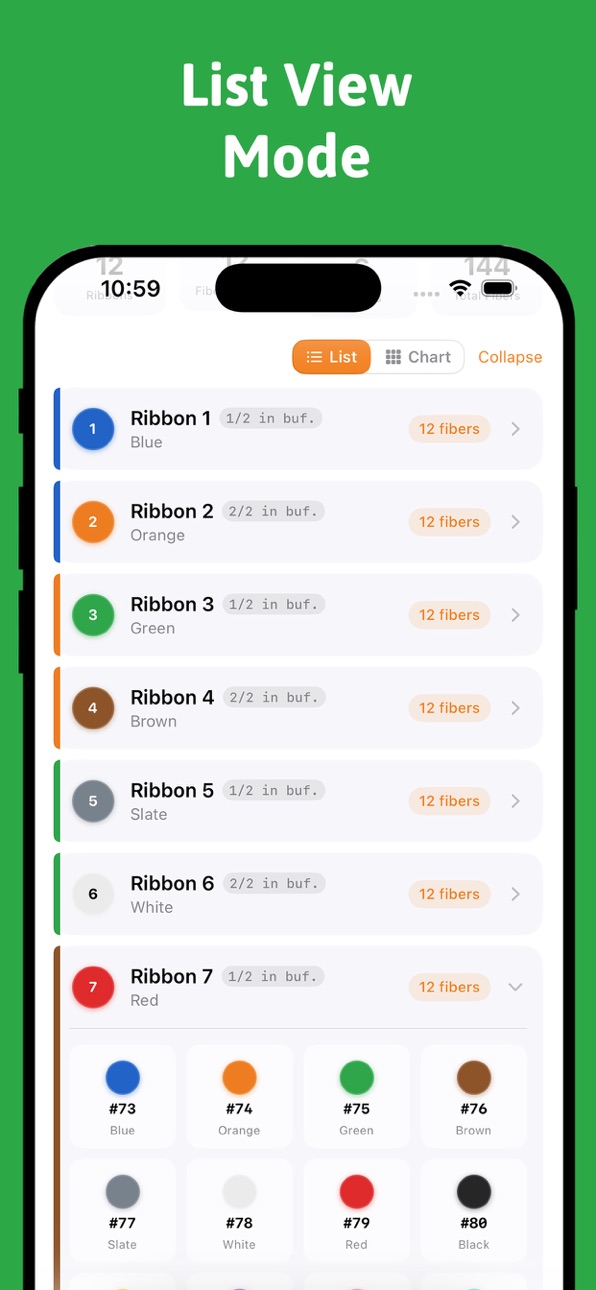
The Fiber Color Chart tab is the fastest way to identify any strand in a ribbon fiber cable — no laminated card, no guessing, no wasted time on the job.
Instant Strand Lookup Select your cable size from the picker at the top and every tube, ribbon, and strand maps out instantly below. Standard ribbon cables from 144F to 1728F are fully supported, as are high-density Micro Fiber cables from 12F to 864F. Need a non-standard count? Build a Custom Cable by entering any total fiber count and buffer configuration — the chart generates on the fly.
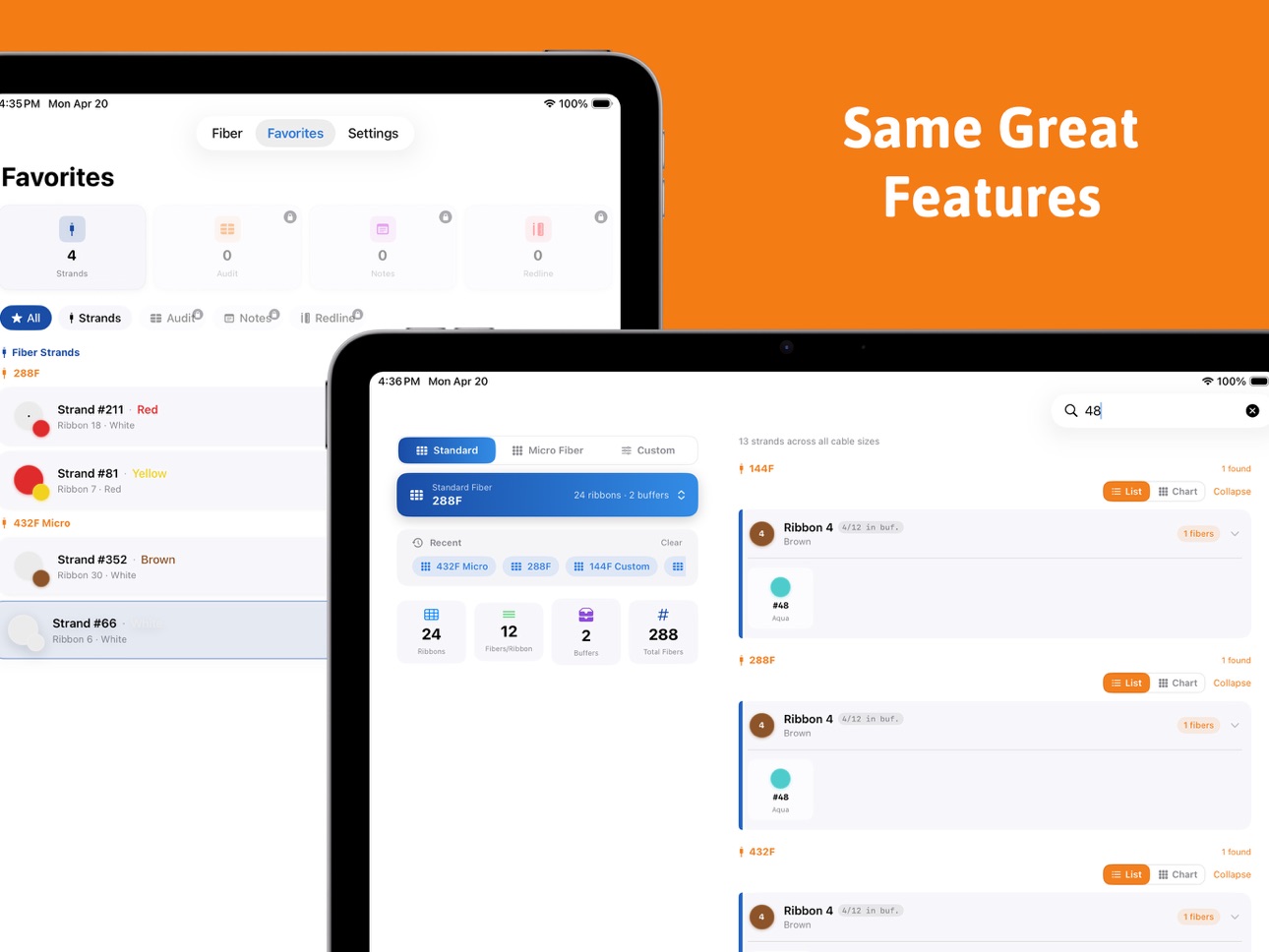
Search by Strand Number Type any strand number into the search bar and the app pinpoints exactly which tube and ribbon it lives in — not just for the current cable, but across every standard and micro cable size simultaneously. Results show the tube color, ribbon position, and strand color following TIA-598 conventions, with the matching cell highlighted and scrolled into view automatically.
Color-Coded Tube Cards Each buffer tube is displayed as a card showing its TIA-598 color identity, black-stripe count (for tubes beyond the first 12), and a full ribbon breakdown. Tubes collapse and expand individually so you can focus on the buffer you care about. On iPad, the cable picker and stats panel sit side-by-side with the tube list for a true two-column workflow.
At-a-Glance Stats Below the cable picker, a stats row shows the total fiber count, number of ribbons, buffer count, and fibers per ribbon — confirming at a glance that the cable you selected matches what's in front of you.
Recent Lookups A scrollable recents bar remembers the cable sizes you looked at last, so switching between the two cables on a splice tray is a single tap rather than re-navigating the picker every time.
Bookmarked Strands Any strand can be starred and saved to the Favorites tab with a custom label. Bookmarked strands deep-link back into the chart — tapping one scrolls directly to the correct tube, expands it, and highlights the exact strand cell.
TIA-598 Compliant All color assignments follow the TIA-598 fiber color standard: Blue, Orange, Green, Brown, Slate, White, Red, Black, Yellow, Violet, Rose, Aqua — in order, with black-stripe cycling applied correctly for cables with more than 12 ribbons per buffer.
Accessibility
ipadiphonemacrealityDevicetvoswatch
Version history 4 versions
Build 884955409v1.72026-04-27 23:53:05
• Added a toggle switch to the search bar. Originally for the FiberView Pro version.
Now you can do a universal search across all cable types or lock it to the specific cable you are working in.
• Added a rate the app link in the settings menu.
• Bug & Fixes.
Thank you for your support.
Build 884735497v1.62026-04-21 13:07:29
Updated the Fiber Cable System with a Standard, Micro and Custom View and Search.
Added a Vertical color line next to the ribbons to indicate the buffer.
Added a Favorites section to save strands.
Added more accent colors.
Bugs and Fixes.
Build 884211841v1.12026-04-07 17:47:31
Bug Fixes.
Build 883837934v1.02026-04-01 18:33:40
Price history by region
Currency
Show
Columns
Search
Availability 175 of 175 storefronts
| Region | Language | Price | Ratings | Avg | Version |
|---|---|---|---|---|---|
| AE | en-GB | AED 7.99 | 0 | — | 1.7 |
| AF | en-GB | USD 1.99 | 0 | — | 1.7 |
| AG | en-GB | USD 1.99 | 0 | — | 1.7 |
| AI | en-GB | USD 1.99 | 0 | — | 1.7 |
| AL | en-GB | USD 1.99 | 0 | — | 1.7 |
| AM | en-GB | USD 1.99 | 0 | — | 1.7 |
| AO | en-GB | USD 1.99 | 0 | — | 1.7 |
| AR | es-MX | USD 1.99 | 0 | — | 1.7 |
| AT | de-DE | EUR 1.99 | 0 | — | 1.7 |
| AU | en-AU | AUD 2.99 | 0 | — | 1.7 |
| AZ | en-GB | USD 1.99 | 0 | — | 1.7 |
| BA | en-GB | EUR 1.99 | 0 | — | 1.7 |
| BB | en-GB | USD 1.99 | 0 | — | 1.7 |
| BE | en-GB | EUR 1.99 | 0 | — | 1.7 |
| BF | en-GB | USD 1.99 | 0 | — | 1.7 |
| BG | en-GB | EUR 1.99 | 0 | — | 1.7 |
| BH | en-GB | USD 1.99 | 0 | — | 1.7 |
| BJ | en-GB | USD 1.99 | 0 | — | 1.7 |
| BM | en-GB | USD 1.99 | 0 | — | 1.7 |
| BN | en-GB | USD 1.99 | 0 | — | 1.7 |
| BO | es-MX | USD 1.99 | 0 | — | 1.7 |
| BR | pt-BR | BRL 12.9 | 0 | — | 1.7 |
| BS | en-GB | USD 1.99 | 0 | — | 1.7 |
| BT | en-GB | USD 1.99 | 0 | — | 1.7 |
| BW | en-GB | USD 1.99 | 0 | — | 1.7 |
| BY | en-GB | USD 1.99 | 0 | — | 1.7 |
| BZ | en-GB | USD 1.99 | 0 | — | 1.7 |
| CA | en-CA | CAD 2.99 | 0 | — | 1.7 |
| CD | en-GB | USD 1.99 | 0 | — | 1.7 |
| CG | en-GB | USD 1.99 | 0 | — | 1.7 |
| CH | de-CH | CHF 2 | 0 | — | 1.7 |
| CI | fr-FR | USD 1.99 | 0 | — | 1.7 |
| CL | es-MX | CLP 1990 | 0 | — | 1.7 |
| CM | fr-FR | USD 1.99 | 0 | — | 1.7 |
| CN | zh-Hans-CN | CNY 15 | 0 | — | 1.7 |
| CO | es-MX | COP 9900 | 0 | — | 1.7 |
| CR | es-MX | USD 1.99 | 0 | — | 1.7 |
| CV | en-GB | USD 1.99 | 0 | — | 1.7 |
| CY | en-GB | EUR 1.99 | 0 | — | 1.7 |
| CZ | en-GB | CZK 49 | 0 | — | 1.7 |
| DE | de-DE | EUR 1.99 | 0 | — | 1.7 |
| DK | en-GB | DKK 19 | 0 | — | 1.7 |
| DM | en-GB | USD 1.99 | 0 | — | 1.7 |
| DO | es-MX | USD 1.99 | 0 | — | 1.7 |
| DZ | en-GB | USD 1.99 | 0 | — | 1.7 |
| EC | es-MX | USD 1.99 | 0 | — | 1.7 |
| EE | en-GB | EUR 1.99 | 0 | — | 1.7 |
| EG | en-GB | EGP 99.99 | 0 | — | 1.7 |
| ES | es-ES | EUR 1.99 | 0 | — | 1.7 |
| FI | en-GB | EUR 1.99 | 0 | — | 1.7 |
| FJ | en-GB | USD 1.99 | 0 | — | 1.7 |
| FM | en-GB | USD 1.99 | 0 | — | 1.7 |
| FR | fr-FR | EUR 1.99 | 0 | — | 1.7 |
| GA | fr-FR | USD 1.99 | 0 | — | 1.7 |
| GB | en-GB | GBP 1.99 | 0 | — | 1.7 |
| GD | en-GB | USD 1.99 | 0 | — | 1.7 |
| GE | en-GB | USD 1.99 | 0 | — | 1.7 |
| GH | en-GB | USD 1.99 | 0 | — | 1.7 |
| GM | en-GB | USD 1.99 | 0 | — | 1.7 |
| GR | en-GB | EUR 1.99 | 0 | — | 1.7 |
| GT | es-MX | USD 1.99 | 0 | — | 1.7 |
| GW | en-GB | USD 1.99 | 0 | — | 1.7 |
| GY | en-GB | USD 1.99 | 0 | — | 1.7 |
| HK | zh-Hant-HK | HKD 18 | 0 | — | 1.7 |
| HN | es-MX | USD 1.99 | 0 | — | 1.7 |
| HR | en-GB | EUR 1.99 | 0 | — | 1.7 |
| HU | en-GB | HUF 999 | 0 | — | 1.7 |
| ID | en-GB | IDR 29000 | 0 | — | 1.7 |
| IE | en-GB | EUR 1.99 | 0 | — | 1.7 |
| IL | en-GB | ILS 7.9 | 0 | — | 1.7 |
| IN | en-GB | INR 199 | 0 | — | 1.7 |
| IQ | en-GB | USD 1.99 | 0 | — | 1.7 |
| IS | en-GB | USD 1.99 | 0 | — | 1.7 |
| IT | it | EUR 1.99 | 0 | — | 1.7 |
| JM | en-GB | USD 1.99 | 0 | — | 1.7 |
| JO | en-GB | USD 1.99 | 0 | — | 1.7 |
| JP | ja | JPY 300 | 0 | — | 1.7 |
| KE | en-GB | USD 1.99 | 0 | — | 1.7 |
| KG | en-GB | USD 1.99 | 0 | — | 1.7 |
| KH | en-GB | USD 1.99 | 0 | — | 1.7 |
| KN | en-GB | USD 1.99 | 0 | — | 1.7 |
| KR | ko | KRW 3300 | 0 | — | 1.7 |
| KW | en-GB | USD 1.99 | 0 | — | 1.7 |
| KY | en-GB | USD 1.99 | 0 | — | 1.7 |
| KZ | en-GB | KZT 999 | 0 | — | 1.7 |
| LA | en-GB | USD 1.99 | 0 | — | 1.7 |
| LB | en-GB | USD 1.99 | 0 | — | 1.7 |
| LC | en-GB | USD 1.99 | 0 | — | 1.7 |
| LK | en-GB | USD 1.99 | 0 | — | 1.7 |
| LR | en-GB | USD 1.99 | 0 | — | 1.7 |
| LT | en-GB | EUR 1.99 | 0 | — | 1.7 |
| LU | en-GB | EUR 1.99 | 0 | — | 1.7 |
| LV | en-GB | EUR 1.99 | 0 | — | 1.7 |
| LY | en-GB | USD 1.99 | 0 | — | 1.7 |
| MA | en-GB | USD 1.99 | 0 | — | 1.7 |
| MD | en-GB | USD 1.99 | 0 | — | 1.7 |
| ME | en-GB | EUR 1.99 | 0 | — | 1.7 |
| MG | en-GB | USD 1.99 | 0 | — | 1.7 |
| MK | en-GB | USD 1.99 | 0 | — | 1.7 |
| ML | en-GB | USD 1.99 | 0 | — | 1.7 |
| MM | en-GB | USD 1.99 | 0 | — | 1.7 |
| MN | en-GB | USD 1.99 | 0 | — | 1.7 |
| MO | zh-Hant-HK | USD 1.99 | 0 | — | 1.7 |
| MR | en-GB | USD 1.99 | 0 | — | 1.7 |
| MS | en-GB | USD 1.99 | 0 | — | 1.7 |
| MT | en-GB | EUR 1.99 | 0 | — | 1.7 |
| MU | en-GB | USD 1.99 | 0 | — | 1.7 |
| MV | en-GB | USD 1.99 | 0 | — | 1.7 |
| MW | en-GB | USD 1.99 | 0 | — | 1.7 |
| MX | es-MX | MXN 39 | 0 | — | 1.7 |
| MY | en-GB | MYR 9.9 | 0 | — | 1.7 |
| MZ | en-GB | USD 1.99 | 0 | — | 1.7 |
| NA | en-GB | USD 1.99 | 0 | — | 1.7 |
| NE | en-GB | USD 1.99 | 0 | — | 1.7 |
| NG | en-GB | NGN 3200 | 0 | — | 1.7 |
| NI | es-MX | USD 1.99 | 0 | — | 1.7 |
| NL | nl | EUR 1.99 | 0 | — | 1.7 |
| NO | en-GB | NOK 29 | 0 | — | 1.7 |
| NP | en-GB | USD 1.99 | 0 | — | 1.7 |
| NR | en-GB | USD 1.99 | 0 | — | 1.7 |
| NZ | en-AU | NZD 3.99 | 0 | — | 1.7 |
| OM | en-GB | USD 1.99 | 0 | — | 1.7 |
| PA | es-MX | USD 1.99 | 0 | — | 1.7 |
| PE | es-MX | PEN 9.9 | 0 | — | 1.7 |
| PG | en-GB | USD 1.99 | 0 | — | 1.7 |
| PH | en-GB | PHP 129 | 0 | — | 1.7 |
| PK | en-GB | PKR 500 | 0 | — | 1.7 |
| PL | en-GB | PLN 9.99 | 0 | — | 1.7 |
| PT | pt-PT | EUR 1.99 | 0 | — | 1.7 |
| PW | en-GB | USD 1.99 | 0 | — | 1.7 |
| PY | es-MX | USD 1.99 | 0 | — | 1.7 |
| QA | en-GB | QAR 7.99 | 0 | — | 1.7 |
| RO | en-GB | RON 9.99 | 0 | — | 1.7 |
| RS | en-GB | EUR 1.99 | 0 | — | 1.7 |
| RU | ru | RUB 199 | 0 | — | 1.7 |
| RW | en-GB | USD 1.99 | 0 | — | 1.7 |
| SA | en-GB | SAR 9.99 | 0 | — | 1.7 |
| SB | en-GB | USD 1.99 | 0 | — | 1.7 |
| SC | en-GB | USD 1.99 | 0 | — | 1.7 |
| SE | sv | SEK 29 | 0 | — | 1.7 |
| SG | en-GB | SGD 2.98 | 0 | — | 1.7 |
| SI | en-GB | EUR 1.99 | 0 | — | 1.7 |
| SK | en-GB | EUR 1.99 | 0 | — | 1.7 |
| SL | en-GB | USD 1.99 | 0 | — | 1.7 |
| SN | en-GB | USD 1.99 | 0 | — | 1.7 |
| SR | en-GB | USD 1.99 | 0 | — | 1.7 |
| ST | en-GB | USD 1.99 | 0 | — | 1.7 |
| SV | es-MX | USD 1.99 | 0 | — | 1.7 |
| SZ | en-GB | USD 1.99 | 0 | — | 1.7 |
| TC | en-GB | USD 1.99 | 0 | — | 1.7 |
| TD | en-GB | USD 1.99 | 0 | — | 1.7 |
| TH | en-GB | THB 79 | 0 | — | 1.7 |
| TJ | en-GB | USD 1.99 | 0 | — | 1.7 |
| TM | en-GB | USD 1.99 | 0 | — | 1.7 |
| TN | en-GB | USD 1.99 | 0 | — | 1.7 |
| TO | en-GB | USD 1.99 | 0 | — | 1.7 |
| TR | en-GB | TRY 99.99 | 0 | — | 1.7 |
| TT | en-GB | USD 1.99 | 0 | — | 1.7 |
| TW | zh-Hant-TW | TWD 60 | 0 | — | 1.7 |
| TZ | en-GB | TZS 5900 | 0 | — | 1.7 |
| UA | en-GB | USD 1.99 | 0 | — | 1.7 |
| UG | en-GB | USD 1.99 | 0 | — | 1.7 |
| US | en-US | USD 1.99 | 0 | — | 1.7 |
| UY | en-GB | USD 1.99 | 0 | — | 1.7 |
| UZ | en-GB | USD 1.99 | 0 | — | 1.7 |
| VC | en-GB | USD 1.99 | 0 | — | 1.7 |
| VE | es-MX | USD 1.99 | 0 | — | 1.7 |
| VG | en-GB | USD 1.99 | 0 | — | 1.7 |
| VN | en-GB | VND 59000 | 0 | — | 1.7 |
| VU | en-GB | USD 1.99 | 0 | — | 1.7 |
| XK | en-GB | EUR 1.99 | 0 | — | 1.7 |
| YE | en-GB | USD 1.99 | 0 | — | 1.7 |
| ZA | en-GB | ZAR 39.99 | 0 | — | 1.7 |
| ZM | en-GB | USD 1.99 | 0 | — | 1.7 |
| ZW | en-GB | USD 1.99 | 0 | — | 1.7 |
Change log 8 changes · US
✎
releaseNotes updated
• Added a toggle switch to the search bar. Originally for the FiberView Pro version.
Now you can do a universal search across all cable types or lock it to the
✎
description updated
Fiber Color Chart
The Fiber Color Chart tab is the fastest way to identify any strand in a ribbon fiber cable — no laminated card, no guessing, no wasted time
✎
subtitle updated
Fiber Optic color code lookup.
✎
name updated
FiberView
◆
Version 1.7 released
• Added a toggle switch to the search bar. Originally for the FiberView Pro version.
Now you can do a universal search across all cable types or lock it to the specific cable you are working in.
• Added a rate the app link in the settings
◆
Version 1.6 released
Updated the Fiber Cable System with a Standard, Micro and Custom View and Search.
Added a Vertical color line next to the ribbons to indicate the buffer.
Added a Favorites section to save strands.
Added more accent colors.
Bugs and Fixes
◆
Version 1.1 released
Bug Fixes.
◆
Version 1.0 released