Home › Utilities

 US
US
1 of 1 storefronts
Content in en-US
Content in en-US
Information
Preview 4 platforms
iPhone 10 images


iPad 10 images


Mac 10 images




Apple TV 5 images


What’s New Version 1.1.2
- Bug fixes
Description
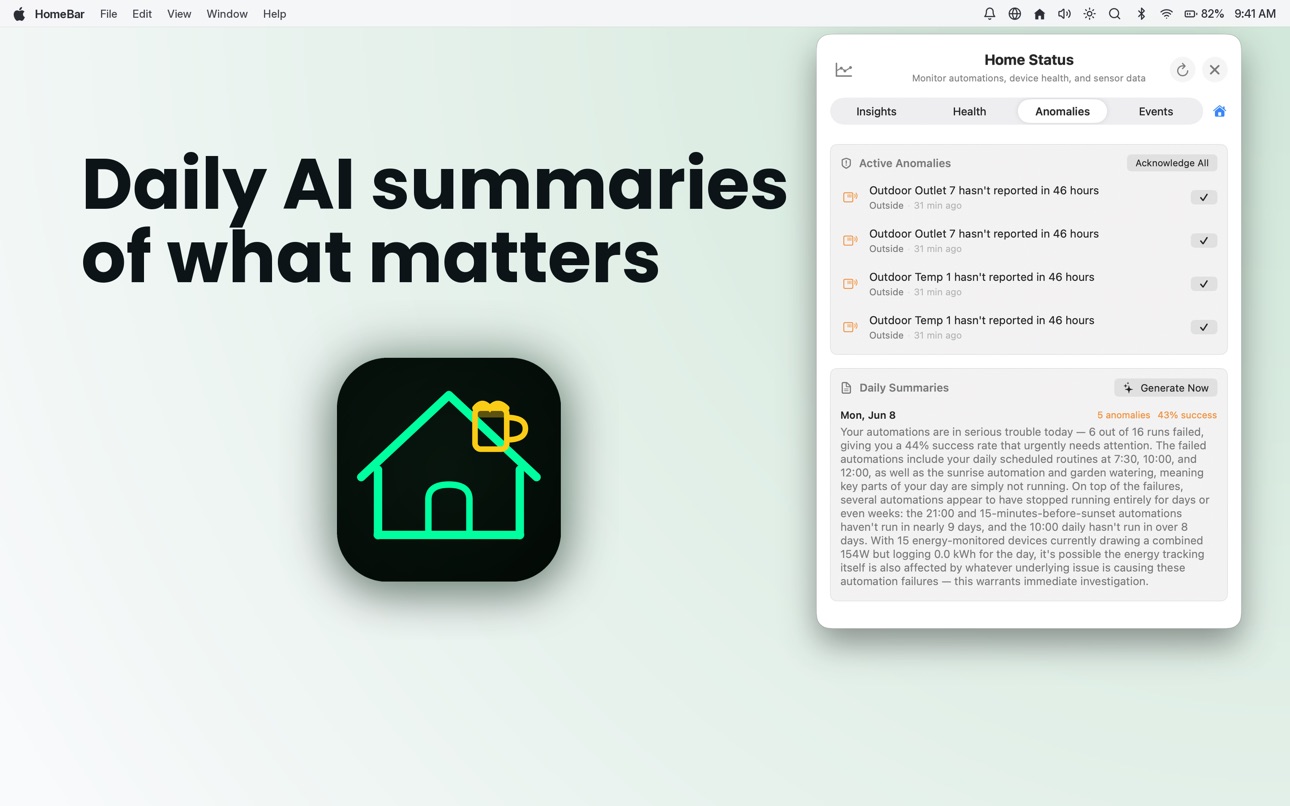
HomeBar is the AI-powered companion that turns your HomeKit setup into a home that actually feels smart. Describe an automation — "when it starts raining, close the garage and turn off the sprinklers" — and HomeBar builds it. Get daily summaries of what's working, see which device is dragging down your reliability, automation and device logs track every change, and track every watt across your home.
Pair it with HomeBar for Mac to unlock the full experience, or use it standalone for powerful on-the-go control that goes far beyond what Apple's Home app offers.
AI-POWERED AUTOMATIONS
Describe what you want in plain English -- "Turn off all lights when I leave home, but only on weekdays" -- and HomeBar's AI builds the automation for you. Powered by Claude, the AI Automation Builder translates your intent into precise HomeKit triggers, conditions, and actions.
SMART DEVICE FILTERS
Build custom device views using natural language. Type "lights that are on upstairs" or "devices using more than 100 watts" and HomeBar creates the filter instantly. Save it for one-tap access.
INTERACTIVE WIDGETS
Home Screen widgets with device toggles, dimmer sliders, and scene activation. Lock Screen widgets for quick device state and scene launch. StandBy mode dashboard with sensor readings at a glance.
DEEP DIAGNOSTICS & LOGS
See exactly why your automations fail. A searchable log of every automation attempt shows which conditions passed or failed, and why. Push notifications alert you to repeated failures even when you're away from your Mac.
DEVICE HEALTH DASHBOARD
One screen showing every device that needs attention -- unreachable accessories, low battery, firmware updates, and broken automation references. Push notifications for new issues.
ENERGY MONITORING & COST INTELLIGENCE
Track real-time power draw, per-device energy breakdowns, and projected costs against your utility rate. Weekly AI recommendations tell you exactly where to save.
AI ANOMALY DETECTION
Proactive monitoring catches what you miss -- doors left open, energy spikes, sensors going offline. Daily smart summaries and pattern-based automation suggestions delivered right to your iPhone.
MATTER NATIVE
HomeBar surfaces Matter device data that HomeKit's own UI doesn't show -- real-time power, energy, and cluster data from Thread and Wi-Fi accessories.
SENSOR HISTORY & CHARTS
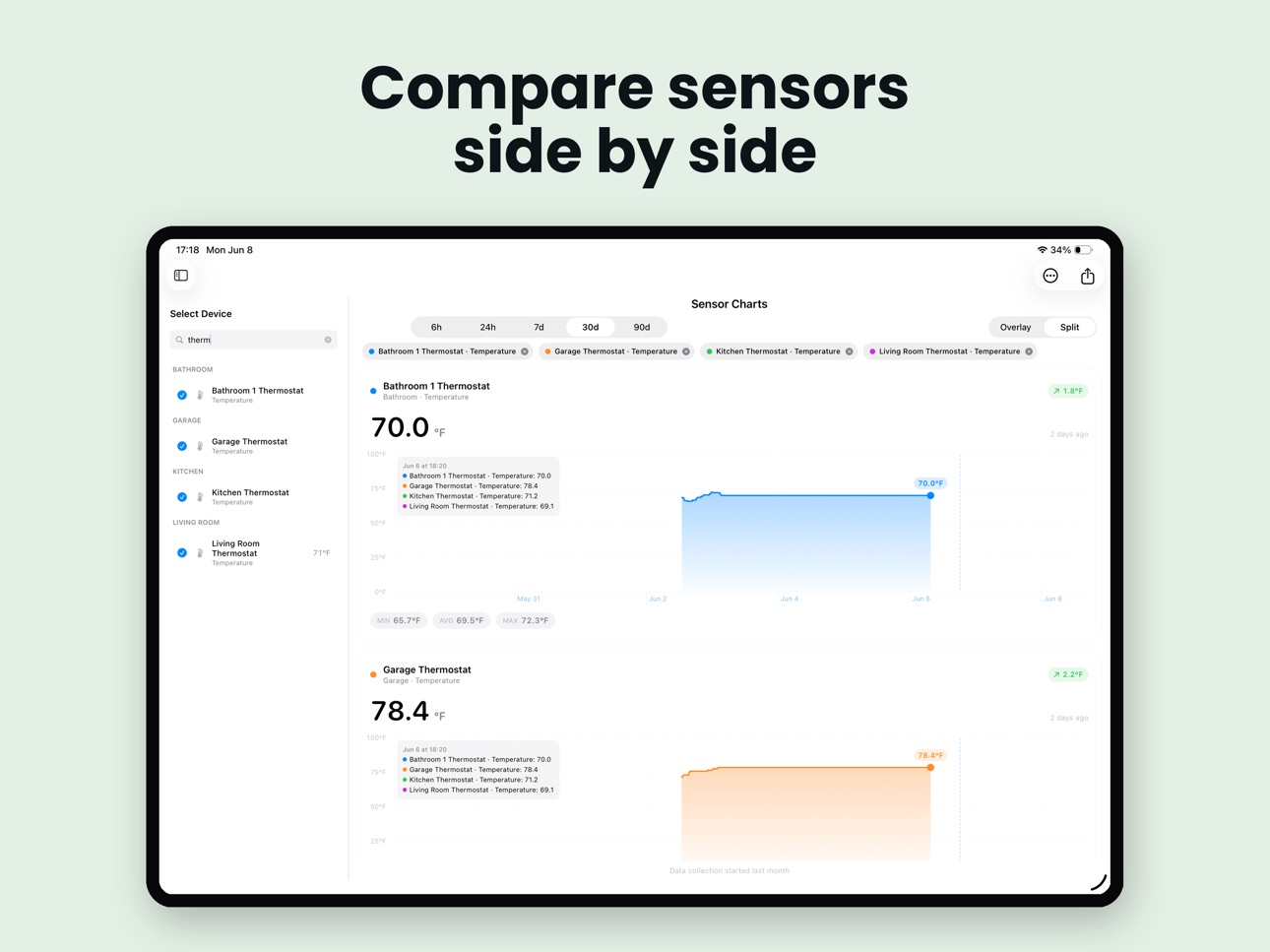
Interactive time-series charts for every sensor. Works with all brands, not just Eve hardware. Compare sensors across rooms with swipe-to-zoom and CSV export.
BACKUP & RESTORE
View and manage HomeKit backups created on your Mac. Full restore guidance with per-device checklists.
NFC AUTOMATION TRIGGERS
Tap a standard NFC tag to trigger any HomeKit scene or automation. No custom hardware needed -- just writable NFC tags.
SIRI SHORTCUTS
Full Shortcuts integration for building custom workflows with HomeBar actions.
SYNCS WITH MAC
CloudKit sync keeps your automation logs, sensor history, and folder assignments in perfect sync between Mac and iPhone. Delta sync minimizes cellular data usage.
PRIVATE BY DEFAULT
All data stays on your device. No cloud accounts required. AI features send only device names and types -- never audio, video, or location.
PRICING
HomeBar is free to download with powerful core features. Unlock Pro ($3.99/mo or $34/yr) for advanced automations, diagnostics, and backup. Go Max ($8.99/mo or $74/yr) for unlimited AI, energy monitoring, anomaly detection, and 90-day history. One subscription works across Mac, iPhone, iPad, and Apple TV.
EULA
https://www.apple.com/legal/internet-services/itunes/dev/stdeula/
PRIVACY POLICY
https://homebar.industries/privacy
Capabilities
In-App Purchases
Accessibility
ipadiphonemacrealityDevicetvoswatch
Version history 4 versions
Build 887390531v1.1.22026-06-24 20:38:32
- Bug fixes
Build 886612212v1.12026-06-10 17:54:36
Watchdogs - all new (Max tier)
Your home's AI safety net.
* Set up Watchdogs to monitor devices and alert, switch state or fire an automation. Ex: If the backyard water spigot is on for more than 10 minutes, turn it off.
* Monitor: Power, Contact (door/window), Lock, Garage Door, Motion, Occupancy, Smoke, Leak
* Multiple watchdogs per device — e.g. one on the plug's power, another on the paired contact sensor
* Smart Threshold (opt-in): learns from at least 7 days of your device's actual usage and picks a threshold from your 90th-percentile "on" stretch, so it only fires on true outliers
* Per-category defaults: Lighting 4h, Climate 8h, Entertainment 6h, Heat-generating 30min
* Auto-shutoff (power, opt-in): a second, longer timer that turns the device off if you ignore the alert
* Run a HomeKit automation on trip resolution — link any trigger and it fires when the trip clears
* History view tracks past trips with estimated runaway energy cost
Camera Wall - all new (Max tier)
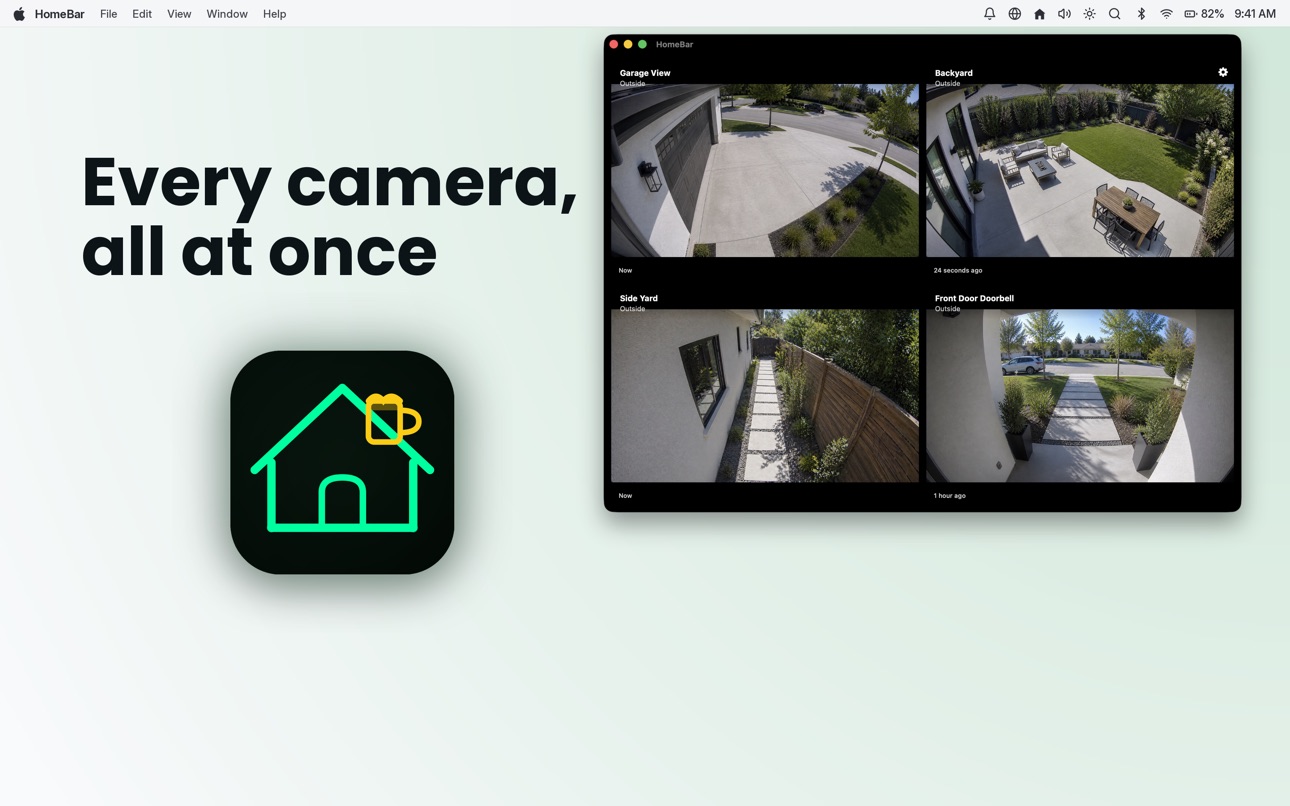
The whole house at a glance — every HomeKit camera, in one beautiful, always-live view.
* Every camera, all at once — your front door, driveway, nursery, garage, and back porch on one screen, all streaming live
* Auto-cycle mode — let Camera Wall rotate through your cameras hands-free, perfect for an always-on iPad in the kitchen
* Tap to focus — see something worth a closer look? Tap any tile for an instant fullscreen view of that single camera
* AI motion alerts — Camera Wall watches for motion across every feed and surfaces a banner the moment someone's at the door, walking the
driveway, or moving in a room you weren't watching
* Built for big screens — fills the screen on iPad
* Private and direct — streams come straight from your HomeKit cameras over your own network. Nothing routes through our servers, ever
* One window, every home — multi-home households can flip between properties without leaving Camera Wall
Calendar-event automations
* A new automation engine driven by your iOS Calendar.
* Search by text (contains or exact) across all-day, timed, or any events
* Fire when the event starts or ends
* Chain actions: set a value, toggle, run a scene, wait N seconds
* Survives relaunch — won't re-fire occurrences it's already run
Sensor Charts
* New more powerful look and feel on iPadOS
* Shared snapshots now include a title/range/timestamp header and a per-sensor legend with current values, and honor Split mode
Polish
* Filter bar shadow no longer leaks past the left edge when "All" is selected
* Long device names in the control sheet header scale instead of colliding with the close button (reported on iPhone 17 Pro Max)
* Scene pill labels cap at a sensible width with tail truncation
* Energy rate settings: time-of-use rows are readable on iPad mini again
* Calendar permission is properly requested on iOS26 (Calendar features now work — previously the OS silently denied access)
* Insights tab Refresh button actually refreshes
* Unified Home picker across the app for multi-home setups
* Fixed background crash cluster that affected users running automations while suspended
Build 886794183v1.1.12026-06-10 20:13:58
Watchdogs - all new (Max tier)
Your home's AI safety net.
* Set up Watchdogs to monitor devices and alert, switch state or fire an automation. Ex: If the backyard water spigot is on for more than 10 minutes, turn it off.
* Monitor: Power, Contact (door/window), Lock, Garage Door, Motion, Occupancy, Smoke, Leak
* Multiple watchdogs per device — e.g. one on the plug's power, another on the paired contact sensor
* Smart Threshold (opt-in): learns from at least 7 days of your device's actual usage and picks a threshold from your 90th-percentile "on" stretch, so it only fires on true outliers
* Per-category defaults: Lighting 4h, Climate 8h, Entertainment 6h, Heat-generating 30min
* Auto-shutoff (power, opt-in): a second, longer timer that turns the device off if you ignore the alert
* Run a HomeKit automation on trip resolution — link any trigger and it fires when the trip clears
* History view tracks past trips with estimated runaway energy cost
Camera Wall - all new (Max tier)
The whole house at a glance — every HomeKit camera, in one beautiful, always-live view.
* Every camera, all at once — your front door, driveway, nursery, garage, and back porch on one screen, all streaming live
* Auto-cycle mode — let Camera Wall rotate through your cameras hands-free, perfect for an always-on iPad in the kitchen
* Tap to focus — see something worth a closer look? Tap any tile for an instant fullscreen view of that single camera
* AI motion alerts — Camera Wall watches for motion across every feed and surfaces a banner the moment someone's at the door, walking the
driveway, or moving in a room you weren't watching
* Built for big screens — fills the screen on iPad
* Private and direct — streams come straight from your HomeKit cameras over your own network. Nothing routes through our servers, ever
* One window, every home — multi-home households can flip between properties without leaving Camera Wall
Calendar-event automations
* A new automation engine driven by your iOS Calendar.
* Search by text (contains or exact) across all-day, timed, or any events
* Fire when the event starts or ends
* Chain actions: set a value, toggle, run a scene, wait N seconds
* Survives relaunch — won't re-fire occurrences it's already run
Sensor Charts
* New more powerful look and feel on iPadOS
* Shared snapshots now include a title/range/timestamp header and a per-sensor legend with current values, and honor Split mode
Polish
* Filter bar shadow no longer leaks past the left edge when "All" is selected
* Long device names in the control sheet header scale instead of colliding with the close button (reported on iPhone 17 Pro Max)
* Scene pill labels cap at a sensible width with tail truncation
* Energy rate settings: time-of-use rows are readable on iPad mini again
* Calendar permission is properly requested on iOS26 (Calendar features now work — previously the OS silently denied access)
* Insights tab Refresh button actually refreshes
* Unified Home picker across the app for multi-home setups
* Fixed background crash cluster that affected users running automations while suspended
Build 884925605v1.02026-05-26 15:49:30
No pricing data captured yet — comparisons appear once the app has paid storefronts or in-app purchases.
Availability 1 of 1 storefronts
| Region | Language | Price | Ratings | Avg | Version |
|---|---|---|---|---|---|
| US | en-US | Free | 0 | — | 1.1.2 |
Change log 8 changes · US
✎
releaseNotes updated
- Bug fixes
✎
description updated
HomeBar is the AI-powered companion that turns your HomeKit setup into a home that actually feels smart. Describe an automation — "when it starts raining, close
✎
subtitle updated
Your automation, served neat
✎
name updated
HomeBar for HomeKit
◆
Version 1.1.2 released
- Bug fixes
◆
Version 1.1.1 released
Watchdogs - all new (Max tier)
Your home's AI safety net.
* Set up Watchdogs to monitor devices and alert, switch state or fire an automation. Ex: If the backyard water spigot is on for more than 10 minutes, turn it off.
* Monitor: Power,
◆
Version 1.1 released
Watchdogs - all new (Max tier)
Your home's AI safety net.
* Set up Watchdogs to monitor devices and alert, switch state or fire an automation. Ex: If the backyard water spigot is on for more than 10 minutes, turn it off.
* Monitor: Power,
◆
Version 1.0 released