Home › Photo & Video

 US
US
 MXes-MX
 AGen-GB
 AIen-GB
 AOen-GB
 ARes-MX
 BBen-GB
 BFen-GB
 BJen-GB
 BOes-MX
 BRpt-BR
 BSen-GB
 BWen-GB
 BZen-GB
 CDen-GB
 CGen-GB
 CIfr-FR
 CLes-MX
 CMfr-FR
 COes-MX
 CRes-MX
 CVen-GB
 DMen-GB
 DOes-MX
 DZen-GB
 ECes-MX
 GAfr-FR
 GDen-GB
 GHen-GB
 GMen-GB
 GTes-MX
 GWen-GB
 GYen-GB
 HNes-MX
 JMen-GB
 KEen-GB
 KNen-GB
 KYen-GB
 LCen-GB
 LRen-GB
 LYen-GB
 MAen-GB
 MGen-GB
 MLen-GB
 MSen-GB
 MUen-GB
 MWen-GB
 MZen-GB
 NAen-GB
 NEen-GB
 NGen-GB
 NIes-MX
 PAes-MX
 PEes-MX
 PYes-MX
 RWen-GB
 SCen-GB
 SLen-GB
 SNen-GB
 SRen-GB
 STen-GB
 SVes-MX
 SZen-GB
 TCen-GB
 TDen-GB
 TNen-GB
 TTen-GB
 TZen-GB
 UGen-GBUSen-US
 UYen-GB
 VCen-GB
 VEes-MX
 VGen-GB
 ZMen-GB
 ZWen-GB
75 of 75 storefronts
Content in en-US
Content in en-US
Information
Preview 1 platform
iPhone 6 images



What’s New Version 1.0.6
1. New Features
Added Text-to-Video creation function
Added Image-to-Image creation function
2. New & Optimized Templates
Launched multiple popular video templates for richer effects and more fun generation
3. Experience Optimization
Improved generation speed and overall fluidity for a smoother experience
4. Bug Fixes
Fixed known issues and improved stability.
Description
VifunAI is an innovative AI-powered video creation tool that transforms your static photos into high-quality, artistic dynamic videos. By leveraging advanced AI motion synthesis and stylization technology, it enables your images to present natural and smooth visual effects with just a few taps.
Whether you’re looking to create artistic short clips, anime-style animations, or creative social media stories, VifunAI provides a safe and professional environment for your imagination to flourish.
[Core Features]
● AI Artistic Video Generator: Utilize professional AI animation technology to convert ordinary photos into high-definition dynamic videos with natural motion and cinematic visual appeal.
● Photo to Motion: Bring your portraits to life. Simply upload a photo to apply artistic motion effects, dynamic lighting enhancements, and smooth animations, creating unique AI-driven visual content.
● Diverse Creative Templates: Explore a curated library of high-quality video templates.
● Style & Filter Magic: Support for multiple AI stylization effects including 2D animation, oil painting textures, and artistic filters, making every video a unique masterpiece.
● High-Definition Export: Fast generation speed with stable, natural results. Export your creations in high definition for easy saving and sharing with friends and family.
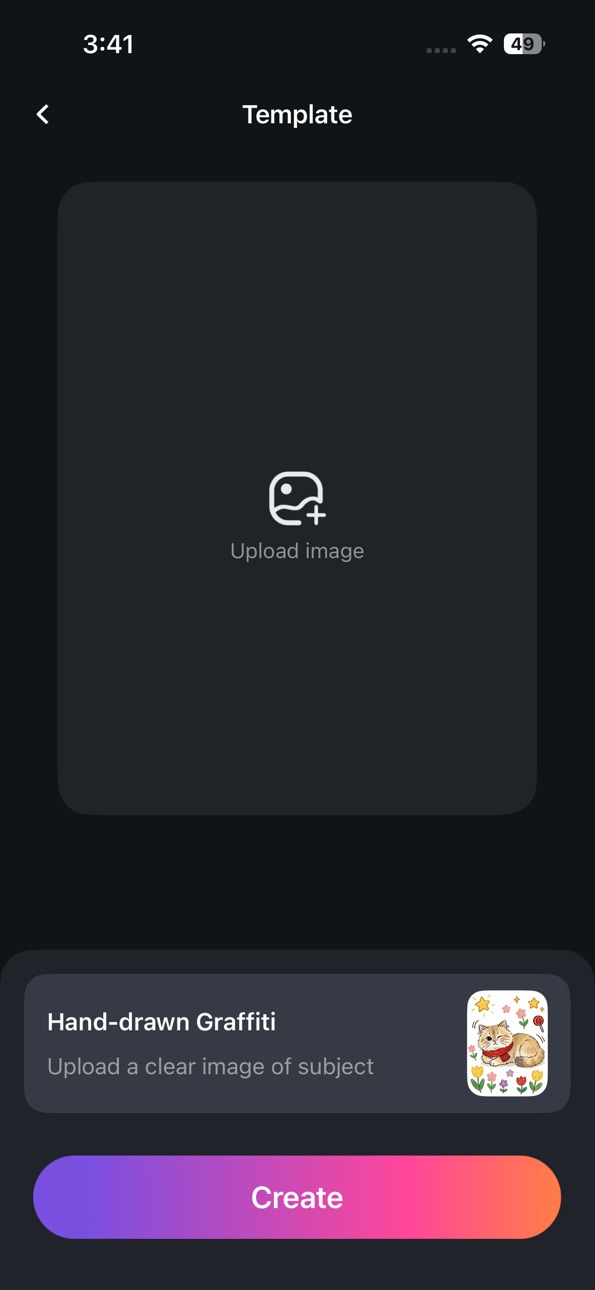
● Simple & Intuitive: No professional editing skills required. Select an artistic template, upload a clear photo, and let the AI generate your creative video in seconds.
[AI Content & Safety Standards]
1. Our Commitment to Safety: VifunAI is dedicated to providing a safe and appropriate experience for a general audience. We employ strict AI safety filters to automatically detect and block the generation of any objectionable or inappropriate content.
2. Prohibited Behavior: We maintain a zero-tolerance policy for any misuse of our technology. Users are strictly prohibited from generating:
- Inappropriate Content: Any imagery that is mature, sensitive, or suggestive in nature.
- Non-consensual Content: Using portraits of individuals without their explicit authorization to create unauthorized animations.
- Illegal or Harmful Material: Content that promotes violence, hate speech, or any form of harassment and discrimination.
3. User Responsibility: Users must ensure they own the legal rights to any photos uploaded. We encourage our community to use AI responsibly and ethically.
4. Reporting & Enforcement: If you encounter any content that violates our standards, please use our in-app reporting feature or contact us at moontemplee@gmail.com. Violations will result in immediate account termination.
[Subscription Plans]
Unlock unlimited creativity with VifunAI Pro:
- Weekly: $7.99/week
- Discounted Weekly: $3.39 for the 1st week, then $7.99/week auto-renewal.
- Yearly: $39.99/year (Best Value)
Subscription Details:
- Payment will be charged to your iTunes Account at confirmation of purchase.
- Subscriptions automatically renew unless auto-renew is turned off at least 24 hours before the end of the current period.
- Manage your subscription and turn off auto-renewal in your App Store Account Settings.
[How to Use]
1. Select Template: Browse our gallery and pick an artistic style.
2. Upload Photo: Upload a clear, unobstructed portrait photo.
3. Generate & Save: Tap generate, preview your artistic video, and save it to your album.
Privacy Policy: https://sites.google.com/view/aivideoios
User Agreement: https://sites.google.com/view/aivideo-ios
Contact Us: moontemplee@gmail.com
Capabilities
In-App Purchases
Accessibility
ipadiphonemacrealityDevicetvoswatch
Version history 7 versions
Build 885646968v1.0.62026-07-06 01:33:49
1. New Features
Added Text-to-Video creation function
Added Image-to-Image creation function
2. New & Optimized Templates
Launched multiple popular video templates for richer effects and more fun generation
3. Experience Optimization
Improved generation speed and overall fluidity for a smoother experience
4. Bug Fixes
Fixed known issues and improved stability.
Build 885521544v1.0.52026-05-12 01:54:31
1. New Features
Added Text-to-Video creation function
Added Image-to-Image creation function
2. New & Optimized Templates
Launched multiple popular video templates for richer effects and more fun generation
3. Experience Optimization
Improved generation speed and overall fluidity for a smoother experience
4. Bug Fixes
Fixed known issues and improved stability.
Build 885080926v1.0.42026-05-05 03:20:34
What's New
New & Optimized Templates
Launched several popular video templates with richer effects and fun results.
Performance Optimization
Improved generation speed and overall smoothness for a better user experience.
Bug Fixes
Fixed known issues and enhanced stability.
Build 884795999v1.0.32026-04-24 17:55:05
What's New
New Subscription Feature
Experience more templates and creative power for a complete AI video experience.
New & Optimized Templates
Launched several popular video templates with richer effects and fun results.
Performance Optimization
Improved generation speed and overall smoothness for a better user experience.
Bug Fixes
Fixed known issues and enhanced stability.
Build 884491074v1.0.22026-04-20 11:47:40
1. Optimized the user experience when loading videos
2. Fixed various user experience bugs
Build 884314552v1.0.12026-04-10 01:21:02
1. Optimized the user experience when loading videos
2. Fixed various user experience bugs
Build 883732567v1.0.02026-04-09 01:25:25
No pricing data captured yet — comparisons appear once the app has paid storefronts or in-app purchases.
Availability 75 of 75 storefronts
| Region | Language | Price | Ratings | Avg | Version |
|---|---|---|---|---|---|
| MX | es-MX | Free | 1 | 3.0 | 1.0.6 |
| AG | en-GB | Free | 0 | — | 1.0.6 |
| AI | en-GB | Free | 0 | — | 1.0.6 |
| AO | en-GB | Free | 0 | — | 1.0.6 |
| AR | es-MX | Free | 0 | — | 1.0.6 |
| BB | en-GB | Free | 0 | — | 1.0.6 |
| BF | en-GB | Free | 0 | — | 1.0.6 |
| BJ | en-GB | Free | 0 | — | 1.0.6 |
| BO | es-MX | Free | 0 | — | 1.0.6 |
| BR | pt-BR | Free | 0 | — | 1.0.6 |
| BS | en-GB | Free | 0 | — | 1.0.6 |
| BW | en-GB | Free | 0 | — | 1.0.6 |
| BZ | en-GB | Free | 0 | — | 1.0.6 |
| CD | en-GB | Free | 0 | — | 1.0.6 |
| CG | en-GB | Free | 0 | — | 1.0.6 |
| CI | fr-FR | Free | 0 | — | 1.0.6 |
| CL | es-MX | Free | 0 | — | 1.0.6 |
| CM | fr-FR | Free | 0 | — | 1.0.6 |
| CO | es-MX | Free | 0 | — | 1.0.6 |
| CR | es-MX | Free | 0 | — | 1.0.6 |
| CV | en-GB | Free | 0 | — | 1.0.6 |
| DM | en-GB | Free | 0 | — | 1.0.6 |
| DO | es-MX | Free | 0 | — | 1.0.6 |
| DZ | en-GB | Free | 0 | — | 1.0.6 |
| EC | es-MX | Free | 0 | — | 1.0.6 |
| GA | fr-FR | Free | 0 | — | 1.0.6 |
| GD | en-GB | Free | 0 | — | 1.0.6 |
| GH | en-GB | Free | 0 | — | 1.0.6 |
| GM | en-GB | Free | 0 | — | 1.0.6 |
| GT | es-MX | Free | 0 | — | 1.0.6 |
| GW | en-GB | Free | 0 | — | 1.0.6 |
| GY | en-GB | Free | 0 | — | 1.0.6 |
| HN | es-MX | Free | 0 | — | 1.0.6 |
| JM | en-GB | Free | 0 | — | 1.0.6 |
| KE | en-GB | Free | 0 | — | 1.0.6 |
| KN | en-GB | Free | 0 | — | 1.0.6 |
| KY | en-GB | Free | 0 | — | 1.0.6 |
| LC | en-GB | Free | 0 | — | 1.0.6 |
| LR | en-GB | Free | 0 | — | 1.0.6 |
| LY | en-GB | Free | 0 | — | 1.0.6 |
| MA | en-GB | Free | 0 | — | 1.0.6 |
| MG | en-GB | Free | 0 | — | 1.0.6 |
| ML | en-GB | Free | 0 | — | 1.0.6 |
| MS | en-GB | Free | 0 | — | 1.0.6 |
| MU | en-GB | Free | 0 | — | 1.0.6 |
| MW | en-GB | Free | 0 | — | 1.0.6 |
| MZ | en-GB | Free | 0 | — | 1.0.6 |
| NA | en-GB | Free | 0 | — | 1.0.6 |
| NE | en-GB | Free | 0 | — | 1.0.6 |
| NG | en-GB | Free | 0 | — | 1.0.6 |
| NI | es-MX | Free | 0 | — | 1.0.6 |
| PA | es-MX | Free | 0 | — | 1.0.6 |
| PE | es-MX | Free | 0 | — | 1.0.6 |
| PY | es-MX | Free | 0 | — | 1.0.6 |
| RW | en-GB | Free | 0 | — | 1.0.6 |
| SC | en-GB | Free | 0 | — | 1.0.6 |
| SL | en-GB | Free | 0 | — | 1.0.6 |
| SN | en-GB | Free | 0 | — | 1.0.6 |
| SR | en-GB | Free | 0 | — | 1.0.6 |
| ST | en-GB | Free | 0 | — | 1.0.6 |
| SV | es-MX | Free | 0 | — | 1.0.6 |
| SZ | en-GB | Free | 0 | — | 1.0.6 |
| TC | en-GB | Free | 0 | — | 1.0.6 |
| TD | en-GB | Free | 0 | — | 1.0.6 |
| TN | en-GB | Free | 0 | — | 1.0.6 |
| TT | en-GB | Free | 0 | — | 1.0.6 |
| TZ | en-GB | Free | 0 | — | 1.0.6 |
| UG | en-GB | Free | 0 | — | 1.0.6 |
| US | en-US | Free | 0 | — | 1.0.6 |
| UY | en-GB | Free | 0 | — | 1.0.6 |
| VC | en-GB | Free | 0 | — | 1.0.6 |
| VE | es-MX | Free | 0 | — | 1.0.6 |
| VG | en-GB | Free | 0 | — | 1.0.6 |
| ZM | en-GB | Free | 0 | — | 1.0.6 |
| ZW | en-GB | Free | 0 | — | 1.0.6 |
Change log 11 changes · US
✎
releaseNotes updated
1. New Features
Added Text-to-Video creation function
Added Image-to-Image creation function
2. New & Optimized Templates
Launched multiple popular video templa
✎
description updated
VifunAI is an innovative AI-powered video creation tool that transforms your static photos into high-quality, artistic dynamic videos. By leveraging advanced AI
✎
subtitle updated
Photo to Video Creator
✎
name updated
VifunAI : AI Video Generator
◆
Version 1.0.6 released
1. New Features
Added Text-to-Video creation function
Added Image-to-Image creation function
2. New & Optimized Templates
Launched multiple popular video templates for richer effects and more fun generation
3. Experience Optimization
Improv
◆
Version 1.0.5 released
1. New Features
Added Text-to-Video creation function
Added Image-to-Image creation function
2. New & Optimized Templates
Launched multiple popular video templates for richer effects and more fun generation
3. Experience Optimization
Improv
◆
Version 1.0.4 released
What's New
New & Optimized Templates
Launched several popular video templates with richer effects and fun results.
Performance Optimization
Improved generation speed and overall smoothness for a better user experience.
Bug Fixes
Fixed known
◆
Version 1.0.3 released
What's New
New Subscription Feature
Experience more templates and creative power for a complete AI video experience.
New & Optimized Templates
Launched several popular video templates with richer effects and fun results.
Performance Optimiz
◆
Version 1.0.2 released
1. Optimized the user experience when loading videos
2. Fixed various user experience bugs
◆
Version 1.0.1 released
1. Optimized the user experience when loading videos
2. Fixed various user experience bugs
◆
Version 1.0.0 released