Home › Utilities

 US
US
1 of 1 storefronts
Content in en-US
Content in en-US
Information
Preview 3 platforms
iPhone 4 images


iPad 3 images


Mac 4 images


What’s New Version 1.0.2
• Fixed minor bugs and improved stability
• Refined the user experience for smoother file transfers
Description
Transfer files between your iPhone, iPad, and any device — Windows PC, Mac, or Linux computer — over Wi-Fi. No cables, no cloud, no accounts needed.
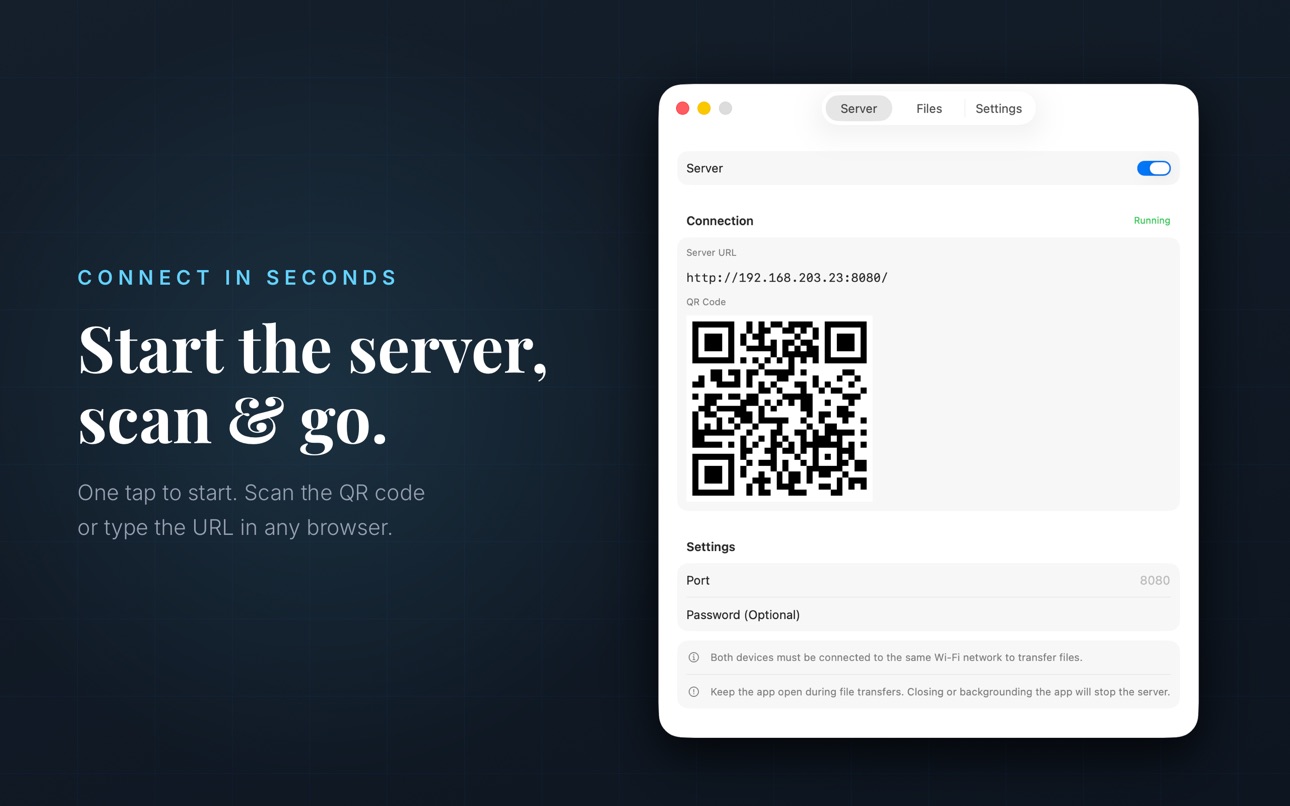
WiFi File Transfer turns your device into a local file server. Just start the server, open the web address in any browser, and start transferring. Works with Chrome, Safari, Firefox, Edge — on any operating system.
CONNECT IN SECONDS
1. Start the server on your iPhone or iPad
2. Open the URL in any browser or scan the QR code
3. Drag and drop files to upload, or tap to download
That's it — no cable, no app needed on your computer.
WORKS WITH EVERY DEVICE
• Windows PC — open any browser and connect instantly
• Mac — Safari, Chrome, or any browser works
• Other devices — connect from any device with a browser, even smart TVs and game consoles
• Linux — full support through any modern browser
KEY FEATURES
• No internet required — everything stays on your local Wi-Fi network
• Two-way file transfer — upload and download files freely
• QR code connection — scan to connect, no typing needed
• Password protection — secure your file transfers with optional authentication
• Custom port — choose your preferred port number
• File management — browse, download, and delete files from the web interface
• Dark mode — web UI adapts to your system theme
• Universal app — works on both iPhone and iPad
PRIVACY FIRST
Your files never leave your local network. No cloud servers, no third-party services, no tracking. Every file transfer happens directly between your devices over Wi-Fi — fast, private, and completely under your control.
PERFECT FOR
• Moving photos and videos from your Windows PC to your iPhone
• Sharing documents between your devices without cables
• Backing up files from your phone to your laptop
• Quick wireless file transfer when you don't have a USB cable
• Transferring large files without slow cloud uploads
Privacy Policy: https://filetransfer.avunia.com/privacy
Terms of Use: https://filetransfer.avunia.com/terms
In-App Purchases US pricing
FileTransfer Pro Subscription
Monthly · Monthly 3-day free trial$2.99
Yearly · Yearly 3-day free trial$8.99
One-Time Purchases
Lifetime$14.99
Capabilities
In-App Purchases
Accessibility
ipadiphonemacrealityDevicetvoswatch
Version history 3 versions
Build 886746056v1.0.22026-06-10 01:49:58
• Fixed minor bugs and improved stability
• Refined the user experience for smoother file transfers
Build 883894842v1.0.12026-04-07 13:14:38
• Select & delete — tap Edit, pick multiple files, and remove them all at once
• Multi-file upload — drag several files at once from your browser with live progress bars
• 2 GB uploads — transfer large videos and archives without size worries
• Mac app — File Transfer is now available as a native macOS app
Build 883650635v1.02026-03-28 10:18:10
Price history by region
Currency
Show
Columns
Search
Availability 1 of 1 storefronts
| Region | Language | Price | Ratings | Avg | Version |
|---|---|---|---|---|---|
| US | en-US | USD 1.99 | 0 | — | 1.0.2 |
Change log 7 changes · US
✎
releaseNotes updated
• Fixed minor bugs and improved stability
• Refined the user experience for smoother file transfers
✎
description updated
Transfer files between your iPhone, iPad, and any device — Windows PC, Mac, or Linux computer — over Wi-Fi. No cables, no cloud, no accounts needed.
WiFi File
✎
subtitle updated
Send & Receive Files, No Cable
✎
name updated
WiFi File Transfer: From PC
◆
Version 1.0.2 released
• Fixed minor bugs and improved stability
• Refined the user experience for smoother file transfers
◆
Version 1.0.1 released
• Select & delete — tap Edit, pick multiple files, and remove them all at once
• Multi-file upload — drag several files at once from your browser with live progress bars
• 2 GB uploads — transfer large videos and archives without size worri
◆
Version 1.0 released