Home › Productivity

 US
US
 DEde-DE
 AUen-AU
 ESes-ESUSen-US
 ATNot Available
 BENot Available
 CANot Available
 CHNot Available
 CZNot Available
 DKNot Available
 FINot Available
 FRNot Available
 GBNot Available
 IENot Available
 ISNot Available
 ITNot Available
 LUNot Available
 NLNot Available
 NONot Available
 NZNot Available
 PLNot Available
 PTNot Available
 SENot Available
 SKNot Available
4 of 24 storefronts
Content in en-US
Content in en-US
Information
Preview 2 platforms
iPhone 3 images


iPad 4 images


What’s New Version 1.1.5
QR-Log Bridge 1.1.5 adds automatic video capture for fast QR streams. The app can record a detected transfer, decode the recording, and reconstruct the original file with optimized post processing.
This update also improves `2x2` QR Grid transfer, live scan quality feedback, captured-video handling, file-library cleanup, camera stability, and overall responsiveness during video decoding.
### Stability and Performance
- Improved camera startup behavior with a gentler resolution and frame-rate ramp.
- Reduced camera restarts during device rotation.
- Device orientation is locked while Video Decode is running.
- Improved handling of unsupported 60 FPS camera modes.
- Reduced UI blocking during video post processing.
Description
# QR-log Bridge
QR-log Bridge is a local-first transfer system that moves files, logs, and diagnostic information by scanning a stream of QR codes. It is built for situations where AirDrop, cloud storage, shared folders, VPN tunnels, or direct network links are not available or not desirable.
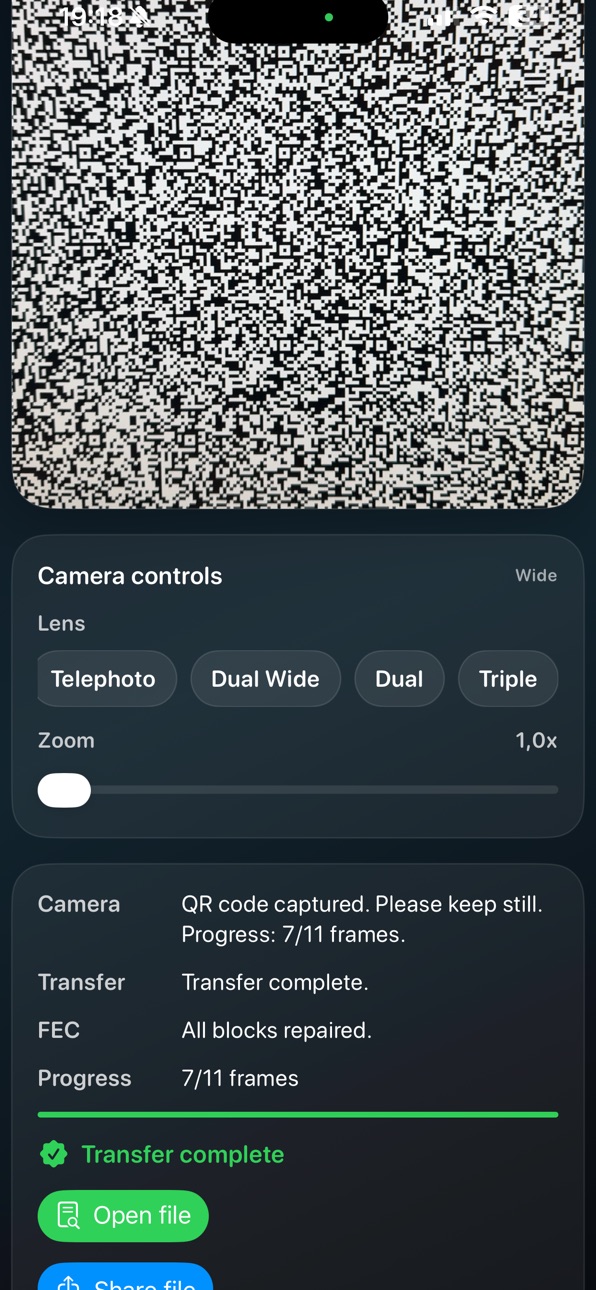
The sender splits the source data into compact protocol frames and renders them as a high-density QR stream. The iPhone or iPad scans the stream, reconstructs the payload locally, and verifies the result with integrity checks.
The current preview GIFs on the website include `mini.gif`, `medium.gif`, `2x2.gif`, and `25fps.gif`. They are intended to test normal live scanning, 2x2 QR grid scanning, and Video Decode from a recorded QR stream.
## Why It Exists
QR-log Bridge is especially useful when a support case must be prepared without relying on a permanent diagnostics connection between a device and the manufacturer's support organization.
In medical device environments, that can mean:
- no internet access on the device
- no VPN connection to the manufacturer
- local policy restrictions
- site security rules
- defense-related or regulated network constraints
Instead of waiting for manual extraction with a USB stick or a specialized on-site workflow, the customer can capture diagnostic information directly with a mobile device and transfer it immediately. That shortens the path from issue discovery to support action and increases the chance that the first customer service engineer visit is already well prepared.
## Key Features
- QR-based offline file transfer
- iPhone and iPad receiver app
- Up to 200 kbit/s on-the-fly transfer rates depending on payload and scan conditions
- 2x2 QR grid mode for four QR payloads per displayed frame
- Video Decode from Photos or Files for recorded QR streams
- Early rejection of normal videos that do not contain a QR-log transfer
- Optional protocol header with default fallback behavior
- Block-based parity and FEC recovery
- Interleaved replay to improve scan resilience
- CRC32 and SHA-256 integrity checks
- Camera lens selection and zoom control up to 3.0x
- Frame rate toggle between 30 FPS and 60 FPS
- Dedicated received-files sheet with preview, share, and delete actions
- Local debug text export with protocol details and transfer rates
- iPhone and iPad portrait and landscape layouts
- Automatic collapsing of controls and status panels during active use
- Practical fit for service workflows, medical device support, and other constrained environments
## How It Works
1. Start the sender on the desktop computer or source system.
2. Open QR-log Bridge on iPhone or iPad.
3. Scan the animated QR stream live, or import a recorded QR stream video.
4. The app reconstructs the original file or diagnostic payload locally.
5. After transfer, you can preview, share, or delete the received file.
## Typical Service Flow
1. A technical issue is identified on site.
2. Relevant logs or diagnostic exports are prepared on the source system.
3. The customer or service team scans the QR stream with an iPhone or iPad.
4. The data is transferred without needing a network connection.
5. The customer service engineer receives the information early and can prepare the repair visit more precisely.
## Notes
- Camera access is required only for QR scanning.
- The app works offline and does not require an account, cloud service, or permanent pairing.
- Received files are stored locally in the app sandbox.
- Version 1.1.2 testing focuses on Video Decode and 2x2 QR grid scanning.
- A debug text file can be generated after transfer for troubleshooting, validation, and performance analysis.
- The workflow is designed to be practical, inspectable, and easy to test.
## Contact
Roland Emrich
emrich.roland@gmail.com
Accessibility
ipadiphonemacrealityDevicetvoswatch
Version history 3 versions
Build 885484096v1.1.52026-05-11 03:01:20
QR-Log Bridge 1.1.5 adds automatic video capture for fast QR streams. The app can record a detected transfer, decode the recording, and reconstruct the original file with optimized post processing.
This update also improves `2x2` QR Grid transfer, live scan quality feedback, captured-video handling, file-library cleanup, camera stability, and overall responsiveness during video decoding.
### Stability and Performance
- Improved camera startup behavior with a gentler resolution and frame-rate ramp.
- Reduced camera restarts during device rotation.
- Device orientation is locked while Video Decode is running.
- Improved handling of unsupported 60 FPS camera modes.
- Reduced UI blocking during video post processing.
Build 884831022v1.1.22026-04-23 20:32:10
What's New
2x2 QR Grid Mode
Added support for 2x2 QR grid streams.
The app can now scan four QR codes per displayed frame when the 2x2 layout is selected.
This improves practical throughput for compatible sender streams while keeping the transfer QR-based.
Progress reporting now reflects how many QR codes were actually decoded in the latest camera frame.
Video Decode
Added Video Decode for recorded QR streams.
QR transfer videos can be imported from Photos or Files.
The app reconstructs the original transferred file from the decoded video frames.
Normal videos without a QR-log transfer are rejected early to avoid long unnecessary processing.
Stability Improvements
Improved camera behavior during portrait and landscape rotation.
Reduced unnecessary camera restarts and scanning interruptions.
Live camera scanning is guarded while Video Decode is running.
After a successful Video Decode, the next live QR scan starts with a clean transfer state.
Improved handling of unsupported camera frame-rate modes.
Performance Improvements
Improved scan pipeline behavior for higher frame-rate capture.
Better handling of 2x2 QR streams under real-world scanning conditions.
Video Decode now stops once enough frames have been decoded to reconstruct the transfer.
Progress reporting has been refined for both live scanning and video decoding.
Build 883638147v1.0.82026-03-29 15:07:58
No pricing data captured yet — comparisons appear once the app has paid storefronts or in-app purchases.
Availability 4 of 24 storefronts
| Region | Language | Price | Ratings | Avg | Version |
|---|---|---|---|---|---|
| DE | de-DE | Free | 1 | 5.0 | 1.1.5 |
| AU | en-AU | Free | 0 | — | 1.1.5 |
| ES | es-ES | Free | 0 | — | 1.1.5 |
| US | en-US | Free | 0 | — | 1.1.5 |
Not available in: AT, BE, CA, CH, CZ, DK, FI, FR, GB, IE, IS, IT, LU, NL, NO, NZ, PL, PT, SE, SK
Change log 6 changes · US
✎
releaseNotes updated
QR-Log Bridge 1.1.5 adds automatic video capture for fast QR streams. The app can record a detected transfer, decode the recording, and reconstruct the original
✎
description updated
# QR-log Bridge
QR-log Bridge is a local-first transfer system that moves files, logs, and diagnostic information by scanning a stream of QR codes. It is built
✎
name updated
QR-log-Bridge
◆
Version 1.1.5 released
QR-Log Bridge 1.1.5 adds automatic video capture for fast QR streams. The app can record a detected transfer, decode the recording, and reconstruct the original file with optimized post processing.
This update also improves `2x2` QR Grid t
◆
Version 1.1.2 released
What's New
2x2 QR Grid Mode
Added support for 2x2 QR grid streams.
The app can now scan four QR codes per displayed frame when the 2x2 layout is selected.
This improves practical throughput for compatible sender streams while keeping the tr
◆
Version 1.0.8 released