Home › Health & Fitness

 US
US
1 of 1 storefronts
Content in en-US
Content in en-US
Information
Preview 3 platforms
iPhone 6 images


iPad 6 images




Mac 6 images



What’s New Version 2026.7.14
iPad now uses the full screen. The calendar gets a desktop-style month view with a week summary, goal banner, intensity and RPE on each day, and a side panel for the selected day. The dashboard lays its cards out in two columns, milestones collapse into a compact shelf you can expand, and the sidebar shows every section. Fixed: pages now scroll while your finger is on a chart.
iPad now uses the full screen. The calendar gets a desktop-style month view with a week summary, goal banner, intensity and RPE on each day, and a side panel for the selected day. The dashboard lays its cards out in two columns, milestones collapse into a compact shelf you can expand, and the sidebar shows every section. Fixed: pages now scroll while your finger is on a chart.
iPad now uses the full screen: a desktop-style month calendar with a week summary, goal banner, and a side panel for the selected day; a two-column dashboard; collapsible milestones; and a complete sidebar. This build also fixes the white bars on either side of iPad pages, makes the whole Recovery/Sleep cards tappable, and opens a workout from the calendar the same way as everywhere else. Plus: pages scroll while your finger is on a chart, and the new calendar labels are translated.
More iPad polish: tapping a day with a single workout opens it directly (and multiple workouts open the side panel to pick); the Add Workout sheet now offers every supported sport and opens at a comfortable size; and the day and workout screens open consistently across the app. Also includes the earlier iPad desktop calendar, two-column dashboard, full sidebar, edge-to-edge pages, tappable Recovery/Sleep cards, and the chart-scroll fix.
Description
Your workout, rewritten every morning.
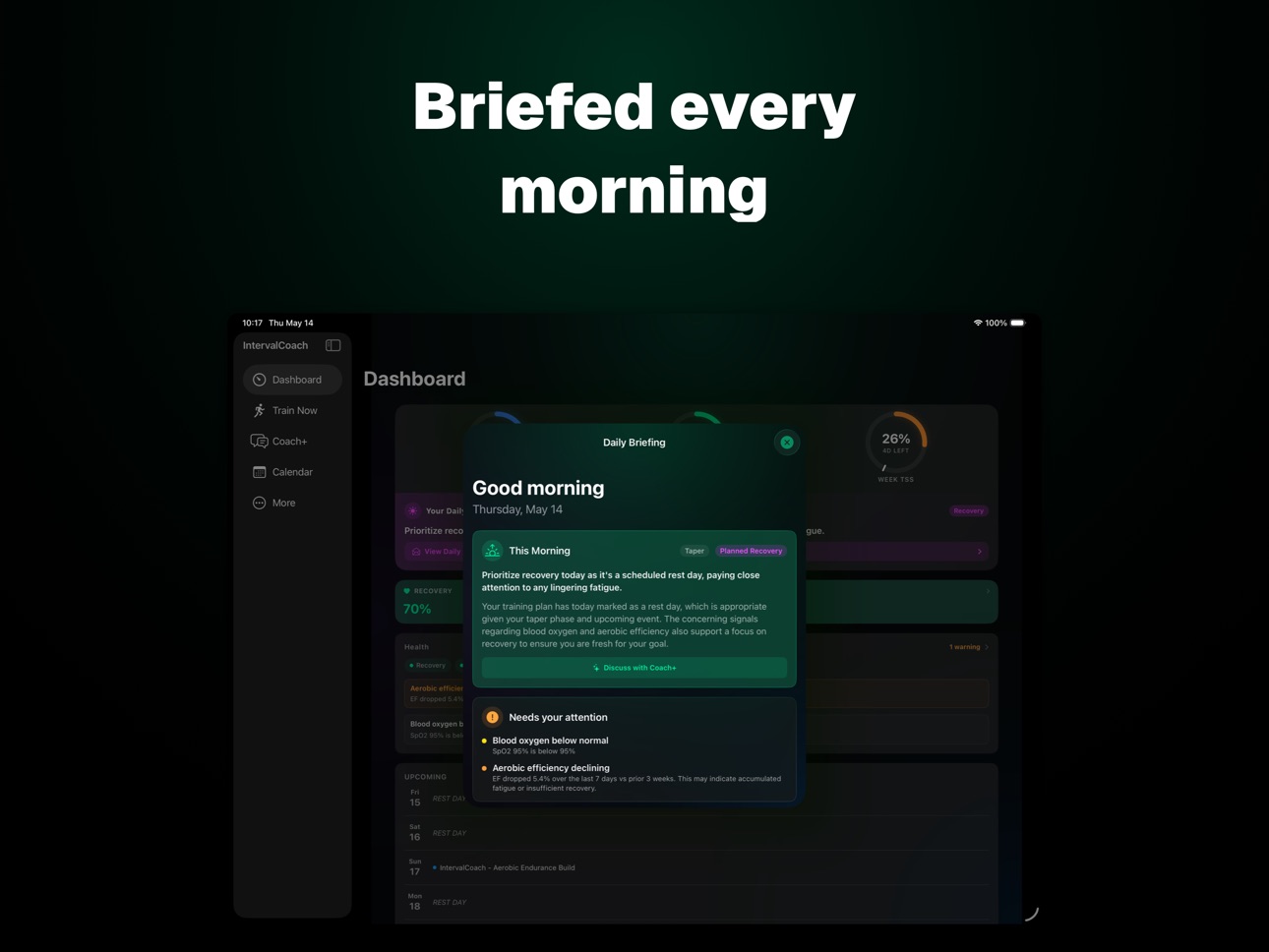
IntervalCoach is an AI training coach for cyclists, runners, and triathletes. Every morning it reads 60+ recovery signals — HRV, sleep, sleep debt, training load, subjective wellness — and reshapes today's session before you start.
Not a static plan. Not a generic "easy day / hard day" nudge. A real coach watching your data and rewriting tomorrow's workout based on how you actually slept.
WHAT YOU GET
- Daily adapting workouts that respond to your recovery
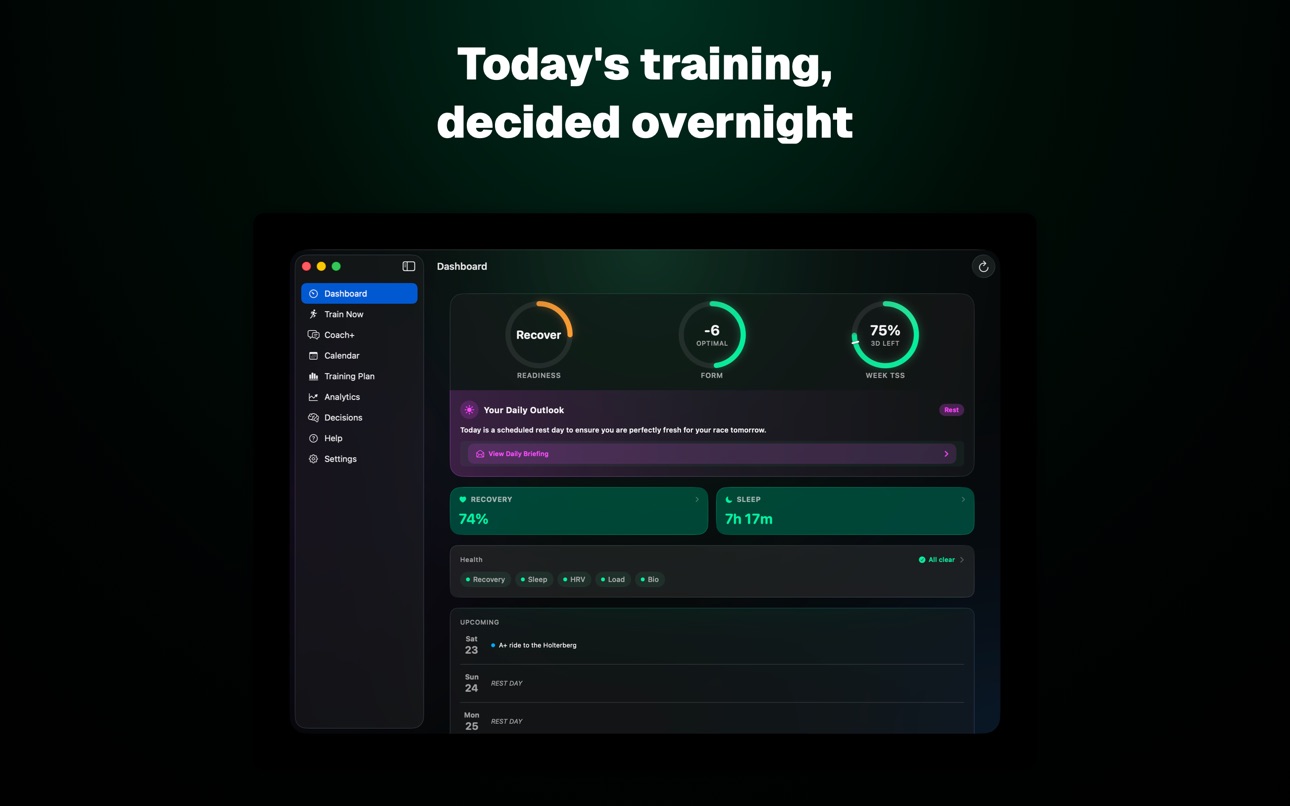
- Daily readiness scoring (HRV, sleep, form, training load)
- Five periodization models from peer-reviewed sport science
- Multi-sport: cycling, running, swimming, strength
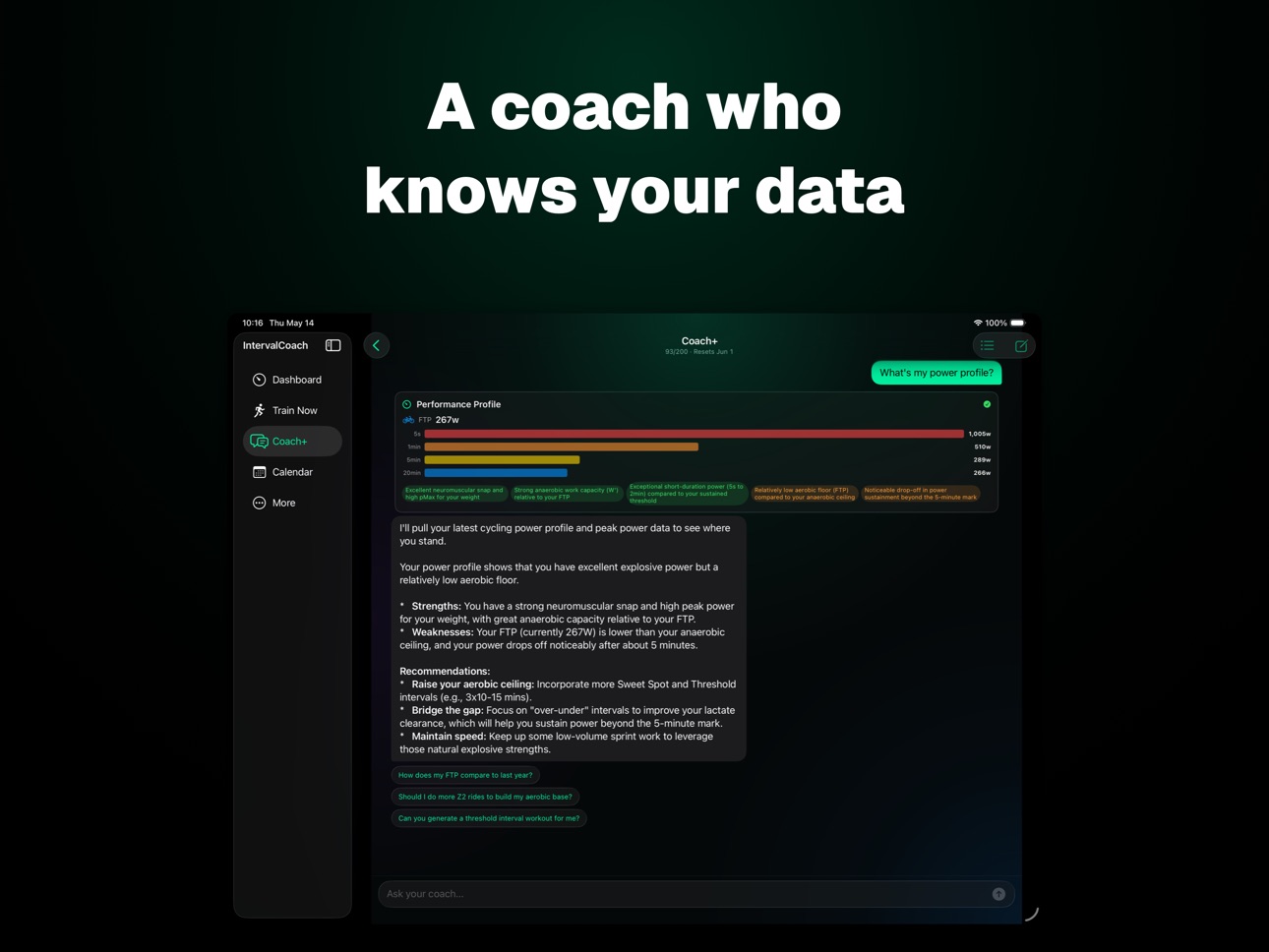
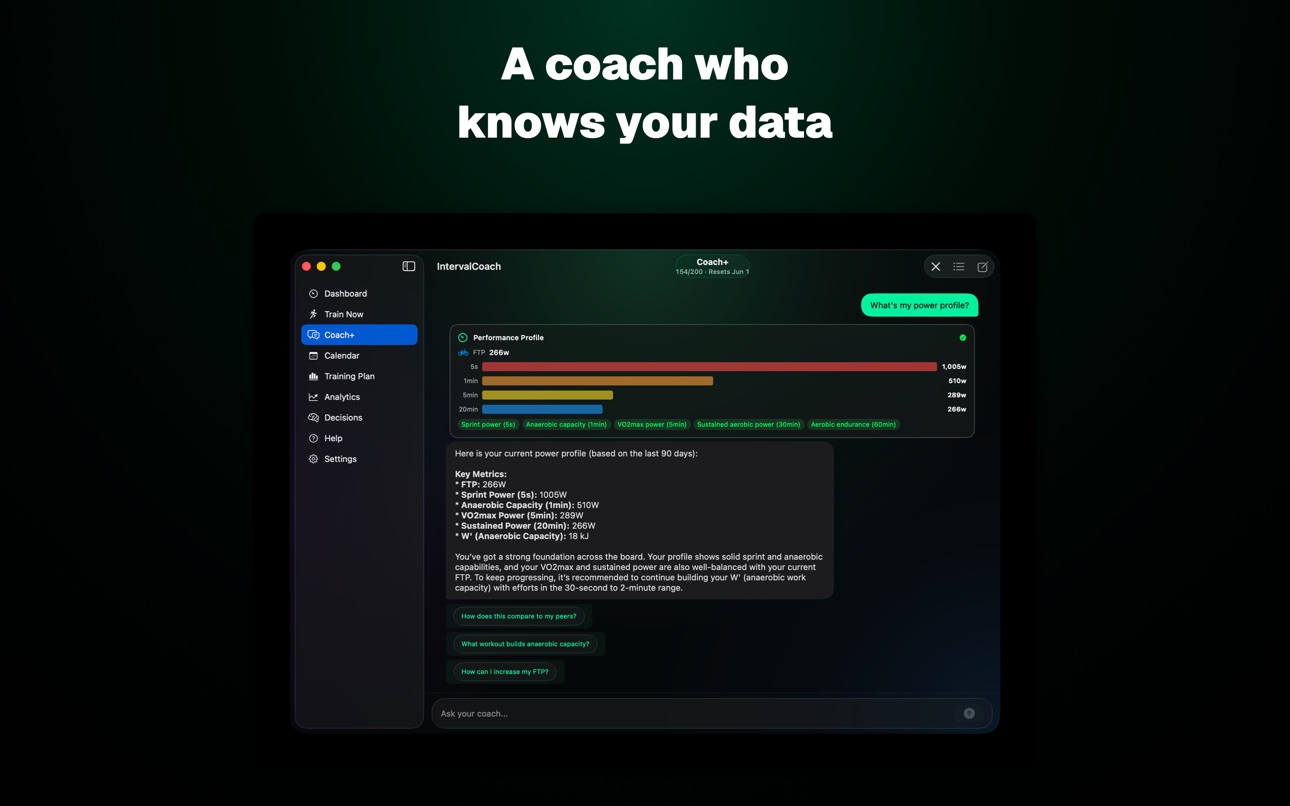
- Coach+ — a conversational AI coach that knows your data
- Goal event countdown and progress projection
- Activity detail with power zones, AI analysis, and nutrition advice
- Post-workout RPE and feel ratings, plus push notifications
- Weekly summaries and monthly progress reports
- Widgets, App Intents, and Siri shortcuts
WORKS WITH
Apple Health · Whoop · Oura · Garmin · Polar · Wahoo · Intervals.icu · Zwift
PRICING
14-day free trial, no credit card required.
Pro — €3/month: daily adapting workouts, unlimited generation, daily emails.
Max — €8/month: everything in Pro plus 200 Coach+ chat messages and performance benchmarks.
12 LANGUAGES
English, Dutch, German, Spanish, Italian, French, Polish, Portuguese, Czech, Slovenian, Danish, Chinese.
Built and updated weekly.
Requires an Intervals.icu account.
Terms of Use: https://www.intervalcoach.app/terms
Privacy Policy: https://www.intervalcoach.app/privacy
In-App Purchases US pricing
IntervalCoach Subscription
Max Yearly · Yearly$69.99
Max Monthly · Monthly$6.99
Pro Yearly · Yearly$24.99
Pro Monthly · Monthly$2.99
Capabilities
In-App Purchases
Accessibility
ipadiphonemacrealityDevicetvoswatch
Version history 25 versions
Build 887907756v2026.7.102026-07-07 15:58:51
More activities now show their own icon: kayaking, canoeing, SUP and rowing, open-water swims, gravel and mountain bike rides, gym sessions, yoga and pilates, and winter sports like skiing, snowboarding and skating.
The weather card now shows which place the forecast is for, so you can check it matches where you'll actually ride or run.
The weather card on your planned workouts now shows in your language. Condition names, labels and details were appearing in English for some languages.
Coach+ now reliably applies calendar changes when you approve more than one at once. Before, approving a batch (like deleting a few workouts and adding a new one in one go) could quietly do nothing.
Coach+ now applies every calendar change when you approve several cards in one go. Deleting or creating a few workouts in the same message and approving each one now updates all of them, not just the first.
Build 887965237v2026.7.142026-07-07 21:09:01
iPad now uses the full screen. The calendar gets a desktop-style month view with a week summary, goal banner, intensity and RPE on each day, and a side panel for the selected day. The dashboard lays its cards out in two columns, milestones collapse into a compact shelf you can expand, and the sidebar shows every section. Fixed: pages now scroll while your finger is on a chart.
iPad now uses the full screen. The calendar gets a desktop-style month view with a week summary, goal banner, intensity and RPE on each day, and a side panel for the selected day. The dashboard lays its cards out in two columns, milestones collapse into a compact shelf you can expand, and the sidebar shows every section. Fixed: pages now scroll while your finger is on a chart.
iPad now uses the full screen: a desktop-style month calendar with a week summary, goal banner, and a side panel for the selected day; a two-column dashboard; collapsible milestones; and a complete sidebar. This build also fixes the white bars on either side of iPad pages, makes the whole Recovery/Sleep cards tappable, and opens a workout from the calendar the same way as everywhere else. Plus: pages scroll while your finger is on a chart, and the new calendar labels are translated.
More iPad polish: tapping a day with a single workout opens it directly (and multiple workouts open the side panel to pick); the Add Workout sheet now offers every supported sport and opens at a comfortable size; and the day and workout screens open consistently across the app. Also includes the earlier iPad desktop calendar, two-column dashboard, full sidebar, edge-to-edge pages, tappable Recovery/Sleep cards, and the chart-scroll fix.
Build 887853091v2026.7.62026-07-05 21:30:48
More activities now show their own icon: kayaking, canoeing, SUP and rowing, open-water swims, gravel and mountain bike rides, gym sessions, yoga and pilates, and winter sports like skiing, snowboarding and skating.
Build 887831497v2026.7.32026-07-04 21:34:25
Fixed: the weather on a planned outdoor workout now follows the units you picked in the app. If you set Imperial but your device region is metric (or the other way round), it could show °C and km/h instead of °F and mph. It now uses your chosen units.
Readiness score 2.0: the score now reflects purely how recovered your body is - your plan no longer drags it down on rest days. Tap the ring to see every factor behind today's score compared with your personal 30-day baseline. Your morning check-in completes a provisional score, and once your morning data is in, the score stays put for the day.
Morning check-in gets its own quick sheet: tap the invite next to your readiness ring and log how you feel in 30 seconds, with your saved answers prefilled. The check-in invite now also shows on days your score is already set, and answers you logged in Intervals.icu count automatically. Plus: the app version is now shown at the bottom of Settings, and the check-in buttons align neatly in every language.
Build 887545573v2026.6.452026-06-30 22:49:51
Weather for your upcoming outdoor workouts (Pro): open a planned outdoor ride or run to see the forecast for exactly when you'll be training, based on your location. You get temperature and feels-like, an hour-by-hour strip from your start time so you can see how conditions change during the session, wind speed and direction, rain chance, UV and more.
Weather for your planned outdoor workouts: open a session to see the forecast for exactly when you'll train (temperature, an hour-by-hour strip, wind, rain, UV). Planned workouts now also show fueling guidance (before, during, after). And you can tap "Ask Coach+ about this workout" to chat about a session with it as context — how to approach it, or whether to adjust for the weather.
Coach+ can now check the weather for your planned workout using your location, and factor it into its advice. Planned outdoor workouts show fueling guidance (before/during/after), and you can tap Ask Coach+ on a session to chat about it with that workout as context.
Build 887519722v2026.6.432026-06-27 20:54:25
Weather for your upcoming outdoor workouts (Pro): open a planned outdoor ride or run to see the forecast for exactly when you'll be training, based on your location. You get temperature and feels-like, an hour-by-hour strip from your start time so you can see how conditions change during the session, wind speed and direction, rain chance, UV and more.
Build 887429753v2026.6.412026-06-25 18:07:41
Faster, smoother home screen: fixed brief freezes that could lock up the app for a few seconds when opening your dashboard.
Build 887397651v2026.6.402026-06-24 21:01:43
Coach+ now runs on our streamlined coaching toolset for faster, more reliable answers. Max members can also connect IntervalCoach to AI assistants like Claude and ChatGPT (beta) — see Settings → Beta.
Coach+ no longer gets stuck on "Executing…" after you approve an action like adding a race. If a confirmation doesn't go through, the buttons come back so you can try again.
Fixed: when you ask Coach+ to adjust a workout in chat (add a set, change intensity, move a session), the Approve button now shows up reliably so your change actually applies.
Build 887260652v2026.6.372026-06-22 14:04:42
Your Daily Outlook now shows your full coaching read the moment you open the app, instead of a short generic line until you refreshed by hand.
Completed strength and gym sessions now show an estimated recovery time.
On an activity, swipe in from the left edge to go back to the previous screen.
Completed activities now show only post-workout nutrition advice, not the pre and during tips.
Readiness ring polish: the label stays on one line and the score breakdown reads cleanly.
Build 887232810v2026.6.362026-06-21 04:46:35
Behind-the-scenes reliability improvements.
Reliability work behind the scenes: better freeze and crash diagnostics so we can spot and fix any app slowdowns faster. No visible changes in this build.
Build 887180196v2026.6.342026-06-19 21:56:07
macOS: 'Manage on web' now opens your default browser instead of a second app window, 'Manage in App Store' opens the App Store subscriptions page, and the subscription help text no longer says 'iOS'.
• Apple Watch sync now keeps your interval structure, so sprint and interval sessions no longer collapse into one averaged block.
• Rides and runs synced from your Apple Watch now include power and cadence, not just heart rate and pace.
• Workouts you send to Apple Watch keep their heart-rate targets and no longer get an extra warm-up and cool-down added on top.
• Cadence targets now appear on the watch for cadence-focused steps like spin-ups and drills.
• The Calendar now starts each week on Monday, matching Intervals.icu.
Build 887142121v2026.6.312026-06-18 20:01:39
Recovery from a session now leads with when you'll be ready for your next hard effort and shows your own recovery curve, placed higher in the activity view. Saving your morning check-in now updates your readiness right away.
Activity detail: HR, power, speed, cadence and altitude charts, plus a power-curve with a fresh-vs-fatigued durability view. Pull down to refresh an activity.
Activity charts now scrub: drag across a chart to read the value at any point. HR/power/speed/cadence/altitude charts and the power-curve durability view.
• Apple Health-workouts syncen nu vanzelf op de achtergrond, direct nadat je klaar bent. Je hoeft de app niet meer te openen.
• Activiteitsgrafieken: sleep over een grafiek om de exacte waarde op elk punt te lezen.
Build 887108774v2026.6.272026-06-17 21:51:43
Added sleep quality, soreness, fatigue, injury and hydration to the daily check-in, fully translated and editable again. Dashboard now shows a readiness score with a tappable ring.
Daily check-in now lists all your fields cleanly down the card, with sleep quality, soreness, fatigue, injury and hydration fully translated and editable.
Daily Briefing now shows where today's recovery sits against your personal curve, and activity detail shows when you'll be ready for your next hard session.
The readiness score now appears right on your home and lock screen widget, and the motivation check-in matches the Intervals.icu scale.
The readiness ring's colour and label now match your final score band.
Activity detail now draws your personal recovery curve and shows the recovery card higher up.
Build 887040442v2026.6.212026-06-16 19:46:19
What to test in this build:
• Coach+ and TrainNow now show the upgrade options on the free plan instead of an error. TrainNow also shows how many free sessions you have left.
• Connecting Whoop or Apple Health, and creating a club, now show the upgrade path on the free plan instead of failing.
• Performance Benchmarks now shows how to unlock it on a lower plan.
• Smoother, faster scrolling on the Calendar.
• Stability improvements.
What's new:
• Big localization update — the whole app now follows your language. Dashboard, Training Plan, workouts, analytics, settings and onboarding are fully translated across all 13 languages, including dates and weekday names. Many screens that still showed English are now in your language.
• Recent Activities are now grouped by date with day separators.
What's new:
• Coach+ suggested questions now appear in your language instead of English.
What's new:
• More of the app now follows your language — achievement badges, onboarding, paywall details, and assorted status and error messages that previously stayed in English.
Build 886959691v2026.6.172026-06-15 16:15:34
When your coach suggests a different workout for the day, you can now see the full session before you approve it: a profile chart plus the warm-up, main set and cool-down steps, right on the dashboard.
Traditional Chinese language support, plus stability and translation improvements.
Build 886793704v2026.6.152026-06-10 21:33:20
• Swipe any failed workout in the Apple Health sync history to retry it right away.
• Fixed an issue where some Apple Health workouts could fail to sync when several arrived close together.
Outdoor rides and runs now show their route on an interactive map in the activity detail.
Your weekly training schedule now shows the correct sport for each day instead of defaulting everything to cycling, and the Edit button to change your availability is easier to find.
Your weekly schedule now shows the correct sport for each day instead of defaulting to cycling, and the Edit button is easier to find. HRV on the dashboard now uses your overnight average, so it's stable and no longer triggers false recovery warnings from a single stray reading.
Build 886740091v2026.6.112026-06-09 21:44:01
• Help Center, Support and Roadmap, now in the More tab
• A refined light mode across the whole app
• Calendar redesigned Apple-style, with swipe between weeks and a Today button
• More tab: clearer subscription status, plus quick access to referrals and what's new
• Training Plan: see how your weekly target is built, recent coach adjustments, and how hard each session is for you
• New Rider Profile in Analytics: your rider type and energy-system strengths
• Fixed the upgrade screen showing for members who already subscribe on the web
Build 886570289v2026.6.52026-06-05 20:04:30
Log sick days, injuries and holidays right from your calendar and training plan — pick the dates and whether you're fully out or just limited, and your coach eases off or pauses training for those days, then ramps you back up afterwards.
Clubs: discover and join public clubs, make your own club discoverable so anyone can join with no invite, edit club events, and add an event as a member. Get notified when a club adds, cancels or reschedules an event.
TrainNow: size a workout by a target training load (Target TSS), not just by duration.
Your free trial now shows a countdown on the dashboard, so you always know how long is left.
The subscription screen now shows everything Max includes — performance benchmarks, inviting a human coach, and unlimited clubs with the weekly AI digest — and is fully translated into every supported language.
Build 886486473v2026.6.22026-06-03 19:37:50
• Choose your training methodology — Norwegian Singles/Doubles or the Easy Interval Method — and your weekly plan follows it.
• Clubs: a new Overview tab shows top performers, your next event and recent activity at a glance.
• Various improvements and fixes for clubs and training plans.
Build 886394241v2026.6.12026-06-01 23:34:57
Clubs are here. Train with the friends who keep you honest: create or join a club, share an activity feed, compare on fair leaderboards (consistency and fitness growth, not raw watts), and post group rides and races that land on everyone's calendar. Free to join on any plan.
Build 886230650v2026.5.162026-05-28 17:25:17
• Trail Run is now its own sport — pick it in TrainNow and when building your weekly schedule to get trail-specific workouts instead of road-running defaults.
• Brick days in your schedule — add a bike-to-run brick to any day in the training schedule editor.
• Smarter setup — onboarding now checks that your activity and recovery data is actually flowing from Intervals.icu, and if your Apple Health sync looks broken, we walk you through fixing it right in the app.
• Fixed the Training Score widget showing "Pro feature" for Pro and Max members; your score appears again.
Build 886107607v2026.5.152026-05-25 20:35:20
- Fixed high CPU usage on the Mac dashboard when idle.
- Fixed a sleep duration that showed one extra minute in the briefing.
Build 886057005v2026.5.142026-05-24 18:40:28
- A new welcome flow introduces what IntervalCoach offers, with a personalized recap at the end.
- Dashboard now shows your weekly training load alongside readiness and form.
- Forecast and remaining-load numbers on the dashboard are now sharper and more consistent.
Build 885955668v2026.5.132026-05-21 20:23:21
- Daily Briefing rest days now show a snapshot of recovery, sleep, week TSS, and yesterday's session
- New chip launchers to start a chat with Coach+ about today — full briefing, why this take, push it / take it easy, and more
- Coach+ now opens in place over whatever you were looking at instead of swapping you to another tab
- Yesterday's recap can be tapped to expand
- Daily Outlook on the dashboard no longer disappears when the AI take is still loading
- Cleaner sheet styling: every close button is now in the same place
- Coach+ no longer flashes a phantom "stopped responding" message after an idle conversation
Build 885901199v2026.5.112026-05-20 20:01:09
Fixed: you'll stay signed in to Intervals.icu after powering your phone off overnight.
Fixed: hitting your monthly Coach+ chat limit now shows an Upgrade option instead of a generic error.
Fixed: Training Plan now shows your average completion instead of a confusing cumulative TSS number.
Removed the Warnings section from the Training Plan page.
Price history by region
Currency
Show
Columns
Search
Availability 1 of 1 storefronts
| Region | Language | Price | Ratings | Avg | Version |
|---|---|---|---|---|---|
| US | en-US | Free | 4 | 5.0 | 2026.7.14 |
Change log 29 changes · US
✎
releaseNotes updated
iPad now uses the full screen. The calendar gets a desktop-style month view with a week summary, goal banner, intensity and RPE on each day, and a side panel fo
✎
description updated
Your workout, rewritten every morning.
IntervalCoach is an AI training coach for cyclists, runners, and triathletes. Every morning it reads 60+ recovery signal
✎
subtitle updated
Daily Adaptive Training Coach
✎
name updated
IntervalCoach: AI Training
◆
Version 2026.7.14 released
iPad now uses the full screen. The calendar gets a desktop-style month view with a week summary, goal banner, intensity and RPE on each day, and a side panel for the selected day. The dashboard lays its cards out in two columns, milestones
◆
Version 2026.7.10 released
More activities now show their own icon: kayaking, canoeing, SUP and rowing, open-water swims, gravel and mountain bike rides, gym sessions, yoga and pilates, and winter sports like skiing, snowboarding and skating.
The weather card now sh
◆
Version 2026.7.6 released
More activities now show their own icon: kayaking, canoeing, SUP and rowing, open-water swims, gravel and mountain bike rides, gym sessions, yoga and pilates, and winter sports like skiing, snowboarding and skating.
◆
Version 2026.7.3 released
Fixed: the weather on a planned outdoor workout now follows the units you picked in the app. If you set Imperial but your device region is metric (or the other way round), it could show °C and km/h instead of °F and mph. It now uses your ch
◆
Version 2026.6.45 released
Weather for your upcoming outdoor workouts (Pro): open a planned outdoor ride or run to see the forecast for exactly when you'll be training, based on your location. You get temperature and feels-like, an hour-by-hour strip from your start
◆
Version 2026.6.43 released
Weather for your upcoming outdoor workouts (Pro): open a planned outdoor ride or run to see the forecast for exactly when you'll be training, based on your location. You get temperature and feels-like, an hour-by-hour strip from your start
◆
Version 2026.6.41 released
Faster, smoother home screen: fixed brief freezes that could lock up the app for a few seconds when opening your dashboard.
◆
Version 2026.6.40 released
Coach+ now runs on our streamlined coaching toolset for faster, more reliable answers. Max members can also connect IntervalCoach to AI assistants like Claude and ChatGPT (beta) — see Settings → Beta.
Coach+ no longer gets stuck on "Execut
◆
Version 2026.6.37 released
Your Daily Outlook now shows your full coaching read the moment you open the app, instead of a short generic line until you refreshed by hand.
Completed strength and gym sessions now show an estimated recovery time.
On an activity, swipe in
◆
Version 2026.6.36 released
Behind-the-scenes reliability improvements.
Reliability work behind the scenes: better freeze and crash diagnostics so we can spot and fix any app slowdowns faster. No visible changes in this build.
◆
Version 2026.6.34 released
macOS: 'Manage on web' now opens your default browser instead of a second app window, 'Manage in App Store' opens the App Store subscriptions page, and the subscription help text no longer says 'iOS'.
• Apple Watch sync now keeps your inte
◆
Version 2026.6.31 released
Recovery from a session now leads with when you'll be ready for your next hard effort and shows your own recovery curve, placed higher in the activity view. Saving your morning check-in now updates your readiness right away.
Activity detai
◆
Version 2026.6.27 released
Added sleep quality, soreness, fatigue, injury and hydration to the daily check-in, fully translated and editable again. Dashboard now shows a readiness score with a tappable ring.
Daily check-in now lists all your fields cleanly down the
◆
Version 2026.6.21 released
What to test in this build:
• Coach+ and TrainNow now show the upgrade options on the free plan instead of an error. TrainNow also shows how many free sessions you have left.
• Connecting Whoop or Apple Health, and creating a club, now show
◆
Version 2026.6.17 released
When your coach suggests a different workout for the day, you can now see the full session before you approve it: a profile chart plus the warm-up, main set and cool-down steps, right on the dashboard.
Traditional Chinese language support,
◆
Version 2026.6.15 released
• Swipe any failed workout in the Apple Health sync history to retry it right away.
• Fixed an issue where some Apple Health workouts could fail to sync when several arrived close together.
Outdoor rides and runs now show their route on an
◆
Version 2026.6.11 released
• Help Center, Support and Roadmap, now in the More tab
• A refined light mode across the whole app
• Calendar redesigned Apple-style, with swipe between weeks and a Today button
• More tab: clearer subscription status, plus quick access to
◆
Version 2026.6.5 released
Log sick days, injuries and holidays right from your calendar and training plan — pick the dates and whether you're fully out or just limited, and your coach eases off or pauses training for those days, then ramps you back up afterwards.
C
◆
Version 2026.6.2 released
• Choose your training methodology — Norwegian Singles/Doubles or the Easy Interval Method — and your weekly plan follows it.
• Clubs: a new Overview tab shows top performers, your next event and recent activity at a glance.
• Various impro
◆
Version 2026.6.1 released
Clubs are here. Train with the friends who keep you honest: create or join a club, share an activity feed, compare on fair leaderboards (consistency and fitness growth, not raw watts), and post group rides and races that land on everyone's
◆
Version 2026.5.16 released
• Trail Run is now its own sport — pick it in TrainNow and when building your weekly schedule to get trail-specific workouts instead of road-running defaults.
• Brick days in your schedule — add a bike-to-run brick to any day in the trainin
◆
Version 2026.5.15 released
- Fixed high CPU usage on the Mac dashboard when idle.
- Fixed a sleep duration that showed one extra minute in the briefing.
◆
Version 2026.5.14 released
- A new welcome flow introduces what IntervalCoach offers, with a personalized recap at the end.
- Dashboard now shows your weekly training load alongside readiness and form.
- Forecast and remaining-load numbers on the dashboard are now sh
◆
Version 2026.5.13 released
- Daily Briefing rest days now show a snapshot of recovery, sleep, week TSS, and yesterday's session
- New chip launchers to start a chat with Coach+ about today — full briefing, why this take, push it / take it easy, and more
- Coach+ now
◆
Version 2026.5.11 released
Fixed: you'll stay signed in to Intervals.icu after powering your phone off overnight.
Fixed: hitting your monthly Coach+ chat limit now shows an Upgrade option instead of a generic error.
Fixed: Training Plan now shows your average complet