Home › Photo & Video

PassportSnap:Passport ID Photo
AI Visa & Document Photos
 US
US
1 of 1 storefronts
Content in en-US
Content in en-US
Information
Preview 1 platform
iPhone 9 images


What’s New Version 1.1
We've added a quick video walkthrough so you can see exactly how PassportSnap works before you start — from photo selection to compliance-checked output in 30 seconds.
Same powerful features:
- Government-compliant photos for 8 countries
- 100% on-device AI processing
- Money-back guarantee on technical rejections
Questions? passportsnap@kkbcori.com
Description
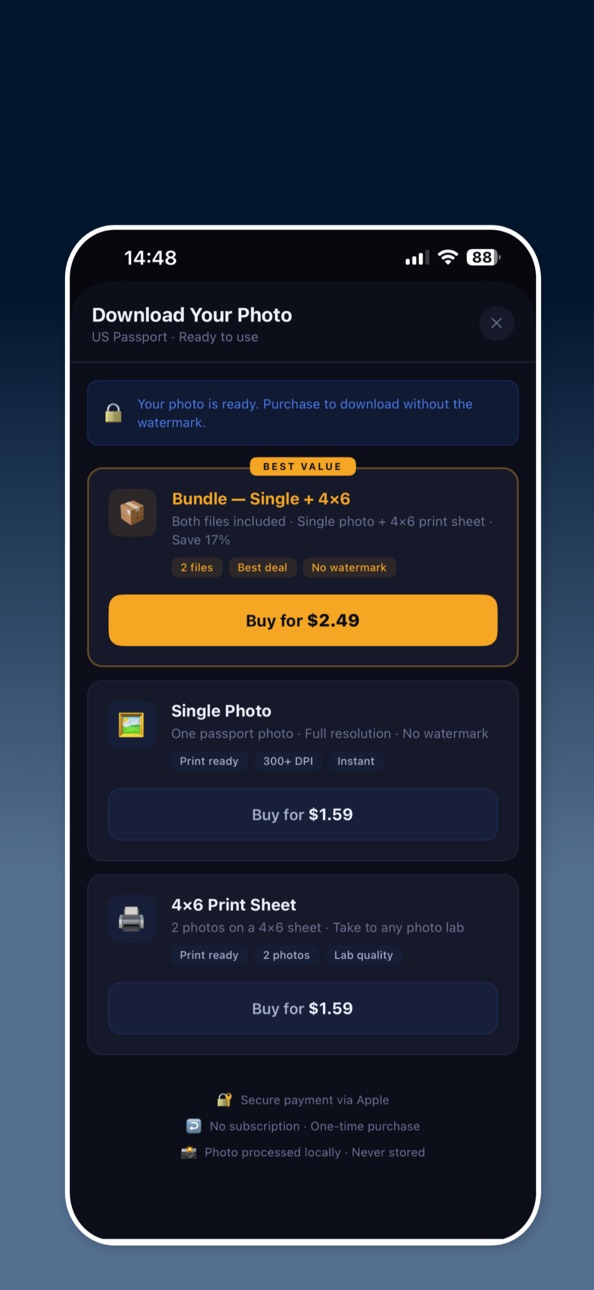
PassportSnap produces biometric-compliant passport and ID photos that meet the official specifications for 8 countries — entirely on your device. Your photo is never uploaded to any server. Upload a photo, and PassportSnap automatically removes the background, sizes the image to the correct dimensions, and positions your face within the required guidelines. The result is a print-ready photo that meets government standards. SUPPORTED COUNTRIES • United States — 2×2 in (51×51 mm) • India — 2×2 in (51×51 mm) • United Kingdom — 35×45 mm • Canada — 50×70 mm • Australia — 35×45 mm • Schengen Area — 35×45 mm • Germany — 35×45 mm • South Africa — 35×45 mm WHAT YOU GET • Single passport photo at the correct dimensions and resolution • 4×6 print sheet with two photos — ready for home or lab printing • Bundle — both files in one purchase HOW IT WORKS 1. Select your country and upload a photo 2. The app removes the background and places a white background automatically 3. Adjust the framing using the on-screen guide — align the crown of your head with the green line. If the framing doesn't look right, use the toolbar to adjust zoom and position manually 4. Purchase and download your watermark-free photo PRIVACY FIRST All processing happens on your iPhone using Apple's on-device AI. Your photo is never sent to any server, never stored in the cloud, and never shared with third parties. PassportSnap has no account system and requires no login. MONEY-BACK GUARANTEE If your photo is rejected by the issuing authority due to a technical compliance issue — incorrect dimensions, background colour, or head size — contact us with the rejection notice and we will refund your purchase in full. Note: PassportSnap assists with technical compliance. Final acceptance is subject to the issuing authority's review of the submitted photo.
In-App Purchases US pricing
One-Time Purchases
passport_single$1.59
passport_4x6$1.59
passport_bundle$2.49
Capabilities
In-App Purchases
Accessibility
ipadiphonemacrealityDevicetvoswatch
Version history 2 versions
Build 885476709v1.12026-05-13 07:11:17
We've added a quick video walkthrough so you can see exactly how PassportSnap works before you start — from photo selection to compliance-checked output in 30 seconds.
Same powerful features:
- Government-compliant photos for 8 countries
- 100% on-device AI processing
- Money-back guarantee on technical rejections
Questions? passportsnap@kkbcori.com
Build 883625080v1.02026-05-05 18:12:31
Price history by region
Currency
Show
Columns
Search
Availability 1 of 1 storefronts
| Region | Language | Price | Ratings | Avg | Version |
|---|---|---|---|---|---|
| US | en-US | Free | 5 | 5.0 | 1.1 |
Change log 6 changes · US
✎
releaseNotes updated
We've added a quick video walkthrough so you can see exactly how PassportSnap works before you start — from photo selection to compliance-checked output in 30 s
✎
description updated
PassportSnap produces biometric-compliant passport and ID photos that meet the official specifications for 8 countries — entirely on your device. Your photo is
✎
subtitle updated
AI Visa & Document Photos
✎
name updated
PassportSnap:Passport ID Photo
◆
Version 1.1 released
We've added a quick video walkthrough so you can see exactly how PassportSnap works before you start — from photo selection to compliance-checked output in 30 seconds.
Same powerful features:
- Government-compliant photos for 8 countries
-
◆
Version 1.0 released