Home › Food & Drink

 US
US
1 of 1 storefronts
Content in en-US
Content in en-US
Information
Preview 2 platforms
iPhone 8 images



Apple Watch 2 images


What’s New Version 2.0.2
Tazzina now works for pour-over, immersion, and stovetop, not just espresso. Dial in a V60, Kalita Wave, Chemex, or AeroPress, each with its own recipes for the dose and grinder you use.
Save more than one recipe per bean. Pull a shot of one coffee in the morning and brew the same beans on a V60 in the afternoon, each with its own grind, dose, and yield.
You can now add more than one grinder, and every grind setting stays tied to the grinder it was dialed in on.
Save your usual doses for each brewer, so an 18g and a 9g espresso, or a 15g and a 25g V60, are a tap apart.
If you already know your way around, you can hide the guided steps and dial in manually.
Ask Siri to pull up any recipe, hands free.
Your espresso recipes carry over exactly as they were. And if you use a single brewer and grinder, Tazzina stays just as simple as before.
You can always see what’s new by going to Settings > About > What’s New.
Description
Tazzina helps you dial in better coffee with less waste, whether you pull espresso or brew a V60, Chemex, or AeroPress. Save your settings for every bean and brewer, see what other home baristas dialed in for the same coffee, and get real recipe suggestions so you’re not starting from zero with a new bag.
Every way you brew, in one place
Espresso, pour-over, immersion, stovetop. Keep a separate recipe for each brewer, dose, and grinder you use, and more than one recipe per bean.
A real starting point, not a guess
Open a new bag and Tazzina suggests recipes from home baristas who’ve already dialed in the same bean on the same brewer. You’re not guessing your way through half the bag.
Dial in without the guesswork
Describe how it tasted and Tazzina walks you through what to adjust, one variable at a time, until you nail it.
Every grinder, every dose
Use more than one grinder, and Tazzina keeps every grind setting tied to the grinder it was dialed in on. Save your usual doses for each brewer so your regular setups are always a tap away.
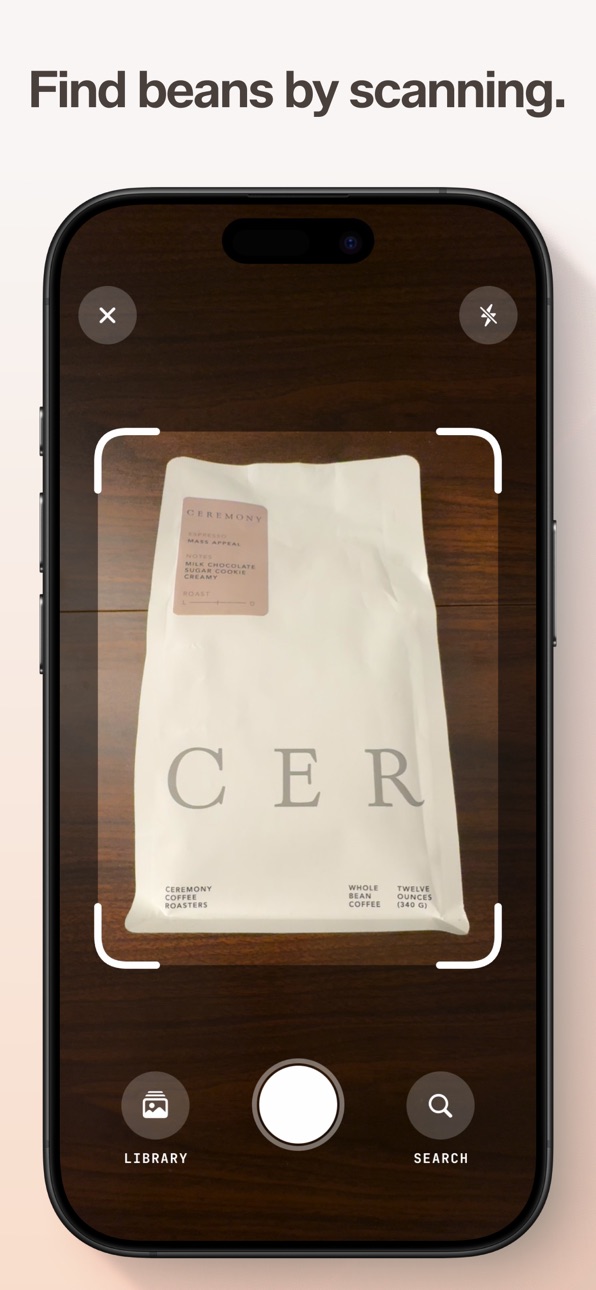
Just scan the bag
Point your camera at a coffee bag and the app finds your bean so you can start dialing in faster.
Remember which bag was the amazing one
Favorite beans you loved so you can buy them again. Archive finished bags and your recipe is still there when you rebuy. Group beans into your own collections, like milk drinks, bright morning shots, or coffees you want to revisit. Share a collection with friends, and they can save the same live list in Tazzina as you add or reorder beans.
Is it me, or are these beans just old?
A freshness indicator tells you if your beans are resting, peaking, or past it. Tazzina also recommends when to adjust your grind as your beans age.
Widgets, Apple Watch, and Siri
Glance at your recipe without opening the app. Home screen widgets show your current bean, recipe, and freshness, check from your wrist on Apple Watch, or just ask Siri to pull up a recipe.
Works offline
Your recipes save locally and sync when you’re back online. No connection needed to brew.
Accessibility
ipadiphonemacrealityDevicetvoswatch
Version history 14 versions
Build 888138469v2.0.22026-07-11 20:24:24
Tazzina now works for pour-over, immersion, and stovetop, not just espresso. Dial in a V60, Kalita Wave, Chemex, or AeroPress, each with its own recipes for the dose and grinder you use.
Save more than one recipe per bean. Pull a shot of one coffee in the morning and brew the same beans on a V60 in the afternoon, each with its own grind, dose, and yield.
You can now add more than one grinder, and every grind setting stays tied to the grinder it was dialed in on.
Save your usual doses for each brewer, so an 18g and a 9g espresso, or a 15g and a 25g V60, are a tap apart.
If you already know your way around, you can hide the guided steps and dial in manually.
Ask Siri to pull up any recipe, hands free.
Your espresso recipes carry over exactly as they were. And if you use a single brewer and grinder, Tazzina stays just as simple as before.
You can always see what’s new by going to Settings > About > What’s New.
Build 888034380v2.0.12026-07-09 18:22:16
Tazzina now works for pour-over, immersion, and stovetop, not just espresso. Dial in a V60, Kalita Wave, Chemex, or AeroPress, each with its own recipes for the dose and grinder you use.
Save more than one recipe per bean. Pull a shot of one coffee in the morning and brew the same beans on a V60 in the afternoon, each with its own grind, dose, and yield.
You can now add more than one grinder, and every grind setting stays tied to the grinder it was dialed in on.
Save your usual doses for each brewer, so an 18g and a 9g espresso, or a 15g and a 25g V60, are a tap apart.
If you already know your way around, you can hide the guided steps and dial in manually.
Ask Siri to pull up any recipe, hands free.
Your espresso recipes carry over exactly as they were. And if you use a single brewer and grinder, Tazzina stays just as simple as before.
You can always see what’s new by going to Settings > About > What’s New.
Build 887978861v2.0.02026-07-08 17:28:49
Tazzina now works for pour-over, immersion, and stovetop, not just espresso. Dial in a V60, Kalita Wave, Chemex, or AeroPress, each with its own recipes for the dose and grinder you use.
Save more than one recipe per bean. Pull a shot of one coffee in the morning and brew the same beans on a V60 in the afternoon, each with its own grind, dose, and yield.
You can now add more than one grinder, and every grind setting stays tied to the grinder it was dialed in on.
Save your usual doses for each brewer, so an 18g and a 9g espresso, or a 15g and a 25g V60, are a tap apart.
If you already know your way around, you can hide the guided steps and dial in manually.
Ask Siri to pull up any recipe, hands free.
Your espresso recipes carry over exactly as they were. And if you use a single brewer and grinder, Tazzina stays just as simple as before.
You can always see what’s new by going to Settings > About > What’s New.
Build 887016428v1.4.12026-06-16 22:06:15
Collections can now be shared! Build a list of chocolaty comfort beans, bright morning shots, cozy light roasts, fall favorites, or coffees that pair well with milk. Send the link, and other Tazzina users can save the collection in their own app.
Saved collections stay alive. Add a new favorite, remove a bean that fell out of rotation, rename the list, or reorder it, and everyone who saved it sees the latest version. Collections can also be shared as images, just like beans and recipes.
This update also adds notes to shared collections, so the context behind a favorite coffee can travel with the collection. You can now arrange beans manually within collections, and archived bean cards keep roast date and freshness details tucked away.
You can always see what's new by going to Settings > About > What's New.
Build 886934454v1.4.02026-06-14 17:03:37
Collections can now be shared!
Build a list of chocolaty comfort beans, bright morning shots, cozy light roasts, fall favorites, or coffees that pair well with milk. Send the link, and other Tazzina users can save the collection in their own app.
Saved collections stay alive. Add a new favorite, remove a bean that fell out of rotation, rename the list, or reorder it, and everyone who saved it sees the latest version.
Collections can also be shared as images, just like beans and recipes.
Collections also got a visual refresh, plus bug fixes and polish.
You can always see what’s new by going to Settings > About > What’s New.
Build 886681563v1.3.12026-06-08 21:35:56
You can now share your recipes! Every share card carries the dose, grind, yield, ratio, grinder, and temperature behind a great shot, with the grinder always included so your grind numbers actually make sense.
Save the card as an image to post in a message or on social, or just send the link so the recipient can save the recipe straight into Tazzina, with the grind already translated to their own grinder so there's no dialing in.
This release also includes bug fixes and polish.
You can always see what's new by going to Settings > About > What's New.
Build 886638727v1.3.02026-06-07 17:15:01
You can now share a whole recipe, not just a bean. Every share card carries the dose, grind, yield, ratio, grinder, and temperature behind a great shot, with the grinder always included so your grind numbers actually make sense.
Save the card as an image to post in a message or on social, or just send the link so the recipient can save the recipe straight into Tazzina, with the grind already translated to their own grinder so there's no dialing in.
This release also includes bug fixes and polish.
You can always see what's new by going to Settings > About > What's New.
Build 886237660v1.2.42026-05-30 13:01:03
Fixes a crash that could happen when renewing a bean from the archive list. Manual mode now defaults to your last used brew temperature. This update also includes visual improvements and performance optimisations.
You can always see what's new by going to Settings > About > What's New.
Build 885333407v1.2.32026-05-06 23:26:41
- Fixed a sorting menu issue where tapping Freshness or Date added could dismiss the menu before choosing the sort direction.
- Other bug fixes and improvements
You can always see what’s new by going to Settings > About > What’s New.
Build 885131152v1.2.22026-04-30 21:20:59
Improvements
- Ratios are now displayed wherever yields are displayed. To turn this on, go to Settings and enable Ratio display.
- Tap on a bean’s photo to see it in full size, retake, or remove the photo.
- Temperature will not be displayed as a dash if you have turned temperature tracking on but haven’t set it for a recipe.
Bug fixes
- Made photos look sharper.
- Fixed a bug where grind size nudges would appear for archived beans.
- Other bug fixes and cosmetic improvements.
You can always see what’s new by going to Settings > About > What’s New.
Build 884931688v1.2.12026-04-26 19:11:28
You can now show the coffee-to-water ratio alongside each recipe’s yield. Open Settings to enable ratio display.
This release also fixes a bug that could cause single and double dose values to revert after changing them in Settings.
You’ll see some cosmetic improvements on the Bean Detail screen too. Try slowly tilting your phone!
Other bug fixes and performance improvements throughout the app.
You can always see what’s new by going to Settings > About > What’s New.
Build 884518288v1.2.02026-04-14 22:51:47
You can now track water temperature alongside dose, grind, and yield. To enable it, open Settings and toggle temperature tracking on. When dialing in manually, use the slider to set your brew temperature. In guided mode, Tazzina will ask questions about your brew and suggest temperature corrections along the way.
UI improvements throughout the app, bug fixes, and performance optimisations.
You can always see what’s new by going to Settings > About > What’s New.
Build 884432192v1.1.02026-04-13 00:04:11
Grind freshness nudge
Your beans age between sessions. When it’s been a few days since you last dialed in, Tazzina nudges you to grind finer so your next shot doesn’t run fast.
Share beans
Send any verified bean to a friend. One tap sends a link that lands them right on it, ready to dial in.
UI improvements throughout the app, bug fixes, and performance optimizations.
Build 883617618v1.02026-04-05 20:13:09
No pricing data captured yet — comparisons appear once the app has paid storefronts or in-app purchases.
Availability 1 of 1 storefronts
| Region | Language | Price | Ratings | Avg | Version |
|---|---|---|---|---|---|
| US | en-US | Free | 1 | 5.0 | 2.0.2 |
Change log 18 changes · US
✎
releaseNotes updated
Tazzina now works for pour-over, immersion, and stovetop, not just espresso. Dial in a V60, Kalita Wave, Chemex, or AeroPress, each with its own recipes for the
✎
description updated
Tazzina helps you dial in better coffee with less waste, whether you pull espresso or brew a V60, Chemex, or AeroPress. Save your settings for every bean and br
✎
subtitle updated
Waste less coffee dialing in
✎
name updated
Tazzina
◆
Version 2.0.2 released
Tazzina now works for pour-over, immersion, and stovetop, not just espresso. Dial in a V60, Kalita Wave, Chemex, or AeroPress, each with its own recipes for the dose and grinder you use.
Save more than one recipe per bean. Pull a shot of o
◆
Version 2.0.1 released
Tazzina now works for pour-over, immersion, and stovetop, not just espresso. Dial in a V60, Kalita Wave, Chemex, or AeroPress, each with its own recipes for the dose and grinder you use.
Save more than one recipe per bean. Pull a shot of o
◆
Version 2.0.0 released
Tazzina now works for pour-over, immersion, and stovetop, not just espresso. Dial in a V60, Kalita Wave, Chemex, or AeroPress, each with its own recipes for the dose and grinder you use.
Save more than one recipe per bean. Pull a shot of o
◆
Version 1.4.1 released
Collections can now be shared! Build a list of chocolaty comfort beans, bright morning shots, cozy light roasts, fall favorites, or coffees that pair well with milk. Send the link, and other Tazzina users can save the collection in their ow
◆
Version 1.4.0 released
Collections can now be shared!
Build a list of chocolaty comfort beans, bright morning shots, cozy light roasts, fall favorites, or coffees that pair well with milk. Send the link, and other Tazzina users can save the collection in their ow
◆
Version 1.3.1 released
You can now share your recipes! Every share card carries the dose, grind, yield, ratio, grinder, and temperature behind a great shot, with the grinder always included so your grind numbers actually make sense.
Save the card as an image to
◆
Version 1.3.0 released
You can now share a whole recipe, not just a bean. Every share card carries the dose, grind, yield, ratio, grinder, and temperature behind a great shot, with the grinder always included so your grind numbers actually make sense.
Save the c
◆
Version 1.2.4 released
Fixes a crash that could happen when renewing a bean from the archive list. Manual mode now defaults to your last used brew temperature. This update also includes visual improvements and performance optimisations.
You can always see what's
◆
Version 1.2.3 released
- Fixed a sorting menu issue where tapping Freshness or Date added could dismiss the menu before choosing the sort direction.
- Other bug fixes and improvements
You can always see what’s new by going to Settings > About > What’s New.
◆
Version 1.2.2 released
Improvements
- Ratios are now displayed wherever yields are displayed. To turn this on, go to Settings and enable Ratio display.
- Tap on a bean’s photo to see it in full size, retake, or remove the photo.
- Temperature will not be displaye
◆
Version 1.2.1 released
You can now show the coffee-to-water ratio alongside each recipe’s yield. Open Settings to enable ratio display.
This release also fixes a bug that could cause single and double dose values to revert after changing them in Settings.
You’l
◆
Version 1.2.0 released
You can now track water temperature alongside dose, grind, and yield. To enable it, open Settings and toggle temperature tracking on. When dialing in manually, use the slider to set your brew temperature. In guided mode, Tazzina will ask qu
◆
Version 1.1.0 released
Grind freshness nudge
Your beans age between sessions. When it’s been a few days since you last dialed in, Tazzina nudges you to grind finer so your next shot doesn’t run fast.
Share beans
Send any verified bean to a friend. One tap sends
◆
Version 1.0 released