Home › Health & Fitness

 US
US
 AGen-GB
 AIen-GB
 AOen-GB
 ARes-MX
 BBen-GB
 BFen-GB
 BJen-GB
 BOes-MX
 BRpt-BR
 BSen-GB
 BZen-GB
 CDen-GB
 CGen-GB
 CIfr-FR
 CLes-MX
 CMfr-FR
 COes-MX
 CRes-MX
 CVen-GB
 DMen-GB
 DOes-MX
 DZen-GB
 ECes-MX
 GAfr-FR
 GDen-GB
 GHen-GB
 GMen-GB
 GTes-MX
 GWen-GB
 GYen-GB
 HNes-MX
 JMen-GB
 KEen-GB
 KNen-GB
 KYen-GB
 LCen-GB
 LRen-GB
 LYen-GB
 MAen-GB
 MGen-GB
 MLen-GB
 MSen-GB
 MUen-GB
 MWen-GB
 MXes-MX
 MZen-GB
 NAen-GB
 NEen-GB
 NGen-GB
 NIes-MX
 PAes-MX
 PEes-MX
 PYes-MX
 RWen-GB
 SCen-GB
 SLen-GB
 SNen-GB
 SRen-GB
 STen-GB
 SVes-MX
 SZen-GB
 TCen-GB
 TDen-GB
 TNen-GB
 TTen-GB
 TZen-GB
 UGen-GBUSen-US
 UYen-GB
 VCen-GB
 VEes-MX
 VGen-GB
72 of 72 storefronts
Content in en-US
Content in en-US
Information
Preview 2 platforms
iPhone 5 images

iPad 3 images


What’s New Version 1.3
MetricPull 1.3 adds Analysis Kit, a combined Blood Pressure view in Quick Metrics, and new System/Light/Dark appearance options.
Analysis Kit packages any Summary export as a ZIP containing your CSV plus a plain-language instructions file that documents columns, units, date format, missing-data rules, and partial periods, so spreadsheets and AI tools can interpret your export correctly.
Blood Pressure in Quick Metrics now shows systolic and diastolic together with a paired chart, latest reading, and weekly/30-day comparisons.
Description
Apple Health collects a wealth of data, but getting it out in a usable format is painful. The native export dumps everything into a massive XML file. Third-party apps either overwhelm you with features you don't need or produce messy output that needs cleanup before you can use it.
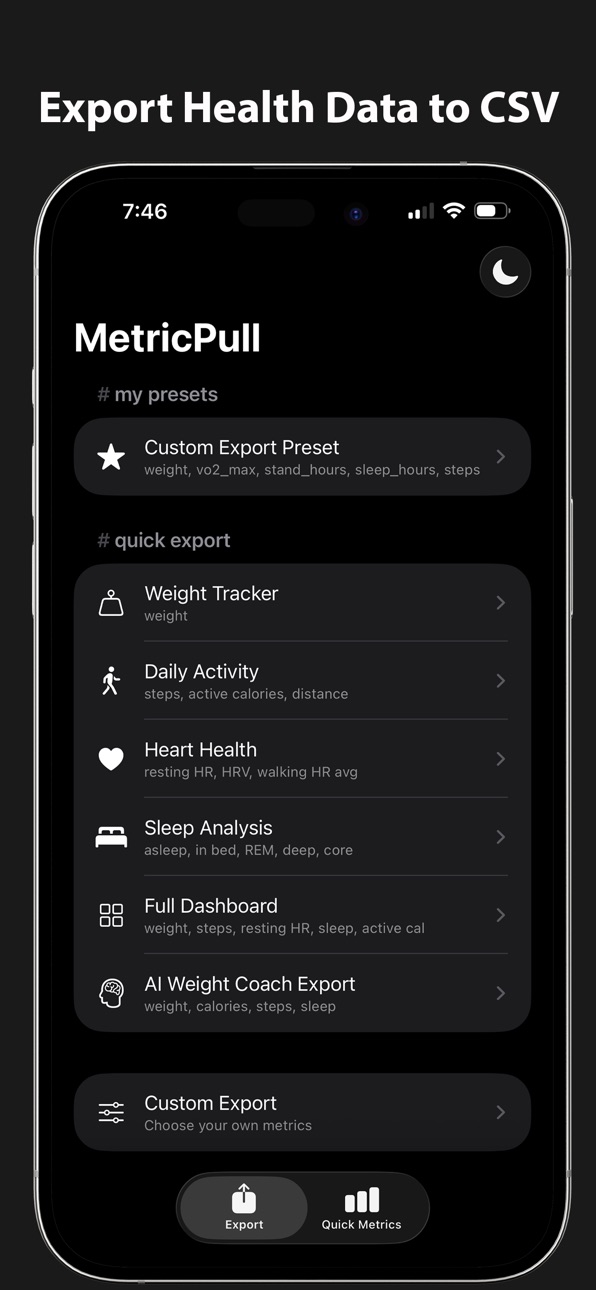
MetricPull is a simple, free utility that lets you build exactly the export you want. Pick your metrics, pick your date format, get a clean CSV. No subscriptions, no premium tiers, no features you'll never use.
EXPORT YOUR WAY
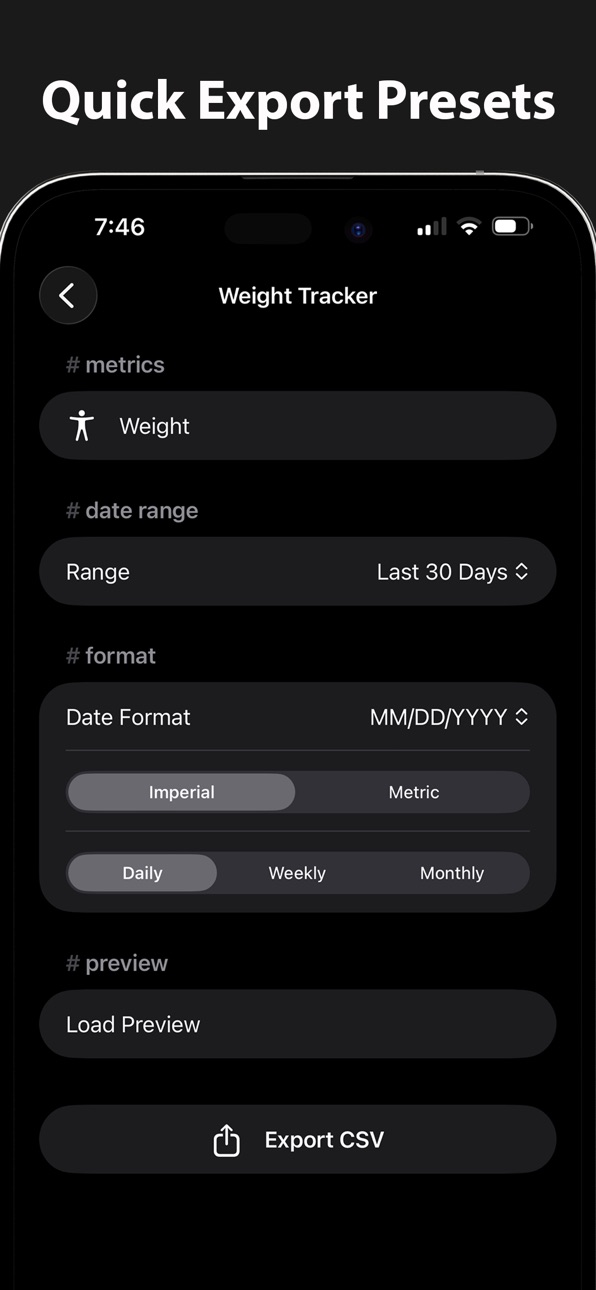
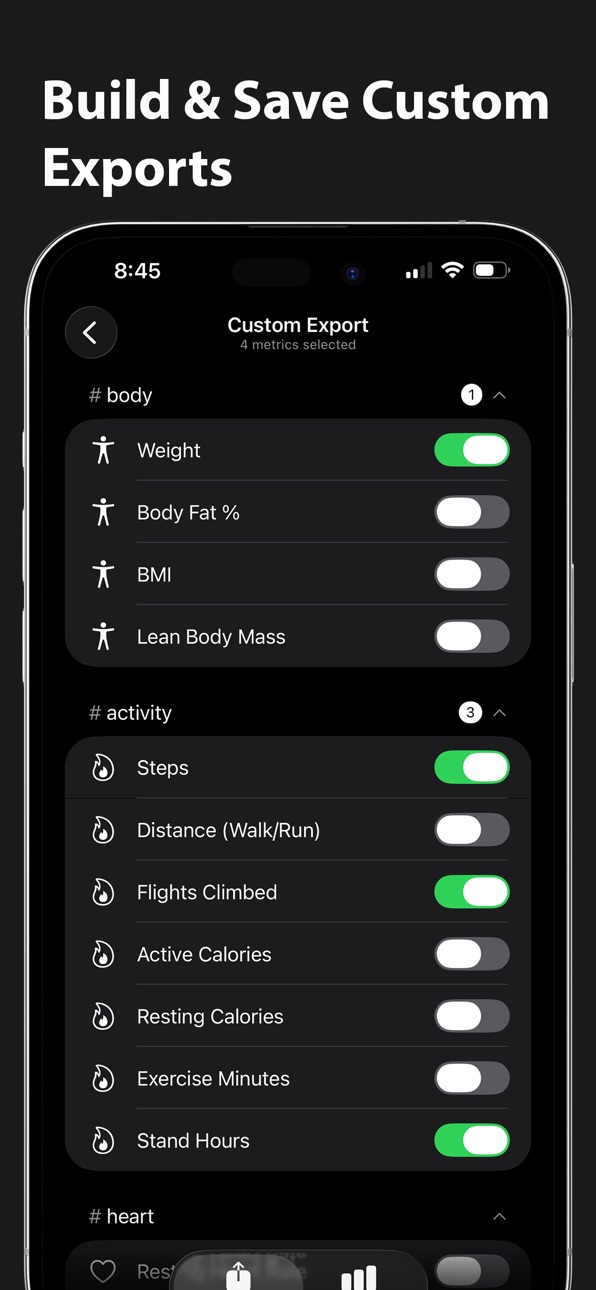
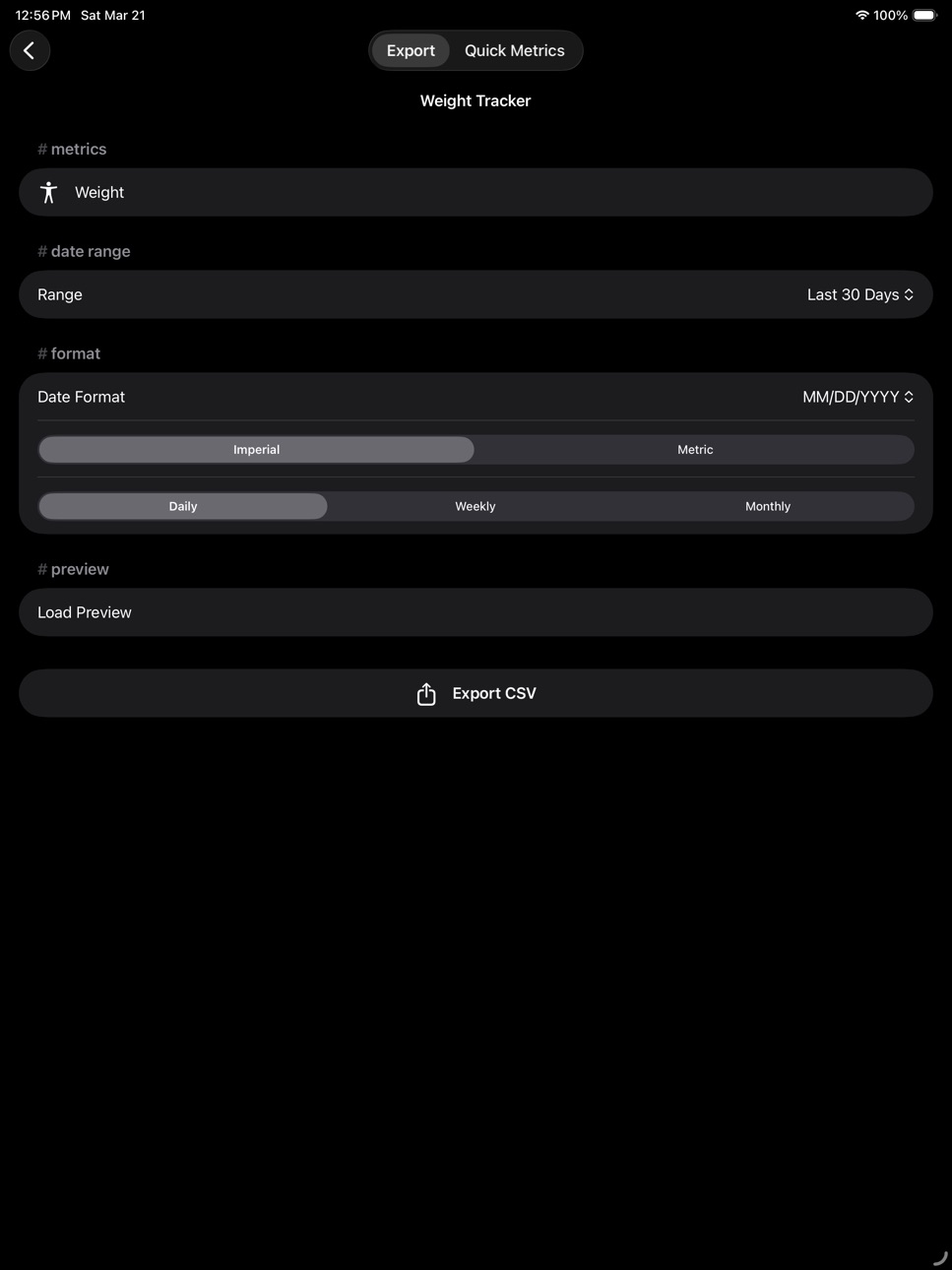
Choose from over 70 health metrics across six categories — Body, Activity, Heart, Sleep, Vitals, and Nutrition. Includes complete coverage of every nutrition metric Apple Health supports: macros, fats, fiber, sugar, all minerals and vitamins, plus caffeine and water. Select a date range, choose your date format, set imperial or metric units, and pick daily, weekly, or monthly aggregation. For blood pressure, weight, and workouts, you can also export individual timestamped readings as Log Entries or Raw Samples. Preview your data before exporting, then share via the iOS share sheet to Files, AirDrop, email, or any app that accepts files.
ANALYSIS KIT
Turn any Summary export into a package that explains itself. With one toggle, MetricPull exports a ZIP containing your CSV plus a plain-language instructions file that documents every column, its unit, the date format, row count, and how to read missing data and partial periods. Spreadsheets, scripts, and AI tools get the context they need to interpret your numbers correctly — empty cells aren't zeros, pounds aren't kilograms, and partial days are clearly labeled. Everything is generated on your device; MetricPull never analyzes your data itself.
BUILT-IN PRESETS
Nine ready-to-use export templates: Weight Tracker, Daily Activity, Heart Health, Sleep Analysis, Nutrition Dashboard, Full Dashboard, Blood Pressure Log, Workout Log, and AI Weight Coach Export. Each one is fully customizable before you export. Save your own presets for one-tap reuse.
QUICK METRICS
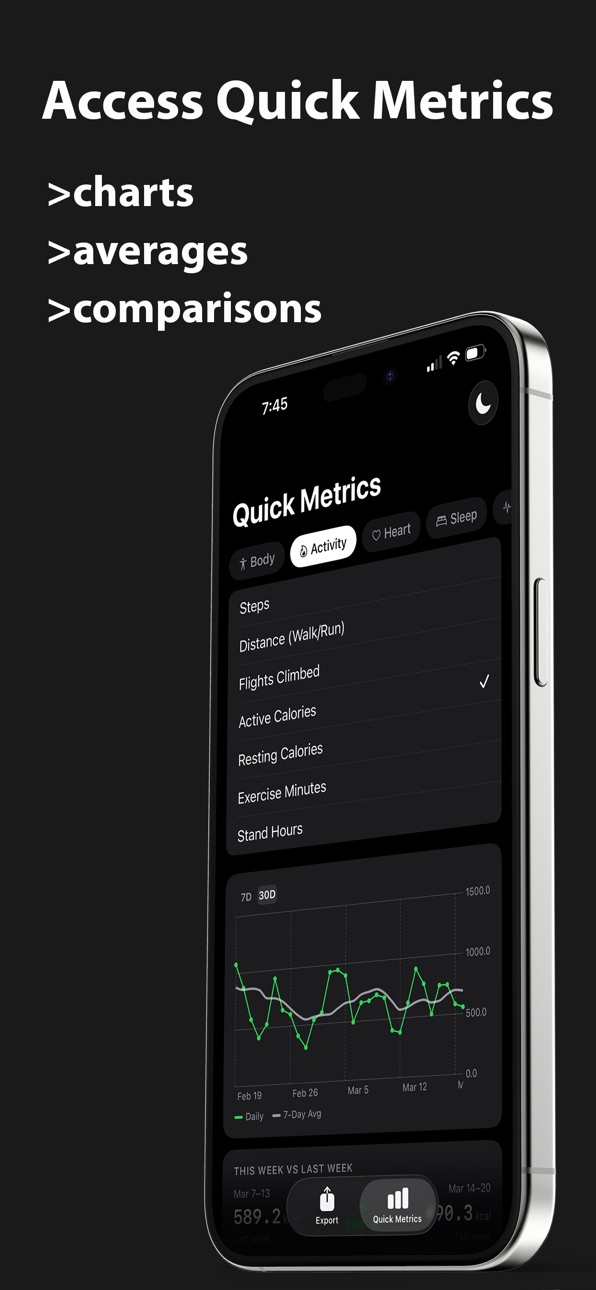
Browse any health metric and instantly see a trend chart with a 7-day rolling average overlay. Switch between 7-day, 30-day, 90-day, 6-month, 1-year, and 5-year views. See week-over-week and 30-day comparisons, rolling averages, min/max values, and trend direction — all without exporting anything.
DESIGNED FOR YOUR DATA
Clean CSV output imports directly into Excel, Google Sheets, Numbers, Python, or R, and is formatted so AI tools can read it without misinterpreting your numbers. One row per day, week, or month, proper formatting, no cleanup needed. Nutrition columns include unit suffixes so spreadsheet consumers know exactly what each value represents.
PRIVATE BY DESIGN
All processing happens on your device. Read-only HealthKit access. No accounts, no analytics, no tracking, no cloud backend. Your health data stays on your device until you choose to export it. You decide exactly where it goes.
Accessibility
ipadiphonemacrealityDevicetvoswatch
Version history 4 versions
Build 887912258v1.32026-07-07 05:45:27
MetricPull 1.3 adds Analysis Kit, a combined Blood Pressure view in Quick Metrics, and new System/Light/Dark appearance options.
Analysis Kit packages any Summary export as a ZIP containing your CSV plus a plain-language instructions file that documents columns, units, date format, missing-data rules, and partial periods, so spreadsheets and AI tools can interpret your export correctly.
Blood Pressure in Quick Metrics now shows systolic and diastolic together with a paired chart, latest reading, and weekly/30-day comparisons.
Build 884927731v1.22026-04-26 18:19:11
Big update with major new features and polish.
Full nutrition tracking
MetricPull now exports every nutrition metric Apple Health supports — 36 new dietary metrics covering macros, vitamins, minerals, caffeine, and water. The Nutrition category is grouped into Macros & Energy, Minerals, Vitamins, and Other for easy navigation. New "Nutrition Dashboard" preset with the most commonly tracked items.
New 30-day comparison card
Quick Metrics now includes a "Last 30 Days vs Previous 30 Days" card alongside the existing weekly comparison, giving you a clearer picture of longer-term trends.
In-app feedback
A new gear icon in the toolbar opens an About screen with appearance settings, a "Send Feedback" link, and version info. Easier to reach the developer with bug reports or feature requests.
Five additional metrics
- Heart Rate (daily average)
- Cycling Distance
- Swimming Distance (in yards or meters)
- Blood Glucose
- Basal Body Temperature
Polish and fixes
- Trend card label rewritten for clarity ("Last 7 days above/below 30-day average")
- Blood Oxygen and Body Fat % now display correctly as percentages
- Metrics that aren't strictly "good" or "bad" (carbs, total fat, caffeine, water) now show as neutral
- CSV column names for nutrition metrics now include unit suffixes (_g, _mg, _ug, _ml, _kcal) so spreadsheet consumers know exactly what unit each column represents
- Improved handling of rolling-window edge cases for users with limited history
Build 884606356v1.12026-04-18 20:54:23
Quick Metrics charts now support 90-day, 6-month, 1-year, and 5-year views. Zoom out to see long-term trends in any health metric.
Build 883612152v1.02026-03-24 12:29:24
No pricing data captured yet — comparisons appear once the app has paid storefronts or in-app purchases.
Availability 72 of 72 storefronts
| Region | Language | Price | Ratings | Avg | Version |
|---|---|---|---|---|---|
| AG | en-GB | Free | 0 | — | 1.3 |
| AI | en-GB | Free | 0 | — | 1.3 |
| AO | en-GB | Free | 0 | — | 1.3 |
| AR | es-MX | Free | 0 | — | 1.3 |
| BB | en-GB | Free | 0 | — | 1.3 |
| BF | en-GB | Free | 0 | — | 1.3 |
| BJ | en-GB | Free | 0 | — | 1.3 |
| BO | es-MX | Free | 0 | — | 1.3 |
| BR | pt-BR | Free | 0 | — | 1.3 |
| BS | en-GB | Free | 0 | — | 1.3 |
| BZ | en-GB | Free | 0 | — | 1.3 |
| CD | en-GB | Free | 0 | — | 1.3 |
| CG | en-GB | Free | 0 | — | 1.3 |
| CI | fr-FR | Free | 0 | — | 1.3 |
| CL | es-MX | Free | 0 | — | 1.3 |
| CM | fr-FR | Free | 0 | — | 1.3 |
| CO | es-MX | Free | 0 | — | 1.3 |
| CR | es-MX | Free | 0 | — | 1.3 |
| CV | en-GB | Free | 0 | — | 1.3 |
| DM | en-GB | Free | 0 | — | 1.3 |
| DO | es-MX | Free | 0 | — | 1.3 |
| DZ | en-GB | Free | 0 | — | 1.3 |
| EC | es-MX | Free | 0 | — | 1.3 |
| GA | fr-FR | Free | 0 | — | 1.3 |
| GD | en-GB | Free | 0 | — | 1.3 |
| GH | en-GB | Free | 0 | — | 1.3 |
| GM | en-GB | Free | 0 | — | 1.3 |
| GT | es-MX | Free | 0 | — | 1.3 |
| GW | en-GB | Free | 0 | — | 1.3 |
| GY | en-GB | Free | 0 | — | 1.3 |
| HN | es-MX | Free | 0 | — | 1.3 |
| JM | en-GB | Free | 0 | — | 1.3 |
| KE | en-GB | Free | 0 | — | 1.3 |
| KN | en-GB | Free | 0 | — | 1.3 |
| KY | en-GB | Free | 0 | — | 1.3 |
| LC | en-GB | Free | 0 | — | 1.3 |
| LR | en-GB | Free | 0 | — | 1.3 |
| LY | en-GB | Free | 0 | — | 1.3 |
| MA | en-GB | Free | 0 | — | 1.3 |
| MG | en-GB | Free | 0 | — | 1.3 |
| ML | en-GB | Free | 0 | — | 1.3 |
| MS | en-GB | Free | 0 | — | 1.3 |
| MU | en-GB | Free | 0 | — | 1.3 |
| MW | en-GB | Free | 0 | — | 1.3 |
| MX | es-MX | Free | 0 | — | 1.3 |
| MZ | en-GB | Free | 0 | — | 1.3 |
| NA | en-GB | Free | 0 | — | 1.3 |
| NE | en-GB | Free | 0 | — | 1.3 |
| NG | en-GB | Free | 0 | — | 1.3 |
| NI | es-MX | Free | 0 | — | 1.3 |
| PA | es-MX | Free | 0 | — | 1.3 |
| PE | es-MX | Free | 0 | — | 1.3 |
| PY | es-MX | Free | 0 | — | 1.3 |
| RW | en-GB | Free | 0 | — | 1.3 |
| SC | en-GB | Free | 0 | — | 1.3 |
| SL | en-GB | Free | 0 | — | 1.3 |
| SN | en-GB | Free | 0 | — | 1.3 |
| SR | en-GB | Free | 0 | — | 1.3 |
| ST | en-GB | Free | 0 | — | 1.3 |
| SV | es-MX | Free | 0 | — | 1.3 |
| SZ | en-GB | Free | 0 | — | 1.3 |
| TC | en-GB | Free | 0 | — | 1.3 |
| TD | en-GB | Free | 0 | — | 1.3 |
| TN | en-GB | Free | 0 | — | 1.3 |
| TT | en-GB | Free | 0 | — | 1.3 |
| TZ | en-GB | Free | 0 | — | 1.3 |
| UG | en-GB | Free | 0 | — | 1.3 |
| US | en-US | Free | 0 | — | 1.3 |
| UY | en-GB | Free | 0 | — | 1.3 |
| VC | en-GB | Free | 0 | — | 1.3 |
| VE | es-MX | Free | 0 | — | 1.3 |
| VG | en-GB | Free | 0 | — | 1.3 |
Change log 8 changes · US
✎
releaseNotes updated
MetricPull 1.3 adds Analysis Kit, a combined Blood Pressure view in Quick Metrics, and new System/Light/Dark appearance options.
Analysis Kit packages any Summ
✎
description updated
Apple Health collects a wealth of data, but getting it out in a usable format is painful. The native export dumps everything into a massive XML file. Third-part
✎
subtitle updated
Export Apple Health as CSV
✎
name updated
MetricPull
◆
Version 1.3 released
MetricPull 1.3 adds Analysis Kit, a combined Blood Pressure view in Quick Metrics, and new System/Light/Dark appearance options.
Analysis Kit packages any Summary export as a ZIP containing your CSV plus a plain-language instructions file
◆
Version 1.2 released
Big update with major new features and polish.
Full nutrition tracking
MetricPull now exports every nutrition metric Apple Health supports — 36 new dietary metrics covering macros, vitamins, minerals, caffeine, and water. The Nutrition cat
◆
Version 1.1 released
Quick Metrics charts now support 90-day, 6-month, 1-year, and 5-year views. Zoom out to see long-term trends in any health metric.
◆
Version 1.0 released