Home › Books

 US
US
1 of 1 storefronts
Content in en-US
Content in en-US
Information
Preview 1 platform
iPhone 10 images





What’s New Version 1.2.1
Reading Now Widgets
A good book stays with you even when you're not reading it. Now your current read can sit right on your Home Screen, just the cover, the way it's meant to be seen. A quiet reminder of the world you're in the middle of, and an easy way back whenever you need it. Atlas now has a small and medium sized widget, allowing you to see up to four books from your Reading list.
A Few Other Improvements
- Refresh Book Details. Now you can pull the most up-to-date covers and descriptions for any book in your library straight from Apple Books via the ellipsis menu.
- Re-reading's icon has been updated to be the repeat icon.
- Book rows in list view have updated swipe gestures, so the old right swipe gesture no longer conflicts with swiping back to the previous page.
- Importing now better handles titles where the only difference is punctuation, so books like "Tomorrow, and Tomorrow, and Tomorrow" match even when your CSV leaves the commas out.
- For those who have already taken the jump to iOS 27, the toolbar edge effect has been set to soft across the app to keep the same immersive toolbar experience from iOS 26.
Atlas 1.2.1
- Fixed a hiccup where a library could look empty for a moment if you added the widget to your Home Screen before opening Atlas.
- Tidied up spacing and padding for the new widgets.
- Gave the Reading icon its proper color and gradient on the new widgets.
As always, if you have feedback, want to say hi, or found a bug, don't hesitate to reach out! I'd love to hear from you at atlas.app@icloud.com
Ps. If Atlas has made a nice home for your books and you think it's pretty neat, a rating or review can really help other readers find it on the App Store (and it supports a solo dev!)
Happy reading,
- Austin
Description
A calm, private space to track your books, navigate your reading lists, and get back to what you love: reading.
No streaks, no goals, no ratings, no guilt. Not a habit tracker, not a stats dashboard, not a social network.
Just your books, their beautiful covers, and the order you intend to read them.
Organize
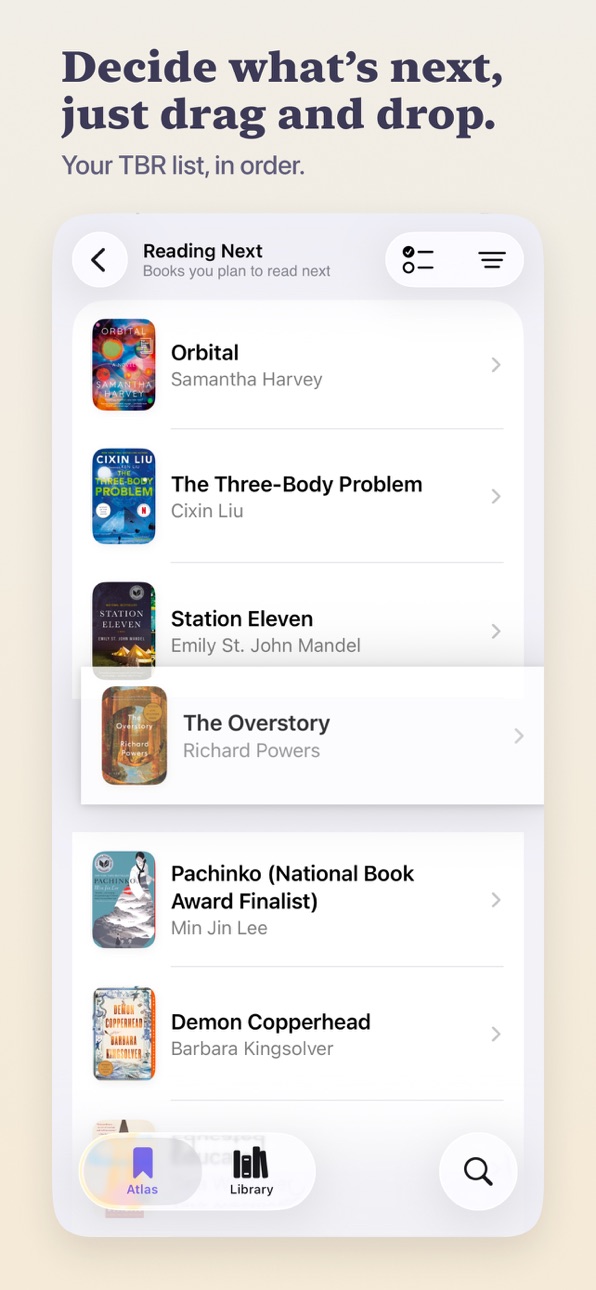
- Five reading lists: Reading, Reading Next, Someday, Read, and Set Aside
- Drag and drop to reorder books in the exact order you intend to read them
- Bulk edit to move, favorite, or remove a stack of books at once
- Mark books as owned to keep track of what's on your shelf
Covers, front and center
- Book covers are treated like the art they are
- Tap the cover on its detail page to open it in full screen
- Zoom in to discover details you've never noticed before
- Displayed in high resolution throughout the app
Find your next book
- Search powered by Apple Books
- Book detail pages with cover art, description, genres, and more from the author
- Tap any author to view their full catalog
- Add books that aren't in Apple Books, with your own covers and details
- A Coming Soon list that tracks upcoming releases automatically
Reflect
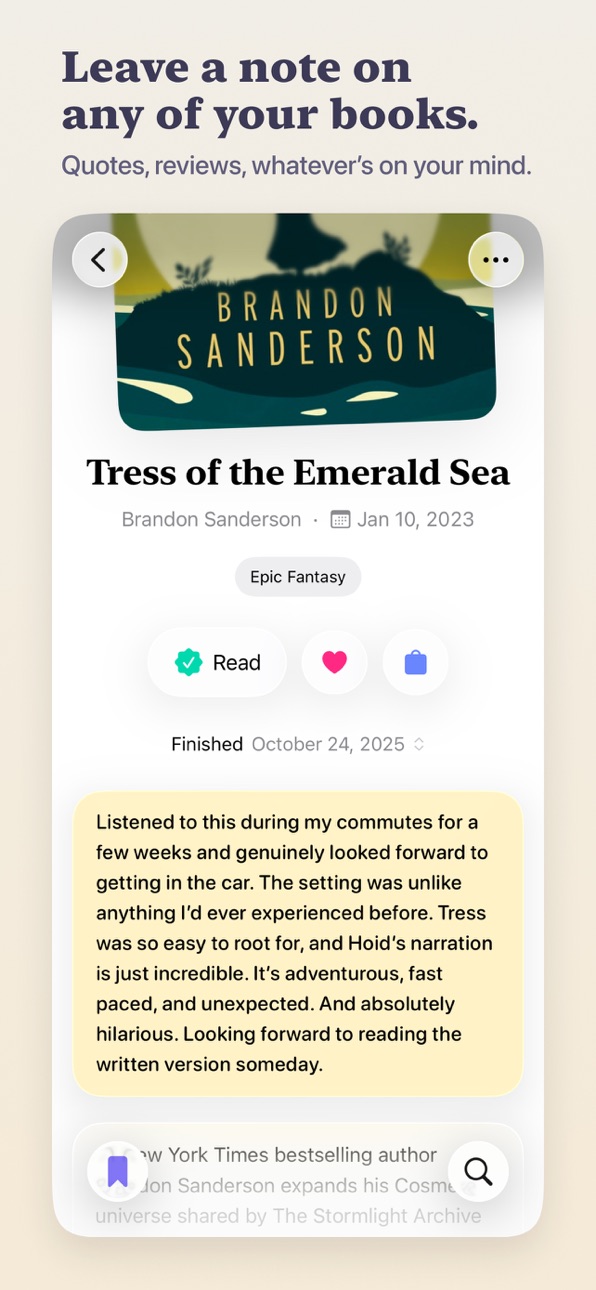
- Add notes on any book in your library
- A reading timeline showing what you finished, and when
- Start a re-read from any finished book, keeping your first reading intact
- Favorite the books you loved, then drag and drop to rank them
Browse your library
- Masonry grid and list views
- Filter and sort by genre, author, date, favorites, ownership, and availability
- Search directly within your library and individual reading lists
Bring your books with you
- Import from Goodreads, StoryGraph, or CSV
- Export your full library as CSV
- iCloud sync across all your devices
Designed for iOS
- Built natively for iOS26 from the ground up with Liquid Glass and system styling
- Feels like a cohesive, first-party Apple app
- Light, Dark, and System themes
Private by design, and no data collection
- No accounts. No sign-up. No profile.
- No analytics, no tracking, no data collection
- Your library lives on your device and syncs through iCloud
Atlas was built to highlight your covers, your lists, and the order you decide to read your books in. Reading doesn't need to be gamified, optimized, or made public. It just needs a quiet space to keep your books, plan what's next, and remember where you've been.
Reading is one of the few things left that's slow, quiet, and entirely yours. Atlas is built to keep it that way.
Happy reading,
- Austin
In-App Purchases US pricing
One-Time Purchases
Sticker Tip$1.99
Coffee Tip$4.99
Book Tip$9.99
Capabilities
In-App Purchases
Accessibility
ipadiphonemacrealityDevicetvoswatch
Version history 5 versions
Build 887454147v1.2.12026-06-26 14:28:55
Reading Now Widgets
A good book stays with you even when you're not reading it. Now your current read can sit right on your Home Screen, just the cover, the way it's meant to be seen. A quiet reminder of the world you're in the middle of, and an easy way back whenever you need it. Atlas now has a small and medium sized widget, allowing you to see up to four books from your Reading list.
A Few Other Improvements
- Refresh Book Details. Now you can pull the most up-to-date covers and descriptions for any book in your library straight from Apple Books via the ellipsis menu.
- Re-reading's icon has been updated to be the repeat icon.
- Book rows in list view have updated swipe gestures, so the old right swipe gesture no longer conflicts with swiping back to the previous page.
- Importing now better handles titles where the only difference is punctuation, so books like "Tomorrow, and Tomorrow, and Tomorrow" match even when your CSV leaves the commas out.
- For those who have already taken the jump to iOS 27, the toolbar edge effect has been set to soft across the app to keep the same immersive toolbar experience from iOS 26.
Atlas 1.2.1
- Fixed a hiccup where a library could look empty for a moment if you added the widget to your Home Screen before opening Atlas.
- Tidied up spacing and padding for the new widgets.
- Gave the Reading icon its proper color and gradient on the new widgets.
As always, if you have feedback, want to say hi, or found a bug, don't hesitate to reach out! I'd love to hear from you at atlas.app@icloud.com
Ps. If Atlas has made a nice home for your books and you think it's pretty neat, a rating or review can really help other readers find it on the App Store (and it supports a solo dev!)
Happy reading,
- Austin
Build 887306945v1.22026-06-23 22:39:59
Reading Now Widgets
A good book stays with you even when you're not reading it. Now your current read can sit right on your Home Screen, just the cover, the way it's meant to be seen. A quiet reminder of the world you're in the middle of, and an easy way back whenever you need it. Atlas now has a small and medium sized widget, allowing you to see up to four books from your Reading list.
A Few Other Improvements
- Refresh Book Details. Now you can pull the most up-to-date covers and descriptions for any book in your library straight from Apple Books via the ellipsis menu.
- Re-reading's icon has been updated to be the repeat icon.
- Book rows in list view have updated swipe gestures, so the old right swipe gesture no longer conflicts with swiping back to the previous page.
- Importing now better handles titles where the only difference is punctuation, so books like "Tomorrow, and Tomorrow, and Tomorrow" match even when your CSV leaves the commas out.
- For those who have already taken the jump to iOS 27, the toolbar edge effect has been set to soft across the app to keep the same immersive toolbar experience from iOS 26.
As always, if you have feedback, want to say hi, or found a bug, don't hesitate to reach out! I'd love to hear from you at atlas.app@icloud.com
Ps. If Atlas has made a nice home for your books and you think it's pretty neat, a rating or review can really help other readers find it on the App Store (and it supports a solo dev!)
Happy reading,
- Austin
Build 886387956v1.12026-06-04 00:25:06
Re-Reading
Some books are worth returning to. The favorites, the comfort reads, the ones you keep thinking about years later. Now you can start a re-read from any finished book. Your original read stays right where it is, and the new one moves through your lists like anything else you're reading. When you finish it, it lands in your Read list with its own finished date. So here's to those second reads. And the thirds. And to every read after.
Several Small Improvements
- Deleting a book and then tapping undo now also restores any notes and reading history along with it.
- Book titles are back in the breadcrumb menu where they belong.
- Book covers no longer flicker and re-load when you add a book from search results.
- List icons now show their lovely iOS 26 gradients.
- Preferences icons got a makeover, now with distinct colors so you can actually tell them apart at a glance.
- The welcome screen now greets you with a few gentle animations for a friendlier hello.
As always, if you have feedback, want to say hi, or found a bug, don't hesitate to reach out! I'd love to hear from you at atlas.app@icloud.com
Ps. If Atlas has made a nice home for your books and you think it's pretty neat, a rating or review can really help other readers find it on the App Store (and it supports a solo dev!)
Happy reading,
- Austin
Build 885571015v1.0.12026-05-13 01:57:56
A few small fixes from the first week after launch.
- The list selection animation on book detail is now a bit smoother.
- During an import, your screen will now stay awake the whole time (Atlas brewed some coffee).
- The bookmark tip is now correctly called the sticker tip.
- Cleaned up a few bits of copy in Preferences.
Have feedback, a suggestion, or found a bug? Don't hesitate to reach out! I'd love to hear from you at atlas.app@icloud.com
Happy reading,
- Austin
Build 883601830v1.02026-05-07 11:34:06
Price history by region
Currency
Show
Columns
Search
Availability 1 of 1 storefronts
| Region | Language | Price | Ratings | Avg | Version |
|---|---|---|---|---|---|
| US | en-US | Free | 2 | 5.0 | 1.2.1 |
Change log 9 changes · US
✎
releaseNotes updated
Reading Now Widgets
A good book stays with you even when you're not reading it. Now your current read can sit right on your Home Screen, just the cover, the way
✎
description updated
A calm, private space to track your books, navigate your reading lists, and get back to what you love: reading.
No streaks, no goals, no ratings, no guilt. Not
✎
subtitle updated
A Calm, Private Book Tracker
✎
name updated
Atlas: Reading Tracker
◆
Version 1.2.1 released
Reading Now Widgets
A good book stays with you even when you're not reading it. Now your current read can sit right on your Home Screen, just the cover, the way it's meant to be seen. A quiet reminder of the world you're in the middle of, a
◆
Version 1.2 released
Reading Now Widgets
A good book stays with you even when you're not reading it. Now your current read can sit right on your Home Screen, just the cover, the way it's meant to be seen. A quiet reminder of the world you're in the middle of, a
◆
Version 1.1 released
Re-Reading
Some books are worth returning to. The favorites, the comfort reads, the ones you keep thinking about years later. Now you can start a re-read from any finished book. Your original read stays right where it is, and the new one mo
◆
Version 1.0.1 released
A few small fixes from the first week after launch.
- The list selection animation on book detail is now a bit smoother.
- During an import, your screen will now stay awake the whole time (Atlas brewed some coffee).
- The bookmark tip is n
◆
Version 1.0 released